Author: Muaad Elsharif (Page 320 of 325)

FSL Great Start Menu Launcher

Hello There , welcome to another techtip
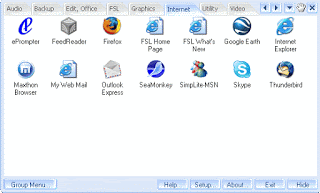
Today we will be discussing the FSL Launcher , a Start menu type launcher that Displays your short cuts , files and other data in a tabbed dock .
Rating

My review of it is 4/5 , it’s good , but can go better , for example some functions are limited only for the subscribers , but even the free version can be very handy .

 Another notice

I also noticed that it does not handle Program Files Shortcuts right away, in 64 bit you have two of them but the program only launched the ones installed in the same program files with it , in that case  program files (x86) , so you need to edit that shortcut manually , when it does not launch it freezes until you press the OK under the Icons , and the icon is displayed without the Picture .
That bug was on Windows 7 64 Bit
Tell us what you think 🙂


Download Link 

RSS Feed how and why + note

Hi there dear reader , and welcome to another tech-tip , today we will be talking about RSS feeds

RSS feeds give you summaries of web pages you subscribe to , a slimmed down version of of if i may
Subscribing is very easy , some browsers do that from it’s bookmark menu , another way is to have a dedicated software , like RSS Bandit or RSSOwl that are free and very easy to use

My blog views has passed the 2500 barrier , but the comments are less than 5 !!

Installing mathmap in Gimp 2.8 under Windows 7

Today we will install mathmap , which is :

“an image processing application that works on several levels”

  • Without any prerequisite knowledge about image processing, one can use any of the more than one hundred filters that come bundled with MathMap.
  • More advanced users can combine filters intuitively in the Composer, as pictured above.
  • For expert users MathMap provides a simple but very efficient programming language. This is the core of MathMap and the language that almost all MathMap filters are implemented in.”

OK, lets get busy

First download the install form here .
After that install the file , and change the directory from “C:Usersyour name.gimp-2.6” to  “C:Usersyour name.gimp-2.8”
Run gimp as usual and then go to the menu filters generic mathmap
And here you go ..
Thanks for reading , please comment if you can 🙂


Intstalling Gimp paint studio for gimp 2.8 on Windows 7

If you are using windows 7 then here is how you install gimp paint studio updated for Gimp 2.8
First of all download the file and extract it to the folder

C:Users”your user name goes here”.gimp-2.8

replace any folders that need to be replaced, by default they are empty, but if you installed anything in them , be careful it will be lost.

Run gimp as you would normally do and that is that.

Thank you for reading 🙂 , please comment.

« Older posts Newer posts »