Category: Blogger (Page 6 of 8)

Reasons why I’m not renewing my domain

I had a domain for over a year now which I got from Libya’s biggest (and only) ISP,Libya Telecom and Technology, it wasn’t as good as I thought!

I had some expectations about getting a domain of my own, sadly none of them came true, even when I did my best promoting and getting my name out there!


  • I thought it would look good on a resume.
    People started to think (for some reason) that I’m really good with making sites, and all of a sudden I’m plagued with requests of making websites, I am not a web developer! 
  • I thought it would help get me a better job
    I thought that having a site (not just a free hosted blog) would catch the eyes of HR personal and enhance my chance of nailing a dream job (any decent job in my case) but it didn’t!
  • Times aren’t so easy
    With this economy I have to squeeze in every penny, and since the domain didn’t reel in any money or do anything real to enhance my career, then I’m better off making other investments and leave the domain for now.
  •  Not making the full potential out of the domain I bought a domain and a hosting space in order to redirect users from my blogspot site to the domain, I didn’t upload anything on the server so it’s a total waste! I found an easy way to change the blog’s name across all posts, and that was awesome! And the space that was given to me was so small! I mean Google provides 15 GB of drive space, and a free hosting services, let alone that using a custom domain takes away the ability of using HTTPS to secure my site!
  • Difficult to manage I’m using Google’s webmaster tools, and having a custom domains means I have four sites to manage (the blog, the blog with www, the domain, the domain with www) and dropping the custom domain would make the management easier, and since my domain is a country domain, it’s guided towards readers of that county, and my target is the world!!
  •  Promotion issues I thought having a custom domain would make twitter treat my URL differently, instead of taking 30 characters from the tweet it would take less (since I have a shorter domain), well that was not the case there! My url took the same amount of characters and I was in for a shocker! No HTTPS availability Since I linked my blogger domain to my purchased domain, my blogger domain is simply redirecting to my ly domain, in the process I lost HTTPS security because blogger doesn’t support that yet, meaning I’m less secure now than I was before getting the domain!

What happens next?

Life is all about experiences, I had a nice year with a custom LY domain, and now it’s time to go back to the old subdomain that blogspot provides, it’s not that bad, many professional bloggers, artists, and products use subdomains to blog, let alone me! Someone who is still finding his way in the world of blogging. Why should I pay for my site to be online and for people to read free of charge, while I can keep it hosted for free? It would take me some work to change all my bios and social media sites to the new site, but I’m sure it’s worth the effort! And I think that my stats will improve so much after dumping the LY domain which I think it limiting me from reaching my total potential (due to google’s geographic location settings). Do you have a custom domain? How much do you pay for it? What’s your current plan? And finally: What do you think of me going back to a free service hosted by Google? Waiting for your comments below!
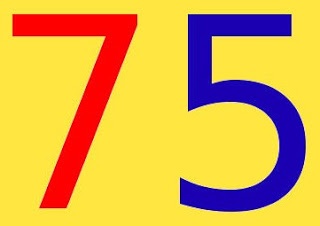
    75,000 views!

    Today I reached 75,000 views!

    Today is one of the days I feel my hard work is paying off!
    It’s an important step towards a goal I set for myself, the 100,000 views, three quarters of the way.

    reaching 75000 on my blog

    I’m also really close to reaching 15,000 followers on Twitter, which is a huge part of my promotion success!
    Since I don’t want to be overly talkative on the blog, I wanted to use this post as a total update, I’ve been experimenting with several templates lately, and until I can find something decent I’ll stick to the basic template, I’m afraid I’ll be sticking on it for a while!

    As for the domain issue some of my readers reached out to me saying that the domain is down, and that’s true! My LTT hosted domain went down and I’m yet to fix it, I’m still unsure how to add it to the blog, this makes me rethink the whole “third party domain thing”.

    An update

    I haven’t been able to restore the domain, so I just configured it to redirect to here until it expires, and I don’t think I’ll be renewing it.
    The contact page hasn’t been working for a few days (thanks for letting me know!) And I fixed it by not touching it at all!

    The simple template proved to be far too simple, I had to change it a little bit, I found a perfect template but had some issues I had to fix, and the developer wasn’t replying to anyone who contacted him, so I came up with the one you see now. I hope you like it.
    Last but not least, linkedwithin.
    For some reason, linked within is showing posts with the new domain and the old one together, and even tho I made a redirect, it doesn’t work with the posts, just the home page.
    I tried contacting them several times, but they didn’t respond to my initial e-mails that I sent over a year ago, and didn’t respond now..
    So Linkedwithin had to go to. 


    Thanks for being a part of this journey! See you at 80,000 views

    Tell me what you have in mind in the comments section below, if you can help with the domain issue or have a cool template for me.

    LinkWithin not showing similar posts fixed!

    LinkWithin is a widget that appears on your blog and shows similar posts to the post you are on, it’s a good way to show more content and get the users engaged, I tried adding it to my site and it didn’t work!
    It wasn’t showing any posts!
    In this post I’m going to show you how to fix it with one easy step!


    This tutorial doesn’t explain how to install LinkedWithin, it’s explained thoroughly on the site itself when you are installing, so take a moment to look at it before jumping in!

     Cause #1: Third party domains

    At first make sure you are using a blogger domain! Don’t use the domain you bought from the hosting company, your blogspot blog must be a sub domain of blogspot.com in order for Linkwithin to work!
    Seems basic? Check your settings again!

    Cause #2: Must be placed directly under the post!

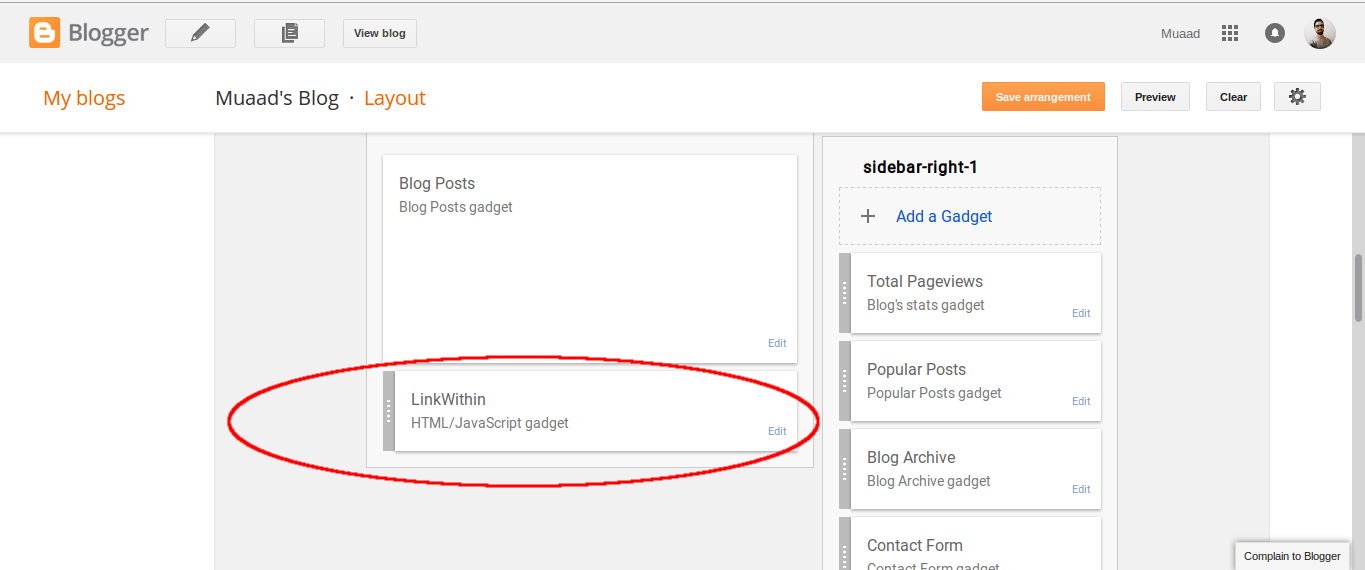
    There are many places to place widgets in blogger, at first when you add Linkwithin it will be added to the sidebar, drag it and place it under the post, not in the footer! Under the post as in the image below!

    This should fix the problem right away! And LinkWithin will show posts in minutes!
    For me it worked, too much I’m afraid!
    LinkedWithin was showing posts on the home page, something I didn’t expect! And the fix for that is also very easy!

    3. Fix LinkedWithin showing posts on Home page

    Go to Blogger Your blog Template Edit HTML
    From there search for LinkWithin, and go inside the widget and you will find this line of code

    <b:includable id=”main” <data:content / </b:includable
     
    Replace it with this one, and you are good to go!
    <b:includable id=”main” <b:if cond=’data:blog.pageType ==&quot;item&quot;’ <data:content / </b:if </b:includable  

     4. HTTPS redirect

    If you are using HTTPS for added security on your blog then you are going to have to sacrifice using Linkwithin, the widget only supports the usual version of the domain “http://” and not “https://” and won’t even show it on the blog unless you change the settings. 

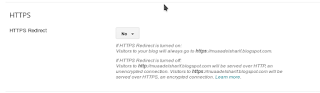
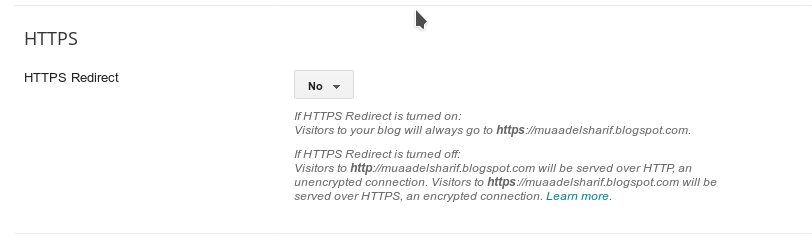
    Go to settings HTTPS and switch from on to off.


    Switch HTTPS from on to off
    Switch HTTPS from on to off

    I hope you found this post useful, I will be posting tips on how
    to increase your blog views soon enough
    Share with your friends and family and have a good day!

    My 400th post, what a journey!

    I realized that I have reached my 400th post, and it’s a significant milestone indeed!

    I always stopped to celebrate these milestones (even when I didn’t have a clear direction for my blog) and this happens to be a big one!
    I have written 400 posts since I started blogging back in 2012, not all of them are good, in fact some are pretty bad! And I’m not planning to change them one bit!

    They will remain as a reminder for me of my humble beginnings, and a measure of my improvement.


    400 Post

    I am glad I’m able to help people around the world with my blogging, it’s gives me a sense of achievement like nothing else to know that somewhere, I made someone’s day through my writing, the writing I have so much fun doing!

    I remember writing on my first post saying that I wanted to blog to share my knowledge with the world and provide solutions for problems I couldn’t find online, no surprise that the first two posts written in that concept were a hit! Over 3000 views for both on the very first day, how did it happen? I didn’t know or care much, I was busy doing my job and documenting what I encountered.

    I’m glad that at this time I know what I want to blog about, I’ve taken the direction of open source and just ran with it all the way! It’s my cause and what I want to spend my life working with..

    What does the future hold for my blogging?

    I’m looking forward at my 500th post, I will try to enjoy the path and not think of numbers like I did now, and god willing I’ll take the pause to reflect on the 100 posts I’ve wrote.

    « Older posts Newer posts »