Last week I posted about wanting some change by changing the interface, and took a look at several interfaces, this post is the second part, where I actually chose an interface and got down to business.
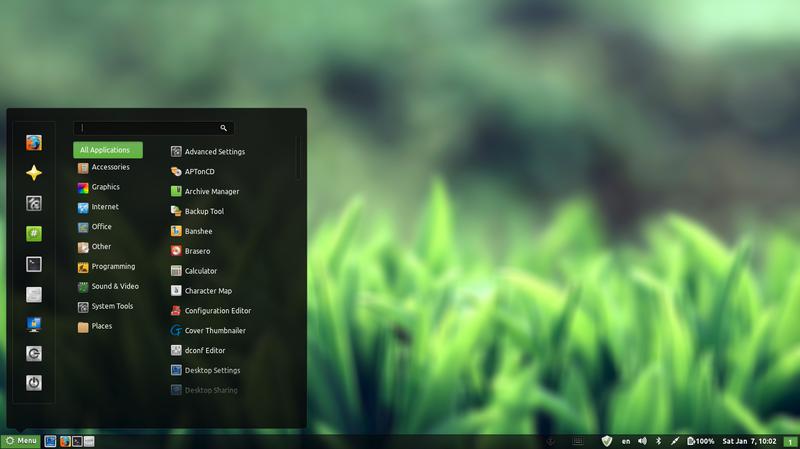
I decided to go with Cinnamon, it’s visually appealing and the download size is relatively small (51.4 MB). My only concern was reading online that it’s buggy and has many problems. But I was willing to take a chance!
At first I installed Cinnamon using these commands
This command is to add the repository to my system.
sudo add-apt-repository ppa:lestcape/cinnamon
This command is to update and install.
sudo apt-get update && sudo apt-get install cinnamon.After the first reboot I had Cinnamon as an option on the login screen, which still looked like it was in XFCE and I had to enter my password twice! (it’s a common bug actually!)
I figured that deleting Xubuntu will fix my problem, so I began deleting Xubuntu, once and for all!
I used several commands to make sure the interface went away, like:
sudo apt-get -f install
sudo apt-get clean
sudo apt-get autoclean
sudo apt-get update
sudo apt-get purge xfce4
The second command is probably the longest I ever used, thank god for copy and paste!!
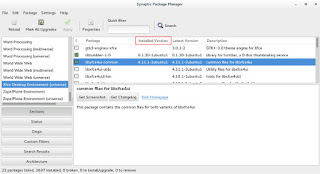
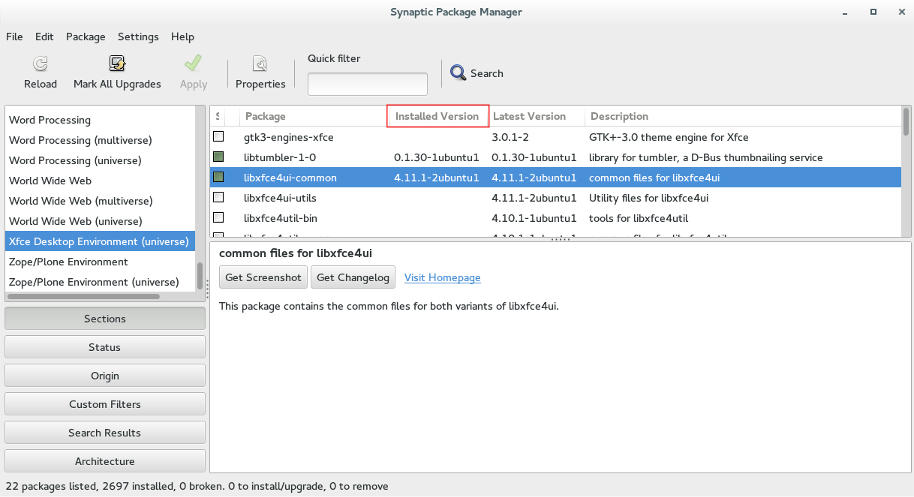
sudo apt-get remove abiword abiword-common abiword-plugin-grammar abiword-plugin-mathview bison blueman brltty-x11 catfish elementary-icon-theme exo-utils flex gigolo gimp gimp-data gmusicbrowser gnome-icon-theme-full gnome-system-tools gnome-time-admin gnumeric gnumeric-common gnumeric-doc gstreamer0.10-gnomevfs gthumb gthumb-data gtk2-engines-pixbuf gtk2-engines-xfce indicator-application-gtk2 indicator-messages-gtk2 indicator-sound-gtk2 indicator-status-provider-pidgin leafpad libabiword-2.8 libaiksaurus-1.2-0c2a libaiksaurus-1.2-data libaiksaurusgtk-1.2-0c2a libao-common libao4 libaudio-scrobbler-perl libbabl-0.0-0 libclutter-1.0-0 libclutter-1.0-common libclutter-gtk-1.0-0 libcogl-common libcogl5 libconfig-inifiles-perl libencode-locale-perl libept1 libexo-1-0 libexo-common libfile-listing-perl libfont-afm-perl libgarcon-1-0 libgarcon-common libgdome2-0 libgdome2-cpp-smart0c2a libgegl-0.0-0 libgimp2.0 libglade2-0 libgnomevfs2-extra libgoffice-0.8-8 libgoffice-0.8-8-common libgsf-1-114 libgsf-1-common libgstreamer-perl libgtk2-notify-perl libgtk2-trayicon-perl libgtkmathview0c2a libhtml-form-perl libhtml-format-perl libhtml-parser-perl libhtml-tagset-perl libhtml-tree-perl libhttp-cookies-perl libhttp-daemon-perl libhttp-date-perl libhttp-message-perl libhttp-negotiate-perl libid3tag0 libido-0.1-0 libilmbase6 libio-socket-ssl-perl libjpeg-progs libkeybinder0 liblink-grammar4 libloudmouth1-0 liblwp-mediatypes-perl liblwp-protocol-https-perl libmad0 libmailtools-perl libnet-dbus-perl libnet-http-perl libnet-ssleay-perl liboobs-1-5 libopenexr6 libotr2 libots0 libpolkit-gtk-1-0 libsexy2 libtagc0 libthunarx-2-0 libtie-ixhash-perl libtimedate-perl libtumbler-1-0 liburi-perl libwv-1.2-3 libwww-perl libwww-robotrules-perl libxfce4ui-1-0 libxfce4util-bin libxfce4util-common libxfce4util4 libxfcegui4-4 libxfconf-0-2 libxml-parser-perl libxml-twig-perl libxml-xpath-perl libxss1 lightdm-gtk-greeter link-grammar-dictionaries-en m4 mpg321 murrine-themes orage parole pastebinit pidgin pidgin-data pidgin-libnotify pidgin-microblog pidgin-otr plymouth-theme-xubuntu-logo plymouth-theme-xubuntu-text python-configobj python-glade2 quadrapassel ristretto screensaver-default-images synaptic system-tools-backends tango-icon-theme tango-icon-theme-common tcl8.5 thunar thunar-archive-plugin thunar-data thunar-media-tags-plugin thunar-volman ttf-droid ttf-lyx tumbler tumbler-common xchat xchat-common xfburn xfce-keyboard-shortcuts xfce4-appfinder xfce4-cpugraph-plugin xfce4-dict xfce4-fsguard-plugin xfce4-indicator-plugin xfce4-mailwatch-plugin xfce4-mixer xfce4-mount-plugin xfce4-netload-plugin xfce4-notes xfce4-notes-plugin xfce4-notifyd xfce4-panel xfce4-places-plugin xfce4-power-manager xfce4-power-manager-data xfce4-quicklauncher-plugin xfce4-screenshooter xfce4-session xfce4-settings xfce4-smartbookmark-plugin xfce4-systemload-plugin xfce4-taskmanager xfce4-terminal xfce4-utils xfce4-verve-plugin xfce4-volumed xfce4-weather-plugin xfconf xfdesktop4 xfdesktop4-data xfwm4 xfwm4-themes xscreensaver xscreensaver-data xscreensaver-gl xubuntu-artwork xubuntu-default-settings xubuntu-desktop xubuntu-docs xubuntu-icon-theme xubuntu-wallpapersFinally I used Synaptic to make sure nothing titled XFCE was there, I used the custom filters Sections XFCE desktop environment universe to wipe anything that was left.
Now I was running Cinnamon alone on my computer, and immediately I notice why it was dubbed as “Buggy”..
It was true, Cinnamon was buggy! I noticed several issues right off the bat!
A minor video issue was resolved in one of the reboots (no fix for that sadly).
The power manager is acting up, either this fixed my battery somehow or it’s just not reading it right!
I had to fix Docky like I did after the partial upgrade. This time locked all parts of it.
I rearranged the Grub menu items, now Ubuntu is top, I Also renamed it from Xubutnu to Ubuntu on the boot menut using Grub Customizer.
I was left with a buggy but pretty interface, and the login was messed up! Next week I’ll post what I did next, stay tuned!