Page 274 of 325

Fix the p { margin-bottom: 0.1in; line-height: 120%; }a:link { } problem in your blog

It happens more often with me than ever, maybe because now I write my posts outside of blogger and then paste them (and there is nothing wrong with that by the way!). It makes my blog look bad and a lot less professional.

I tried so many things including font play and adjusting the breakers, nothing worked! I was able to fix it so easily, so read on to learn the complete fix!
My old fix was to delete the post and post it again, and I’d lose the comments, and a lot of time. But thankfully I was able to fix it on my own. I looked the problem on line and found nothing.

The Fix

First of all if you publish your post and notice the Fix the p { margin-bottom: 0.1in; line-height: 120%; }a:link { } line where it shouldn’t be then go to blogger and edit the post.

The post has that line

On the edit menu you will see the button to the far left called “Compose”
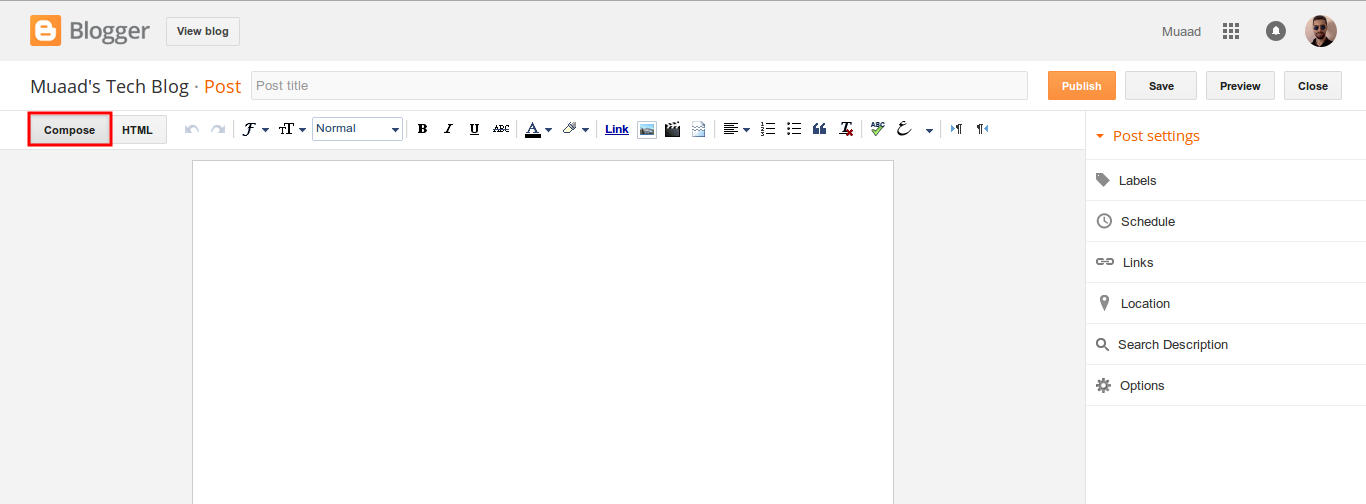
Compose view

  and a button next to it called “HTML”, click on HTML.
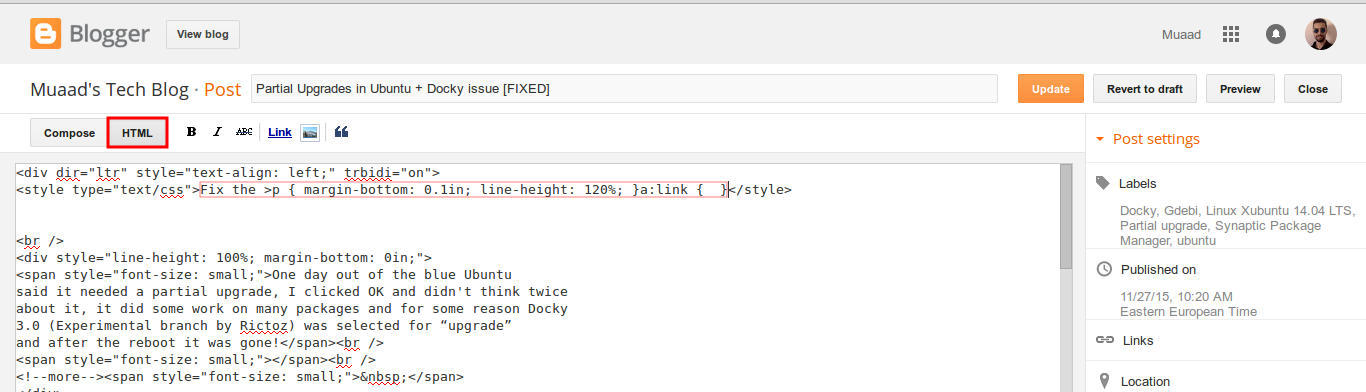
HTML view

Even if you had zero knowledge with HTML, this fix is really easy (And I recommend you as a blogger to learn some HTML as it’s so easy to learn!).
What are we going to do is to remove the Fix the p { margin-bottom: 0.1in; line-height: 120%; }a:link { } line from the post, it’s highlighted in red so it should be easy.
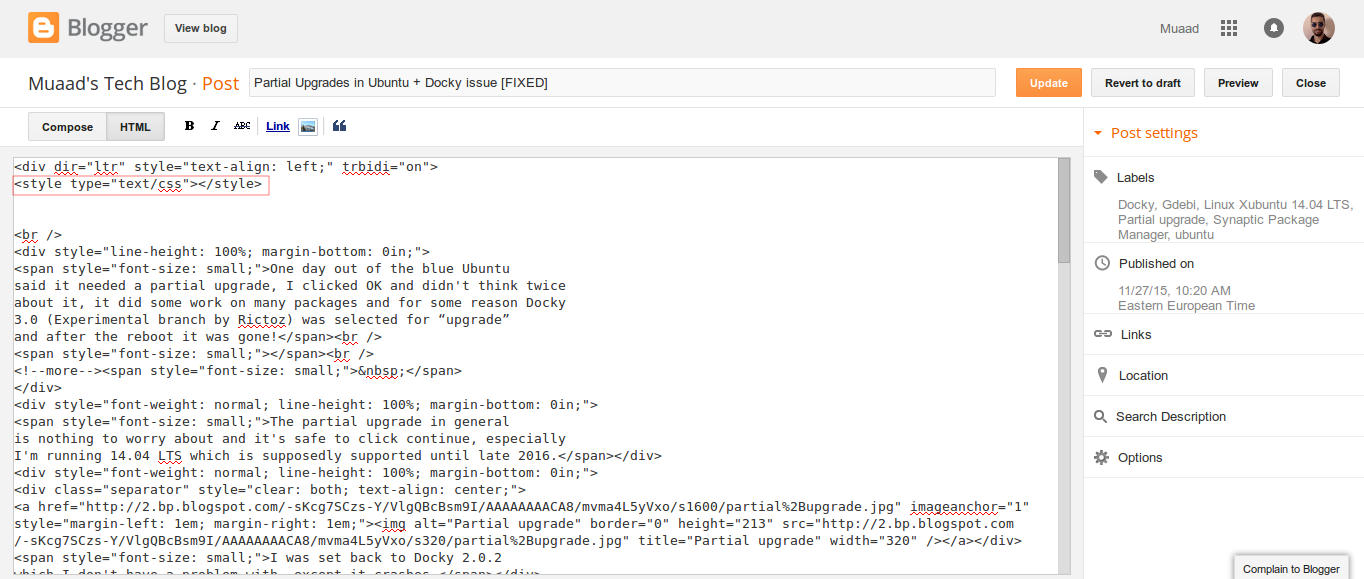
The line to remove is highlighted in red

From the HTML view click find and search for “p { margin-bottom: 0.1in; line-height: 120%; }a:link { }” and you will find it looking like this <style type=”text/css” p { margin-bottom: 0.1in; line-height: 120%; }a:link { }</style
Delete only the line maintaining the brackets or you will result in an error, it needs to look like this after delete <style type=”text/css” </style
go back to compose and update, the problem will be fixed right away!!

So what’s the cause of this annoying bug anyway?

I discovered that it is caused by “Rich text formatting”, as I use LibreOffice to do all of my writing work, I tend to copy and paste directly into blogger, that caused these characters to appear inside the posts!

How to avoid it?

The only way is to strip the text of formatting before pasting it into blogger’s text editor, you can do that by clearing format from LibreOffice’s right click menu. Or by pasting it into a plain text editor like Notepad or Atom.

I hope you found this useful, how often did this happen to you? And how did you deal with it? Please let me know what you have in mind in the comments section below.

P.S: This post itself was infected with this issue, glad I could get it fixed eventually. 

Partial Upgrades in Ubuntu + Docky issue [FIXED]

One day out of the blue Ubuntu said it needed a partial upgrade, I clicked OK and didn’t think twice about it, it did some work on many packages and for some reason Docky 3.0 (Experimental branch by Rictoz) was selected for “upgrade” and after the reboot it was gone!
The partial upgrade in general is nothing to worry about and it’s safe to click continue, especially I’m running Ubuntu  14.04 LTS which is supposedly supported until late 2019.

I was set back to Docky 2.0.2 which I don’t have a problem with, except it crashes.

(If you read my Docky post you know that I chose Docky 3.0 over 2.0.2 because it’s more stable and doesn’t crash randomly all the time. Despite Docky 2.0.2 having cool “Docklets” that added to it’s functionality.)

I couldn’t install Docky 3.0 due to package dependency issues, and therefore I was stuck with Docky 2.0.2 for a while, only then I realized how much I depended on it to get my things done!

The fix was super easy!

I went to the downloaded files I had which were three files: Docky, Libplank, and Libplank common.

Using Gdebi I installed Libplank common the first, then Libplank and finally Docky 3.0, it replaces the old one and no need to uninstall.

Thing is every time it looks for updates it wants to remove Docky, and that happens daily, I found a way to fix that by simply “locking” the version.

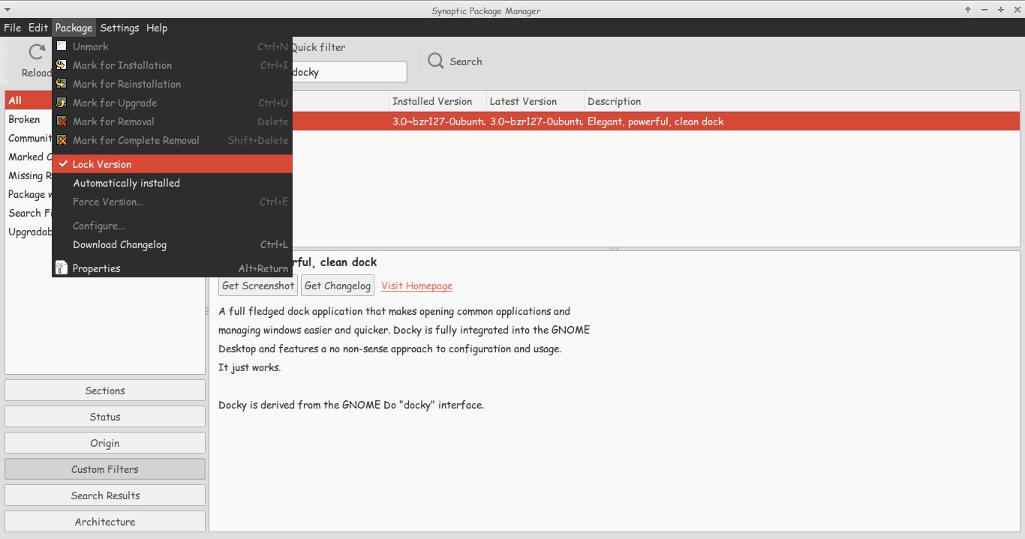
I went to Synaptic and searched for Docky, selected it and clicked lock version under package. Now even when it looks for updates it greys out Docky and doesn’t update it. I have a detailed tutorial on how to use Synaptic that you can find here.

That’s how I got Docky 3.0 back after it was ruined by the partial upgrade, I hope you found this useful, please let me hear your feedback and have a nice day.

ساعة برمجة 2015

ساعة برمجة هو جزء من الأسبوع العالمي لعلوم الحاسوب، يتيح للملايين تعلم البرمجة ونشر الثقافة بين الطلاب وإعطائهم فرصة لتعلم البرمجة وتطوير أنفسهم، وأيضا لمنح طلبة المدارس ساعة من علوم البرمجة.

أجمل ما في هذا الحدث أنه يحدث في نفس الوقت في جميع أنحاء العالم عن طريق متطوعين لنشر ثقافة البرمجة في المجتمعات عن طريق ألعاب تفاعلية وترفيهية تبسط مفاهيم البرمجة على الكبار والصغار في نفس الوقت، ويحصل الطالب على شهادة إتمام للكورس التفاعلي تحمل اسمه من الموقع.


لم يعد يخفى على أحد أهمية برمجة الكمبيوتر وكيف أنها غيرت العالم الذي نعيش فيه بالكامل

.

في ليبيا توجد عدة مجتمعات نشيطة أحيت ساعة برمجة لسنتين متتاليتين

وتسعى لإحياء الحدث هذه السنة أيضا في الفترة ما بين السادس والثاني عشر من شهر ديسمبر.

العديد من المدن الليبية مثل: الزاوية وبنغازي وزليطن وسبها وطرابلس (مرتبة أبجديا) ستقوم بإحياء الحدث لهذه السنة.

الحدث في ليبيا هذه السنة تنفرد بتنظيمه هكسا كونيكشن وهم يبحثون عن متطوعين للتدريب، لا يشترط الخبرة، فقط الالتزام وإتقان المادة التدريبية الخاصة بهم التي سيتم تدريب المتطوعين عليها.

مدة التطوع أسبوع واحد فقط، إن كنت مهتما بالمشاركة فسجل بياناتك في هذا الرابط وسيتم الاتصال بك. (تم مسح الرابط من قبل المنظمة).

.
المبادرة جيدة جدا ومن الجميل رغم كل الظروف أن نواكب العصر ونحيي مثل هذا الحدث، مع أن العدد في ليبيا مقارنة بالدول الأخرى قليل جدا جدا.

. ولا أتحدث عن الدول الأوروبية، بل عن دول الجوار العربية المغاربية مثل تونس ومصر والجزائر والمغرب. لمشاهدة الخريطة أنقر هنا.

بتطوعكم نذلل الفارق وننشر العلم بين أبناء مجتمعنا.

رابط الحدث على الفيس بوك


How to make the awesome Docky bar even more awesome with these tricks?

Today I’ll be talking about making the awesome Docky dock even more awesome!

As you know Docks are really productive and once you get used to them you are hooked for good!  I mentioned it in an earlier post as an honorable mention, but I always felt Docky deserved a post of it’s own!

First of all let’s take a look into how many versions of Docky are available and what to choose from?

Docky has two active branches : Stable and Development, each one has it’s pros and cons. I will be talking about them in detail and why I choose one over the other!

Stable branch

It’s the official Docky branch currently at version 2.2.0.2
You can add it to your system by adding the PPA to your software sources. If you aren’t sure how to add the PPA then check this post I made some time ago that shows how to add a PPA.

  • It has many options compared to the development branch with the ability of adding more than one dock!
  • It also has docklets and helpers which are excellent for productivity.
  • It has some bugs tho like crashing on standby and not docking the file manager (easy to fix).
  • I tested out both and came up with a resolution!
  • I choose the stable branch simply because it gives you more options to work with, not to forget the docklets that add great productivity value, like adding a work timer!


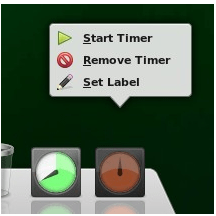
I didn’t find a similar work timer to the awesome Instant boss, this is really close! Checkout how to set this awesome clock from it’s help page! It can also work as an RSI timer! All from within your Dock!!
You can set more than one timers and set labels each, For example one for work and one for rest and have them work together on the Dock!!

I overcame the stable branch not pinning my file manager Thunar simply by dragging the home folder and dropping it on Docky! Now whenever I click it I get my home folder in a blink of an eye.
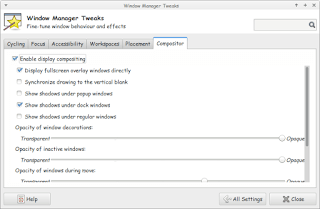
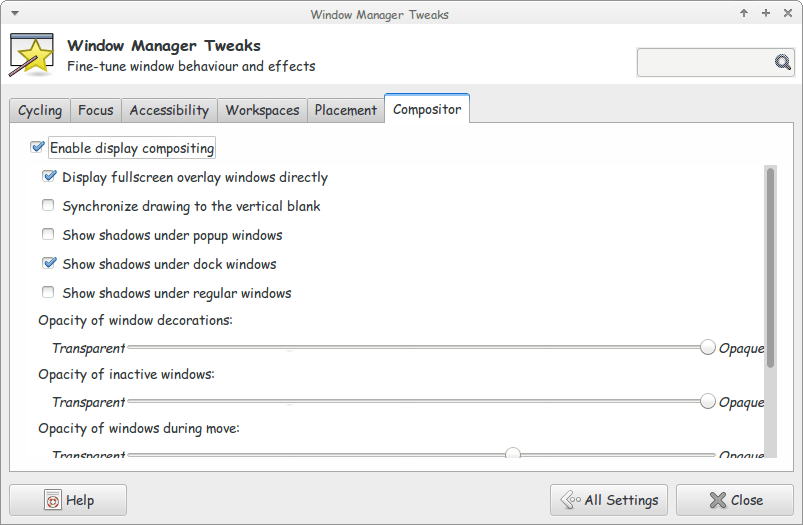
Another bug is when you install Docky for the first time it asks for composite to run properly. And you will notice that the dock seems off!
Go to Settings Windows Manager Tweaks And on the Compositor tab enable composition, it will work like a charm!

Enable composition for docky to work properly

A strange bug

Finally there is one weird bug that happened with me on 14.04 LTS Trusty, whenever I put the computer to sleep and wake it again, Docky isn’t there!
I used to put an icon for it on the desktop to “wake it up” but that’s just too counterproductive isn’t it?
The answer is really simple and I can’t wait to share it with you! All you have to do is to add a script to your sleep folder and execute it using terminal.
The steps are displayed in here, because I’m using Xubuntu I had to change gedit to mousepad. But the rest applies and works 100%

*Update 1: It didn’t go as planned and I had to undo it.
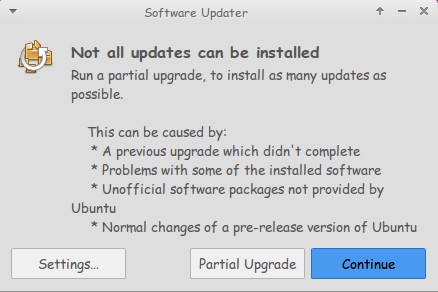
**Update 2: Not all updates can be installed: partial upgrade.

Once this message appeared Docky 3.0 was removed and I wasn’t able to install it again. Docky 2.2 closes itself without warning. I still haven’t figured that out yet!

***Update 3:  I managed to make docky 3.0 work again I used the debs downloaded from the repositery and installed them using gdeb. The secret is the order of install. Libplanlkcommon at first, then libplank, and finally docky. Read about it here.

There you have it! We made the awesome Docky even more awesome! And you thought that wasn’t possible!
I chose Docky 3.0 over 2.0.2 because it’s more stable and doesn’t crash randomly all the time.
Anyway I hope you enjoyed this! And I’ll see you in a coming post!

« Older posts Newer posts »