Category: English Post (Page 87 of 97)

FDM can continue a broken download when the server does not support that!!

Hey guys, I feel super because I was able to continue a download from a server that does not allow you to continue the download, if your download fails for any reason you start from the beginning which is pretty bad especially when the internet connection is slow and the file size is big.

Here is what happened

I was downloading Apache OpenOffice 4.0.0 which is 137MB, I used FDM to download the file because it’s faster, even if the servers in filehippo didn’t support resuming downloads.

When the download reached 99% the lights were out!! And since my modem is AC powered i lost the connection and the download.

I went to the directory and marked the file as visible the file and did a test using 7zip, the archive was corrupt.

When the lights were back on I tried starting the download again (Right click and then start download), that didn’t work, i was given the message: File no longer existed on server.

So here is what I did to resume the download and save the time and Internet quota:

  • I went to FDM and right clicked the file and went to download properties, or hit the shortcut key Alt + Enter

  • Go to the second tab from the left “Mirrors” and click the button add to add the same link you used to download the file.

  • Hit OK then OK.Wait for the download to resume and Continue from where it stopped. Go to the download, check it using 7zip, you have yourself the file ..!

Hope you liked it, please recommend me on Google+ & subscribe to my RSS feed.

Suggested Edit for making Gimp look like photoshop cs3

Hey there dear fans 😀

Today am thinking of something old but new, making my most notable work more readable and easier to understand, of course I am talking about this post on how to make Gimp look like PS CS3.


I have been told it’s hard to follow, which may explain why is it viewed so many times!!

Even I had a hard time following it, and am the one who made it!!

So please if you read and followed my tutorial successfully then suggest me some edits and I will give you credits for it.

Thank you, that is all.

Have a nice day 🙂

Arcconvert. Optimize your compressed files with one click

Hey dear readers

Today I will talk about archives, you know they are a good way to save disk space and protect your executable from virus infection,  there are many formats for archives, .ZIP, .RAR, .7Z

One of my favorites is 7z and I use 7zip to deal with it and all formats, but what if you become picky and decide to check for the smallest and most efficient file format for your space?
Here you have to use this freeware called: Arcconvert, will do the job for you in an easy to use interface, calculating the archive size and telling which one is the smallest to keep.

Download the latest version 0.70 from this link.
Hope you like this tech tip, please like and share and comment

Total Organizer 2.43 Review

I feel this blog is gaining rep, with all the posts and views and stuff, so I want to share my IT experience with you guys, still on the topic of productivity.


Today we take a look at Total Organizer 2.43 by Konard Papala
In my modest opinion this is one of the best software in this category, it has many pros
which I will list

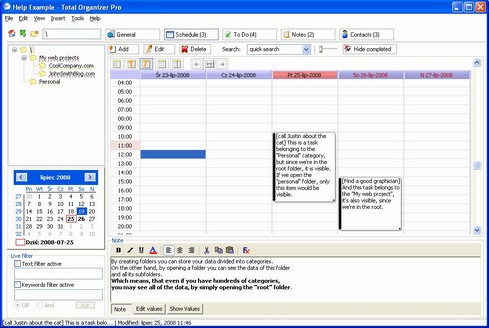
Screenshot of Total Organizer 2.43

Let’s look at the pros of downloading and using Total Organizer 2.43

  1. Small memory foot print
  2. Simple interface
  3. Very easy to use
  4. Small size  
  5.  It’s a very nice software to keep up with your fast-paced life, if you are interested you can download the free version here or you can go pro.

    Sadly the developer site is down, I added a new download link from Freewarefiles.com

    « Older posts Newer posts »