Category: Gimp 2.8 (Page 2 of 5)

Windows is bloatware

Hey there you guys!
How are you today? I hope you are doing good!
As I am writing this. You will see a lot of “feel” and “felt” being thrown around. It’s that much devotion I have to my writing. I haven’t really used any tools to benchmark the performance. All I used was my “feeling” and of course. Loading times, shall we?
 

In case you missed it. I like many others, dual-boot. Which means I use two operating systems on my computer. Why I do that you ask? Please refer to my dual-boot path for more.


Now I happen to use most of the software I have on both systems. And what I have noticed is: It runs so much better and a lot smoother on Linux than it does on Windows!!

Atom takes 18.7 seconds to load on Windows. Linux, 3 seconds!

Gimp takes 30 seconds to load on Windows, Linux 10 seconds (With many plug-ins and effects!).

LibreOffice crashes on Windows often. Very smooth on Linux!

And as I said in the dual-boot path. Windows loads slower. Takes up a lot more resources. Crashes more often. Filled with problems and prone to viruses!
How is it possible that Windows is the most popular operating system on earth?

Closed source

It’s closed sourced. How do you know what does what exactly? How much of the space is actually used to serve your needs. And what is the rest doing?

Windows is a black box. You buy it as it is. You know what it does but not how it does it. Get this. I don’t think it’s doing it very well.

Windows has matured into a heavy, recourse hungry beast. Whom it’s only purpose is to suck and drain every drop of your pocket. And keep you in need for them.

I don’t feel like the computer is dying just to keep the computer on. Or that powering up is an achievement to be celebrated with several minutes of silence and unresponsiveness. My computer is OK. But Windows expects you to update to a new computer every 10 days or so!

Android is not free

And please don’t say you are an Android person, and since Android is already Linux that means you are all for open source. Android has put more money in Microsoft’s pocket than Windows mobile. Five times that is!

More money than Skype, Windows phone and Xbox combined. And the reason is Samsung -_-

I do feel that Windows is forced and over bloated. Not with features. But with crap!

Linux is “Cancer”

Have you seen the licenses lately? They offer you basic usage rights as professional. And then put an oversized price tag on it! And call it theirs!!

They prefer you use hacked software than you using Linux! They think it’s cancer. I think Windows is the real cancer.

If I need to occupy 20 Gigabytes of my HDD and need to have a Core I3, 4GB Ram just to open my files. Then we have a serious problem here, Microsoft!!

It’s consuming. It’s useless. And it’s ugly (have you used Windows 8 before?)

You might take from this that I hate. Well I don’t. I respect all code. And think that paying for code is a healthy practice.

I’m against monopoly and taking advantage of people. And piracy is never a solution.

To be continued ..!How did you like this post? Did you find it useful? Please comment below and let me hear what you have in mind.


Gimp 2.10.14 won’t install problem solved!

Hey guys 🙂

It’s been ages since I posted anything about GIMP!! Not that I don’t like it or don’t use it anymore. It’s just I’ve been busy exploring other things while working with Gimp often.

I had gimp installed by default when I got Xubuntu 14.04 LTS. And to my greatest pleasure it is automatically updated. So I didn’t check the new versions for a while.

When I started reviewing some web design material. I had to have the Gimp on Windows too (For comfort 😛 ) and so I downloaded the latest version 2.8.14.1 from Filehippo.com t. And to my disappointment. It didn’t work ..

I double clicked and it didn’t progress pass the language selection option. It stopped responding many times.

I went to the official website and downloaded it via a bit-torrent client. Nothing ..

It did the same thing, no matter what I did it froze on the language selection and I had to end it from the task manager.

It was a bummer .. I downloaded it twice. Fiddled with many windows settings like:
Running as administrator.
Trying the compatibility options with every prior version of Windows.
I even installed the latest GTK library and Python ( Didn’t work).

And the funny thing no one reported that problem. I Googled all around. Nothing!!

When I installed it on a another Windows 8 computer. It went smooth!

Maybe the problem is with something in Windows 8.1?

What did I do to fix it?

Nothing!

I ran the installer. And let it running. After a few minutes it resumed installing like nothing happened.

I even uninstalled GTK and Python. And it didn’t affect how Gimp worked!

So here you have it. Be patient! It’s a Gimprtue !! Play on virtue!

That was today’s post. Please tell me if worked for you! And did it happen with you?

Please join my blog and subscribe to my mail list!

Suggested Edit for making Gimp look like photoshop cs3

Hey there dear fans 😀

Today am thinking of something old but new, making my most notable work more readable and easier to understand, of course I am talking about this post on how to make Gimp look like PS CS3.


I have been told it’s hard to follow, which may explain why is it viewed so many times!!

Even I had a hard time following it, and am the one who made it!!

So please if you read and followed my tutorial successfully then suggest me some edits and I will give you credits for it.

Thank you, that is all.

Have a nice day 🙂

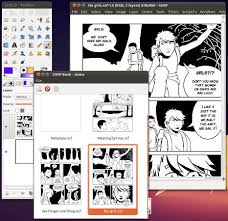
How to install and run GIMP Book on Gimp 2.8

GIMP Book is a script for managing multiple pages in GIMP, it’s great for creating comic books, illustrated books, sketch books or similar. It opens a separate window with thumbnails of all your pages, where you can add, delete, sort and rename them. Once you’re done you can export your book to various formats, for web or print.

 To make this script work for gimp 2.8 all you have to do is to extract the .zip file and paste it to this directory :
“C:Program FilesGIMP 2libgimp2.0plug-ins” and run the program afterwards
To run the script go to Window Book
Enjoy your comics 😀 & please refer to the manual in the zip archive 🙂
Download
Original page

« Older posts Newer posts »