Category: Linux Xubuntu (Page 1 of 2)

Ubuntu 16.04 is finally out!

Finally! The much anticipated Ubuntu 16.04 is out! I’ve been waiting for months for this new release! Thank god it’s finally out!

The wait is FINALLY over!!

So what makes this release very special?

  New features in Ubuntu 16.04


  • Introduces “snaps” for new robust, secure app format
  • Introduces LXD pure-container hypervisor with OpenStack Mitaka
  • Supports IBM Z and LinuxONE systems with flat pricing
  • Steps towards converged Ubuntu across IOT, Phone, Desktop and Server
  • Introduces ZFS and CephFS for large-scale cloud storage .
  • New Linux Kernel 4.4

New installation media!

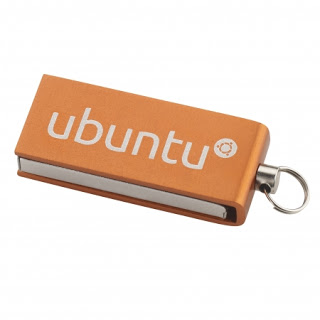
For the first time, Ubuntu will be shipped on USB Installation Disk rather than the usual CD/DVD that has been used since the beginning, and will cost around 6.5$ per disk (shipping not included), credit for this goes to omgubuntu.
If you cant buy it or won’t, here is my tutorial on making your own Ubuntu USB disk, but I’d love to have one of those to be honest!!


Ubuntu 16.04 installation disk

Other flavors of Ubuntu are out today as well! So feel free to check your flavor’s website! Most get 3 years updates unless you crave Kubuntu!
Now we come to my personal favorite part, downloading Ubuntu!

Download

To download the ISO image click here, 1.5 GB.
There is also a torrent link for Ubuntu, which is better for the servers (not sure how!)
I’m personally downloading Ubuntu Gnome, so here is a link for that.
Sadly it comes with 3 years support only, but I’m sure it will be enough!
After you download the image, you are going to need to burn it on a DVD or use the much faster USB method, see my tutorial on putting Linux on a flash (Don’t worry if 16.04 isn’t listed in YUMI’s list, it will work!).
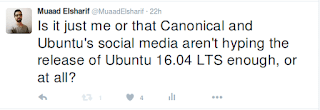

 

Ubutnu 16.04 just around the corner, total media silence!

It’s just two days away separating us from the release of Ubuntu 16.04 LTS!
Yet it seems like there is nothing, no one is talking about the imminent release!


 16.04 almost here!

I’ve been covering Ubuntu 16.04 since the first Alpha, you can tell how much I’m excited for this release since I’ve been using Ubuntu 14.04 Trusty Taher ever since it was released! Down to the first Beta and second beta released,
What surprises me isn’t the lack of media coverage from big tech sites and mainstream attention, I’m really stunned that Ubuntu themselves aren’t covering the event at all!
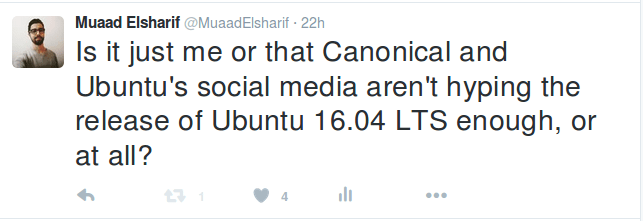
I am following Ubuntu’s twitter account closely, and nothing about Ubuntu 16.04 was tweeted, nothing at all! Not even a tweet!
Now I understand that Canonical has more profiting projects to cover and that Ubuntu for the desktop draws little if any money at all, but that doesn’t mean to completely ignore the release!

My take on the issue in 144 letters!

It would be awful if Ubuntu’s release was announced after it was actually released, or worse! A couple days after..


Why all the excitement? It’s just an OS

This release has interesting features and updates! Most notably the addition of a new Kernel (Linux 4.4), I’m personally hoping for better power management.
And lets not forget this is an LTS version, so 5 years of updates off the bat!
It is, it’s just an operating system, so as Mac OS and Windows 10, but Ubuntu is always special!


What the public wants?

Even blogs that specialize in covering Ubuntu news aren’t hyping the release! Take OMGUbuntu for example! According to a recent poll the conducted 66.76% of the people who voted said they will upgrade to Ubuntu 16.04 “As soon as possible”, 8,282 to this date, and 27.1% answered “Yes, but not right away”, those totaled in at 3,412. And 3% are undecided (to me these are potential yes)!

When will be Ubuntu 16.04 released?

I think that’s the million dollars question, according to the wiki it will be released on April the 21th if everything goes according to plan, I’m not sure about other Ubuntu flavors, this date is for Ubuntu that ships with the Unity interface.


Never forget who you are!

I know that Canoical is busy promoting the new Ubuntu tablet (which is pretty cool by the way!) and it’s cloud services, let alone the shock that Ubuntu runs from CMD on Windows 10 now (that needs a whole post to vent to be honest!). All of that success was built on the platform that is good old Ubuntu for desktop!
I hope that Ubuntu doesn’t lose itself trying to reach out of it’s current Eco-system.

How did you like this post? It’s pretty much a part of my Ubuntu 16.04 hype! Please let me know what you think and share it with your people!

Minor update
OMGUbuntu’s account on twitter posted a tweet about 16.04. That’s a start..
And now a day before the release they started hyping, which is good!

Fixes to bugs encounterd after moving to Gnome 3.12 on Xubuntu 14.04

I just moved to Gnome and noticed several bugs! First of all I didn’t know how to go to sleep mode!

That was very easy, click on the right corner and hold ALT and the power off button will change to sleep. That’s great! But now that I can go to sleep mode, the computer won’t wake up!


It doesn’t show up anything! Just a laminated dark screen and I have to power it off to be able to use the computer!

I looked up dozens of pages without finding a single clue, many people assumed it was a video driver issue or something. It wasn’t the video driver!
The answer was right under my nose!
Coming to gnome I noticed that it still used the “ugly” login manager LightDM-GTK-Greeter. So I used the command to change the login manager to GDM, Gnome’s default login manager, that’s where the problem started!
As soon as I chose LightDM-GTK-Greeter and rebooted, I’ve been able to sleep and wake at will! No problem at all!
So that’s the fix! Install LightDM-GTK-Greeter.
First of all add it to the repositories via this command:
Then install it via this command:
Finally: Use this command to make it the default login manager.
sudo dpkg-reconfigure lightdm
My problem wasn’t “fixed” 100%. I was feeling bitter-sweet!
I fixed the sleep issue, and now the extensions remain after reboot too! But the login manager is hideous! Isn’t there a way to make it pretty?
Why is it hideous you ask? It was a part of the XCFE interface and when I removed it, it lost the visual elements it had and went back to defaults. And that’s not pretty at all!
Ubutu Tweak couldn’t customize it, and the Tweak utility provided by Gnome had no options for it.
The question remained: How to customize LightDM-GTK-Greeter?
It’s very simple actually! There is a package called: LightDM-GTK-Greeter-Settings. All you have to do is to install it. And use it to customize LightDM-GTK-Greeter to look better!
I began by adding it to the repositories via this command:
Then install it via this command:
sudo apt-get install lightdm-webkit-greeter
From the menu I ran it and it needs administrator rights so I had to enter my password to start it.
I had several options to choose from like theme and position and what tabs to be displayed. It looks so much better now and it gets the job done.
Not as pretty as GDM of course, but at least it works!

In addition to the sleep and wake bug fix, and the extensions staying enabled after reboot, the Gnome classic mode loads an interface rather than just a background with a mouse cursor, but it looks the same as Gnome. I’m yet to figure that out!

My fix to that was very simple, Installing Ubuntu Gnome 14.04.4 a fresh install.

Continue reading

Bugs faced after moving to Gnome 3.12 on Xubuntu 14.04

One of the major issues I felt in Gnome was the extensions installed get disabled after restart (since I can’t go to sleep anyway). The fix suggested was to use the “System default”.


 It didn’t fix other issues like the sleep mode not waking up and the classic mode not showing any elements, but I am tackling issues one at the time.

Message tray pop ups

Message tray, it looked big and annoying ( it responds to every mouse gesture no matter how small)

Size

It’s also very big in size, it took 5GB more than XFCE took, even with cleaners like Bleachbit, I was running low on space.

No sleep

I didn’t even know how to go into sleep mode, turns out you need to press and hold ALT while the menu is popped out to go to sleep menu.

Doesn’t wake up from sleep

I couldn’t find an explanation for this bug! The computer displays a black screen whenever waking from standby and stays that way until I turn it off manually!

No classic mode (just a background)

It only loads a mouse cursor and a background with no visual elements until I turn it off manually! No easy fix or workaround for it (yet).

Extensions won’t install

I wasn’t able to install extensions from the extension site, extensions.gnome.org even after enabling the addon in my browser and adding the site to trust list. It was resolved on it’s on.

After install won’t stay enabled after reboot

Even the extension that is supposed to make it less sensitive resets on reboot. The fix was to choose the “System default” from the login which (worked for me like many other people). It wasn’t convenient but it was an easy fix.

I’ll post that has a fix for most of these issues very soon 🙂

« Older posts