Category: page views (Page 3 of 3)

90,000 page Views!

Today I noticed that I reached 90,000 page Views!!

Another significant milestone on my blog while reaching for my goal of 100,000 views which doesn’t seem too far away!  There are some changes and things I’d like to address in this site update

Blogging about Libya in Arabic

The 90,000 views post banner that I made in Gimp

Since my last milestone a few months ago I made some changes to the blog regarding content, I decided to put more focus on Libyan readers (seems only natural since I’m a Libyan living in Libya, duh!) and I have to say it’s starting to pay off! After all my top viewed post is the passport post, a pure Libyan matter.

I added a Libyan section on my blog collecting all the posts I made about Libya in Arabic and English too, I am afraid I can’t express some matters properly lately, we have some very unique problems and explaining it to foreign friends is really frustrating, people can’t imagine a country without cash flow in banks for over 6 months!

Putting more focus on Libyan readers and blogging more in Arabic doesn’t mean that I’m not blogging in English anymore or neglecting my English speaking fans! I can do both (I hope!). After all I posted this in English haven’t I?

I also started post journals, it’s an old school kind of blogging, where a blogger captures his impressions and events of his daily life and turns it into blogging, lets see how that turns out.

 I also been doing several S.E.O (search engine optimization) tweaks on my blog, I hope they come into play soon and help my blog grow.

CAPTCHA much?

I’ve taken a courageous step and decided to remove the CAPTCHA from my blog, it attracts spammers like crazy, but it’s a risk I’m willing to make, I mean Google’s CAPTCHA has become so annoying lately it drives me off stuff I want to see, so I guess it’s the same for readers wanting to comment, I’m moderating each and every comment tho, no chance!!

I got me a new logo!

I’ve been helping a friend promote his Radio show on Twitter (Checkout 96.9 FM Wednesday at 10:)) PM CET) and he thought he would reward me by designing me something, I asked him for a logo I can use on my blog, what do you think?
My blog’s new logo

Social media update

  • I’ve reached 20,000 followers on Twitter and I’ve decided to take a break of the whole “Followback” system, it requires so much energy without real reward, and don’t get me started on spam! I will continue to follow back people who follow me, but not the in same way I used to do.

    20,000 twitter followers banner
    My 20,000 Twitter follower banner, also made in Gimp


  • I’ve decided to create a Facebook page, not a personal page, a page for my blog! Who would have thought!
    While I’m known to be an anti Facebook person, I know for a fact it’s the biggest social network out there, and it’s a shame not to share my content there, it would be interesting to preach about the dangers of Facebook while being on the site! I have to admit that Facebook is my biggest traffic source. As we grow up we learn to compromise, I guess this is a price I have to pay to grow my blog.
    I’ll post a link to my blog’s Facebook page when I have it ready. 

On a lighter note, this is my 300th post after the cleanup I did a few months ago and I didn’t make a banner because this wasn’t supposed to be my 300th post!

With less that 10,000 views separating me from my blogging goal, a lot of work is due to celebrate that properly, and I’m going to need tons of fan feedback, so keep that coming folks!

As the month of Ramadan is coming to an end, I wish you enjoy a peaceful month with your friends and loved ones, and that things in Libya and all of the Arab and Muslim world improve soon.

Thank you for reading this update, please leave your comments in the comments section below, and have a nice day.
80,000 views! Site update inside

80,000 views on my blog, what a day!

I have reached 80,000 views on my blog, it’s a milestone to be celebrated indeed! The result of hard work and dedication, and I can’t forget my loyal readers!These last few weeks since I last wrote an update were a true blessing, while I blogged less, I embarked on a soul finding journey beyond the interface of blogger, I am still undecided about posting that kind of posts yet on this blog, I’ve thought of it, I might pitch a pilot post like that soon, but without feedback, none of that is happening..


Times call for a change

  • I moved from a 3rd party domain to the Blogspot hosted domain (actually I didn’t renew the subscription fee), if you feel like reading the full post, then you are welcomed to check it out from here.
  •  I’ve lost a great deal of traffic due to this sudden change, but I’m sure I’ll be able to win my readers back, after all most of them are from Libya searching franticly for a way to get a passport (pray for Libya please) and I’m sure they will comeback as soon as the reservation site gets back on-line, it’s that bad!
  • As a side effect Linkwithin is acting off, giving me two links instead of one, one for the third party domain that expired recently and the other is for the Blogspot domain.
    Since Linkwithin has a really responsive support team (just kidding), I’ve dropped the idea of using Linkwithin all together, but if you are still into it, check out this post covering a popular fix for the post issue (shameless self promotion at it’s best!!).

Blog improvements

  • During this time I decided to take a “real” look on my blog, and I found some really bad posts, I mean REALLY bad (I’m my own worst critic), so I went happy with the delete button.The total post number went down from 410 to 288, that’s in case you noticed, and in case you didn’t, there you go!
  • Deleting that huge number of posts left “dead links” all over the blog! Since I tend to link my posts together to create a better context, deleting a huge number of posts will create gaps! And there is no way to tell blogger the posts were deleted, I had to take care of those manually, one by one! With the help of a little tool of course! This tool helped me search for dead links and locate them exactly inside the blog, some of it was from the old domain but mostly it was deleted posts (and a very few links that expired ad needed to be removed).
  • I’ve figured out why some of my posts have awkward spaces in them while I didn’t do that, I might post about that, it depends on readers mainly.. 
  • Sometimes, doing nothing fixes stuff, if you wait long enough, some issues will resolve themselves (I’m talking about blogging, if you have problems work on them!). 
  • Blogger has changed the sitemap limit, only allowing 150 posts to be submitted, even with the massive downsizing I did, I was still way above the limit, luckily I found a way to add more sitemaps to fetch all my posts, which happens to be very easy to use, checkout the sitemap tool from here.
    And YES! I believe that adding a sitemap is important for blog growth, despite the claims that Google sitemaps sites automatically, I find that very hard to believe.

Brand growth

  • It’s no secret that I use Twitter for promoting my content, and I am pleased with the results, if anyone is interested I’ll make a post (or a series of posts) on how to develop a strategy to promote your blog content and twitter account side by side.
  • It’s worth mentioning that my twitter followers exceeded 16,000 followers!
  • I focus on Twitter a lot because I’m an anti-Facebook activist, so I can’t use Facebook for promotion (and everybody is on Facebook)..
  • The blog grew a great deal in comparison with the same time last year, that’s great! If I could seduce the readers to comment? That would be super too! (Come to the comments section, we have cookies).

Blog look and feel

I finally settled with a look for my blog, I like this template, and I hope you do too, because it’s going to stick around for a while!
It’s clean and responsive, so far this is the closest template to my vision of a personal blog, unless if you have a better thing to offer, I’m always down for an awesome template (in almost 4 years of blogging no one has suggested me such a thing).
I think it’s time to settle down with one look for the blog, don’t you agree?

Final words..

Change is never easy, and for some it could be harder than ever. This last month was a wild roller coaster ride of changes and challenges, and I’m glad to say I’ve concurred them all, it’s really down to how you adapt to the changes and challenges in your life and make the best of them!
Till the next major milestone.
Have a nice day, and do tell me what do you think of this post?

LinkWithin not showing similar posts fixed!

LinkWithin is a widget that appears on your blog and shows similar posts to the post you are on, it’s a good way to show more content and get the users engaged, I tried adding it to my site and it didn’t work!
It wasn’t showing any posts!
In this post I’m going to show you how to fix it with one easy step!


This tutorial doesn’t explain how to install LinkedWithin, it’s explained thoroughly on the site itself when you are installing, so take a moment to look at it before jumping in!

 Cause #1: Third party domains

At first make sure you are using a blogger domain! Don’t use the domain you bought from the hosting company, your blogspot blog must be a sub domain of blogspot.com in order for Linkwithin to work!
Seems basic? Check your settings again!

Cause #2: Must be placed directly under the post!

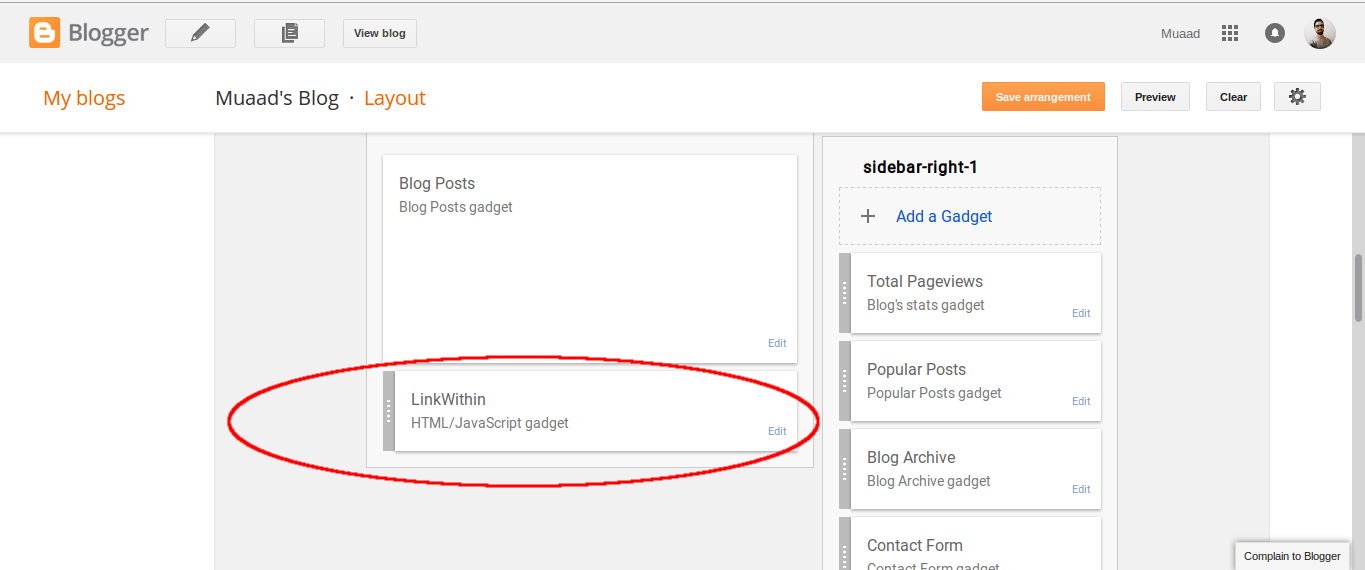
There are many places to place widgets in blogger, at first when you add Linkwithin it will be added to the sidebar, drag it and place it under the post, not in the footer! Under the post as in the image below!

This should fix the problem right away! And LinkWithin will show posts in minutes!
For me it worked, too much I’m afraid!
LinkedWithin was showing posts on the home page, something I didn’t expect! And the fix for that is also very easy!

3. Fix LinkedWithin showing posts on Home page

Go to Blogger Your blog Template Edit HTML
From there search for LinkWithin, and go inside the widget and you will find this line of code

<b:includable id=”main” <data:content / </b:includable
 
Replace it with this one, and you are good to go!
<b:includable id=”main” <b:if cond=’data:blog.pageType ==&quot;item&quot;’ <data:content / </b:if </b:includable  

 4. HTTPS redirect

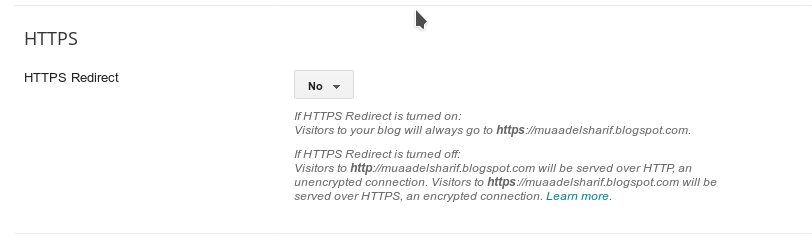
If you are using HTTPS for added security on your blog then you are going to have to sacrifice using Linkwithin, the widget only supports the usual version of the domain “http://” and not “https://” and won’t even show it on the blog unless you change the settings. 

Go to settings HTTPS and switch from on to off.


Switch HTTPS from on to off

I hope you found this post useful, I will be posting tips on how
to increase your blog views soon enough
Share with your friends and family and have a good day!
Newer posts »