Page 323 of 325

Speed up Windows XP with AlwaysUnloadDll

I only added this tweak for reference in a another post about gimp 2.8 which you can check from here.


“Users that still has and using Windows operating system prior to Windows 2000, such as Windows NT, Windows Me, Windows 98 and Windows 95, there is a trick to free up memory without using any third-party software utility. The trick is to force Windows to unload and free cached DLLs from memory.
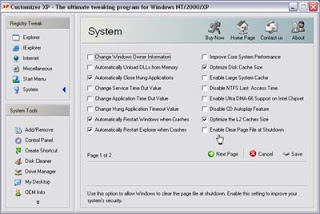
These are the steps to do this tweak

   1. In system prior to Windows Vista, user can force Windows unload the unused DLL to free up the occupied memory by using “AlwaysUnloadDLL” setting in the registry.

   2. Run Registry Editor and navigate to the following registry key:

   3. [HKEY_LOCAL_MACHINESOFTWAREMicrosoftWindowsCurr entVersionExplorer]

   4. Create a new sub-key named AlwaysUnloadDLL and set the default value to 1 to disable Windows caching the DLL in memory.

   5. Restart Windows for the change to take effect.

If you use Customizer XP, it has this tweak among many others. But the shareware is free for 30 uses only.


MyPaint Best free open source draw software Ever

Good day to you, wherever you are.

This software is guided towards drawing, and let it do the rest, so anybody can master it in no time because it’s super easy to use, guided toward artists, like you, so download it and give it a try, it’s only 8mbs, and show the world your talent.

Pros:

Super easy to use.

  • Small in size, never in value.
  • Open source, free software.
  • Deliveries high quality art.
  • wide compatibility.

Cons:

  • You come up with them, I haven’t found em yet.

Choose your link from here

You can also download brushes!! and a GIMP plugin for the OpenRaster file format..

PerigeeCopy 1.6, a great copy handler

In this segment we are going to look at a decent software that never got recognized..

This software does a very simple task. Copy or move files from one place to another without stopping for file replaces. It queues those at the end of the transfer. This is a huge issue in XP SP3.

I use it very often and totally recommend it. Until I replaced it with Teracopy.

Download link for XP/Windows 7

Hope that you like it, and it solves some of your daily problems.

Please comment and feel free to say what you like..

Gimp 2.8 RC Slow problem fixed!! + Notes inside

Hey there
Good day to you all
This tutorial was made on Windows XP SP3 and Gimp 2.8 RC.

Use these steps to improve the performance of Gimp 2.8

  • First of all run the software from a shortcut you create, not the one that comes with it, because it has a line called %Userprofile% which makes the start of the software faster.
  • Uninstall all unnecessary brushes,as it adds to the load time.
  • If the gtk.net library is installed, uninstall it.
  • Gimp themes doesn’t make it much slower but it causes laggy interface, so remove it.


A tool to use

If you followed any of my previous tips, just uninstall everything using iobituninstaller, advanced uninstall and preform a power scan to get rid of everything related to Gimp, then reinstall after a restart, the only thing to do is use the single window mode to make it like Photoshop.

And of course if you were lucky and nothing happened with you, keep it as it is.

Please note that RC is a testing version, use the final version whenever possible!

Thank you for reading, please comment below.

« Older posts Newer posts »