I’m about to breakdown my experience with Atom editor 1.0
Introduction
Atom 1.0 was released yesterday and for those who just joined me here are some basic facts about it.

It took me over an hour to download it for Linux & Windows. As it detects your platform, I had to reboot just to download it and install it!;
What I liked is that it remembered all my customization and even reopened some files I was working on! Also all the packages I downloaded were preserved!
In my initial review of Atom I had 3 major draw backs. So I won’t turn the thumbs up until I see some serious improvements!
1. Resource consuming
Still pretty much resource consuming!!
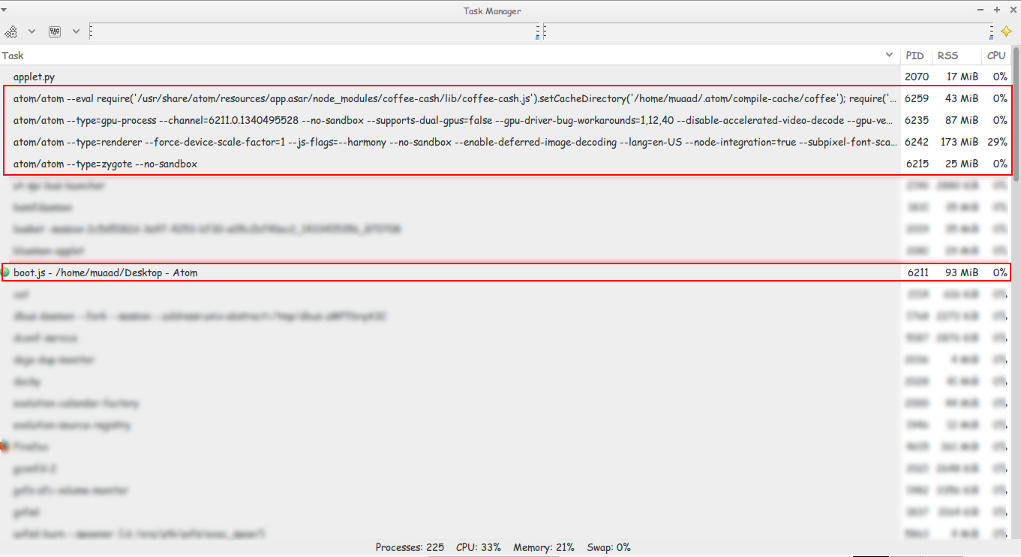 |
| Screenshot of my system monitor |
2. It takes a long time to load
It takes about 10 seconds to load on both Linux and Windows (no mac data so far!).
3.File size restriction of 2 Mega byte file size
It took several minutes to be responsive with a 2248 line .js file less than 2MB!!
I took sometime to test it. It took several minutes to render .JS files under 2MB, hung on and totally crashed with other scripts all less than 5MBs. And the computer was under so much stress I though I was gaming at 4K!
I tested on both (Linux and Windows) while Linux was slightly better. Windows was a catastrophe with Atom.
I tried opening some larger .jar archives, it didn’t have a huge issue with those. And a 39MB .sql file that killed it on Windows.
How can .JS files crash it if it’s made out of JavaScripts?
4. Doesn’t recognize Arabic by default!
Still doesn’t recognize Arabic ..**Arabic update: I managed to make Arabic work on Ubuntu by downloading language support and changing the fall back language in Firefox to Arabic. I’ll post more when I test on Windows.;
Also done on Windows.
So far.. It has let me down 🙁
PS: I used the same computer to test Atom now and then ..
Final verdict
Until they take it seriously. I’m not using Atom anymore! It has a nice look and some neat tricks. But I need something serious to work with..