Month: March 2016 (Page 1 of 5)

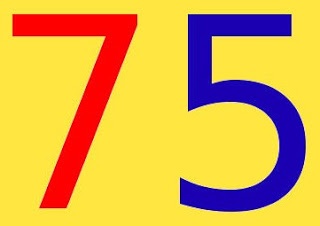
75,000 views!

Today I reached 75,000 views!

Today is one of the days I feel my hard work is paying off!
It’s an important step towards a goal I set for myself, the 100,000 views, three quarters of the way.

reaching 75000 on my blog

I’m also really close to reaching 15,000 followers on Twitter, which is a huge part of my promotion success!
Since I don’t want to be overly talkative on the blog, I wanted to use this post as a total update, I’ve been experimenting with several templates lately, and until I can find something decent I’ll stick to the basic template, I’m afraid I’ll be sticking on it for a while!

As for the domain issue some of my readers reached out to me saying that the domain is down, and that’s true! My LTT hosted domain went down and I’m yet to fix it, I’m still unsure how to add it to the blog, this makes me rethink the whole “third party domain thing”.

An update

I haven’t been able to restore the domain, so I just configured it to redirect to here until it expires, and I don’t think I’ll be renewing it.
The contact page hasn’t been working for a few days (thanks for letting me know!) And I fixed it by not touching it at all!

The simple template proved to be far too simple, I had to change it a little bit, I found a perfect template but had some issues I had to fix, and the developer wasn’t replying to anyone who contacted him, so I came up with the one you see now. I hope you like it.
Last but not least, linkedwithin.
For some reason, linked within is showing posts with the new domain and the old one together, and even tho I made a redirect, it doesn’t work with the posts, just the home page.
I tried contacting them several times, but they didn’t respond to my initial e-mails that I sent over a year ago, and didn’t respond now..
So Linkedwithin had to go to. 


Thanks for being a part of this journey! See you at 80,000 views

Tell me what you have in mind in the comments section below, if you can help with the domain issue or have a cool template for me.


Ubuntu 16.04 Beta 2 is out

Ubuntu 16.04 Beta 2 was released yesterday!

As we follow the highly anticipated launch of Ubuntu 16.04 here on this blog, we saw the Alpha roll out and then the first Beta, now it’s time for the second beta to launch.

Remember this version is far from over and it’s for testing purposes only, but if you would like to download it and give it a spin, you are more than welcome!

On a lighter note, this is the official Ubuntu 16.04 Mascot.

With the Ubuntu 16.04 release being less than 1 month away, I presonally can’t wait and will blog about it as soon as it rolls out god willing.

Have a nice day!

Gnome 3.20 is out!

Gnome 3.20 is out today, let’s take a look at what’s new in this release!

Gnome 3.20 was released on March 23th, it took 6 months of development and the work of 837 contributors and includes 28.933 changes!
This version is named Delhi recognizing the efforts of the  team Asian Gnome team.

The date was delayed from March 20th (which would have been perfect!) to March 23th for reasons unknown to me.

Main highlights for this release

  • OS upgrades can now be installed using Software
  • Wayland support has improved significantly, with kinetic scrolling, drag-and-drop, and middle-click paste
  • Keyboard shortcuts and gestures can be easily learned with new shortcut overlay windows
  • Privacy controls have been improved with per-application location access
  • Quick access to media controls directly from the shell
  • Searching in Files has been much improved
  • Builder can now build XDG-Apps, a new cross-distro framework for building and distributing desktop applications. These can also be installed directly from GNOME Software
  • Gnome photos receives a huge update.Gnome Photos screenshot
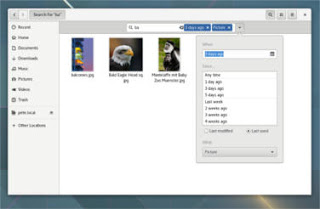
  • The file manager is also updated and refined.
    Gnome files screenshot
  • There is more to find out, like the new map application, the enhanced web browser, or the fonts! Check out the details from here.

How to get this awesome release?  

It’s immediately available on Fedora and Opensuse, but if you want this on Ubuntu you are going to have to wait a little bit, as the highly anticipated Ubuntu 16.04 is going to be released with Gnome 3.18 (there is an unofficial port of course, let’s leave that until Ubuntu Gnome is out!)

I hope you liked this post, I personally can’t wait as I’m writing this on Gnome 3.10 that ships with Ubuntu Gnome 14.04.4 
Share this post with your friends and family, and if you tried it give us your feed back!

LinkWithin not showing similar posts fixed!

LinkWithin is a widget that appears on your blog and shows similar posts to the post you are on, it’s a good way to show more content and get the users engaged, I tried adding it to my site and it didn’t work!
It wasn’t showing any posts!
In this post I’m going to show you how to fix it with one easy step!


This tutorial doesn’t explain how to install LinkedWithin, it’s explained thoroughly on the site itself when you are installing, so take a moment to look at it before jumping in!

 Cause #1: Third party domains

At first make sure you are using a blogger domain! Don’t use the domain you bought from the hosting company, your blogspot blog must be a sub domain of blogspot.com in order for Linkwithin to work!
Seems basic? Check your settings again!

Cause #2: Must be placed directly under the post!

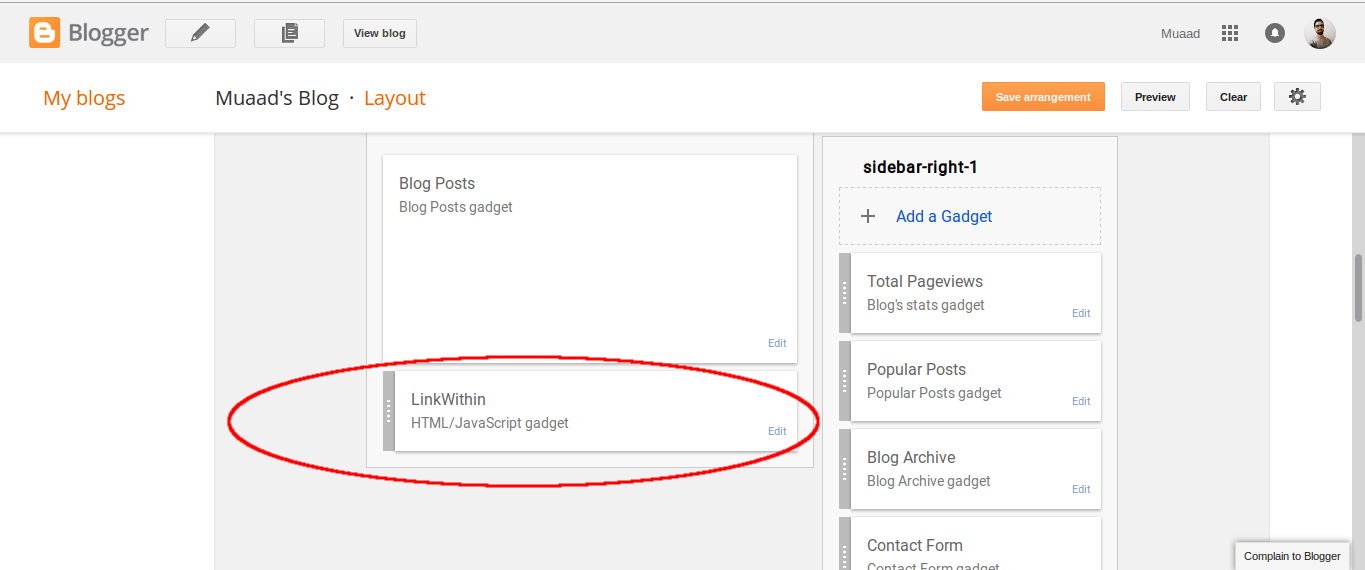
There are many places to place widgets in blogger, at first when you add Linkwithin it will be added to the sidebar, drag it and place it under the post, not in the footer! Under the post as in the image below!

This should fix the problem right away! And LinkWithin will show posts in minutes!
For me it worked, too much I’m afraid!
LinkedWithin was showing posts on the home page, something I didn’t expect! And the fix for that is also very easy!

3. Fix LinkedWithin showing posts on Home page

Go to Blogger Your blog Template Edit HTML
From there search for LinkWithin, and go inside the widget and you will find this line of code

<b:includable id=”main” <data:content / </b:includable
 
Replace it with this one, and you are good to go!
<b:includable id=”main” <b:if cond=’data:blog.pageType ==&quot;item&quot;’ <data:content / </b:if </b:includable  

 4. HTTPS redirect

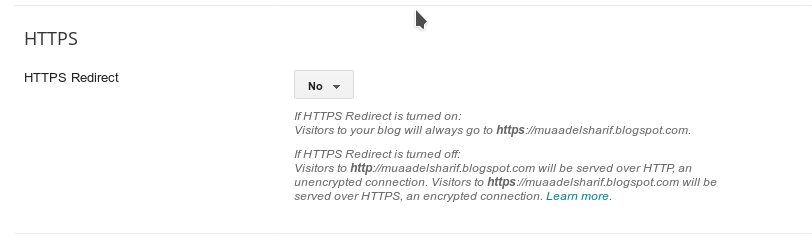
If you are using HTTPS for added security on your blog then you are going to have to sacrifice using Linkwithin, the widget only supports the usual version of the domain “http://” and not “https://” and won’t even show it on the blog unless you change the settings. 

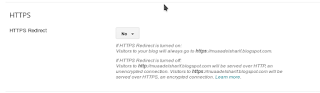
Go to settings HTTPS and switch from on to off.


Switch HTTPS from on to off

I hope you found this post useful, I will be posting tips on how
to increase your blog views soon enough
Share with your friends and family and have a good day!
« Older posts