Category: Docky (Page 2 of 2)

Partial Upgrades in Ubuntu + Docky issue [FIXED]

One day out of the blue Ubuntu said it needed a partial upgrade, I clicked OK and didn’t think twice about it, it did some work on many packages and for some reason Docky 3.0 (Experimental branch by Rictoz) was selected for “upgrade” and after the reboot it was gone!
The partial upgrade in general is nothing to worry about and it’s safe to click continue, especially I’m running Ubuntu  14.04 LTS which is supposedly supported until late 2019.
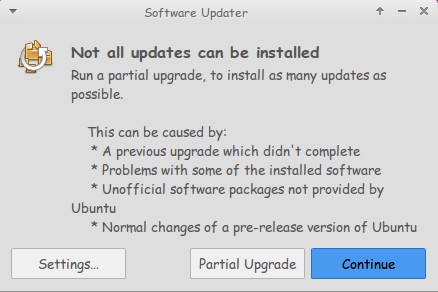
I was set back to Docky 2.0.2 which I don’t have a problem with, except it crashes.

(If you read my Docky post you know that I chose Docky 3.0 over 2.0.2 because it’s more stable and doesn’t crash randomly all the time. Despite Docky 2.0.2 having cool “Docklets” that added to it’s functionality.)

I couldn’t install Docky 3.0 due to package dependency issues, and therefore I was stuck with Docky 2.0.2 for a while, only then I realized how much I depended on it to get my things done!

The fix was super easy!

I went to the downloaded files I had which were three files: Docky, Libplank, and Libplank common.

Using Gdebi I installed Libplank common the first, then Libplank and finally Docky 3.0, it replaces the old one and no need to uninstall.

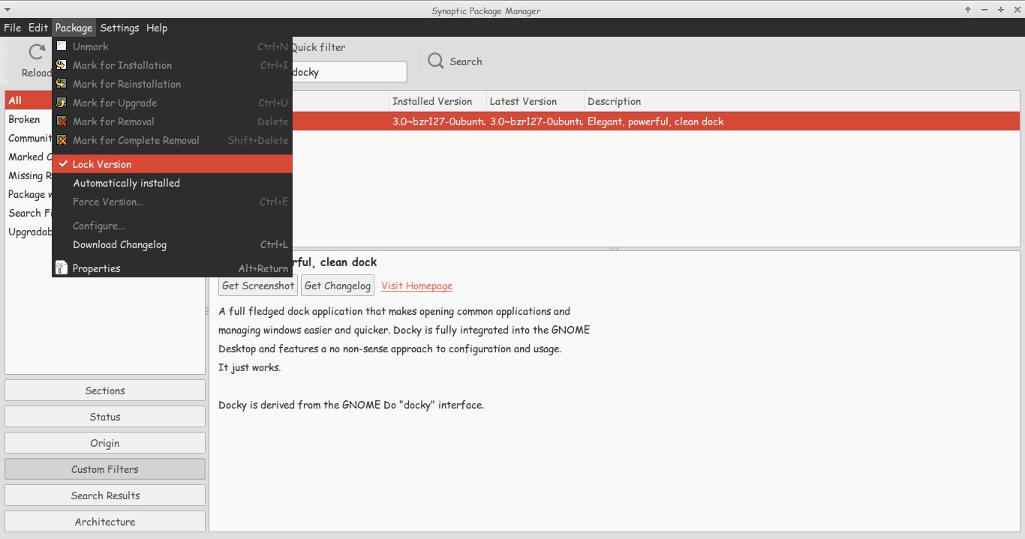
Thing is every time it looks for updates it wants to remove Docky, and that happens daily, I found a way to fix that by simply “locking” the version.

I went to Synaptic and searched for Docky, selected it and clicked lock version under package. Now even when it looks for updates it greys out Docky and doesn’t update it. I have a detailed tutorial on how to use Synaptic that you can find here.
That’s how I got Docky 3.0 back after it was ruined by the partial upgrade, I hope you found this useful, please let me hear your feedback and have a nice day.


Top free Dock (for Linux and Windows)

Hey there you guys 🙂

How are you doing today? How are things?Today we are going to take a look at some great dock software. These docks are great to customize your desktop and make you more productive and your desktop much more organized!
Some of these are so great, I need to dedicate a whole blog post for it! !!First of all: We have to mention what a dock is, For people who don’t know what it is. Then we list our top docks :)A taskbar or dock is a bar displayed on an edge of a GUI desktop that is used to launch and monitor running applications. Source

It’s used to minimize the clutter on your desktop. As you use it to collect shortcuts to software and tools. And you can hide it or set it to disappear after a period of time.


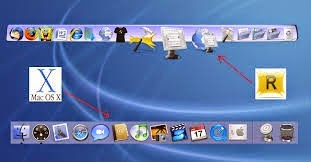
This is the Mac OS X bar.

The first to launch the dock we know today was Apple. Most docks are inspired by the design, take rocket dock for example. It’s made after the Mac OS X dock.

Now lets look at the top docks:

1. Cairo Dock

Cairo-Dock is a desktop interface that takes the shape of docks, desklets, panel, etc

It’s a real eye candy but takes a bit to get used to it. Especially if you migrated from another dock.

My rating 3.5/5


This is Cairo dock

Platform: Linux only. Website


2. Docky

Another dock just for Linux is Docky. The finest dock money can’t buy! And it’s up to it’s proclaimed status! It’s lean and powerful. You won’t even know it’s there! It’s simplicity is purely awesome!

My rating 4.5/5

This is Docky

Platform: Linux only. Website

3. Rocket Dock


RocketDock is an awesome dock for windows. Developed by two hardcore Mac lovers who wanted to bring a piece of Mac to windows!

This is RocketDock compared to the Mac OS X bar

You can put almost anything on it. Customize it in anyway you like, plus it’s super fast and

doesn’t affect the performance at all, let alone the boot 😀 (This is a sneak peak to my next post :D)
My rating 5/5

Platform: Windows only. Website


4. Nexus Dock

It’s made by Winstep and it’s a freeware. There is a paid versions for upgrade too.

It has many skins and widgets. And it’s pretty stable.

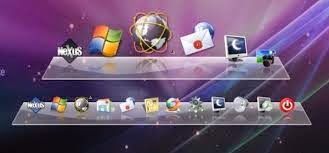
This is Winstep Nexus Dock

It has a medium memory print, and requires more minimum requirements. (This is a sneak peak to a future post :D)

Nexus dock has a larger installation size compared to other docks (30 MB roughly ).

There is a paid version with many more features. Check it out!

My rating 4/5

Platform: Windows only. Website

So there we have it. 4 awesome docks. Two for each OS.

Which one are you using? And if you aren’t using docks. Which one of these will you choose?

Can’t wait to hear your feedback. And remember the next posts will be dedicated to two of these docks. Read again and try to figure which ones I’ll be writing about.

Have a nice day 🙂

Newer posts »