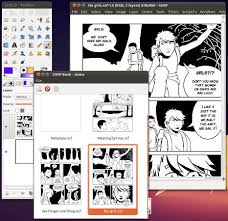
To make this script work for gimp 2.8 all you have to do is to extract the .zip file and paste it to this directory :
“C:Program FilesGIMP 2libgimp2.0plug-ins” and run the program afterwards
To run the script go to Window Book
Enjoy your comics 😀 & please refer to the manual in the zip archive 🙂
Download
Original page
Category: How to (Page 20 of 20)
Creating a Hotspot is Easy as 1, 2, 3!

PRO users can name their hotspot anything they want while Free users must start with “Connectify-”
2: Select which Internet connection you’d like to share.
Share the Internet connection from your Cable or DSL modem, the ethernet jack in your hotel room, a 3G or 4G modem, even another Wi-Fi network
3: Click Start Hotspot, thats it!
Other Wi-Fi devices such as laptops and smartphones will be able to see and connect to your hotspot just like any other access point
Today we are going to talk about a huge productivity advantage.
Adding Everything to Executor to gain the ultimate combination.
For those who are unfamiliar with the programs. Here is a short intro:
1. Everything
Everything is a lightning fast search utility that searches the entire (drive / drives) to get results. It has many parameters to customize the search and many advantages over the usual search utility provided by windows.

2. Executor
What more I could say than I said? It’s an amazing software!
Imagine the power of the two combined!!
1. Index Everything as a search word in Executor. List it as anything you like, for example: Search. (You can do it by simply right clicking everything.exe and choosing send to Executor!)
2. From there launch everything from Executor.
3. Start typing into Everything. The folders and files will appear as you type!
And that’s it!
I hope you enjoyed this remastered version and found it useful!
Please comment and share my post!
For various resons you might want to have your passwords where you can back them up . or simply transfer them to another place , in the old times you had to write them down manually , then enter them one by one .
Until they we had this little addon .
It gives you extra options in the password menu to export and import your passwords , add it to Firefox and follow the steps , if you have any questions post them here .
Thank you for reading .
Update: For versions newer than 57, please use this method.