Category: Review (Page 13 of 16)

Tux Cart review and download

Hey guys 😀
A new corner to this blog: Game of the week.

We visit a free / open source game you didn’t know existed, and we give you the download link to it !!

Today’s game is a twist on the Mario cart series , Tux cart 0.8Tux is Linux’s mascot and he can be found in many open source games , this racer features him and many other mascots from softwares and operating systems !

Impression

the game is really fun , it’s professionally built and it has many aspects to be admired , unlike some other free games who lack this direction , it has a sweet sound track and a add-on feature allowing you to download extra tracks and other fun things

License : Free – Open source

Size : 141 MB

Os: Windows (XP – 7 – 8)

You can download it from here, click for the download to start.

Check out the awesome gameplay video


Note: Site views reach a special number 11111, thank you all.
Please subscribe to my feeds and follow the blog itself, and comment as often as possible, you don’t even have to Login to anything, i made it possible for anonymous people to comment on my blog, you are welcome anytime, and don’t forget to recommend me on Google+

Have a nice day 😀

Tomboy notes great note taking software

HI guys what’s up?

Tomboy is an open source note taking software that is small, light, and easy to use, I’d give it 4 out of 5 stars rating, worth trying and downloading.

Here is the official about:


About Tomboy

Tomboy is a desktop note-taking application for Linux, Unix, Windows, and Mac OS X. Simple and easy to use, but with potential to help you organize the ideas and information you deal with every day.

Have you ever felt the frustration at not being able to locate a website you wanted to check out, or find an email you found interesting, or remember an idea about the direction of the political landscape in post-industrial Australia? Or are you one of those desperate souls with home-made, buggy, or not-quite-perfect notes systems?

Time for Tomboy. We bet you’ll be surprised at how well a little application can make life less cluttered and run more smoothly.”

You can read more from here or download it full from here for windows

It needs Gtk Sharp Version 2.12.0 or higher, it’s 24MB download, if you like you can download it from here, It will not install if you don’t have this Library.

please subscribe to my feeds and follow the blog itself, and comment as often as possible, you don’t even have to Login to anything, i made it possible for anonymous people to comment on my blog, you are welcome anytime.

Best free way to organize your files and folders in windows

Hey guys, checkout this awesome little known software:


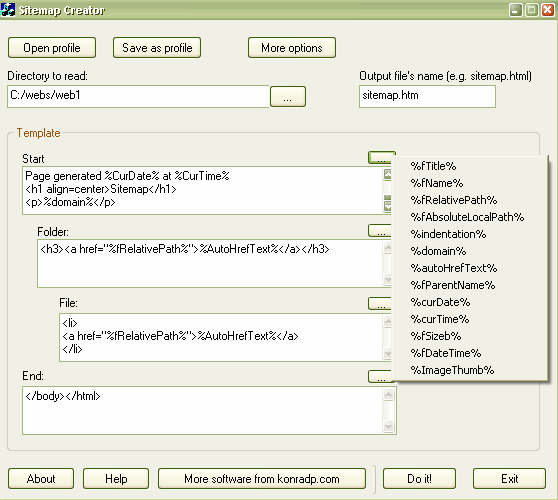
“This application simply reads the given directory and it’s sub directories, and produces .htm file basing on a given template. The result file can be used to print out the contents
of the folder, or as a sitemap of your website.


Note: this program can’t read your website online, it also doesn’t understand external URLs, like: https://muaad.com.ly//, it only reads and exports a folder.


Also, this application was created for myself, then I only added this help doc. and a few other things, and published. This means it is not very strongly tested, but it worked for me fine, so I assume it will work for you too.


So, there are two ways you can use this program: creating sitemaps (for websites) and simply getting a contents of a folder.”


Very handy for creating label disks or organizing huge collections of software for example
Download

Arcconvert. Optimize your compressed files with one click

Hey dear readers

Today I will talk about archives, you know they are a good way to save disk space and protect your executable from virus infection,  there are many formats for archives, .ZIP, .RAR, .7Z

One of my favorites is 7z and I use 7zip to deal with it and all formats, but what if you become picky and decide to check for the smallest and most efficient file format for your space?
Here you have to use this freeware called: Arcconvert, will do the job for you in an easy to use interface, calculating the archive size and telling which one is the smallest to keep.

Download the latest version 0.70 from this link.
Hope you like this tech tip, please like and share and comment

« Older posts Newer posts »