
Day: May 10, 2019

How to restore Firefox Quantum passwords after an update?

The new Firefox is amazing, it’s been renamed Quantum since version 57 back in 2017. I used to use an add – on to import and export passwords, however it’s no longer supported in the new version of Firefox.

An update that does some damage!

However I’ve noticed that sometimes after an update, the saved passwords are erased, and I have to enter them manually, which is a real pain!

How to import and export passwords without an add – on?

There is a very simple way which is creating a Firefox account and using that to sync your information across different devices: Passwords, bookmarks and history.

You must have more than one device for this method to work: Your phone and your computer for example. Or two computers: Your work computer and your house computer.

The fix

From the main menu go to: Edit Preferences Sync
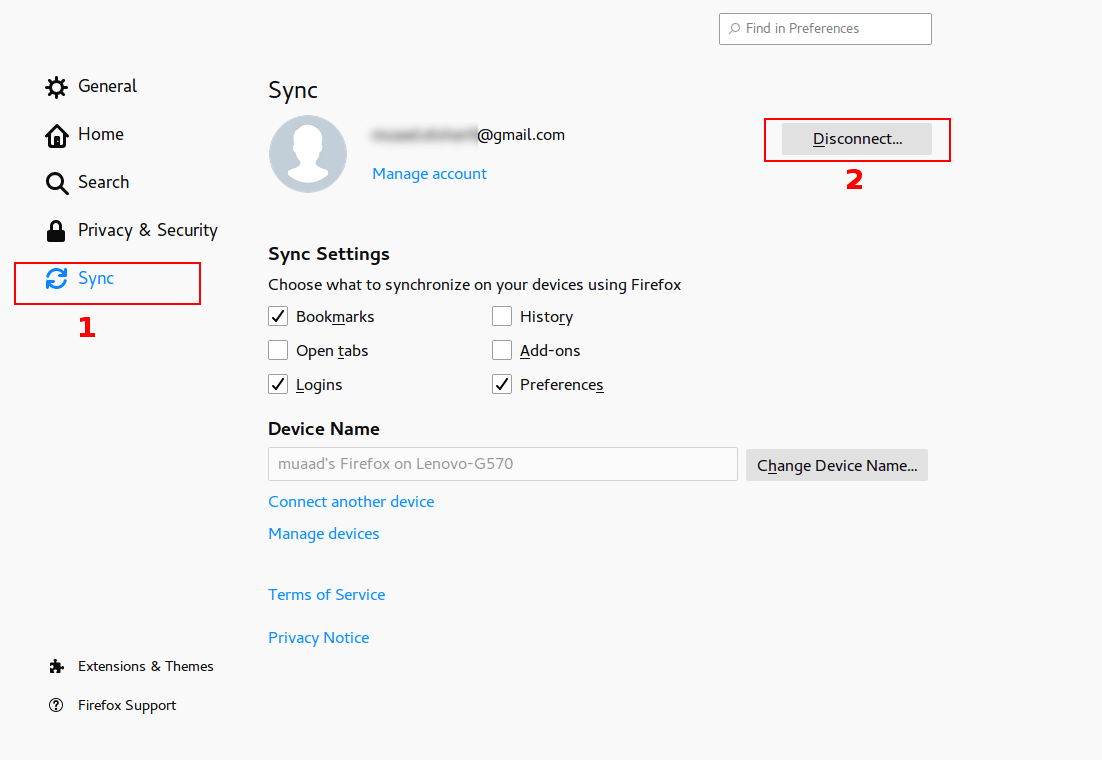
Click Disconnect, then sign again with your login information. Firefox will sync the information from the other device and you will get back your passwords in no time!
Please note that clicking disconnect would erase any data you had stored in Firefox, so watch it!

Final words

That’s how you restore saved passwords and bookmarks for Firefox Quantum. I hope you found this post useful. Please leave a comment if you have a question.


RSSOwlnix: RSSOwl reborn!

RSSOWl is one of the best RSS feed aggregators available for free, if not the best, however it’s well known that RSSOwl has been discontinued since December 2013. This doesn’t pose a real problem as the current version is stable and usable, for now!

The journey ends here

If you plan on upgrading to a more recent version of Ubuntu (18.04 for example being the latest LTS), you will be unpleasantly surprised that RSSOwl won’t work due to dependency related issues.
You can search for an alternative, sites such as: Alternative.to provide millions of software to search through.. I have to be honest and say that no alternative of RSSOwl works in the same way or can be customized to have the same functionality.
What can be done?
If you are on Ubuntu 16.04 you can rest assured knowing that it would be supported until 2021, you will enjoy the usability of RSSOwl for a period of time.

How about something fresh and exciting?

You can use the RSSOwl fork: RSSOwlnix.
That’s the beauty of open source, it really never ends. If a project is discontinued for whatever reason, someone else will pickup the slack and continue the work.. Especially when the project has a massive following as such.
I’d like to see that happen with a commercial software!

What’s new in this fork?

This fork has updated dependencies  and should work with later versions of Linux Ubuntu and Windows. I haven’t tested it  RSSOwlnix on anything but Ubuntu 16.04 and it worked fine. It works slightly different than the original project and a bit unstable being a beta. Albeit it’s rather usable and gets the job done.

RSS essentials

If you are like me, someone who uses RSS feeds a lot and uses them to keep up with the world news, then this is for you. I’ve used RSSOwl for over 7 years and to me it’s an essential software, I no longer have to compromise if I have an upgrade planned.

Download

You can download RSSOwlnix from this link, latest version 2.7.0 as of this writing.
Windows 64 Bit
Linux 64 Bit

Final words

Do you use an RSS reader? Would you consider using RSSOwlnix? Please let me know in the comments section below.