
Category: Windows (Page 18 of 22)

Celebrating the greatness! A collection of Executor posts!!

Hey you guys. This post is dedicated to my favorite software of all time!

This post is a collection of posts varying from the early days of this blog, with some new things too. So read on, maybe you catch the bug 😉
What is executor?

What is Executor


“This is a multi-purpose launcher and a more advanced and customizable version of windows run. The program originated as I was sick of spending too much time searching for programs through my ever growing windows start-menu, and also I missed a tool that could ease and optimize my daily work flow. There was of course already programs like this available, but each had it’s annoyance or missing features or too(!) geeky.” Official website 
I have to admit. I love executor so much! I think it’s the best ever!!
It made my life a lot easier!

I even go to the forms to dwell on the latest improvements and bug fixes. I think I’m in love <3
and there I learned that no Linux version will ever be issued! That broke my heart and lead a frantic search for an alternative. I summed it up here for you to read!

Thanks to it I can have an empty desktop and access my programs and important files easily. Even combine 3 or more command together to launch them together!!

You name it: Websites, drives, documents. As long it’s indexed it’s there and you will get it fast! Even faster if you add the Everything search utility!

It’s never boring. It always has a new exciting side to it! The skins can be changed to many looks. Enjoy the many skins you can apply to your launcher.

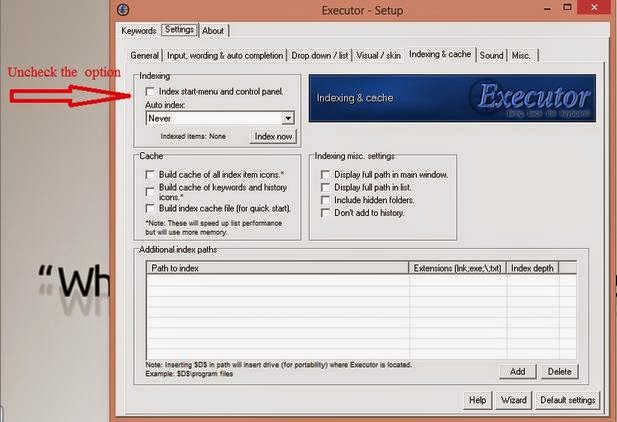
There are some bugs too. You might wanna disable this option “Index and chancing Auto index”. It has caused my whole computer to crash a couple of times :'( . Nothing is perfect sadly
 

Always make sure to backup your keywords! They are your toolkit to dominate over your computer!
Go to settings Keywords right click any word Select Export Keywords.

I hope you enjoyed this as much as I did writing it. And I hope it gets you to download it 😉

3 reasons you never heard of linux

This article is based on my opinions, so don’t treat it as solid facts, you be the judge of whatever you read, you decide what is best for you.

Why you never ever heard of Linux?

It’s the origin of most operating systems (Windows, Android, Nokia S40).

It’s virtually impossible to be infected by viruses (Bad news for Anti virus makers huh?)

It’s a free operating system, Complete with applications, office suite, image manipulation software, multimedia tools, and many other features all free of charge (Again bad news for office makers who charge 100$ per year for a single license, and image manipulation software who charge 700$ per license).

Are there other reasons? Do you have comments on my post? Please chime in 🙂

Thank you for reading my post, please like and share on Google +

New Super Mario Forever 2012 review and download

Hi everybody

Today in our Game of the week we take a look at: New Super Mario Forever 2012, a fan made game that is truly awesome, great graphics and new game play that is true to the series.


It requires high specifications so I recommend using the gamebooster, there is a version for low-spec devices butthe developer’s server is down for some reason so I can’t provide it.

You can download the game full and free from this link, the developer’s server is down for some reason, I uploaded it on my account.
This is a Gameplay video.

So that was game of the week, please comment on my post, follow my blog, and recommend me on Google+

Get the max out of your battery with these simple tips and make it live longer

Hi, welcome to another techtip

Whether you decide to work through a black out or you simply like to write outdoors, here are the tips that make your battery live longer.

    • Close all unused applications and track your startup programs from your task manager and close them.
    •  Turn the brightness of your monitor down and set your windows power scheme to Power saver.
    • Don’t use your laptop while plugged in, charge it to 100% then disconnect it from the power then when it reaches 10% put it back in.
    • Make sure that the fan is not working and that the laptop is on a flat surface.
    • Turn off all unnecessary hardware such as WiFi and Bluetooth. 

    please subscribe to my feeds and follow the blog itself, and comment as often as possible, you don’t even have to Login to anything, I made it possible for anonymous people to comment on my blog, you are welcome anytime. 

      « Older posts Newer posts »