Hey guys, how are you doing today?
We will be putting the Linux / Open source topic aside for now. As this feels like a more pressing matter 🙂
We will be putting the Linux / Open source topic aside for now. As this feels like a more pressing matter 🙂

Hey guys, how are you doing?
I decided to be more consistent with my blog! I will be posting weekly at least~!
So this week. I need to address the topic of cracked software.
I know how corny the title is. It’s an intended pun .. !
And when I say cracked software I mean every aspect of software piracy ( and any kind of piracy as well)
There are some things you need to know about these softwares:
Do you think that some people are kind enough to buy a software, go into the trouble of hacking it, then post it online for free? Wow! They are so noble and selfless, the robin hood of digital age ..
Wrong!!
The price of this so called free software is you downloading a black box. It could contain a virus ( if you are lucky) or a keylogger to record your every keystroke. Including password and credit card information.
Or simply they hack your computer and black mail you with whatever they have ..
These softwares so called free are protected by copyright law. And the violation of these laws can lead to major consequences!! Huge fines and serious jail time included!!
You might think that these softwares are free and full as the links suggest! But you are sadly mistaken!
Windows costs around 250$, Office costs around 200$ And Photoshop costs around 700$. So cracking these would mean stealing them from the companies who made them!
Making software is a rigorous process that consumes time and effort, And a lot of money! The least thing you can do is pay for the software.
Everyone knows that if you “crack” a software you need to disable the update feature. Or else the company will disable the software, block the IP. and in some extreme cases burn the computer into pieces!!
It’s really hard for some third world folks to understand what it means to pay for software. They think the cost is in the hardware. And any software can be downloaded free of the internet. Or purchased through pirated CDs or so called “knock off” software!!
It’s disgusting how people are selling these for really cheap prices. And people don’t have a clue!
They think it’s a wondrous thing that they can buy all of photoshop editions for 5$
Sad thing is these are sold in whole sale by people who have no idea what are they selling!!
My next piece will be for those who can’t afford to buy software. And feel bad for using “Knock off” software.
Please share your thoughts with me. And hold on for the next post ..

This post is a collection of posts varying from the early days of this blog, with some new things too. So read on, maybe you catch the bug 😉
What is executor?
“This is a multi-purpose launcher and a more advanced and customizable version of windows run. The program originated as I was sick of spending too much time searching for programs through my ever growing windows start-menu, and also I missed a tool that could ease and optimize my daily work flow. There was of course already programs like this available, but each had it’s annoyance or missing features or too(!) geeky.” Official website
I have to admit. I love executor so much! I think it’s the best ever!!
It made my life a lot easier!
I even go to the forms to dwell on the latest improvements and bug fixes. I think I’m in love <3
and there I learned that no Linux version will ever be issued! That broke my heart and lead a frantic search for an alternative. I summed it up here for you to read!
Thanks to it I can have an empty desktop and access my programs and important files easily. Even combine 3 or more command together to launch them together!!
You name it: Websites, drives, documents. As long it’s indexed it’s there and you will get it fast! Even faster if you add the Everything search utility!
It’s never boring. It always has a new exciting side to it! The skins can be changed to many looks. Enjoy the many skins you can apply to your launcher.
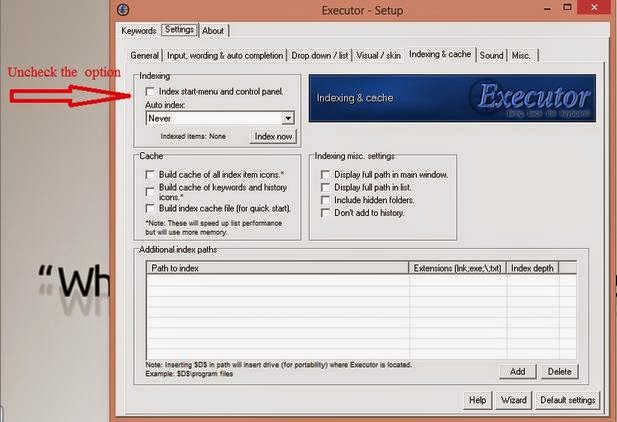
There are some bugs too. You might wanna disable this option “Index and chancing Auto index”. It has caused my whole computer to crash a couple of times :'( . Nothing is perfect sadly
Always make sure to backup your keywords! They are your toolkit to dominate over your computer!
Go to settings Keywords right click any word Select Export Keywords.
I hope you enjoyed this as much as I did writing it. And I hope it gets you to download it 😉
Hey you guys
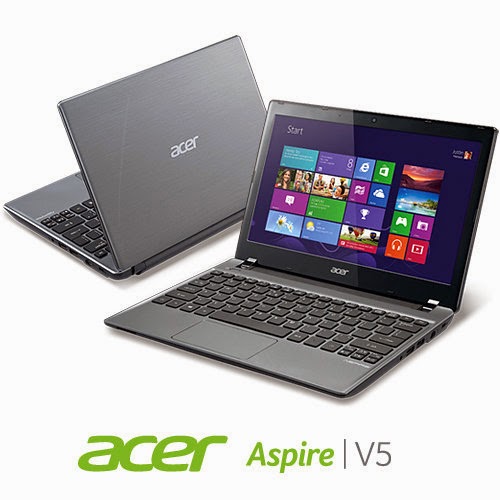
You probably checked out the slick notebook by Acer. Acer Aspier A5 11 inch. It comes with neat features compared to price. Most notably a touch screen and Windows 8 OEM, sadly it has a fatal bug!!
As I searched the web ( including the Acer help ) I noticed a lot of people talking about it online and no one has a clear answer .. 🙁
What happens is: After a short while the computer refuses booting!!
No matter what you do, It won’t boot!
Since it doesn’t have a DVD-ROM there isn’t a way for you to insert the disk to restore Windows !
Even if you were slick enough to use a USB drive. It’s hopeless..
Any and all settings lead to nothing at all ..
So I was fiddling with it. Being an open source fanatic I decided to give my Linux live USB a go. I wasn’t able to boot as well!!
My fix was really simple, all you need us the windows USB and the Ubuntu USB. I’ll make a post on how to make bootable media next year 😉 notice the date 😉
**Update the tutorial for windows can be found here
**Update 2 the tutorial for Linux can be found Here
1. Insert the Windows USB installer.
2. Go to advanced options and then to command prompt.
3. Insert the following command to disable hibernate ( I’ll tell you why in a minute ) powercfg /h off then shutdown /s /t 0
4. After rebooting go to bios and change boot type from UEFI to Legacy. Save the changes and restart.
5. Make sure the Ubuntu flash is connected, boot from it.
6. Select try Ubuntu and in a minute you will get the desktop. Click the hard drives to gain access to your media and recover it.
7. The commands you entered from step two is to access the drive under Ubuntu, or else you will receive an error message saying you can’t access the drives. Because windows 8 doesn’t really shutdown, it hibernates to save boot time.
Also note that the BIOS moves very fast so make sure you press really fast too 😀 and if it doesn’t work check the boot order from the f2 menu putting USB as the default boot device ..
This is how to recover the media. And frankly this is what I was asked to do on the Acer Aspire A5 11 inch. I hope it helps. And if I make any changes I’ll post a new post referencing this one 🙂
*Update!! Problem fixed!
Check this link for full details 😀