
Category: Blogging (Page 23 of 24)

Turn LibreOffice into the best book writing software out there

Recently I’ve came across some “book writing software” that is supposedly able to help me write a book and enhance my productivity, I gave that software a try and felt it was too complicated, If I need to take an advanced course just to learn how to use the software, that’s a serious problem and some major down time spent learning a new software while I have a productivity suit that does everything required with ease!

Ease of use

Ease of use should be factored in whenever evaluating a new software, and that particular software bombed! Not even mentioning the name because it’s not worth it, and the price tag is also discouraging!

I’m giving today a good way to use LibreOffice as a writing software that you can use for anything and really count on!

Why LibreOffice?

LibreOffice is a jack of all trades and can be used for many uses you never thought a word processing suit could do, checkout this very popular post of mine to see how capable LibreOffice is!

  • Let’s Face it, we

already have too much tools!

Type Writer

We use something to write code (Sublime or Notepad++), something to do the daily work (LibreOffice or Microsoft Office) and a “book writing software”?

  • Way to go being minimalist! Lets look at the price tag, shall we?

We bought Sublime for 70$, Got office for 200$ and that “book writing software” for 40$ and you use a Mac book of course, very neat! That’s 310$ worth of writing software alone!

That’s a lot of money, I’m not here to tell you how to live your life, but I think I have a more cost effective way of making this happen!

 

A minimalist dream!

You can’t write everything in one place, I wish that was possible, like Atom handling complex text layout or using LibreOffice to write code! It would be a dream come true! Some die hard programmers who think that memory foot print is everything and mostly prefer CLI over GUI would think this is a total waste, but I like to think I fall somewhere between a CLI nerd and an Apple fan!

Why LibreOffice? Because it’s simply awesome! I could write forever on how awesome LibreOffice is! You can find many posts in this blog that tell you exactly why it’s awesome and should be chosen over commercial and free software, you don’t have to learn new things, it’s the productivity suit you know and use daily! Just add the tips I’m about to tell you, and you are good to go!

1. Distraction free

Focus!An important tool for any writing software is to be able to eliminate all outside distractions and just focus on the piece of writing at hand, it’s a feature of LibreOffice that can be accessed from View Fullscreen, or by typing the shortcut Control + Shift + J. You will have the screen dimmed down to the horizontal ruler and the page only! (you can toggle the ruler by pressing Control + Shift + R) to have the document focused with nothing else on the screen.


2. Word count

Another important tool for writers is the word count, you need to know how much you have written and set daily goals for yourself, you can see that in the lower bar of LibreOffice and it’s updated as you write.

3. Writer’s Tools

Writer tools is a set of tools installed as a single extension for LibreOffice that adds a ton of functionality, so much it deserves a post on it’s own, once you install it, it adds an extra menu to the menu bar called Writer’s Tools, it adds a timer for how much time you spent on a document, a word count to see if you reached your goal (more advanced than the one at the bottom bar), a to do list, a data base to organize your text snippets. And many tools for backup, saving documents and many others. A total of 15!
It’s something you definitely need if you want to use LibreOffice as your main writing suit.

There is a fix for writer tools not working. You can find it here.

4. MultiDeff

This little extension gives you the ability to save in three different formats in one command, ODT, DOC and PDF.

With these tools you are good to go, my advice is yo implement a timer like  Instant boss if you are on Windows or Pomodro if you are on Ubuntu, to keep you healthy while writing the next best seller.


5. Master Document

I left the best for the last! Master pages are a great way to collect your individual documents into one, enabling you to control the style and position of each sub document based on the master document, creating a consistent document all around!
For more information check the detailed help document from here.
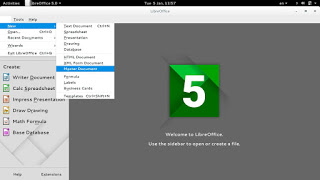
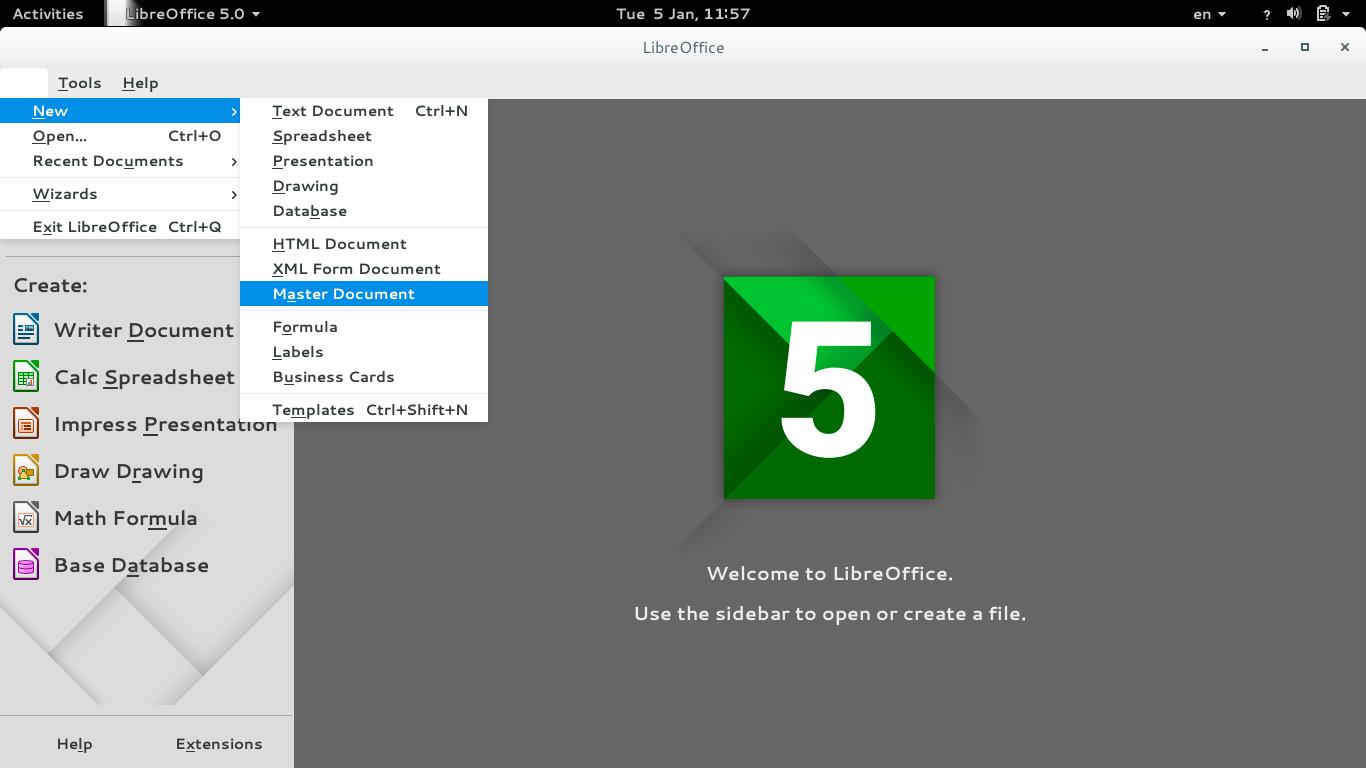
To create a master document, go to File New Master Document
How to create a master document
For complete help on working with master documents, check the

Libreoffice help section from here.

If you aren’t using the excellent native feature, then creating a book will be a problem for you! When you have a standard container for all of your chapters, you can control the style easily and be able to get a central view on all of your work!


Final words

If you aren’t a LibreOffice user already, go download it now! You can install it without changing your settings!

I hope you find this post useful! And I’d like to know what do you use for word flow!

If you are using LibreOffice then you don’t need much more!!
Do you have any other features to add? I’m waiting for your comments!
You like the post you just read? Then share it with your friends! Sharing is caring!
Fix the p { margin-bottom: 0.1in; line-height: 120%; }a:link { } problem in your blog

It happens more often with me than ever, maybe because now I write my posts outside of blogger and then paste them (and there is nothing wrong with that by the way!). It makes my blog look bad and a lot less professional.

I tried so many things including font play and adjusting the breakers, nothing worked! I was able to fix it so easily, so read on to learn the complete fix!
My old fix was to delete the post and post it again, and I’d lose the comments, and a lot of time. But thankfully I was able to fix it on my own. I looked the problem on line and found nothing.

The Fix

First of all if you publish your post and notice the Fix the p { margin-bottom: 0.1in; line-height: 120%; }a:link { } line where it shouldn’t be then go to blogger and edit the post.

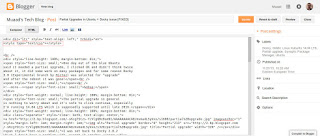
The post has that line

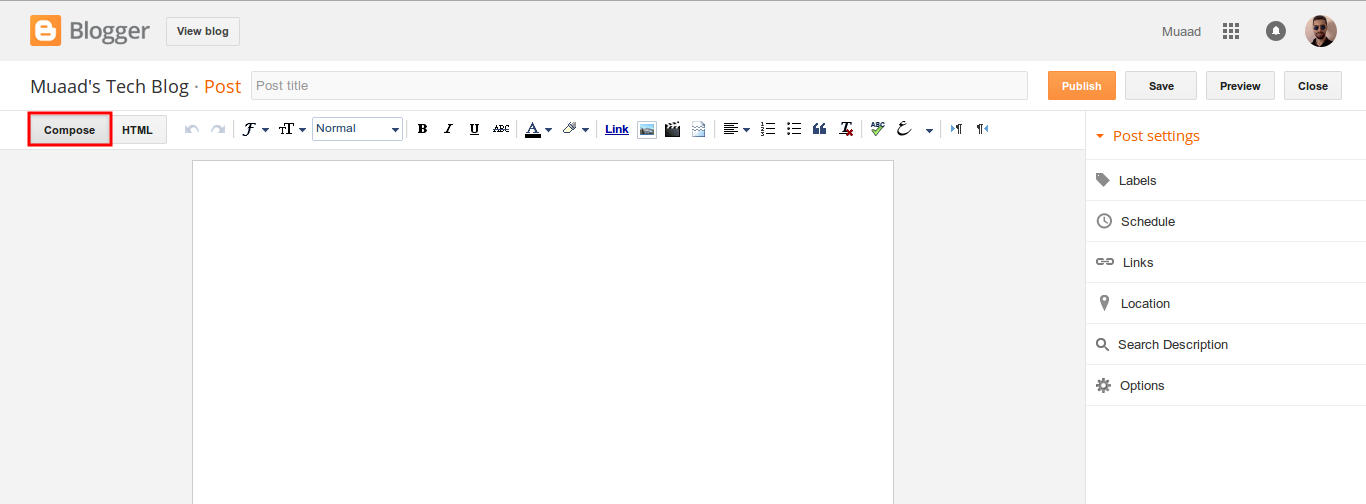
On the edit menu you will see the button to the far left called “Compose”

Compose view

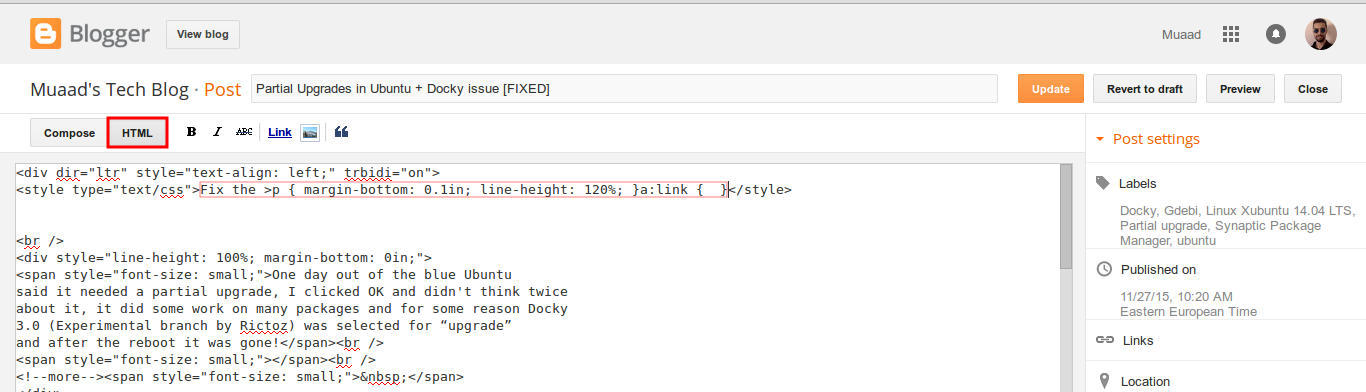
  and a button next to it called “HTML”, click on HTML.

HTML view

Even if you had zero knowledge with HTML, this fix is really easy (And I recommend you as a blogger to learn some HTML as it’s so easy to learn!).
What are we going to do is to remove the Fix the p { margin-bottom: 0.1in; line-height: 120%; }a:link { } line from the post, it’s highlighted in red so it should be easy.

The line to remove is highlighted in red

From the HTML view click find and search for “p { margin-bottom: 0.1in; line-height: 120%; }a:link { }” and you will find it looking like this <style type=”text/css” p { margin-bottom: 0.1in; line-height: 120%; }a:link { }</style
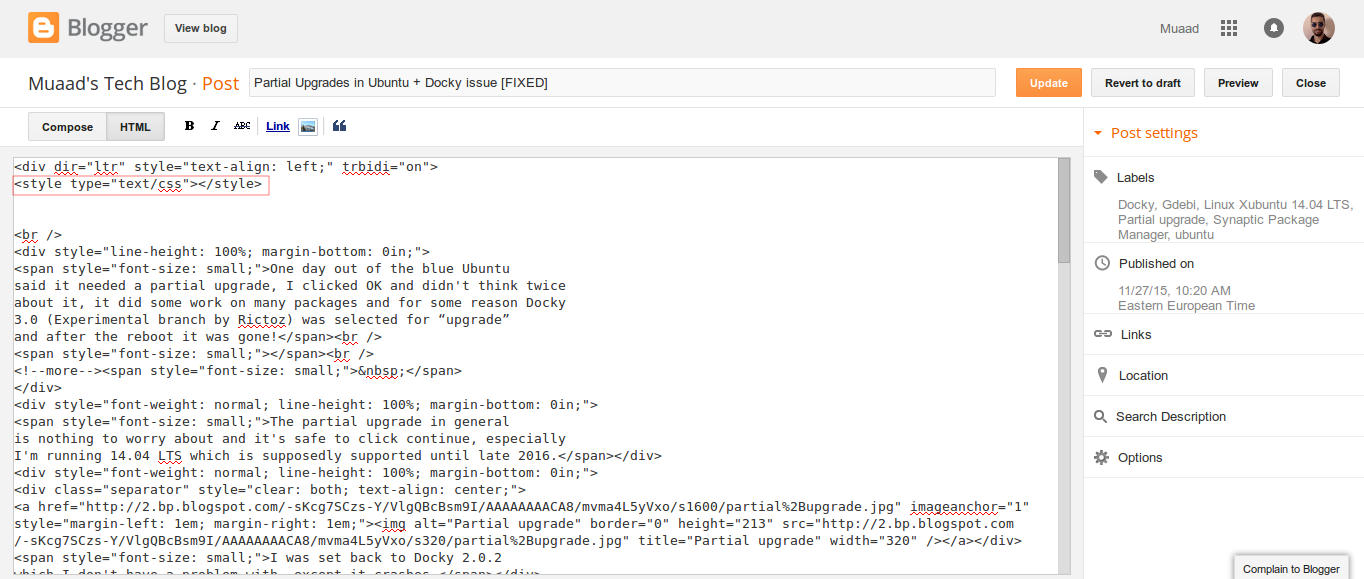
Delete only the line maintaining the brackets or you will result in an error, it needs to look like this after delete <style type=”text/css” </style
go back to compose and update, the problem will be fixed right away!!

So what’s the cause of this annoying bug anyway?

I discovered that it is caused by “Rich text formatting”, as I use LibreOffice to do all of my writing work, I tend to copy and paste directly into blogger, that caused these characters to appear inside the posts!

How to avoid it?

The only way is to strip the text of formatting before pasting it into blogger’s text editor, you can do that by clearing format from LibreOffice’s right click menu. Or by pasting it into a plain text editor like Notepad or Atom.

I hope you found this useful, how often did this happen to you? And how did you deal with it? Please let me know what you have in mind in the comments section below.

P.S: This post itself was infected with this issue, glad I could get it fixed eventually. 

أنت والتدوين

السلام عليكم
تدوينتي هذا الأسبوع هي عن التدوين.

 ما هو التدوين؟

التدوين هو نشاط حضري مجتمعي، فزيادة عدة المدونين وكثرتهم دليل على رقي وتحضر تلك الأمة. في عهدنا هذا لايحتاج التدوين إلى مجلة أو كتاب، يمكنك ودون تكلفة مادية إمتلاك موقع خاص بك على الشبكة (بلوج) -كلمة إفرنجية أتت من دمج Web-Log سجل الويب إختصارا!- وتدوين ماشئت عليه، لذا إستحضر قول الله تعالى (ومايلفظ من قول) صدق الله العظيم

مالذي تحتاج إليه لتصبح مدونَا؟

لاتحتاج إلى أن تكون ذي شهادة عليا لتدير مدونة، أو أن تمتلك الكثير من المال أو أن تحتل منصبا مرموقا! كل هذه ليست أفكارا سليمة (ولا يمنع أن يمتلك الأثرياء وأصحاب المؤهلات العليا المدونات، إلا أنها ليست حكراً عليهم!)

إليك عزيزي دليلا مختصرا عن كيف تصبح مدوناً، سنرى كيف يمكنك (وبعادات بسيطة) أن تصبح مدونا ناجحا!

أي شخص يمكنه أن يكون مدوناً شريطة تمتعه / ها ببعض الخصائص:

    الإملاء

    لا يمكن لشخص كثير الأخطاء الإملائية أن يكون مدوناً ناجحا مهما كانت خبرته العملية أو شهادته، الإملاء السيئة وأخطاء الكتابة تهدم مصداقية النص مهما كان رائعاً! (ولا تعتمد على التصحيح الإملائي).

    الثبات

    يجب أن يتمتع المدون بثبات المواضيع، وأن يطالع قرائه في فترات متقاربة، لا أن يمطرهم بالتدوينات في يوم ويحتجب باقي السنة! كم يحزنني أن أجد مدونة جيدة الأسلوب ولكن كاتبها يضن بالتدوينات وكأنه يدفع ثمنها من جيبه! لا تتحجج بالزواج ولا بالعمل، حدد حدك الأدنى وسر عليه، لاأظن أن تدوينة في الأسبوع كثيرة عليك!

    الإبتعاد عن التعصب الأعمى والأحقاد وسوء الخلق

    ألا تصبح المدونة منبراً للكراهية والشتائم بمناسبة ودون مناسبة، يجب على الكاتب أن يتقي الله في ما يكتب وأن يراعي الأخلاق والذوق العام للقراء، وفي هذا أحب أن أسرد قصة قصيرة عن صحفي ناشئ أمريكي سأل مديره كيف يطرح المواضيع، فقال له: تخيل أنك تقرأ القصة على والدتك وشقيقاتك، فما تستطيع قوله لهم تستطيع حتما نشره.

    الأمانة في النقل

    سواء كان موضوع دينياً أم علمياً أم ثقافيا يجب إعتماد الأمانة في ذكر المصادر، أو نقل الأحداث والحقائق التاريخية والسياسية، سواء إتفقت مع منظورك أم لا.

    أكتب دائما، كل شئ

    كل شئ، وأي شئ، يجب أن تعود نفسك على الكتابة والتدوين حتى ولو بدت لك محاولات ساذجة، يمكن تعديلها لاحقاً وإعادة إستخدامها بوسائل أخرى!

    إستفد من أوقات الإنتظار ووسائل التقنية

    بإمكانك التدوين في أوقات الفراغ أو الإنتظار كطابور المصرف أو في الحافلة، يمكن الإستفادة من هذه الأوقات الضائعة في تدوين الملاحظات، وأفضل تمرين لتنمية الكتابة هو تدوين الأحداث اليومية في دفتر لليوميات (مع الإلتزام بالتدوين اليومي!!) فهي طريقة سهلة لكسر حاجز الجليد وتنمية المهارة! وأقترح إستخدام الهاتف الجوال (الذي صار منتشرا إنتشار النار في الهشيم) لتسهيل صياغتها لاحقا بدل كتابتها في الورق ثم تفريغها في الحاسوب أو الهاتف وهكذا (وقت ضائع)!!

    قراءة مدونات ذوي الخبرة

    إن متابعة المدونين الكبار ورؤية كيفية تنسيقهم للمواضيع والأخبار هي طريقة جيدة لتنمية المهارة في التدوين، والتواصل معهم سيفيد كثيرا لأن الكثير من المدونين يحب المساعدة ومد يد العون للناس (ودون مقابل!!).

بإمكاننا بإستخدام هذه المدونات تسليط الضوء على واقع مجتمعاتنا، ووضع مناطقنا على الخريطة، وأن نسجل حضورنا على الشبكة العنكبوتية باللغة العربية، فما أجمل أن تكتب إسم شارعكم في محرك البحث فتظهر مدونتك أو مدونة صديقك وبها معلومات دقيقة تبرز جمال المنطقة وتخدمها تجاريا وحضريا، هل شجعتك أن تقتحم غمار التدوين؟

لست بحاجة للكثير، جهازك المكتبي أو الهاتف النقال يكفي وزيادة، والباقي على الله سبحانه (فمنه التوفيق وعليه التوكل) ثم على همتك ونشاطك مع قرائك!!

  خطوات عملية للتدوين

يوجد العديد من المنصات التي تمنح المستخدم مدونة مجانية، لكن أفضلها على الإطلاق ( على الأقل من وجهة نظري الشخصية) هي منصة بلوغر Blogger فهي تدعم اللغة العربية، ومدعومة من موقع Google الذي إستحوذ عليها منذ فترة، وإستخدامها لايتطلب خبرة على الإطلاق بل هي في غاية السهولة! وطبعا فهي مجانية ( يوجد بعض الخدمات مدفوعة، لكنها لاتؤثر على تجربة التدوين بأي حال).

يوجد لها تطبيق على الهاتف النقال Android وiOS ويوجد تطبيق للهاتف السمبيان Symbain( وله عشاقه) – توصلت مع مطور التطبيق ال Synbain شخصيا وقد طرحه كبرنامج مفتوح المصدر-.

مالذي يتبقى؟

ماذا تنتظر؟ رتب أفكارك وأرينا أخر ماتوصلت إليه في مدونتك! تمتع بالأمانة، والخلق، حسن إملائك ودون بثبات، وتأكد أنني سأكون من قرائك!!

26,000 views :D

Hey there dear fans 🙂
Yes. Thanks to Allah then to you my site reached 26,000 views 😀
So keep calm and check my site often. I feel the 30,000 is up soon 😀
P.S: I’m downloading something interesting! Want to make a guess?
It’s going to be featured. But I don’t know when exactly 😀
Have a nice day you all 😀
Please let me know what you think in the comments section below!

« Older posts Newer posts »