Category: WYSIWYG (Page 2 of 2)

BlueGriffon 2.0 first preview

BlueGriffon is back to a steady path of development after being marked inactive by Alternativeto.net this time version 2.0 is in the works and recently a first preview version was posted on-line.


It released 1.8 in October and now 2.0 is under development!

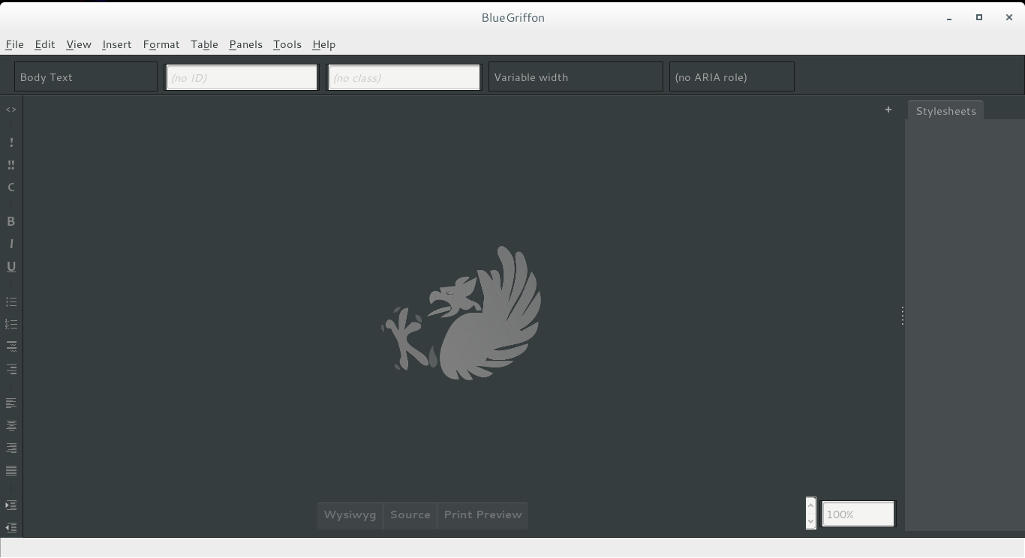
I’ve downloaded the version and tested it on Ubuntu, what I noticed immediately is hat the color scheme is different, and that the toolbar that has been carried along since the days of nVU (one of the earliest open source web author systems).


BlueGriffon 2.0 interface

It enhanced the way that panes are displayed, instead of being awkward pop-up windows now it implements tabs which make better use of the screen.

This version isn’t fully functional and far from complete, but I had to break in the good news!
What I really hope for (and I suggested this to the developers already) that a PPA would be used (personal package archive) that way BlueGriffon will be isntalled easily and updated with the system automatically, and catograized peroperly within the applications (it’s now a portable App that needs to be extracted to the root of your computer).

I think the version 2.0 will be the best one yet, and I hope it fixes all the bugs from 1.8

Will you download the test version? What do you think?

Update: Version 2.0 and 2.1 are released! Check the review from this link!!

BlueGriffon 1.8 is out!

As a free lancer web developer / designer on Linux. I strive to find the tools that make my work easier and more fun! In terms of web development there aren’t many YSIWYG tools to use, with Nvu and Kompozer being discontinued and BlueGriffion’s seemingly end of life (marked as discontinued by Alternativeto.net), LibreOffice has shown some WYSIWYG potential and I noted that in a previous post.

It’s no where near Adobe DreamWaver or Muse – let’s not forget that LibreOffice is a word processing suit and not by any means a web design tool. The wizard technique crashes the whole program often too.
I use text editors like Atom to get my design done. And any decent designer needs to know his code inside out, I don’t mind a little help from a WSIWYG tool to help me see what I do and help arrange stuff a little bit.

I even emailed BlueGriffon asking them for an update, I didn’t get a response so I assumed the project died.

I then stumbled upon the latest update 1.8 I was so excited!! (nerd fit)!

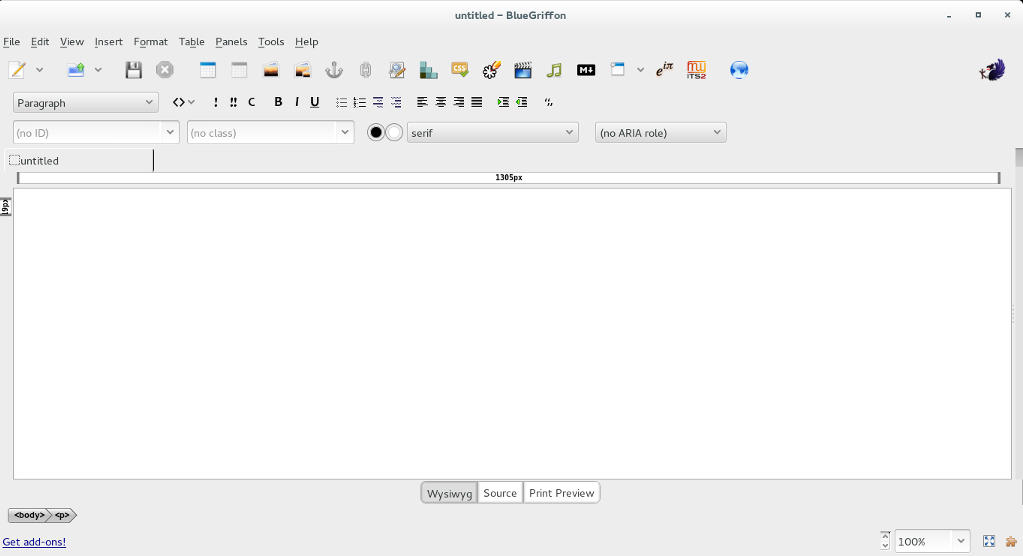
BlueGriffon's main interface

I downloaded it and gave it a quick run, it works well so far.

I was able to find a manual on-line which you can find here, it’s not for version 1.8 but it works fine (the GUI is exactly the same).

Working with BlueGriffon makes the job easier especially working with CSS attributes and values, it also makes the page web complaint by filing all the fields from the beginning.

To download BlueGriffon 1.8 go to this link.

Give it a try and see what you think.
Did you like this post? If you did share it with your friends, sharing is caring 🙂

9 Unique uses for LibreOffice

Hey there you guys! How are you doing today? I hope you are great!
Here I have some unique ways to make maximum use of LibreOffice. You don’t need to install external tools with this suit on your PC! Here are the ones I came up with while experimenting:

1. Draw and design software

I used (Draw) to design the blog icon, it has amazing features and it’s super easy to use.
It can be used to design logos and banners! It reminded me of Inkscape so much!
 

2. Database management

Base can be used to create and mange databases, anywhere from your book collection to an entire school or your small business! Why blow money on a full scale database when all your needs can be met by your user friendly office suit?
It can be buggy on report wizard in Windows.
*Update: Fixed on 4.4.2.2 😀 


3. Basic HTML and XHTML Editor

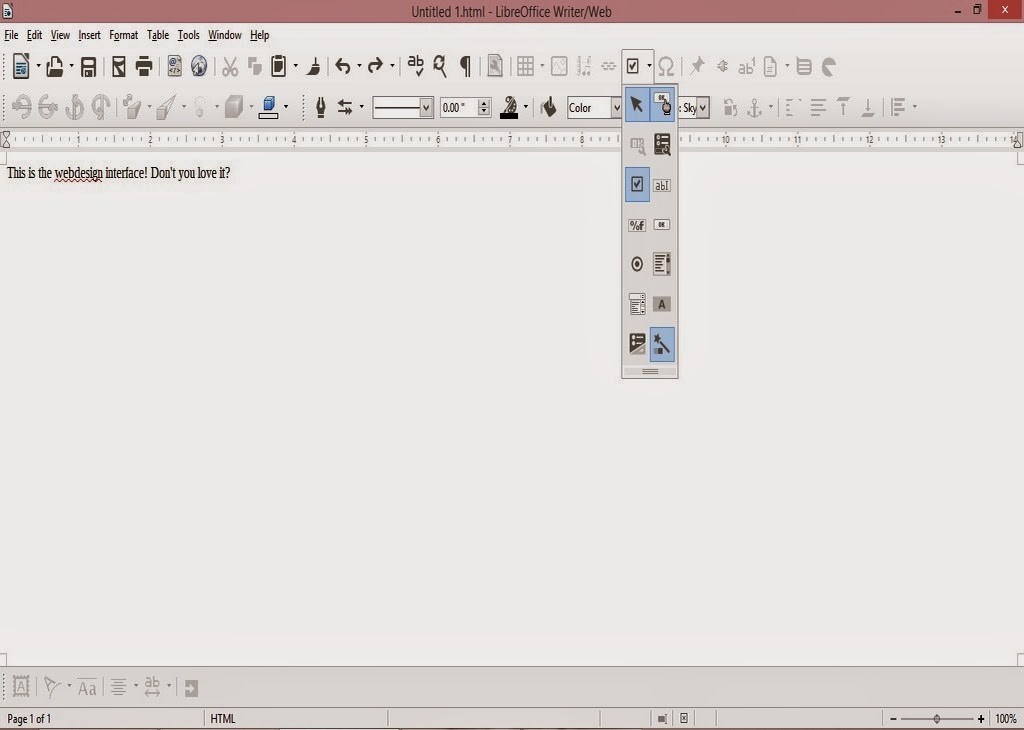
You can access it from File New HTML Document / XHTML Document

It provides a WYSIWYG (What you see is what you get) editor for working with webpages
It has many of the standard features you would expect from an HTML editor. I was amazed when I saw the capabilities this tool had! (Better than most of the free bunch!!).

  • You can toggle between source and WYSIWUG view.
  • Open the document in your default browser (One button click).
  • Has many page controls
  • Image controls: image map etc ..

If you follow the wizard your design will be much much better!
As for XHTML well. I don’t know how to use it so 😛 xD

4. Web publisher

It can publish your website to a local folder, a zip file or even an FTP site!
Sadly it crashes. See the bug details. Works fine in Linux!
*Update (Works great in 4.4.4).

5. Batch convert documents!

If you have some documents in Microsoft office format that you want to convert to LibreOffice format, then all you have to do is to go to File Wizards Document converter.
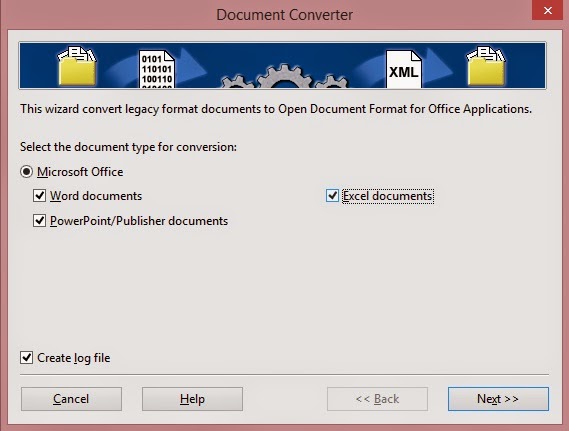
Determine the document types you want to convert

Then set the source folder and destination folder. Note the sub-folder option. It can take a while if you choose many files!
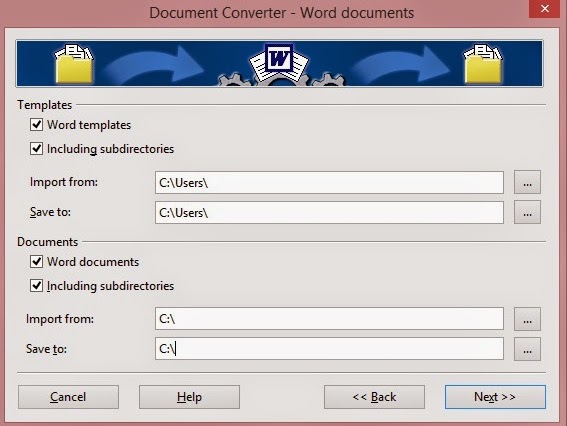
After it’s done a log file is generated with the conversion details!


6. Create labels and business cards!

You can use it to design labels and business cards right out of a database you have!

 You can access it from File New Label
You can access it from File New Business Card

7. Create awesome agendas for work and home 

You can create professional looking agendas for work and home. And to keep it as a template for creating future agendas!

8.Write books!

Yes that’s right! You can use LibreOfficeto write books! I’ve made an entire post about it that you can checkout from here, it has a fair share of tools and tips to turn LibreOffice into the book writing software you always fancied!

9. Mind maps!

You read correctly!You can use LibreOffice draw to make awesome mind maps, just download this template and start mapping!

10. Tons of extensions to increase usability

You can increase the usability by adding one of the thousands of extensions ready for download, from dictionaries to Templates.

What’s the hidden feature you came across? How much can you name? Please let me know. I’ll add it right away! Hope you like it. Drop a line below and let me know!
Join my blog and subscribe to my mailing list so you don’t miss a post! NEW!!

Newer posts »