Month: December 2015 (Page 1 of 7)

Turning the page on 2015

It’s the end of 2015 which has been an excellent year for me, I did my biggest year blogging so far!
I posted 233 posts (this post is counted too) which totals up to 64% of my entire blogging!!

Goals

In 2015 I decided to take blogging seriously and take my blogging skills to a new height, glad to say I did it!
I’ve reached 48,000 views on my blog, a little short than my original 50,000 mark, but I knew that was unachievable!
I also started blogging in Arabic, which was a huge draw on some topics!
With the new domain and sitemap and awesome templates, adding podcasts and better posts all around, I just raised the bar so high, I don’t think I could do what I did the next year!

Social media gains

I also gained closer to 8000 twitter followers! That helped my blog grow, a lot!
But do numbers really matter when it comes to blogging?
I do believe that if my blog is helping people solve daily problems, and inspiring them  and showing them the way to success, that I achieved my goal blogging!

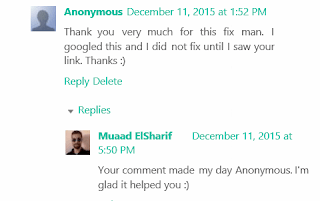
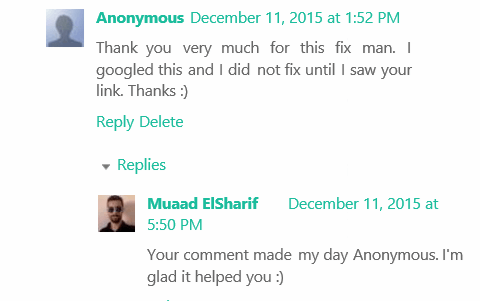
Replies like that remind me why I became a blogger 

Shout out

I also like to thank my brother Alaa for providing Facebook traffic, I don’t use Facebook at all and he is sharing my posts and bringing in valuable stas!!

Summing up

This year it will be quality over quantity, I might deliver less posts, but these posts will be detailed and presented in a different way, that’s my 2016 goal!
Thank you for being a part of 2015, and lets take 2016 on!!
Idea taken from: KhadijaTeri

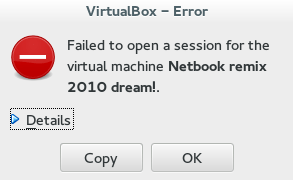
VirtualBox NS_ERROR_FAILURE (0x80004005) [FIXED]

It’s a common problem of VirtualBox and I looked through tons of pages and didn’t find a fix, maybe because there isn’t? Good think I found a fix!!

That’s the error message:

Could not open the medium ‘/drive/username/partition/virtual_machine_name.vdi’.
VD: error VERR_FILE_NOT_FOUND opening image file ‘/
drive/username/Data/virtual_machine_name.vdi.vdi’ (VERR_FILE_NOT_FOUND).


NS_ERROR_FAILURE (0x80004005)

More details on the error:

Result Code:
NS_ERROR_FAILURE (0x80004005)
Component:
MediumWrap
Interface:
IMedium {4afe423b-43e0-e9d0-82e8-ceb307940dda}

It happened with me because I have the virtual machine on a different partition, and I started it without mounting it, that ruined the installation.

How to fix it?

I had to uninstall VirtualBox and install from scratch..

That’s the only fix, uninstall VirtualBox.

When you reinstall it, it should work fine, No need to delete the virtual machine.
Did you have this problem before? How did you fix it?

I know this didn’t “fix” the problem, and maybe you aren’t running Ubuntu and it happened with you.

I’ll post more if I found anything.
Did you find this post useful? If you have share it with your friends. Sharing is caring you know 🙂

Turn LibreOffice into the best book writing software out there

Recently I’ve came across some “book writing software” that is supposedly able to help me write a book and enhance my productivity, I gave that software a try and felt it was too complicated, If I need to take an advanced course just to learn how to use the software, that’s a serious problem and some major down time spent learning a new software while I have a productivity suit that does everything required with ease!

Ease of use

Ease of use should be factored in whenever evaluating a new software, and that particular software bombed! Not even mentioning the name because it’s not worth it, and the price tag is also discouraging!

I’m giving today a good way to use LibreOffice as a writing software that you can use for anything and really count on!

Why LibreOffice?

LibreOffice is a jack of all trades and can be used for many uses you never thought a word processing suit could do, checkout this very popular post of mine to see how capable LibreOffice is!

  • Let’s Face it, we

already have too much tools!

Type Writer

We use something to write code (Sublime or Notepad++), something to do the daily work (LibreOffice or Microsoft Office) and a “book writing software”?

  • Way to go being minimalist! Lets look at the price tag, shall we?

We bought Sublime for 70$, Got office for 200$ and that “book writing software” for 40$ and you use a Mac book of course, very neat! That’s 310$ worth of writing software alone!

That’s a lot of money, I’m not here to tell you how to live your life, but I think I have a more cost effective way of making this happen!


A minimalist dream!

You can’t write everything in one place, I wish that was possible, like Atom handling complex text layout or using LibreOffice to write code! It would be a dream come true! Some die hard programmers who think that memory foot print is everything and mostly prefer CLI over GUI would think this is a total waste, but I like to think I fall somewhere between a CLI nerd and an Apple fan!

Why LibreOffice? Because it’s simply awesome! I could write forever on how awesome LibreOffice is! You can find many posts in this blog that tell you exactly why it’s awesome and should be chosen over commercial and free software, you don’t have to learn new things, it’s the productivity suit you know and use daily! Just add the tips I’m about to tell you, and you are good to go!

1. Distraction free

Focus!An important tool for any writing software is to be able to eliminate all outside distractions and just focus on the piece of writing at hand, it’s a feature of LibreOffice that can be accessed from View Fullscreen, or by typing the shortcut Control + Shift + J. You will have the screen dimmed down to the horizontal ruler and the page only! (you can toggle the ruler by pressing Control + Shift + R) to have the document focused with nothing else on the screen.


2. Word count

Another important tool for writers is the word count, you need to know how much you have written and set daily goals for yourself, you can see that in the lower bar of LibreOffice and it’s updated as you write.

3. Writer’s Tools

Writer tools is a set of tools installed as a single extension for LibreOffice that adds a ton of functionality, so much it deserves a post on it’s own, once you install it, it adds an extra menu to the menu bar called Writer’s Tools, it adds a timer for how much time you spent on a document, a word count to see if you reached your goal (more advanced than the one at the bottom bar), a to do list, a data base to organize your text snippets. And many tools for backup, saving documents and many others. A total of 15!
It’s something you definitely need if you want to use LibreOffice as your main writing suit.

There is a fix for writer tools not working. You can find it here.

4. MultiDeff

This little extension gives you the ability to save in three different formats in one command, ODT, DOC and PDF.

With these tools you are good to go, my advice is yo implement a timer like  Instant boss if you are on Windows or Pomodro if you are on Ubuntu, to keep you healthy while writing the next best seller.


5. Master Document

I left the best for the last! Master pages are a great way to collect your individual documents into one, enabling you to control the style and position of each sub document based on the master document, creating a consistent document all around!

For more information check the detailed help document from here.
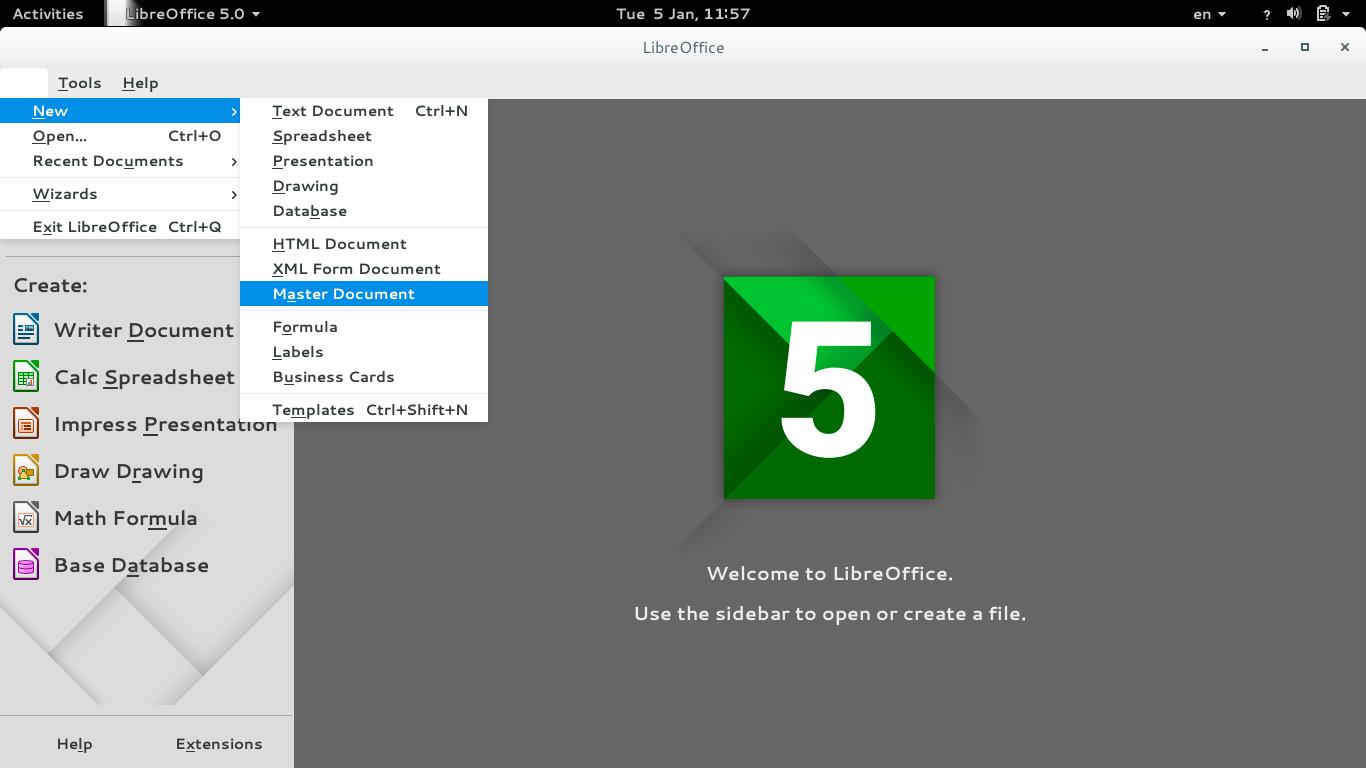
To create a master document, go to File New Master Document
How to create a master document
For complete help on working with master documents, check the

Libreoffice help section from here.

If you aren’t using the excellent native feature, then creating a book will be a problem for you! When you have a standard container for all of your chapters, you can control the style easily and be able to get a central view on all of your work!


Final words

If you aren’t a LibreOffice user already, go download it now! You can install it without changing your settings!

I hope you find this post useful! And I’d like to know what do you use for word flow!

If you are using LibreOffice then you don’t need much more!!
Do you have any other features to add? I’m waiting for your comments!
You like the post you just read? Then share it with your friends! Sharing is caring!
تقرير برنامج CodeLobster PHP Edition 5.8 الداعم للعربية

هذا البرنامج هو بيئة تطوير متعددة الأغراض، يستخدم لتطوير العديد من تقنيات الويب مثل HTML, CSS, JavaScript and PHP في النسخة 5.8 تم دعم اللغة العربية في التحرير وأصبحت تظهر بشكل واضح غير مفكك على غرار النسخ السابقة، وهو مطلب قامت الشركة بتنفيذه نزولًا عند رغبة المستخدمين العرب.
قمت بعمل تقريري على النسخة الاحترافية مكتملة الخصائص، لذلك ربما لا تعمل مع بعض الخصائص حتى تقوم بشراء ترخيص من الشركة. للنسخة الإنجليزية إضغط هنا.

يعمل البرنامج على مختلف نسخ Windows ابتداء من Windows XP وحتى Windows 10 الجديد (قمت بتجريبه عليه وهو يعمل بكفاءة).

حتى اللحظة لا توجد واجهة عربية للبرنامج رغم دعمه للعديد من اللغات العالمية كالألمانية والفرنسية والإيطالية والروسية، سأقوم إن شاء الله بكتابة ترجمة عربية للواجهة وأمل أن تقوم الشركة بإدماجها في النسخة المقبلة من البرنامج.

تحديث: تم بحمد الله تعريب البرنامج، اطلع على الإعلان من هنا. ولتحميل نسخة بالعربية اضغط هنا.

يتوافر من CodeLobsterPHP Edition نسخة مجانية تمامًا وكل ما عليك هو تسجيل بريدك الإلكتروني لتتسلم مفتاح التفعيل دون مقابل، هذه النسخة المجانية تحتوي على المميزات الأتية:

     إبراز النصوص للغات الأتية PHP/HTML/CSS/JavaScript. أي أن النص المكتوب بهذه اللغات يظهر بالألوان التي تسهل قراءته وتتبع السطور البرمجية.
  • التكملة التلقائية للمفردات عند الكتابة باللغات البرمجية الأتية:

PHP/HTML/CSS/JavaScript

  • مصحح أخطاء قوي للغة PHP
  • ملف مساعدة مفهرس مضمن مع البرنامج، ومساعدات تفاعلية تظهر أثناء التطوير.

للتمتع بخصائص النسخة المجانية يجب تسجيل بريدك الإلكتروني من الرابط، بعد ثلاثين يومًا من الاستعمال دون تسجيل سيتوقف البرنامج عن العمل.

الواجهة

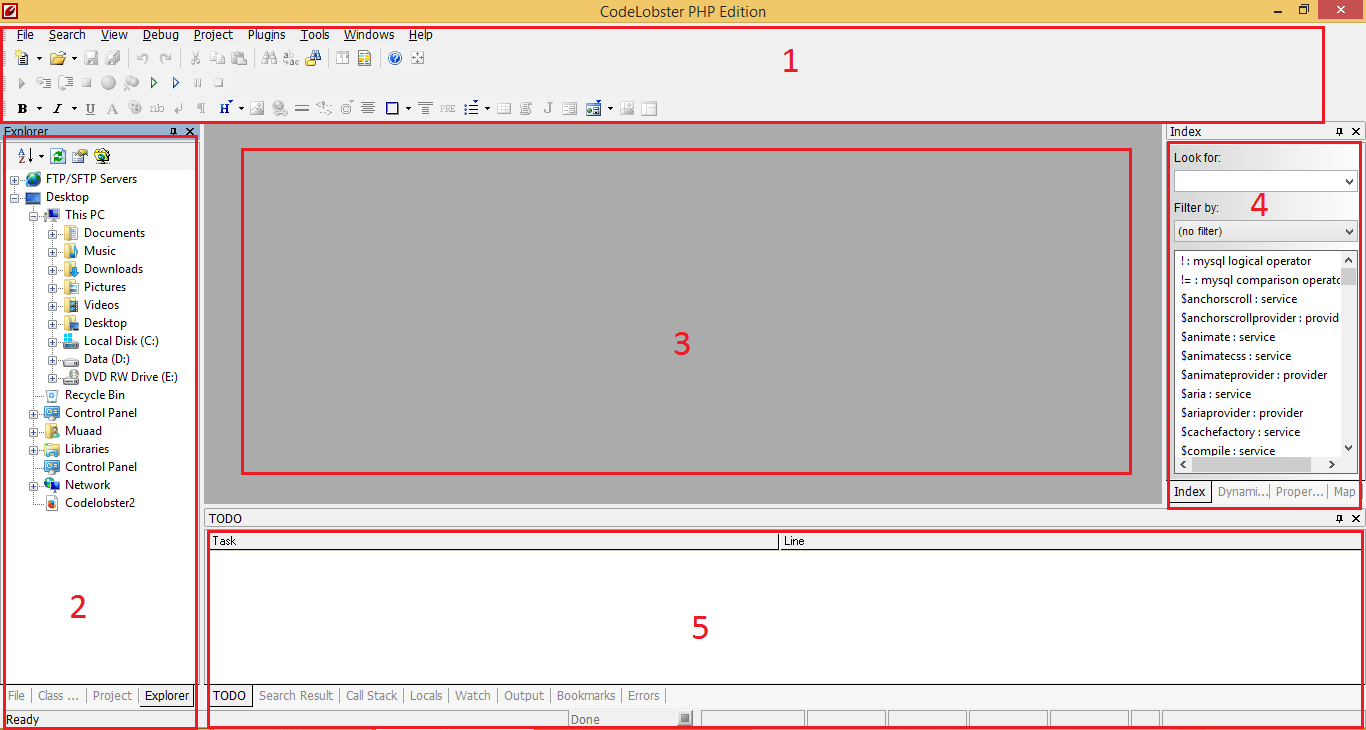
واجهة البرنامج مقسمة إلى أقسام عدة لتسهيل الوصول إلى الخصائص والتعامل معها، بالإمكان تخصيص ألوان البرنامج واختيار مواضيع متنوعة لتناسب كل الأذواق.

CodeLobsterPHP Edition interface

القسم العلوي

يحتوي شريط القائمة، وأسفله شريط الأدوات، ينقسم بدوره إلى ثلاث صفوف وملئ بالأدوات التي تسهل عمل المبرمج، مثل

Image Mapو Divو Span، ومجموعة الأدوات التقليدية كالحفظ والحفظ باسم، التراجع، نسخ وقص ولصق، والبحث.

القسم الأيسر

يعتمد على التبويبات لاستغلال أفضل للمساحة، يحتوي على مستكشف المجلدات، قائمة الملفات، تبويبة المشاريع، وبالإمكان تعديلها من قائمة معاينة نافذة.

القسم الأوسط

يحتوي على محرر النص البرمجي، وتحته ثلاث تبويبات يمكن التنقل بينها بالضغط على مؤشر الفأرة الأيسر، الأول هو الافتراضي: سطر البرمجة. الثاني: معاينة الكود، وهي خاصية مفيدة حيث يمكنك من عرض صفحة الويب في متصفح داخل البرنامج دون الحاجة لفتح متصفح خارجي. الثالث: المدقق ويمكنك من تتبع النص بدقة ومراقبة الأقواس.

القسم الأيسر

من أكثر الأقسام فائدة فهو يحتوي على الدوال البرمجية مع شرحها لكل لغات البرمجة المدعومة، وهي ميزة لا غنى للمبرمج المحترف والهاوي ومن يتعلم البرمجة عنها، مع إمكانية فرز الدوال وتصنيفها، وهو أيضا مقسم لتبويبات للاستفادة الأعظم من المساحة.

القسم الأسفل

هو أيضًا مقسم إلى تبويبات ويمكنك أن تبادل بين الاختيارات للاستفادة من المساحة، وبالإمكان تعديلها من قائمة معاينة نافذة ويمكنك فتح عدة ملفات والمقارنة بين التغييرات.

مدة التعلم

لو إستعملت أي بيئة تطوير مثل Microsoft Visual Studio ستشعر وكأنك في منزلك تمامًا، ومع ملف المساعدة المضمن والمساعدات التفاعلية ستتقن استخدام البرنامج بسرعة وسهولة.

الأداء

حجم التحميل قرابة 30ميغابايت والتنصيب يقارب 100ميغابايت، أي أنه حجم بسيط مقارنة بإمكانات الأجهزة المتوسطة والحديثة، ويأخذ من 70 – 200ميغابايت من الرام حسب الملف المفتوح، كما أنه يفتح الملفات الكبيرة بسرعة فائقة ودون خلل أو انهيار (قمت بتجربة هذه الأمور بنفسي لغرض التقييم).

ميزات البرنامج
  • يمكن تشغيله بشكل محمول دون تنصيب ونقله لأي جهاز تعمل عليه Portable
  • لا يحتاج لمكتبات إضافية ليعمل مثل Java Runtimeأو Microsfot.Net
  • سريع في عرض الملفات الكبيرة.
  • النسخة المجانية بها مميزات جيدة!
  •  التسجيل يعطيك تحديثات مجانية مدى الحياة!
  •  دورة التطوير مستمرة ومنتظمة.
  •  مجتمع ودود يقدم دعم فني ممتاز.
التراخيص
يوجد إمكانية استعمال البرنامج 30 يومًا لغرض التقييم قبل توقف البرنامج عن العمل.

الرخصة المجانية

تمكنك من التمتع بالمواصفات القياسية بدون مقابل، مجرد تسجيل بريدك الإلكتروني وتسلم مفتاح التفعيل.


الرخصة الخفيفة

ثمنها 39.95$ وبالإضافة من تمكنك لدعم المطورين تعطيك ميزات أقوى من ضمنها مدير قواعد بيانات SQL، مدقق للسطور البرمجية، التحكم في النسخة، وغيرها من الميزات القوية.

الرخصة الاحترافية

 تبلغ تسعيرتها 99.95$ وهي نسخة متكاملة الخصائص، تجمع بين خصائص النسخة الخفيفة مع 12 إضافة لبعض أشهر أنظمة إدارة المحتوى وأطر العمل التي تسهل على المطور كتابة المواقع مثل Durpal, WordPress, Joomla, J query .

ويمكن الترقية بسهولة من النسخة الخفيفة إلى الاحترافية، كل المدفوعات مؤمنة عبر شركة Avangate لضمان أمن وسرية معلوماتك!

كل التراخيص تحصل على ترقية مدى الحياة، تشتري الترخيص لمرة، وتتمكن من ترقيته كلما صدر تحديث جديد بدون دفع قرش إضافي!
مع كل هذه المميزات ودعمه للعربية، يدخل CodeLobster PHP Edition المنافسة بقوة، بنسخته المجانية وأسعاره المعتدلة، هو قوة تطالب بالاعتراف بها.


« Older posts