Month: July 2013 (Page 1 of 3)

Tomboy notes great note taking software

HI guys what’s up?

Tomboy is an open source note taking software that is small, light, and easy to use, I’d give it 4 out of 5 stars rating, worth trying and downloading.

Here is the official about:


About Tomboy

Tomboy is a desktop note-taking application for Linux, Unix, Windows, and Mac OS X. Simple and easy to use, but with potential to help you organize the ideas and information you deal with every day.

Have you ever felt the frustration at not being able to locate a website you wanted to check out, or find an email you found interesting, or remember an idea about the direction of the political landscape in post-industrial Australia? Or are you one of those desperate souls with home-made, buggy, or not-quite-perfect notes systems?

Time for Tomboy. We bet you’ll be surprised at how well a little application can make life less cluttered and run more smoothly.”

You can read more from here or download it full from here for windows

It needs Gtk Sharp Version 2.12.0 or higher, it’s 24MB download, if you like you can download it from here, It will not install if you don’t have this Library.

please subscribe to my feeds and follow the blog itself, and comment as often as possible, you don’t even have to Login to anything, i made it possible for anonymous people to comment on my blog, you are welcome anytime.

Best free way to organize your files and folders in windows

Hey guys, checkout this awesome little known software:


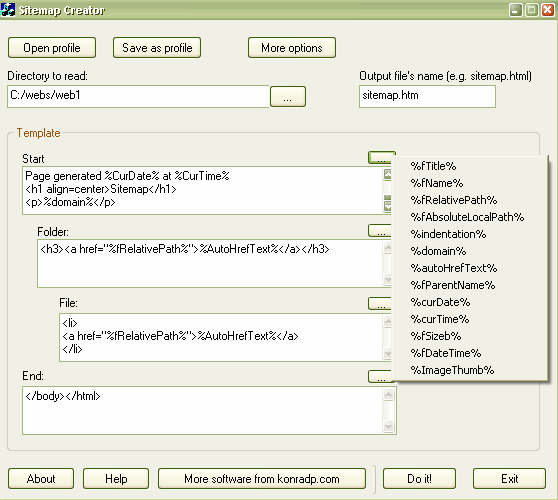
“This application simply reads the given directory and it’s sub directories, and produces .htm file basing on a given template. The result file can be used to print out the contents
of the folder, or as a sitemap of your website.


Note: this program can’t read your website online, it also doesn’t understand external URLs, like: https://muaad.com.ly//, it only reads and exports a folder.


Also, this application was created for myself, then I only added this help doc. and a few other things, and published. This means it is not very strongly tested, but it worked for me fine, so I assume it will work for you too.


So, there are two ways you can use this program: creating sitemaps (for websites) and simply getting a contents of a folder.”


Very handy for creating label disks or organizing huge collections of software for example
Download

FDM can continue a broken download when the server does not support that!!

Hey guys, I feel super because I was able to continue a download from a server that does not allow you to continue the download, if your download fails for any reason you start from the beginning which is pretty bad especially when the internet connection is slow and the file size is big.

Here is what happened

I was downloading Apache OpenOffice 4.0.0 which is 137MB, I used FDM to download the file because it’s faster, even if the servers in filehippo didn’t support resuming downloads.

When the download reached 99% the lights were out!! And since my modem is AC powered i lost the connection and the download.

I went to the directory and marked the file as visible the file and did a test using 7zip, the archive was corrupt.

When the lights were back on I tried starting the download again (Right click and then start download), that didn’t work, i was given the message: File no longer existed on server.

So here is what I did to resume the download and save the time and Internet quota:

  • I went to FDM and right clicked the file and went to download properties, or hit the shortcut key Alt + Enter

  • Go to the second tab from the left “Mirrors” and click the button add to add the same link you used to download the file.

  • Hit OK then OK.Wait for the download to resume and Continue from where it stopped. Go to the download, check it using 7zip, you have yourself the file ..!

Hope you liked it, please recommend me on Google+ & subscribe to my RSS feed.

« Older posts