Category: English Post (Page 8 of 97)

How to stop spam on contact form7

Like many people using WordPress as a blogging platform. I happen to use Contact Form7 to allow my readers a chance to contact me and reach out to me about all sorts of things. Sadly such a great feature can be abused by spammers. Despite me using a captcha and a plugin called “Honey pot”. I still got some spam into my inbox. In this post I will show you how to block these spammers once and for all!

Hosting company wasn’t helpful

After a lengthy exchange with my hosting company. Their support engineers concluded that the issue was from my contact form, not from their severs. And blocking the offending emails didn’t really work.

They did suggest using honey pot, which increased the amount of spam that got into my inbox. I think I must’ve made a mistake configuring the plugin!

The fix

I installed a plugin called “Spam Protect for Contact Form 7” and it works in a very simple way:
It adds a new tab to the contact form options called “anti spam settings” and allows you to block the offending spammers by name or domain. Creating a local blacklist inside the form. I tested it out and it seems to be working so far.
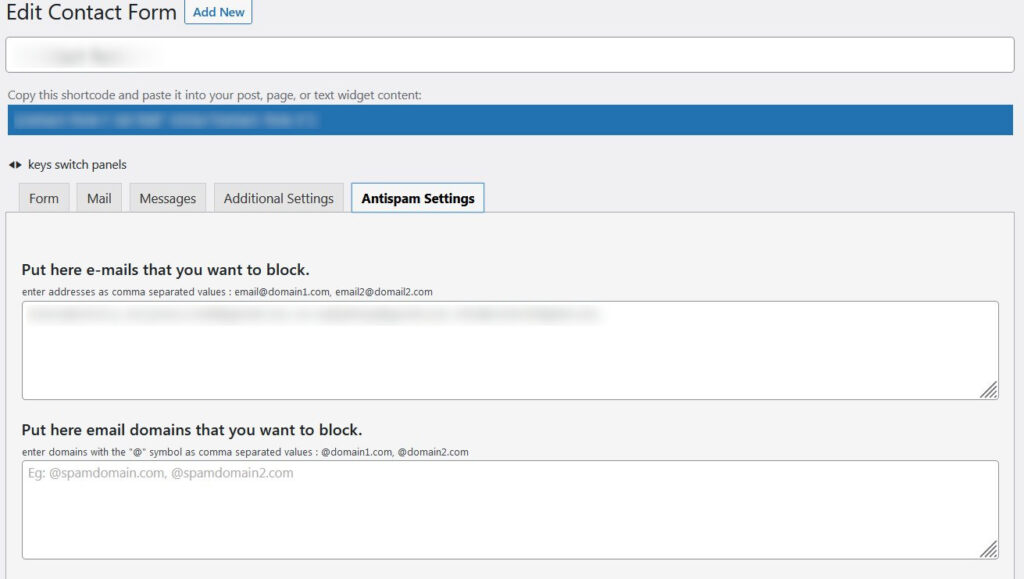
I blurred out the offending emails and form names. But it will work the same for you regardless.

It’s very easy to use and effective. So far it’s the only thing that worked to combat spam on my blog. I’ve rated this plugin with a 5 star rating because I think it truly deserves it.

Final words

Are you suffering from this issue? Did you try out this fix? What solution worked out for you best?
Please let me know in the comments section below.

P.S: Bookmark the page, you’re going to need it!

Pegasus review and download

Back when I was using Linux, gaming was kind of an issue. I had to resort to all sorts of tricks and tools to make the experience somewhat doable (and to a great extent it was). Thanks to one tool called Lutris.

Sadly tho upon using a different computer and leaving Linux behind in favor of Windows 10.

Lutris was sorely missed. No other tools comes anywhere close to collecting a random collection of games.

I tried many solutions to replace Lutris that is until the date of this writing a Linux only software.

The only solution that I felt served the purpose of a game collection software that’s free and open source is called: Pegasus.

The state of my game collection.

My game collection as it stands is filled with all sorts of games: Abandonware DOS games, games that I’ve bought or won, freeware games, open source games, etc. There is no one platform that can contain this library – much like the school library that I’ve organized using Goodreads -. Heck there are games that I’ve made – plug in shameless self promotion in here for Zanga Man -.

What is Pegasus and what does it do?

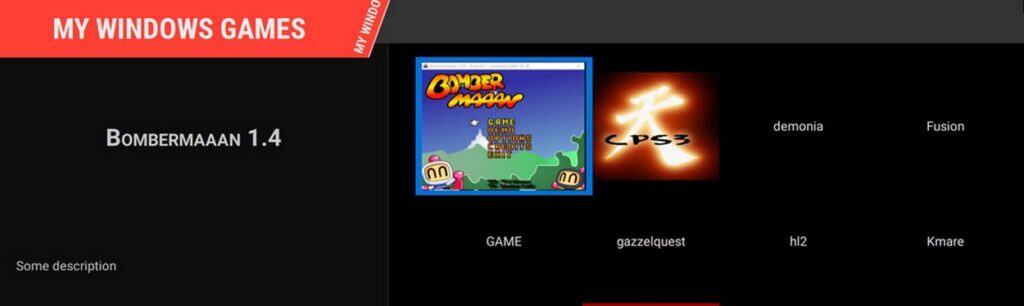
Pegasus is a free and open source software that acts as a front end for game collection. You can add your games to the collection manually and have them displayed in console – like interface.

Can you add games automatically like Lutris?

There is a way displayed on the website. Which includes scrapping for assets and downloading tools that I really didn’t feel comfortable using. I much rather prefer adding the games one by one.

How do you add games?

There is a file called “metadata.pegasus”. Place this file in your game directory and add the folders of games to the text file.
You can also add the picture (or art) that would be displayed once you load the Front end.

Download

To download pegasus please click here.

Final words

Do you use a game collection tool? What’s the tool you are using? Let me know in the comments section below.

Movie Maker 2.1.4026.0 download on Windows 10 Pro

Movie maker is an old software bundled with Windows XP to make simple video files. If you were around during the early days of Youtube that was the de-facto tool to make videos.

I needed to make something quickly and when I tried downloading it from the internet, I was met with many links and articles suggesting that it won’t work and it can’t be done.

Being the stubborn person that I am .. I decided to put that claim to the test.

How did I go by doing that?

I installed Windows XP SP3 on a virtual machine and copied movie maker from there.

When I ran it on my Windows 10 system, it worked fine without an issue!

So, here is the link to download that version (2.1.4026.0). Just extract and get going.

Final words

I hope that you found what you are looking for here. Thanks for dropping by and I’ll see you in another post.

« Older posts Newer posts »