Category: Ubuntu (Page 20 of 24)

Atom.io v1 Atom facts + 1 year of open source!

Hey there you guys. I hope you are doing well on this fine day

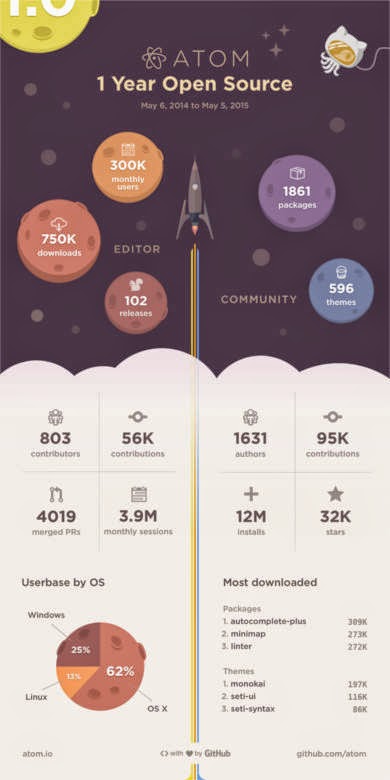
Atom celebrated it’s first year as an open source on the 6th of May by releasing an info-graphic. It contains facts and numbers that are truly interesting!!

Interesting facts

I never would have guessed that most Atom users were Mac users! Or that it has been downloaded 750.000 times!! for full info click this post over here.

Great read
As I was browsing the Atom blog I came across this rather interesting announcement: That the support for deprecated API’s will end on June 1st.
(Sounds really exciting huh? No! Not really!) but the other part of the announcement is what really matters. Announcing that V1.0 milestone will be released sometime later that month (June).
Atom v1.0 will be released in June. That’s according to the official atom blog.

Future hopes

I’m hoping that update brings the removal of the file size restriction. Which has been a real drawback for Atom. I’m also expecting some under the hood improvements. I hope they work the Arabic language problem (it’s shown as scrabble). And maybe the icon. I don’t like it very much :p. Other than that I’m quite happy with the program’s features and performance (on Linux! Of course) Windows boot is almost as long as the Windows boot itself!!

Promised bug fixes 

They have published a list of bug fixes to include in the 1.0 milestone. Some of them as you might have guessed were boot time and file size restriction. The rest can be checked from here.
Let’s see if the Atom team can pull it together. I wasn’t in favor of comparing them to industry titans as I kept saying it’s in Beta. But now the play time is over!

Final words

I really wish them the best. As they put together what could impact the coding world!
What do you expect out of V1.0 of Atom? Are you excited as I am? Please let me know in the comments section below. Don’t forget to give Kudos. Share this post and help the blog grow! Have a lovely day 😀
Tasque. The to-do list app you need

Hey there you guys!
How are you today? I hope you are doing good!

Today we are looking at an awesome task list app. Tasque.
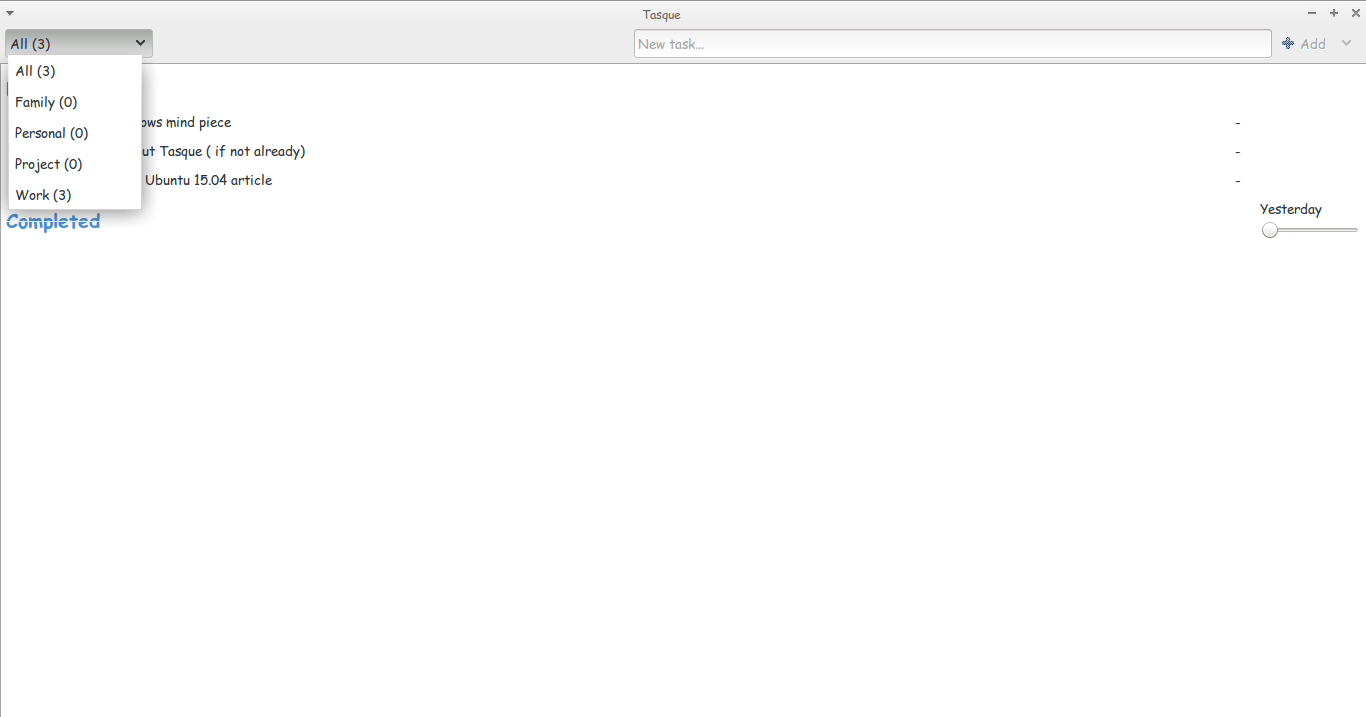
Tasque is a little to-do list that gets the job done. What I like about it is that it’s simple and minimalist. No unneeded features. Just the pure simple core of getting tasks done.

According to Wikipedia the name was partially inspired by the French village by the same spelling. “Tasque” in French is pronounced the same as the word “task” is in English

It’s available from the Ubuntu software center, or via this link as a tar archive. And it can be downloaded for Windows too! Latest stable version is 0.1.12

Reception

It has the rating of 3.5 stars on the Ubuntu software center. True shame. I believe it deserves a 5 star rating. Please up vote it.
How did you like this post? Did you find it useful? Please comment below and let me hear what you have in mind.
Have a nice day. Please give kudos. Share this post and leave a comment!

Ubuntu 15.04 Vivid Vervet is out

Hey there you guys. I hope you are having a good day

As this comes nearly a week late. I am sorry. I had been waiting to write about it for months, but when it came I couldn’t get access to publish it (third world problems)

Anyway. Let’s talk about Ubuntu 15.04, shall we?

It’s a standard release. Which means you get 9 months of security and maintenance updates. (For all flavors) And it ships with LibreOffice 4.4 out of the box. It’s called Vivid vervet.


I dare you to say it three times without stuttering!! 😉 It’s built on the latest 3.19 Ubuntu core. And features desktop improvements and over all application updates. It also features Ubuntu Make. A development studio for many platforms (15 in total).

Release notes

Checkout the total list of changes from here Download Ubuntu 15.04 from here. I hope you liked it. Please comment below. Have a nice day 🙂

Gimp 2.10.14 won’t install problem solved!

Hey guys 🙂

It’s been ages since I posted anything about GIMP!! Not that I don’t like it or don’t use it anymore. It’s just I’ve been busy exploring other things while working with Gimp often.

I had gimp installed by default when I got Xubuntu 14.04 LTS. And to my greatest pleasure it is automatically updated. So I didn’t check the new versions for a while.

When I started reviewing some web design material. I had to have the Gimp on Windows too (For comfort 😛 ) and so I downloaded the latest version 2.8.14.1 from Filehippo.com t. And to my disappointment. It didn’t work ..

I double clicked and it didn’t progress pass the language selection option. It stopped responding many times.

I went to the official website and downloaded it via a bit-torrent client. Nothing ..

It did the same thing, no matter what I did it froze on the language selection and I had to end it from the task manager.

It was a bummer .. I downloaded it twice. Fiddled with many windows settings like:
Running as administrator.
Trying the compatibility options with every prior version of Windows.
I even installed the latest GTK library and Python ( Didn’t work).

And the funny thing no one reported that problem. I Googled all around. Nothing!!

When I installed it on a another Windows 8 computer. It went smooth!

Maybe the problem is with something in Windows 8.1?

What did I do to fix it?

Nothing!

I ran the installer. And let it running. After a few minutes it resumed installing like nothing happened.

I even uninstalled GTK and Python. And it didn’t affect how Gimp worked!

So here you have it. Be patient! It’s a Gimprtue !! Play on virtue!

That was today’s post. Please tell me if worked for you! And did it happen with you?

Please join my blog and subscribe to my mail list!

« Older posts Newer posts »