Category: Update (Page 5 of 7)

Ubuntu 16.04 Beta 1 download

Today Ubuntu 16.04 Beta 1 is ready for download on all flavors of Ubuntu, that includes Lubuntu, Ubuntu Gnome, and Xubuntu. 

 

This is the first major milestone for many flavors as Alpha wasn’t available to many of them, while this version is far from complete, it gives you a clear idea on how will Ubuntu 16.04 will look and behave.

Now every flavor has it’s changes and improvements, but since I’m with Ubuntu Gnome now, here is a list of update and known bugs (Source):

Software Updates

  • GNOME Shell 3.18
  • Most of GNOME 3.18
  • GNOME Software has replaced Ubuntu Software Center
  • GNOME Calendar and GNOME Logs are installed by default
  • GNOME Builder (IDE) is now available in the archives
  • gnome-control-center sharing panel has been fixed
  • Experimental wayland session is now available. Install gnome-session-wayland and then select “GNOME on wayland” from login screen (Only works with OSS GPU drivers).

Known Problems

  • The prompt asking for media removal is not shown at the end of the installation (966480)
  • Shutdown/Restart of live session guest does not work in Virtualbox, and VMWare (1447038)
  • No auto login in Ubuntu GNOME Xenial (1547297)
  • Ubuntu installer says: The creation of swap space in partition failed (990744)
  • Ubuntu GNOME Xenial live image boots to tty1 (1548864)
  • It only shows installed apps, not available ones (1548933)

    The beta version isn’t ready for everyday use, but if you can and have a decent Internet connection, downloaded and give it a try even on a VM.
    I seriously can’t wait for Ubuntu 16.04. It’s going to be awesome!!

    Are you excited as I am? Let me know what you think in the comments section below?
BlueGriffon 2.0 first preview

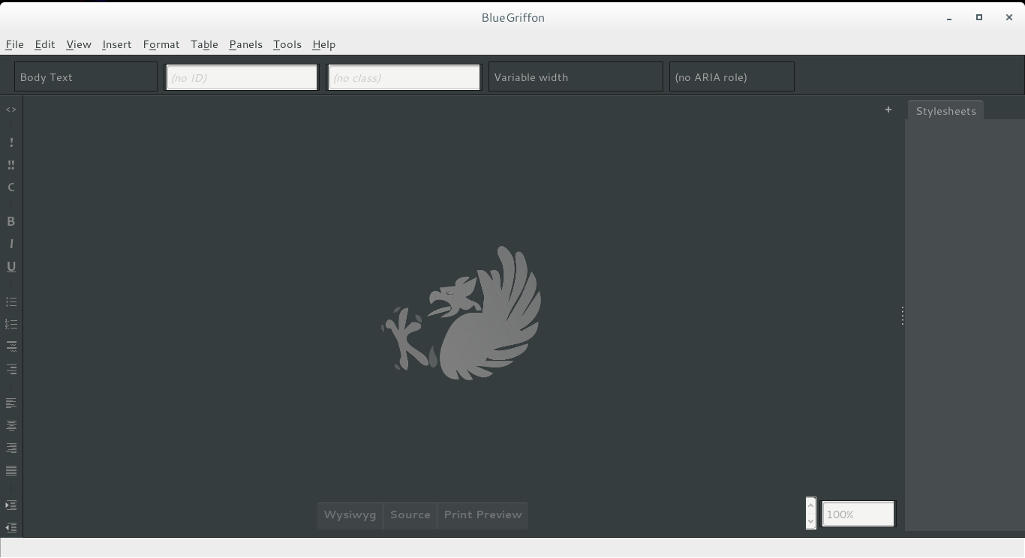
BlueGriffon is back to a steady path of development after being marked inactive by Alternativeto.net this time version 2.0 is in the works and recently a first preview version was posted on-line.


It released 1.8 in October and now 2.0 is under development!

I’ve downloaded the version and tested it on Ubuntu, what I noticed immediately is hat the color scheme is different, and that the toolbar that has been carried along since the days of nVU (one of the earliest open source web author systems).


BlueGriffon 2.0 interface

It enhanced the way that panes are displayed, instead of being awkward pop-up windows now it implements tabs which make better use of the screen.

This version isn’t fully functional and far from complete, but I had to break in the good news!
What I really hope for (and I suggested this to the developers already) that a PPA would be used (personal package archive) that way BlueGriffon will be isntalled easily and updated with the system automatically, and catograized peroperly within the applications (it’s now a portable App that needs to be extracted to the root of your computer).

I think the version 2.0 will be the best one yet, and I hope it fixes all the bugs from 1.8

Will you download the test version? What do you think?

Update: Version 2.0 and 2.1 are released! Check the review from this link!!

FDM 5.1 released, Ubuntu version up for vote?

I’ve blogged about FDM in this blog before, being the best free download manager, and the alternative for IDM, and that it could replace uTorrent on your computer (and if you are using uTorrent, please remove it, it’s malicious!)< and the continue broken downloads using mirrors even if the server doesn’t support it!

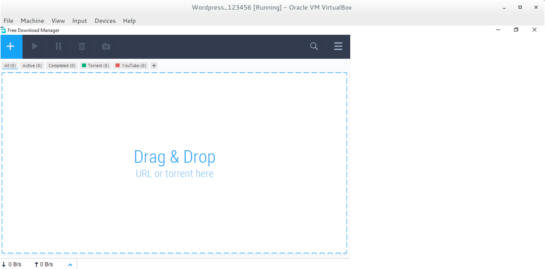
FDM 5.1 Interface

It has been redesigned into a more streamlined UI and they made the configuration is easier to use.
One of the biggest changes noted is the addition of a mac version and dropping the support for Windows XP and Windows Vista.

Since the addition of a Mac version, I wondered, why not an Ubuntu version? So I e-mailed the contact e-mail, and this is the response they gave me:


Hello!
Thank you for your feedback.

Our team is planning to release FDM5 for Linux OS, still, not in the nearest future though. We’ll inform all our users. Please keep up with the news on our blog.

I will be following them closely for you!

That means that FDM is one step away from being truly cross platform after being stuck in the Windows ecosystem for years!

Those are fantastic news! The new version is so awesome, Mac addition is lovely, and I can’t wait to see how does it look on Ubuntu, Will it make it in time for Ubuntu 16.04?

Update 2


“Dear Muaad,
Unfortunately, we are not planning to release a Linux build until a stable release for Mac OS X & Windows is out.
However, we are doing our best to make sure that our source code is compilable under Linux to the extent that it will not be too big an issue when we get to it.”

Update 3:
FDM has published a poll for future features, Linux is one of them! So vote Linux!!

Until this wait is over, be more than welcome to use uGet, it’s that good!
Let me know what you think in the comments section below.

LibreOffice 4.4.4 launched. 5.0 postponed

The document foundation announced on it’s blog the release of LibreOffice 4.4.4 (Code named triple four) and it’s the third minor release of the LibreOffice 4.4 family, coming with over 70 fixes over 4.4.3
Feel free to read the full information about this release from here


The next major release LibreOffice 5.0 is postponed from late July into early August of 2015.
You can download this version from here

Will you download this update? What version are you running at the moment / platform?

Did it fix your bugs? Share with me in the comments below. Have a good one.

P.S: I posted in delay because I thought the next one was 5.0 and they would drop the plans for 4.4

« Older posts Newer posts »