Category: Android (Page 12 of 16)

Telegram VS Whatsapp! Battle of the chat apps!! (2016)

WhatsApp is a popular texting message, and Telegram is an alternative of WhatsApp that has gained mainstream interest after the acquisition of WhatsApp by Facebook. While being really similar in features, I’ll be comparing them head to head so readers can have a decision!
Telegram VS WhatsApp

At the core, both applications are similar, they both serve the same purpose, chat apps!
There are some differences, let’s take a look at them!
I made a table of comparison based on information available at the moment.
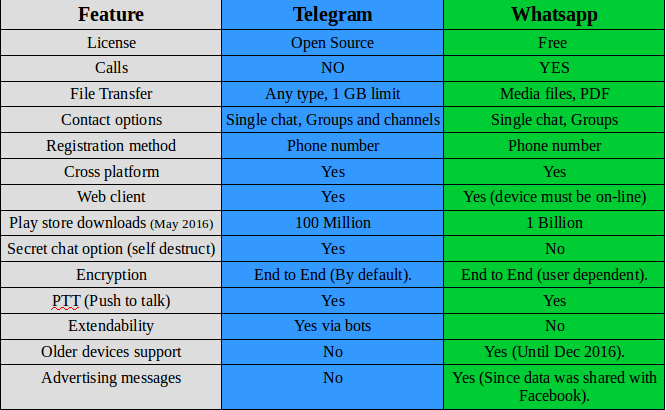
 

Telegram VS Whatsapp comparison

Key points

While being very similar, whatsapp‘s killer edge is having voice calls, the option that Telegram doesn’t have and doesn’t plan on adding them to it’s feature set.

WhatsApp is many times more popular than Telegram, so it has a wider user base, and the devices supported by WhatsApp are much more than Telegram! (supports older model Nokia Asha and Symbian but only until the end of 2016!).
It requires updating very often and it’s hard to manage on a limited internet connection.

And the call quality is terrible for the same reason! So in the few months I had Whatsapp, I didn’t make a single call!

Another major draw is privacy concerns, Whatsapp edited the privacy agreement and shared data with it’s parent company (Facebook) which will use the data for “targeted advertising”.


Whatsapp
has recently added Encryption, it’s not like the protection level that Telegram provides, but it’s a start (Telegram is an end to end application).

Telegramis focused on security and speed, it provides better security than WhasApp and the secret message option is something that WhatsApp doesn’t support!

File transfer is also a plus for Telegram, with 1 GB limit and any file type supported! Whatsapp is limited to media files (and pdfs).

Telegram
‘s bot feature increases the application’s functionality much more than Whatsapp, these bots do many things like instant translation from inside the application, and the possibilities are endless!! You can get nice gifs just by writing @gif in the chat bar.

I think WhatsApp‘s main con is that it’s owned by Facebook, and Facebook is known for not respecting user’s privacy!

Verdict: WhatsApp remains on top by a slight margin! With call support and wider user base, WhatsApp is a better choice for communicating your loved ones. But if security is a concern for you then you have to sacrifice voice calls and use Telegram!

Why not download Telegram too? It’s free and more secure! And in the end your needs determine the winner of this bout!!

I personally prefer Telegram, but I have to be subjective!

After the latest updates, I removed Whatsapp once and for all, Telegram is the way to go.

What do you use? And what do you recommend? Tell me your thoughts in the comments section below!
 

WhatsApp is now free, no subscription fees what so ever!

WhatsApp is changing it’s payment policy to become totally free, before the first year was free and you had to pay 0.99 cents each year, but that is long history now!

In a recent blog post, the company addressed the current payment plan, they admitted the plan wasn’t going well, as many users didn’t have credit cards or debut cards (I for one don’t have one of those), and those people were wondering if they were going to lose service after the first year. This lead to the change we all witnessed, WhatsApp is free now!

You might be wondering, and it’s a very legitimate question, how is WhatsApp going to pay for it’s services?

It’s not going to be paid by ads, it’s paid by “testing tools” for communicating with organizations and companies, so in another way WhatsApp now is a beta and you are the tester!

It’s not bad, my concern is the privacy policy as it’s owned by Facebook, if you want a truly secure messenger, there is Telegram.

I think a head to head post is due between Telegram and WhatsApp.

Until then, how do you feel about WhatsApp becoming free?

Wiping free space to make the phone run faster

After updating a Samsung I9082 (Grand) from 4.1.2 to 4.2.2 it became much slower and restarted often. A factory reset was due. Even after the reset the phone was incredibly slow.

It remained slow and buggy for a while, until I needed to wipe some files for security. I noticed it became much faster after wiping the free space!


What is wiping free space?

Wiping free space is deleting the deleted files that could be restored by recovery software. It’s used to keep privacy and ensures data doesn’t fall in the wrong hands in case the phone is lost, stolen or even in the case of selling it.

What tools to use?

There are several tools available in the Google store to wipe the free space.

Andro shredder is one of them, it deletes files permanently and wipes free space too.
Sceure Wipe is another popular tool.

Wiping free space doesn’t cause data loss and it securely deletes data.

Did this fix work for you? Did you test it on other models? Please let me know what you think in the comments section below.

How to fix the mixed numbers on Android issue?

You got your new Android phone, you pop in the SIM card and expect everything to work like it should, but it doesn’t!

The issue

Your numbers are mixed, you don’t remember any of them and every call is a guess!


How to fix this annoying bug?

Will to begin with you need to transfer your numbers from the old phone to the new one properly, putting the new SIM in won’t just fix it!

Step to repair

  • You need to get the SIM out, delete all the numbers on the phone and slide the SIM in again.
  • It will work and all of the contacts will be sorted, and even across apps like Whatsapp and Viber.
  • That’s all there is to it!

I know it’s really simple and barley counts as a fix, but it worked for me! And I didn’t find it on line (I looked and found no solution!) so I had to post, maybe someone in my place does a little research on line and finds it.

If that didn’t work (although in my case that was more than enough to fix it) I suggest you look into a transfer wizard depending on your phone type, and consulting the dealer is always good especially if the phone is under warranty.

I hope you find it useful, please leave your comments below.

If you liked this post, share it with your friends and family. Sharing is caring you know 😉

« Older posts Newer posts »