Month: March 2015 (Page 2 of 3)

A quick fix to many Windows 8 – 8.1 bluescreen issues

Hey you guys 🙂

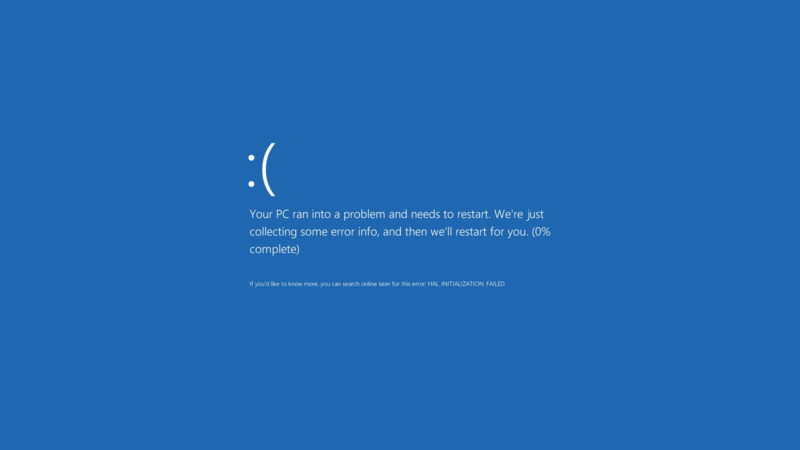
If you are using Windows 8 / 8.1 You would notice an awful lot blue screen of death screens BSOD. Now windows advices you to search online for the error .. (Da! Thanks for the tip captain obvious!)


What’s the cause of these errors?

Some of them are driver related. Others occur when you standby or lock the screen. Some after you install certain software..
The fix to all these causes and more is a simple command!
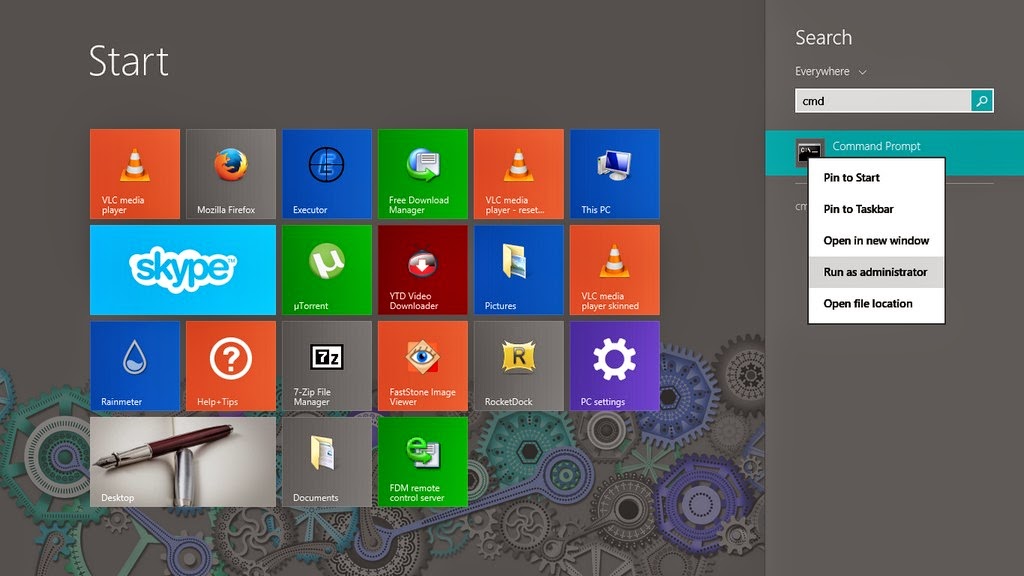
1. Go to the start menu and type CMD

2. When you see command prompt. Right click on it and choose: Run as administrator (Very important!)

3. The command prompt windows will show up. There right this command: “sfc /scannow”

This command checks the system files and attempts to fix the errors.
The process will take some time ( in my case it took an hour to complete)
After it’s done you will be prompted to restart once or twice. After that you are all good!

How easy was that? 🙂

Try it and let me know what you think. Did it fix your problem?
I hope I managed to turn the “frown” upside down 😀
Make sure to follow my blog and join my mail-list NEW

Windows 10 FREE FOR ALL!! What’s the catch?!

Hey you guys! I have some breaking news!!

Windows 10 will be launched this summer. Free for all Windows machines ( Genuine and pirated!) Running Windows 7, 8.1 And it will be available in 190 countries and in 111 languages!

New browser 

They also plan on retiring the famous Internet explorer and to replace it with a new web-browser!

More on the story as it develops!

Sources: 1, 2

Opinion piece

Since when does Microsoft give anything for free? Wouldn’t this be a trick to bust all the pirated users of Windows?

I’d say to wait and see how this develops. And don’t use pirated software!

RocketDock is my new favorite Dock and here is why!

Hey you guys 🙂

How are you today? I hope you are doing great! Here is a post on my new favorite dock. RocketDock!
RocketDock is an awesome dock for windows. Developed by two hardcore Mac lovers who wanted to bring a piece of Mac to windows!
You can put almost anything on it. Customize it in anyway you like, plus it’s super fast and doesn’t affect the performance at all, let alone the boot 😀

RocketDock Icon

Pros

  1. It’s easy to use!
  2. Free of charge! (Provided under the Creative Commons license ).
  3. Light on the system (My memory print was 8.7 MB)
  4. Works great with lower end computers! I tested it on Windows 7, Windows 8, Windows 8 pro, Windows 8.1 and it works fine!

It’s also expandable via a great number of skins and add-ons and docklets! (Available from the download website).


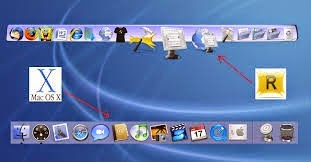
 RocketDock compared to Mac dock

I’ve tried it to replace my old favorite Nexus, who was a huge impact on the startup despite my utter love for that dock. I love a speedy boot more! xD
There are also tutorials on-line on how to develop your own skins. And the one I found was using Gimp! I really need to check that one out 😉

I have been using it for a month now! Works great! I don’t even miss nexus that much anymore ..
And yet .. Nothing is perfect! I’ve had some “issues” with it in general.

Cons

  • It has been version 1.3.5 for so long! Dare to say it’s dead now?
  • It doesn’t start up with the system right away. You need to set it from the settings! ( I don’t know if this counts as a con or not .. )
  • It doesn’t pin opened software automatically like Nexus does!

 Personal tweaks

I have been tweaking the settings and these are my top must have settings I’m going to share with you to maximize the use of RocketDock:

  • General Run at Startup
  • Position Layering – Always on bottom
  • Style Theme – Choose your favorite theme from there 😉
  • Open running application instance. Which minimizes and maximizes the open windows into the dock.

License

The license is “Free for non-commercial use” and to a free lancer like me this is a real bummer!(Just to clarify RocketDock’s license, you can absolutely use it in a work environment. You just can’t sell it. 🙂
The developer of Rocketdock reached out to me and corrected that statement! She is awesome!

Do you have any favorite settings to share with us? Any remarks to add? Possibly a better dock to share with us? Please let us know!
Make sure to follow my blog and join my mail-list NEW

Top free Dock (for Linux and Windows)

Hey there you guys 🙂

How are you doing today? How are things?Today we are going to take a look at some great dock software. These docks are great to customize your desktop and make you more productive and your desktop much more organized!
Some of these are so great, I need to dedicate a whole blog post for it! !!First of all: We have to mention what a dock is, For people who don’t know what it is. Then we list our top docks :)A taskbar or dock is a bar displayed on an edge of a GUI desktop that is used to launch and monitor running applications. Source

It’s used to minimize the clutter on your desktop. As you use it to collect shortcuts to software and tools. And you can hide it or set it to disappear after a period of time.


This is the Mac OS X bar.

The first to launch the dock we know today was Apple. Most docks are inspired by the design, take rocket dock for example. It’s made after the Mac OS X dock.

Now lets look at the top docks:

1. Cairo Dock

Cairo-Dock is a desktop interface that takes the shape of docks, desklets, panel, etc

It’s a real eye candy but takes a bit to get used to it. Especially if you migrated from another dock.

My rating 3.5/5

 

This is Cairo dock

Platform: Linux only. Website


2. Docky

Another dock just for Linux is Docky. The finest dock money can’t buy! And it’s up to it’s proclaimed status! It’s lean and powerful. You won’t even know it’s there! It’s simplicity is purely awesome!

My rating 4.5/5

This is Docky

Platform: Linux only. Website

3. Rocket Dock


RocketDock is an awesome dock for windows. Developed by two hardcore Mac lovers who wanted to bring a piece of Mac to windows!

This is RocketDock compared to the Mac OS X bar

You can put almost anything on it. Customize it in anyway you like, plus it’s super fast and

doesn’t affect the performance at all, let alone the boot 😀 (This is a sneak peak to my next post :D)
My rating 5/5

Platform: Windows only. Website


4. Nexus Dock

It’s made by Winstep and it’s a freeware. There is a paid versions for upgrade too.

It has many skins and widgets. And it’s pretty stable.

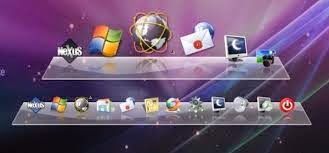
This is Winstep Nexus Dock

It has a medium memory print, and requires more minimum requirements. (This is a sneak peak to a future post :D)

Nexus dock has a larger installation size compared to other docks (30 MB roughly ).

There is a paid version with many more features. Check it out!

My rating 4/5

Platform: Windows only. Website

So there we have it. 4 awesome docks. Two for each OS.

Which one are you using? And if you aren’t using docks. Which one of these will you choose?

Can’t wait to hear your feedback. And remember the next posts will be dedicated to two of these docks. Read again and try to figure which ones I’ll be writing about.

Have a nice day 🙂
« Older posts Newer posts »