Month: January 2016 (Page 1 of 3)

Telegram VS Whatsapp! Battle of the chat apps!! (2016)

WhatsApp is a popular texting message, and Telegram is an alternative of WhatsApp that has gained mainstream interest after the acquisition of WhatsApp by Facebook. While being really similar in features, I’ll be comparing them head to head so readers can have a decision!
Telegram VS WhatsApp

At the core, both applications are similar, they both serve the same purpose, chat apps!
There are some differences, let’s take a look at them!
I made a table of comparison based on information available at the moment.
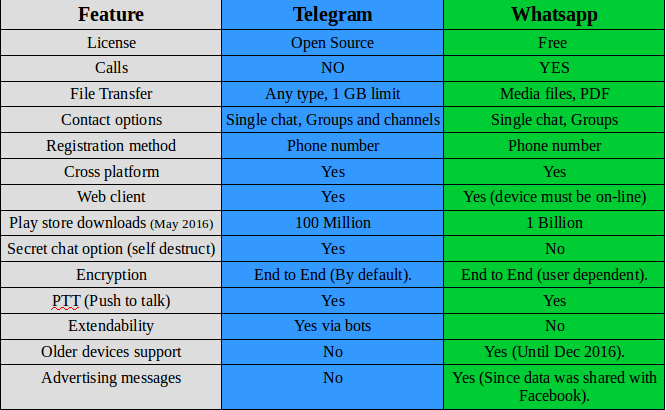
 

Telegram VS Whatsapp comparison

Key points

While being very similar, whatsapp‘s killer edge is having voice calls, the option that Telegram doesn’t have and doesn’t plan on adding them to it’s feature set.

WhatsApp is many times more popular than Telegram, so it has a wider user base, and the devices supported by WhatsApp are much more than Telegram! (supports older model Nokia Asha and Symbian but only until the end of 2016!).
It requires updating very often and it’s hard to manage on a limited internet connection.

And the call quality is terrible for the same reason! So in the few months I had Whatsapp, I didn’t make a single call!

Another major draw is privacy concerns, Whatsapp edited the privacy agreement and shared data with it’s parent company (Facebook) which will use the data for “targeted advertising”.


Whatsapp
has recently added Encryption, it’s not like the protection level that Telegram provides, but it’s a start (Telegram is an end to end application).

Telegramis focused on security and speed, it provides better security than WhasApp and the secret message option is something that WhatsApp doesn’t support!

File transfer is also a plus for Telegram, with 1 GB limit and any file type supported! Whatsapp is limited to media files (and pdfs).

Telegram
‘s bot feature increases the application’s functionality much more than Whatsapp, these bots do many things like instant translation from inside the application, and the possibilities are endless!! You can get nice gifs just by writing @gif in the chat bar.

I think WhatsApp‘s main con is that it’s owned by Facebook, and Facebook is known for not respecting user’s privacy!

Verdict: WhatsApp remains on top by a slight margin! With call support and wider user base, WhatsApp is a better choice for communicating your loved ones. But if security is a concern for you then you have to sacrifice voice calls and use Telegram!

Why not download Telegram too? It’s free and more secure! And in the end your needs determine the winner of this bout!!

I personally prefer Telegram, but I have to be subjective!

After the latest updates, I removed Whatsapp once and for all, Telegram is the way to go.

What do you use? And what do you recommend? Tell me your thoughts in the comments section below!
 

BlueGriffon 2.0 first preview

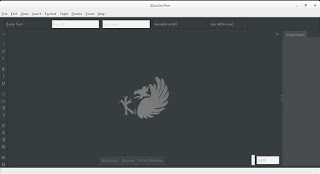
BlueGriffon is back to a steady path of development after being marked inactive by Alternativeto.net this time version 2.0 is in the works and recently a first preview version was posted on-line.


It released 1.8 in October and now 2.0 is under development!

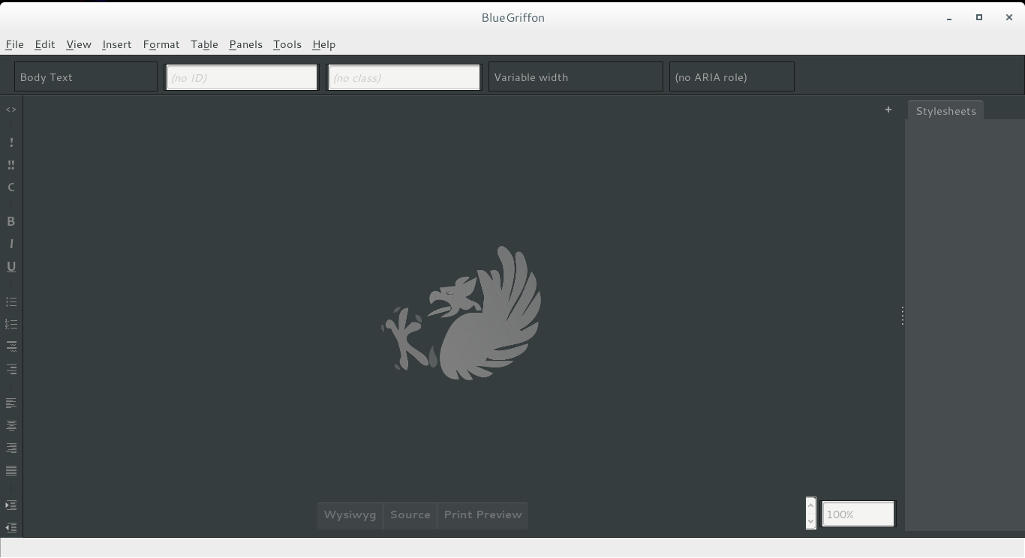
I’ve downloaded the version and tested it on Ubuntu, what I noticed immediately is hat the color scheme is different, and that the toolbar that has been carried along since the days of nVU (one of the earliest open source web author systems).


BlueGriffon 2.0 interface

It enhanced the way that panes are displayed, instead of being awkward pop-up windows now it implements tabs which make better use of the screen.

This version isn’t fully functional and far from complete, but I had to break in the good news!
What I really hope for (and I suggested this to the developers already) that a PPA would be used (personal package archive) that way BlueGriffon will be isntalled easily and updated with the system automatically, and catograized peroperly within the applications (it’s now a portable App that needs to be extracted to the root of your computer).

I think the version 2.0 will be the best one yet, and I hope it fixes all the bugs from 1.8

Will you download the test version? What do you think?

Update: Version 2.0 and 2.1 are released! Check the review from this link!!

Removing Cinammon and Installing Gnome 3.12.2 on Xubuntu 14.04

Over the course of the last weeks I’ve been making change happen by playing around with interfaces, now I’m left with the buggy Cinammon interface and the two login screens bug.


I began downloading Gnome 3.12, it took a while using these commands:

$ sudo add-apt-repository ppa:gnome3-team/gnome3

$ sudo add-apt-repository ppa:gnome3-team/gnome3-staging

$ sudo apt-get update

$ sudo apt-get dist-upgrade

$ sudo apt-get update

To add some extras:

sudo apt-get install bijiben polari gnome-clocks gnome-weather gnome-maps gnome-music gnome-photos gnome-documents gnome-contacts epiphany-browser gnome-sushi gnome-boxes gnome-shell-extensions

That didn’t work. Then I realized I need to download Gnome full from Ubuntu software center

That I did, a total of 436 MB


The lock screen thing wasn’t resolved, one page suggested a full uninstall of lightfm-gtk-greeter
I did that, and it won’t log in any more!!
I had to open the system live mode and it didn’t fix it, even by downloading the package manually
The repair option did the trick after enabling the network and choosing the right login manager, I was back to square one
sudo apt-get install lightdm-gtk-greeter
sudo update-alternatives –config default.plymouth
logo/ubuntu-logo.plymouth, afterwards run this command
sudo update-initramfs -u
For the login screen, run this command :
sudo dpkg-reconfigure lightdm
I did the change from under ubuntu after login, from lightdm to gdm, and it worked!

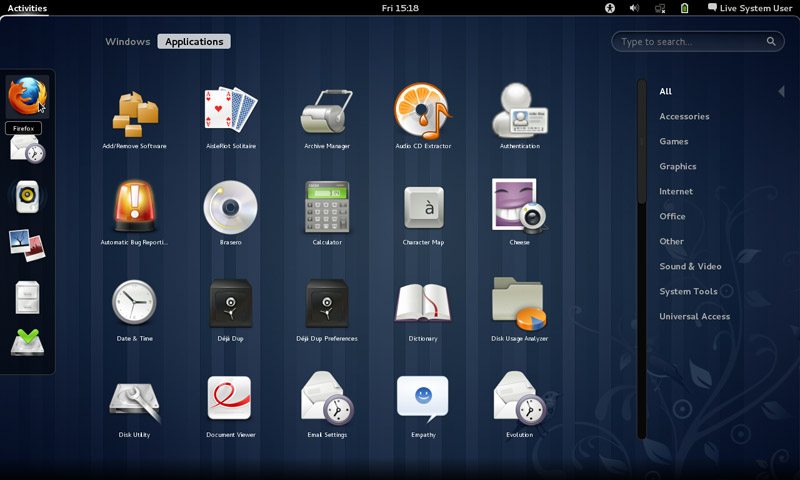
Gnome 3.12.2 Is the last supported Gnome version that Ubuntu 14.04 can handle, that’s one of the drawbacks of running LTS, you can’t always have the latest software.

Work it in

The double password bug was fixed.
I download LightDM-GTK-greeter to fix the deletion of it. And even that didn’t fix it fully. I had to enable it from the commands.
Then I chose Greeter after login to change the ugly Xubuntu login style.
I had to download Ubuntu’s boot animation as it won’t show it.


WhatsApp is now free, no subscription fees what so ever!

WhatsApp is changing it’s payment policy to become totally free, before the first year was free and you had to pay 0.99 cents each year, but that is long history now!

In a recent blog post, the company addressed the current payment plan, they admitted the plan wasn’t going well, as many users didn’t have credit cards or debut cards (I for one don’t have one of those), and those people were wondering if they were going to lose service after the first year. This lead to the change we all witnessed, WhatsApp is free now!

You might be wondering, and it’s a very legitimate question, how is WhatsApp going to pay for it’s services?

It’s not going to be paid by ads, it’s paid by “testing tools” for communicating with organizations and companies, so in another way WhatsApp now is a beta and you are the tester!

It’s not bad, my concern is the privacy policy as it’s owned by Facebook, if you want a truly secure messenger, there is Telegram.

I think a head to head post is due between Telegram and WhatsApp.

Until then, how do you feel about WhatsApp becoming free?

« Older posts