Month: January 2016 (Page 2 of 3)

Time for a change installing Cinammon on Xubuntu 14.04

Last week I posted about wanting some change by changing the interface, and took a look at several interfaces, this post is the second part, where I actually chose an interface and got down to business.

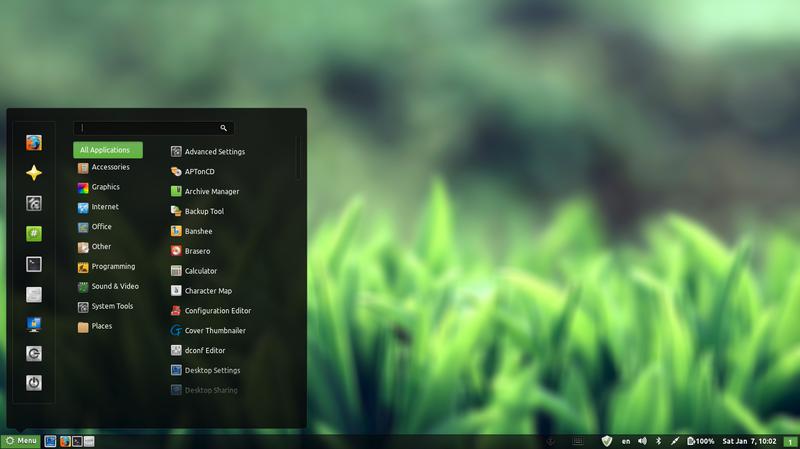
I decided to go with Cinnamon, it’s visually appealing and the download size is relatively small (51.4 MB). My only concern was reading online that it’s buggy and has many problems. But I was willing to take a chance!

At first I installed Cinnamon using these commands
This command is to add the repository to my system.
sudo add-apt-repository ppa:lestcape/cinnamon
This command is to update and install.
sudo apt-get update && sudo apt-get install cinnamon.

After the first reboot I had Cinnamon as an option on the login screen, which still looked like it was in XFCE and I had to enter my password twice! (it’s a common bug actually!)


I figured that deleting Xubuntu will fix my problem, so I began deleting Xubuntu, once and for all!

I used several commands to make sure the interface went away, like:

sudo apt-get -f install
sudo apt-get clean
sudo apt-get autoclean
sudo apt-get update
sudo apt-get purge xfce4

The second command is probably the longest I ever used, thank god for copy and paste!!

sudo apt-get remove abiword abiword-common abiword-plugin-grammar abiword-plugin-mathview bison blueman brltty-x11 catfish elementary-icon-theme exo-utils flex gigolo gimp gimp-data gmusicbrowser gnome-icon-theme-full gnome-system-tools gnome-time-admin gnumeric gnumeric-common gnumeric-doc gstreamer0.10-gnomevfs gthumb gthumb-data gtk2-engines-pixbuf gtk2-engines-xfce indicator-application-gtk2 indicator-messages-gtk2 indicator-sound-gtk2 indicator-status-provider-pidgin leafpad libabiword-2.8 libaiksaurus-1.2-0c2a libaiksaurus-1.2-data libaiksaurusgtk-1.2-0c2a libao-common libao4 libaudio-scrobbler-perl libbabl-0.0-0 libclutter-1.0-0 libclutter-1.0-common libclutter-gtk-1.0-0 libcogl-common libcogl5 libconfig-inifiles-perl libencode-locale-perl libept1 libexo-1-0 libexo-common libfile-listing-perl libfont-afm-perl libgarcon-1-0 libgarcon-common libgdome2-0 libgdome2-cpp-smart0c2a libgegl-0.0-0 libgimp2.0 libglade2-0 libgnomevfs2-extra libgoffice-0.8-8 libgoffice-0.8-8-common libgsf-1-114 libgsf-1-common libgstreamer-perl libgtk2-notify-perl libgtk2-trayicon-perl libgtkmathview0c2a libhtml-form-perl libhtml-format-perl libhtml-parser-perl libhtml-tagset-perl libhtml-tree-perl libhttp-cookies-perl libhttp-daemon-perl libhttp-date-perl libhttp-message-perl libhttp-negotiate-perl libid3tag0 libido-0.1-0 libilmbase6 libio-socket-ssl-perl libjpeg-progs libkeybinder0 liblink-grammar4 libloudmouth1-0 liblwp-mediatypes-perl liblwp-protocol-https-perl libmad0 libmailtools-perl libnet-dbus-perl libnet-http-perl libnet-ssleay-perl liboobs-1-5 libopenexr6 libotr2 libots0 libpolkit-gtk-1-0 libsexy2 libtagc0 libthunarx-2-0 libtie-ixhash-perl libtimedate-perl libtumbler-1-0 liburi-perl libwv-1.2-3 libwww-perl libwww-robotrules-perl libxfce4ui-1-0 libxfce4util-bin libxfce4util-common libxfce4util4 libxfcegui4-4 libxfconf-0-2 libxml-parser-perl libxml-twig-perl libxml-xpath-perl libxss1 lightdm-gtk-greeter link-grammar-dictionaries-en m4 mpg321 murrine-themes orage parole pastebinit pidgin pidgin-data pidgin-libnotify pidgin-microblog pidgin-otr plymouth-theme-xubuntu-logo plymouth-theme-xubuntu-text python-configobj python-glade2 quadrapassel ristretto screensaver-default-images synaptic system-tools-backends tango-icon-theme tango-icon-theme-common tcl8.5 thunar thunar-archive-plugin thunar-data thunar-media-tags-plugin thunar-volman ttf-droid ttf-lyx tumbler tumbler-common xchat xchat-common xfburn xfce-keyboard-shortcuts xfce4-appfinder xfce4-cpugraph-plugin xfce4-dict xfce4-fsguard-plugin xfce4-indicator-plugin xfce4-mailwatch-plugin xfce4-mixer xfce4-mount-plugin xfce4-netload-plugin xfce4-notes xfce4-notes-plugin xfce4-notifyd xfce4-panel xfce4-places-plugin xfce4-power-manager xfce4-power-manager-data xfce4-quicklauncher-plugin xfce4-screenshooter xfce4-session xfce4-settings xfce4-smartbookmark-plugin xfce4-systemload-plugin xfce4-taskmanager xfce4-terminal xfce4-utils xfce4-verve-plugin xfce4-volumed xfce4-weather-plugin xfconf xfdesktop4 xfdesktop4-data xfwm4 xfwm4-themes xscreensaver xscreensaver-data xscreensaver-gl xubuntu-artwork xubuntu-default-settings xubuntu-desktop xubuntu-docs xubuntu-icon-theme xubuntu-wallpapers


Finally I used Synaptic to make sure nothing titled XFCE was there, I used the custom filters Sections XFCE desktop environment universe to wipe anything that was left.
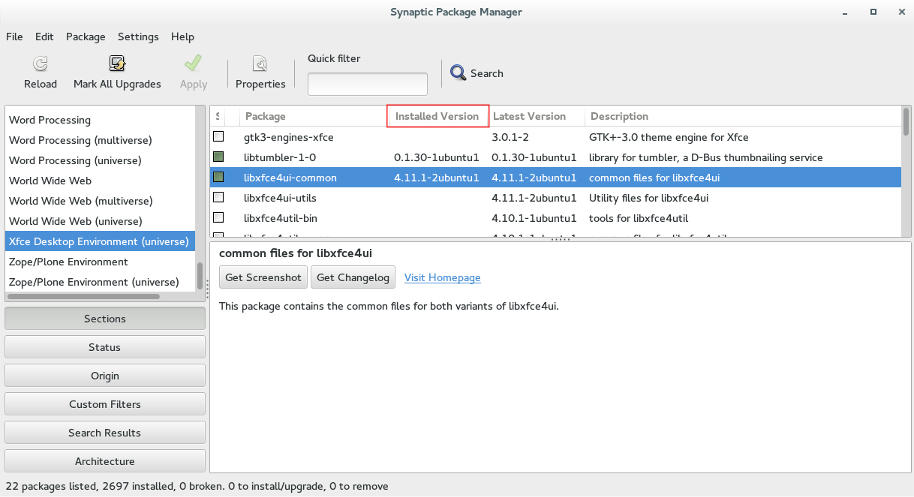
Using Synaptic to make sure all of XFCE's packages are gone.

Now I was running Cinnamon alone on my computer, and immediately I notice why it was dubbed as “Buggy”..

It was true, Cinnamon was buggy! I noticed several issues right off the bat!

A minor video issue was resolved in one of the reboots (no fix for that sadly).
The power manager is acting up, either this fixed my battery somehow or it’s just not reading it right!
I had to fix Docky like I did after the partial upgrade. This time locked all parts of it.
I rearranged the Grub menu items, now Ubuntu is top, I Also renamed it from Xubutnu to Ubuntu on the boot menut using Grub Customizer.

I was left with a buggy but pretty interface, and the login was messed up! Next week I’ll post what I did next, stay tuned!
FDM 5.1 released, Ubuntu version up for vote?

I’ve blogged about FDM in this blog before, being the best free download manager, and the alternative for IDM, and that it could replace uTorrent on your computer (and if you are using uTorrent, please remove it, it’s malicious!)< and the continue broken downloads using mirrors even if the server doesn’t support it!

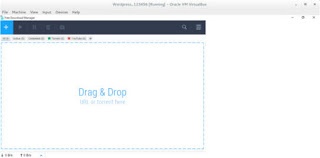
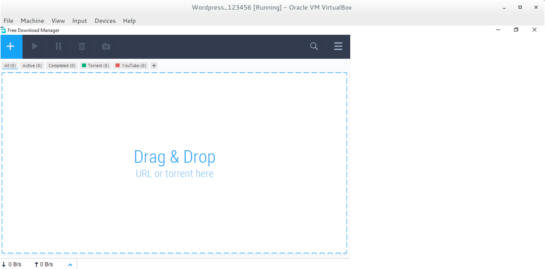
FDM 5.1 Interface

It has been redesigned into a more streamlined UI and they made the configuration is easier to use.
One of the biggest changes noted is the addition of a mac version and dropping the support for Windows XP and Windows Vista.

Since the addition of a Mac version, I wondered, why not an Ubuntu version? So I e-mailed the contact e-mail, and this is the response they gave me:


Hello!
Thank you for your feedback.

Our team is planning to release FDM5 for Linux OS, still, not in the nearest future though. We’ll inform all our users. Please keep up with the news on our blog.

I will be following them closely for you!

That means that FDM is one step away from being truly cross platform after being stuck in the Windows ecosystem for years!

Those are fantastic news! The new version is so awesome, Mac addition is lovely, and I can’t wait to see how does it look on Ubuntu, Will it make it in time for Ubuntu 16.04?

Update 2


“Dear Muaad,
Unfortunately, we are not planning to release a Linux build until a stable release for Mac OS X & Windows is out.
However, we are doing our best to make sure that our source code is compilable under Linux to the extent that it will not be too big an issue when we get to it.”

Update 3:
FDM has published a poll for future features, Linux is one of them! So vote Linux!!

Until this wait is over, be more than welcome to use uGet, it’s that good!
Let me know what you think in the comments section below.

Time for a change of interface on on Xubuntu 14.04

I have a need for change lately, I have been shaking things up and reordering things here and there . I believe its healthy. Amongst the changes decided to do some remodeling on my computer.

As you may know I use Xubuntu Linux and Windows 8.1 side by side as a dual boot. And since I just reverted back to Windows 8.1 (coming back from Windows 10) there is no need to mess around that. So it was time to take a look at my Linux distribution.

I have been using the same interface for quite some time now (since April 2014 to be specific) and that seems like a very long time to spend around one interface.

XFCE works well and I configured it to work like I want. Using Docky and Kupfer to do my daily tasks. And it works too well I’m afraid!

XFCE is a minimalistic interface who focus on performance rather than visual appeal, that’s a polite way of saying it looks awful but works well.

The blue scheme is depressing! I felt a sudden urge to change the scenery ( not just editing the theme, NOPE!).

I took a look at the interface options available for my Ubuntu LTS 14.04 Trusty Taher:

  • Unity (Ubuntu’s default interface).
  • Gnome(Ubuntu’s former default interface).
  • Cinnamon(Comes with Mint).
  • KDE( I assumed it will be much bigger in size because its not Gnome based).
  • LXDE(has an even more minimalistic approach than XFE).

Back when I installed Xubuntu I made the system partition small, so this is going to be an issue. Added to the horrible Internet that Libyawears so proudly, I needed to make a sensible decision to accommodate all of these conditions.

Before going any further, I need to mention that a Linux interface isn’t a theme (there are themes available for every interface), its the upper layer of the system that has the visual elements, login controls, handler apps. While it sounds like a difficult thing to do, its actually very easy to install an interface. You can have multiple interfaces at the same time (if you have enough free space on your system partition.) and alternating between them is as easy as choosing the user on login!

It’s an easy change that feels like installing a whole new system without the hassle of starting over and installing everything like it was before, your apps will be safe but the apps that come with the interface will change from one to the other.
I divided this into parts, I’ll post the next part soon enough, let me know what you think in the comments section belows 🙂

CodeLobster أخيرًا بالعربية!

كنت قد نوهت في تدوينة سابقة أنني سأقوم بترجمة برنامج CodeLobster إلى اللغة العربية لفائدة الشركة، ويسرني أن أعلن أنني قد أتممت ترجمة النسخة والحمد لله، وأتمنى عليكم تجربتها وإطلاعي بأية أخطاء إن وجدت وإرشادي لمواطن النقص فيها.

متى تكون الترجمة جاهزة للاستعمال؟ أظن أن النسخة التالية من CodeLobster ستتضمن الترجمة للعربية، يجب أن أتحقق من الشركة لأتمكن من إجابة هذا السؤال بوضوح!

تعديل: تواصلت مع الشركة وأبلغوني أن الترجمة العربية ستضمن مع النسخة التالية من البرنامج، سأقوم بالتدوين حول ذلك في حينه بمشيئة الله.
أتمنى أن يتقبل الله مني هذا العمل خالصًا مخلصًا لوجهه الكريم، ثم أن تحوز الترجمة على إعجابكم ورضاكم، وأتمنى من السادة مطوري الويب العرب أن يطلعوا على عملي المتواضع هذا ويتواصلوا معي عبر البريد أو المدونة.

« Older posts Newer posts »