Category: Review (Page 8 of 16)

برنامج مصارعة حرة بالليبي

تدوينتي لهذا اليوم ستكون حول برنامج مصارعة حرة بالليبي وكيف أصبحت جزءًا من طاقم العمل والإنتاج!

برنامج مصارعة حرة بالليبي هو أول برنامج إذاعي مختص بالمصارعة والرياضات القتالية في ليبيا، يقدمه الثلاثي: عمر الرقيعي، ونور الرابطي، وعلاء الدين الشريف.

شعار برنامج مصارعة حرة بالليبي
إعلان البرنامج على موقع فيسبوك

البداية

بدأ البرنامج منذ عام تقريبًا وكان يقدمه: عمر الرابطي وفتحي الديلاوي، لكن فتحي ترك البرنامج واستمر عمر في تقديمه منفردًا، ثم إنضم إليه نور الرابطي وبعده علاء الشريف.

المحطة والتردد وتوقيت البث

 يبث هذا البرنامج على قناة أل واي اف ام التردد 96.9 يوم الثلاثاء من الساعة الخامسة إلى السادسة  وأحيانًا يتحصل على وقت أطول قليلًا للحلقات الخاصة كالحلقة الخمسين (التي عاد فيها فتحي إلى البرنامج كضيف شرف) ويعاد بث الحلقة خلال الأسبوع من وقت لأخر.

الحلقة الخمسين من برنامج مصارعة حرة بالليبي
شعار الحلقة الخمسون المميزة

التواصل

يوفر البرنامج أرقاما هاتفية لتواصل المعجبين على الهواء، كما يمكن التواصل مع البرنامج على مواقع التواصل الاجتماعي: تويتر، وفيسبوك. ويوتيوب.
كما أن تسجيل الحلقات يرفع على موقع يوتيوب ويحقق نجاحًا لافتا مع الجمهور العربي. أرشيف البرنامج بالكامل محفوظ على موقع يوتيوب ويمكن للسادة القراء الإطلاع عليه من هنا.

تقسيم الفقرات

لاحظت تحسنًا كبيرًا في مستوى البرنامج وأنه صار يتسم بالنظام في تقسيم الفقرات وتوقيتها. بالمقارنة بالحلقات الأولى منه..
كما أن الأخبار مترجمة بعناية ومأخوذة عن مصادر تتحرى الصدق في أخبارها.

المشاكل التي تواجه طاقم العمل

علاقتي بالبرنامج

أردت أن أدون حول هذا البرنامج لأنني جزء من فريق الإعداد لفقرة الأخبار، كما شاركت في بث الحلقة الماضية بفقرة سكووب التي قمت فيها ببث الأخبار المستعجلة كمراسل البرنامج على شبكات التواصل الاجتماعي.

 فقرة سكوب من الحلقة الخامسة والخمسين إعدادي وتقديمي، للأسف تم حذف الحلقة بعد اختراق القناة اﻷولى.

بصيص من اﻷمل

هذا البرنامج هو إبتسامة في وجه الظروف الصعبة، ويهدف إلى تسلية المستمعين والترفيه عنهم لبضع دقائق. وشخصيًا هذا البرنامج من الأمور التي أستمتع بالعمل عليها من دون مقابل.
نعم! طاقم العمل لا يتقاضى مليمًا واحدًا عن البرنامج.

إن شغفهم وحبهم لرياضة المصارعة دفعهم لإطلاق أول برنامج من هذا النوع في ليبيا رغم كل الصعوبات والتحديات.

في الختام

لا يزال البرنامج يصارع للحصول على قاعدة جماهيرية من المعجبين، والطاقم يعد المستمعين بمفاجأة قريبة جدًا فكونوا بالقرب.

شارك هذه المقالة على مواقع التواصل، وأثريها بمشاركتك في قسم التعليقات 🙂

للأسف تم اختراق القناة وحذف المحتوى لكن الأرشيف المسموع موجود من هنا.
My review of Ubuntu Gnome 16.04

It’s been a couple of weeks since Ubuntu 16.04 was out! I decided to take my time and give the new distribution some time before making a review, I think two weeks are enough time, so let’s take a look at Ubuntu Gnome 16.04!!


Ubuntu Gnome 16.04 new logo

The distribution

Ubuntu Gnome 16.04 became an official Ubuntu flavor, making use of the Gnome interface, unlike the official Ubuntu that uses Unity as interface, it comes with Gnome software and isn’t a clone of Ubuntu, there are some minor differences in apps, Basero is  the default disk burn utility for example, and gnome software is at 3.20 out of the box.


Ubuntu Gnome 16.04 Screenshot

Please note that some of the tools in the screenshot aren’t installed natively, such as Zim-wiki and Sublime text.

Download and Install

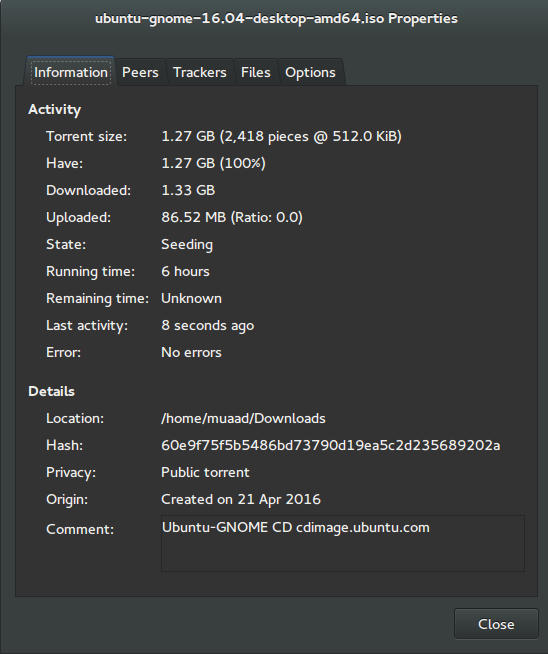
I’ve downloaded Ubuntu Gnome via torrent because I read it’s better for the servers, and come to think of it since the electricity goes out very often here, it’s better to download Ubuntu via torrent to save myself the trouble of downloading it all over again! It was downloaded eventually after 6 hours.
Checkout the download link from here.


It took 6 hours to download!
Torrent download information

I put it on a USB and began installing, pretty much the same since Ubuntu 10.10.
This version has 3 years of LTS support, why not five years? I’m not sure.


Steps to take after installing Ubuntu Gnome 16.04

Most of these steps are on my blog, but it won’t hurt to collect them all together in one neat list, would it?
  • Configuring wireless and Bluetooth, which is really easy to do but very important.
  • Installing the extras, the restricted extras needed to view media files and flash, and some fonts.
  • Installing my softwares, the usual package of stuff: VLC, Inkscape, GimpXmind and Zimwiki
  • Installing extensions: Clipboard indicator and OpenWeather.
  • Editing input sources to make it change between languages by pressing alt + shift, you can find how to do it from this link.
  • Restore the bookmarks and data (notes), Firefox is pretty easy to restore, and so is Zimwiki! All you have to do is to put the note folder in Home.
  • Customize LibreOffice. To make it more compatible with Arabic.
  • Disable apport, more details in the defects section.
  • Installing powertop for more power save and CPU Frequency to reduce fan noise!
  • Pomodro timer works beautifully with Ubuntu Gnome 16.04 and you have to install it, it’s the best timer app for Ubuntu to date! Read my review about it from here.
  • Disable tracker-store as shown in this askubuntu link. 
  • Disable evolution safely without uninstalling it. Saving nearly 170 MB of RAM.
  • I also decided to skip the Grub menu since I only use Ubuntu 16.04, to do that you need to download and install Grub Customizer with these commands:

    sudo add-apt-repository ppa:danielrichter2007/grub-customizer
    sudo apt-get update && sudo apt-get install grub-customizer

    After that go to Grub customizer and enter your password, go to settings and uncheck: show menu and look for other operating systems. This way you will get rid of Grub and boot to Ubuntu right away, don’t do this if you dual boot!!< red;”


Features and improvements

  • I do appreciate the Gnome 3.18 interface! A huge jump from the 3.10 that Ubuntu 14.04.4 ships with, as it has many improvements and tweaks and fixes for annoying bugs in Gnome 3.10 (LTS to LTS upgraders will relate!).
  • The notifications style has changed completely, it’s now displayed in a drop-down menu under the clock.
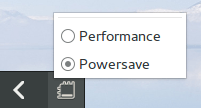
  • The annoying bottom bar was removed completely, a feature I will never miss! It’s replaced with a neat arrow that’s docked on the bottom left corner of the screen.
    Notification dock in Ubuntu Gnome 16.04
  • The new boot logo is so much better than the old one! That looks like a foot! This is more sleek and streamlined, reminds me of SEGA’s logo somehow!


Ubuntu Gnome’s new logo


Issues and defects

  • So far the performance is OK and there are few crashes, pretty much the same as Ubuntu 14.04.4 which is pretty stable by the way.
  • I’ve noticed that the network icon sometimes disappears, hopefully an update will fix this, my only fix is to reboot.
  • I would recommend that you disable apport as it will bring up a message every time you reboot.
  • Software isn’t as clear as it should, I can’t tell how big are the softwares and updates, so I use Synaptic on a daily basis to get things done!
  • When disconnecting the wireless network with the hardware key it’s not recognized anymore until several reboots, it’s a known bug but with no fix afaik! The only info I could find was this terminal command: sudo service network-manager restart This command will restart the network manager and allow it to connect without the need to restart several times.
  • The fan noise was too much at times, even when the computer was idle, I thought upgrading from Ubuntu Gnome 14.04.4 to Ubuntu Gnome 16.04 would fix this but it didn’t, until I installed CPU Frequency!
  • Nautilus 3.14 could use an update and we don’t have to wait till 16.10 to get one! I managed to follow a rather risky tutorial to update it to 3.20 and it’s so much better!
  • If you are using an SSD you might want to look at this post to avoid the /dev/sd1 :Recovering Journal issue.
  • Starting up without a user interface at times, and my only cure was to restart the computer, I found a fix that suggests to clear the packages config from Synaptic.
  • Sometimes shutdown can be slow, I found the steps in here worked like a charm!

“Software”

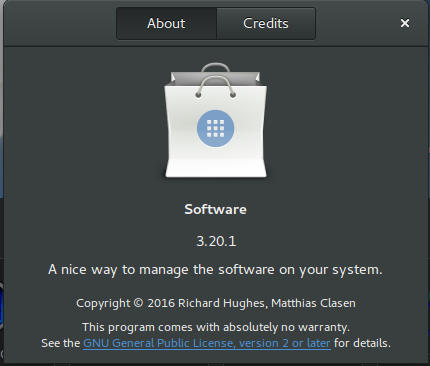
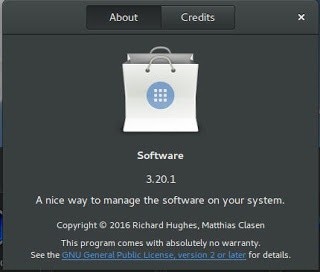
Ubuntu Gnome 16.04 ships with Gnome software 3.20. Which is the software that is supposed to replace Ubuntu Software center, I find them both buggy and unusable, as I use Synaptic to do my package work.


Softwares 3.20 on Ubuntu 16.04

I do believe it needs more work to become a reliable software center, it stays in the background and behaves oddly, it doesn’t show the download progress on software being downloaded too, which seems odd!

I winded up un-installing software and reinstalling the good’ol Ubuntu software center!

Final words

Ubuntu Gnome is a great choice for anyone who wants to enjoy Gnome  without having to leave the Ubuntu universe to Fedora or OpenSuse, it provides the purist Gnome experience possible for Ubuntu, and it preformed better than regular Ubuntu installed on older machines (with proper tweaking mentioned here).

The more I use it the more I could tell that this is the distro for me, great job indeed by the team, and I rate it as a must have!

I hope you enjoyed this post, please let me know what you think in the comments section below, and remember: Sharing is caring!!

تقرير برنامج CodeLobster PHP Edition 5.8 الداعم للعربية

هذا البرنامج هو بيئة تطوير متعددة الأغراض، يستخدم لتطوير العديد من تقنيات الويب مثل HTML, CSS, JavaScript and PHP في النسخة 5.8 تم دعم اللغة العربية في التحرير وأصبحت تظهر بشكل واضح غير مفكك على غرار النسخ السابقة، وهو مطلب قامت الشركة بتنفيذه نزولًا عند رغبة المستخدمين العرب.
قمت بعمل تقريري على النسخة الاحترافية مكتملة الخصائص، لذلك ربما لا تعمل مع بعض الخصائص حتى تقوم بشراء ترخيص من الشركة. للنسخة الإنجليزية إضغط هنا.

يعمل البرنامج على مختلف نسخ Windows ابتداء من Windows XP وحتى Windows 10 الجديد (قمت بتجريبه عليه وهو يعمل بكفاءة).

حتى اللحظة لا توجد واجهة عربية للبرنامج رغم دعمه للعديد من اللغات العالمية كالألمانية والفرنسية والإيطالية والروسية، سأقوم إن شاء الله بكتابة ترجمة عربية للواجهة وأمل أن تقوم الشركة بإدماجها في النسخة المقبلة من البرنامج.

تحديث: تم بحمد الله تعريب البرنامج، اطلع على الإعلان من هنا. ولتحميل نسخة بالعربية اضغط هنا.

يتوافر من CodeLobsterPHP Edition نسخة مجانية تمامًا وكل ما عليك هو تسجيل بريدك الإلكتروني لتتسلم مفتاح التفعيل دون مقابل، هذه النسخة المجانية تحتوي على المميزات الأتية:

     إبراز النصوص للغات الأتية PHP/HTML/CSS/JavaScript. أي أن النص المكتوب بهذه اللغات يظهر بالألوان التي تسهل قراءته وتتبع السطور البرمجية.
  • التكملة التلقائية للمفردات عند الكتابة باللغات البرمجية الأتية:

PHP/HTML/CSS/JavaScript

  • مصحح أخطاء قوي للغة PHP
  • ملف مساعدة مفهرس مضمن مع البرنامج، ومساعدات تفاعلية تظهر أثناء التطوير.

للتمتع بخصائص النسخة المجانية يجب تسجيل بريدك الإلكتروني من الرابط، بعد ثلاثين يومًا من الاستعمال دون تسجيل سيتوقف البرنامج عن العمل.

الواجهة

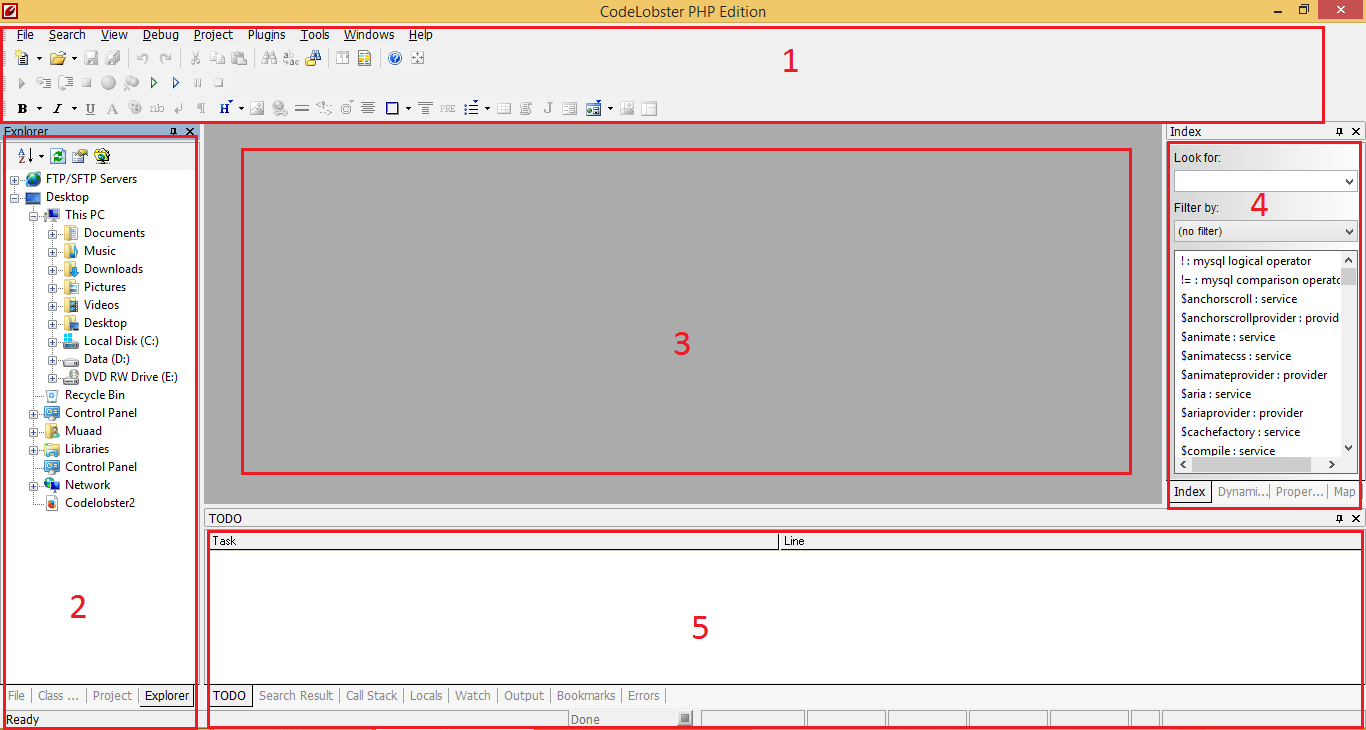
واجهة البرنامج مقسمة إلى أقسام عدة لتسهيل الوصول إلى الخصائص والتعامل معها، بالإمكان تخصيص ألوان البرنامج واختيار مواضيع متنوعة لتناسب كل الأذواق.

CodeLobsterPHP Edition interface

القسم العلوي

يحتوي شريط القائمة، وأسفله شريط الأدوات، ينقسم بدوره إلى ثلاث صفوف وملئ بالأدوات التي تسهل عمل المبرمج، مثل

Image Mapو Divو Span، ومجموعة الأدوات التقليدية كالحفظ والحفظ باسم، التراجع، نسخ وقص ولصق، والبحث.

القسم الأيسر

يعتمد على التبويبات لاستغلال أفضل للمساحة، يحتوي على مستكشف المجلدات، قائمة الملفات، تبويبة المشاريع، وبالإمكان تعديلها من قائمة معاينة نافذة.

القسم الأوسط

يحتوي على محرر النص البرمجي، وتحته ثلاث تبويبات يمكن التنقل بينها بالضغط على مؤشر الفأرة الأيسر، الأول هو الافتراضي: سطر البرمجة. الثاني: معاينة الكود، وهي خاصية مفيدة حيث يمكنك من عرض صفحة الويب في متصفح داخل البرنامج دون الحاجة لفتح متصفح خارجي. الثالث: المدقق ويمكنك من تتبع النص بدقة ومراقبة الأقواس.

القسم الأيسر

من أكثر الأقسام فائدة فهو يحتوي على الدوال البرمجية مع شرحها لكل لغات البرمجة المدعومة، وهي ميزة لا غنى للمبرمج المحترف والهاوي ومن يتعلم البرمجة عنها، مع إمكانية فرز الدوال وتصنيفها، وهو أيضا مقسم لتبويبات للاستفادة الأعظم من المساحة.

القسم الأسفل

هو أيضًا مقسم إلى تبويبات ويمكنك أن تبادل بين الاختيارات للاستفادة من المساحة، وبالإمكان تعديلها من قائمة معاينة نافذة ويمكنك فتح عدة ملفات والمقارنة بين التغييرات.

مدة التعلم

لو إستعملت أي بيئة تطوير مثل Microsoft Visual Studio ستشعر وكأنك في منزلك تمامًا، ومع ملف المساعدة المضمن والمساعدات التفاعلية ستتقن استخدام البرنامج بسرعة وسهولة.

الأداء

حجم التحميل قرابة 30ميغابايت والتنصيب يقارب 100ميغابايت، أي أنه حجم بسيط مقارنة بإمكانات الأجهزة المتوسطة والحديثة، ويأخذ من 70 – 200ميغابايت من الرام حسب الملف المفتوح، كما أنه يفتح الملفات الكبيرة بسرعة فائقة ودون خلل أو انهيار (قمت بتجربة هذه الأمور بنفسي لغرض التقييم).

ميزات البرنامج
  • يمكن تشغيله بشكل محمول دون تنصيب ونقله لأي جهاز تعمل عليه Portable
  • لا يحتاج لمكتبات إضافية ليعمل مثل Java Runtimeأو Microsfot.Net
  • سريع في عرض الملفات الكبيرة.
  • النسخة المجانية بها مميزات جيدة!
  •  التسجيل يعطيك تحديثات مجانية مدى الحياة!
  •  دورة التطوير مستمرة ومنتظمة.
  •  مجتمع ودود يقدم دعم فني ممتاز.
التراخيص
يوجد إمكانية استعمال البرنامج 30 يومًا لغرض التقييم قبل توقف البرنامج عن العمل.

الرخصة المجانية

تمكنك من التمتع بالمواصفات القياسية بدون مقابل، مجرد تسجيل بريدك الإلكتروني وتسلم مفتاح التفعيل.


الرخصة الخفيفة

ثمنها 39.95$ وبالإضافة من تمكنك لدعم المطورين تعطيك ميزات أقوى من ضمنها مدير قواعد بيانات SQL، مدقق للسطور البرمجية، التحكم في النسخة، وغيرها من الميزات القوية.

الرخصة الاحترافية

 تبلغ تسعيرتها 99.95$ وهي نسخة متكاملة الخصائص، تجمع بين خصائص النسخة الخفيفة مع 12 إضافة لبعض أشهر أنظمة إدارة المحتوى وأطر العمل التي تسهل على المطور كتابة المواقع مثل Durpal, WordPress, Joomla, J query .

ويمكن الترقية بسهولة من النسخة الخفيفة إلى الاحترافية، كل المدفوعات مؤمنة عبر شركة Avangate لضمان أمن وسرية معلوماتك!

كل التراخيص تحصل على ترقية مدى الحياة، تشتري الترخيص لمرة، وتتمكن من ترقيته كلما صدر تحديث جديد بدون دفع قرش إضافي!
مع كل هذه المميزات ودعمه للعربية، يدخل CodeLobster PHP Edition المنافسة بقوة، بنسخته المجانية وأسعاره المعتدلة، هو قوة تطالب بالاعتراف بها.


CodeLobsterPHP Edition 5.8 is out, supports Arabic!

CodeLobsterPHP Edition continues it’s active development cycle by launching version 5.8 which brings many improvements to the  IDE, most notably an improvement long anticipated by Arab developers, Arabic support.

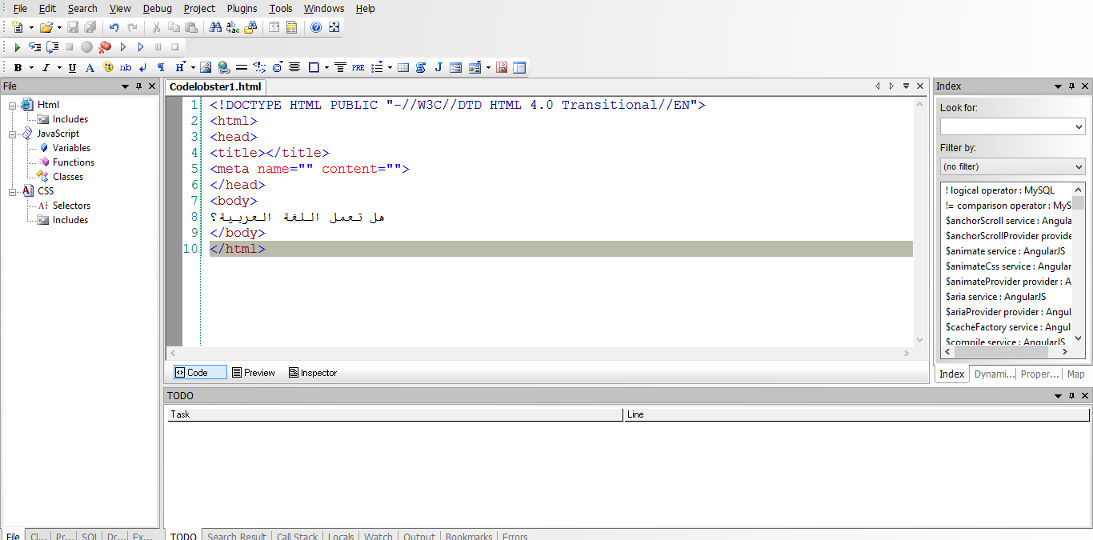
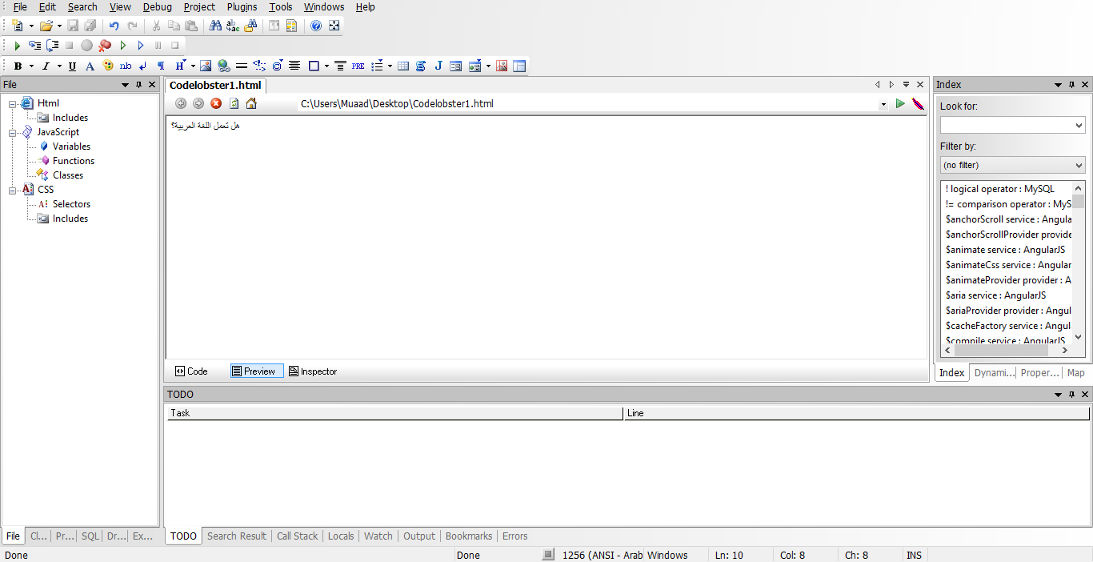
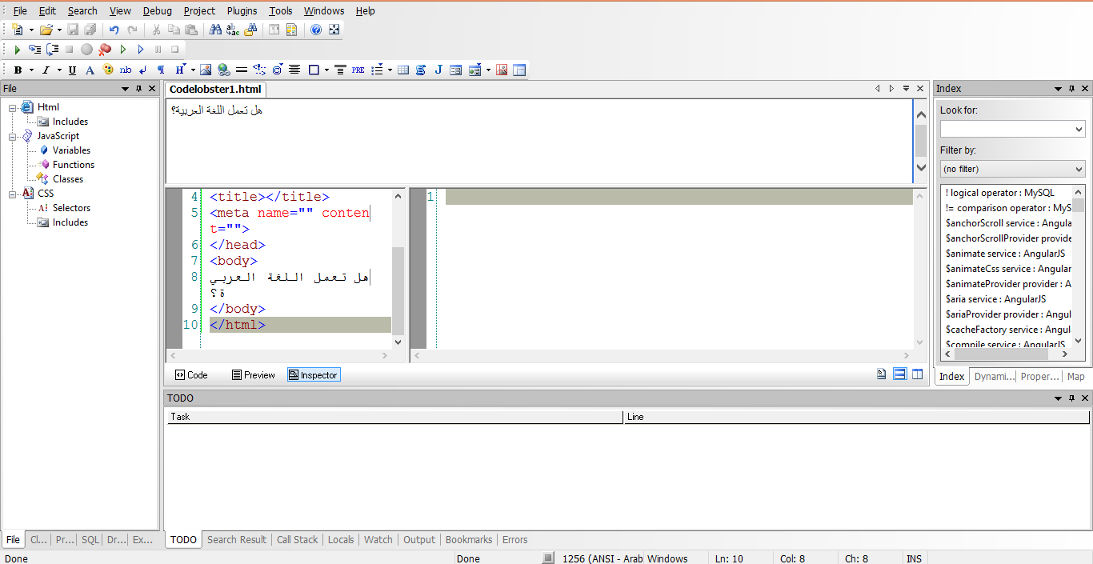
In my review of CodeLobsterPHP IDE I listed not supporting Arabic as a con of this software, now I can proudly say that it supports Arabic, and I was asked by the company to test for Arabic support, here are the results:


Arabic language working on the code pane


Arabic language working on the preview pane


Arabic language working on the inspector pane

For a complete list of features and bug fixes on version 5.8 click here.

Many Arab developers like this IDE and they are interested in purchasing a license, the only thing stopping them is that CodeLobsterPHP Edition doesn’t support Arabic. Starting of version 5.8 that’s a thing of the past!

I listed in my review of CodeLobsterPHP Edition that it has a friendly and responsive community, check the request I posted asking for Arabic language support, they are as good as I said they were!

So here you have it!  It supports Arabic now!
As an Arab developer, is having Arabic support in the tools a problem? How do you feel when Arabic is supported on such an amazing IDE? Would you try it? It has a free version you know 😉
Let me here what you have to say, and expect an Arabic post about CodeLobsterPHP Edition soon!


« Older posts Newer posts »