Category: tech tip (Page 4 of 5)

Movie Maker 2.1.4026.0 download on Windows 10 Pro

Movie maker is an old software bundled with Windows XP to make simple video files. If you were around during the early days of Youtube that was the de-facto tool to make videos.

I needed to make something quickly and when I tried downloading it from the internet, I was met with many links and articles suggesting that it won’t work and it can’t be done.

Being the stubborn person that I am .. I decided to put that claim to the test.

How did I go by doing that?

I installed Windows XP SP3 on a virtual machine and copied movie maker from there.

When I ran it on my Windows 10 system, it worked fine without an issue!

So, here is the link to download that version (2.1.4026.0). Just extract and get going.

Final words

I hope that you found what you are looking for here. Thanks for dropping by and I’ll see you in another post.
انطباعات حول نظام LineageOS 17.1 على هاتف Google Pixel XL

كنت قد دونت من قبل عن الأسباب التي تجعل اقتناء هاتف Google Pixel XL منطقيًا في العام 2020. فهو هاتف Flagship يمكن الحصول عليه بثمن زهيد مقارنة بالهواتف المشابهة له في المواصفات. وكما أن مزاياه لا تزال ملائمة حتى بعد مرور 4 سنوات على إطلاقه. إحدى هذه المزايا هي دعم نظام له. بالنسبة لي الأمر مهم لدرجة أني أعده أحد معايير اختيار هاتفي التالي.

وهذا هو موضوع تدوينة اليوم. حول تجربة مع نظام   على هاتف Google Pixel XL

تحذير واجب: تجربة هذه الطريقة على مسؤوليتك.. تفليش روم مخصص لهاتفك لا يخلو من مخاطرة. وقد يتحول هاتفك الثمين لثقالة ورق فخمة! كما أنه لو حاولت تفليش “روم مخصص” ليس لهاتفك.. فمبروك عليك ثقالة الورق الجديدة!!

أيضًا هذه التدوينة لن تدخل في كيفية التنصيب. فقط سأقوم بتضمين مقطع فيديو يحتوي على الطريقة كاملة. وهو نفس المقطع الذي اتبعته لتنصيب نظام التشغيل..
علما بأن تدوينتي حول هاتف الهواوي بها نفس الخطوات، فقط لجهاز مختلف.

انطباعات أولية

  • بعد تنصيب النظام بنسخته الأخيرة وحزمة تطبيقات Google Gapps لاحظت أن أداء البطارية تحسن مقارنة بروم غوغل السابق.
  • المساحة الخالية المتوفرة للمستخدم زادت بما يقارب 3 غيغا بايت (هذا الهاتف لا يقبل إضافة ذاكرة خارجية).
  • كل شيء يعمل كما هو متوقع منه. عادة تكون هناك تحذيرات حول إستقرار نظام التشغيل أو توافق العتاد (الكاميرا – المايكروفون مثلا) مع النظام الجديد. لكن هذا لم يحدث حتى الآن.
  • إمكانيات التخصيص زادت بشكل كبير جدا. مثل الأيقونات في الشريط العلوي. موضع الساعة وشكلها. اضافة الثواني للساعة. شكل الساعة على شاشة القفل.
  • تخصيص كل زر من الجهاز للقيام بوظائف إضافية. كما يمكن فتح وقفل الشاشة بالنقر عليها فقط (سابقا يمكن فتحها فقط بالنقر).
  • شكل الأيقونات وألوان المؤشر (سابقا كانت بيضاء فحسب). ومن الممكن تحميل حزم أيقونات لتغيير شكل الايقونات كاملة.
  • بالإمكان تخصيص لون ضوء الاشعارات حسب حالة الشحن والتطبيق المرسل. وعلى حد علمي لم تتوفر هذه الخاصية في روم المصنع.
  • وأهم من ذلك كله. توافر تحديثات أسبوعية للنظام. حيث أن Google أوقفت دعم الجهاز رسميا في ديسمبر من العام الماضي.
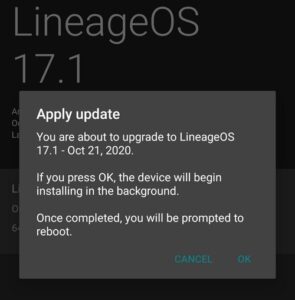
  • بمناسبة التحديثات.. بمجرد تنصيب الروم المخصص يمكن البحث عن التحديثات من الهاتف وتحميلها وتنصيبها دون الحاجة لخوض الخطوات المذكورة في الفيديو وتفليش كل تحديث عن طريق ADB.

خلاصة التجربة

الأمر فعلا يستحق فقد منح هذا النظام شكلَا جديدًا وأداءًا أفضل للهاتف. وأضاف إليه مميزات لم يعد من الممكن الحصول عليها من Google .

هل سبق لك تفليش روم مخصص على جهازك؟ هل كللت تجربتك بالنجاح أم بالفشل؟ سبق لي تفليش روم مخصص على هاتفي الهواوي Y560 وإعادته لروم المصنع بنجاح. ويمكنك الاطلاع على التجربة من هذا الرابط هنا.

ملاحظة: تطبيق الكاميرا ليس بنفس جودة كاميرا قوقل، عدت لاستخدامها بعد أن لاحظت أن جودة الصور أقل.

هناك تدوينة جديدة حول هذا الهاتف أنصح بمطالعتها من هنا.

How to restore Firefox Quantum passwords after an update?

The new Firefox is amazing, it’s been renamed Quantum since version 57 back in 2017. I used to use an add – on to import and export passwords, however it’s no longer supported in the new version of Firefox.

An update that does some damage!

However I’ve noticed that sometimes after an update, the saved passwords are erased, and I have to enter them manually, which is a real pain!

How to import and export passwords without an add – on?

There is a very simple way which is creating a Firefox account and using that to sync your information across different devices: Passwords, bookmarks and history.

You must have more than one device for this method to work: Your phone and your computer for example. Or two computers: Your work computer and your house computer.

The fix

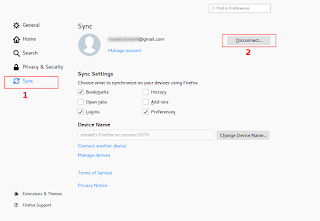
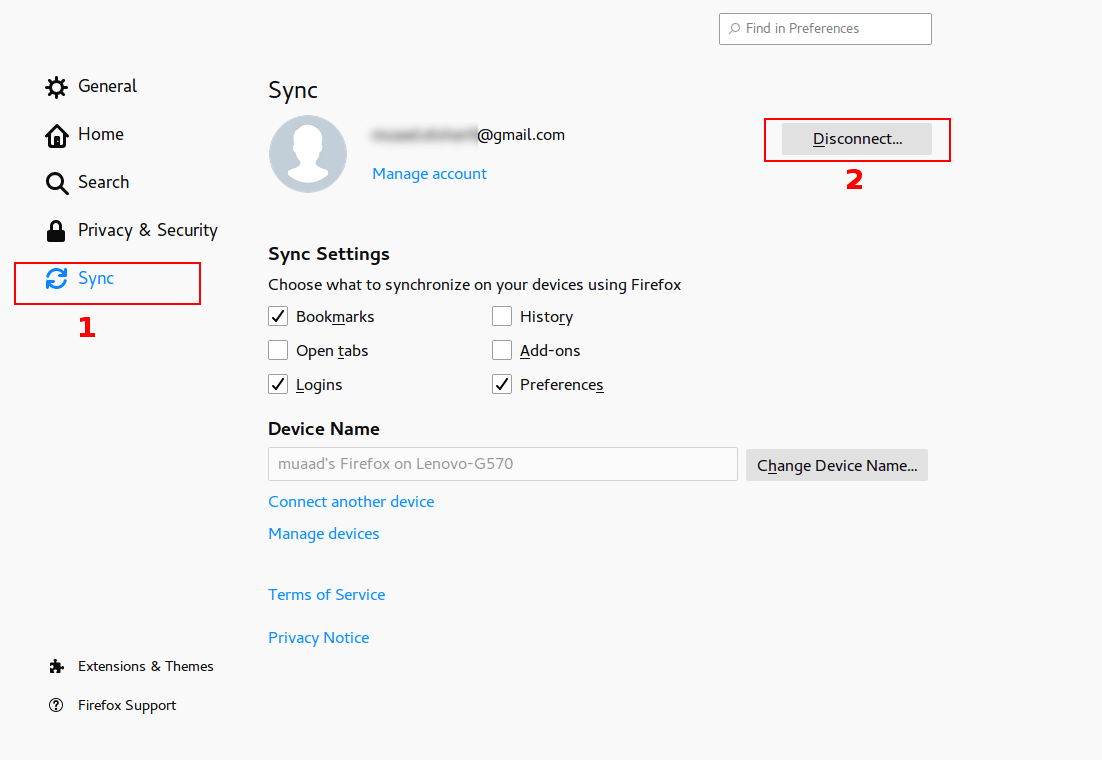
From the main menu go to: Edit Preferences Sync

Click Disconnect, then sign again with your login information. Firefox will sync the information from the other device and you will get back your passwords in no time!
Please note that clicking disconnect would erase any data you had stored in Firefox, so watch it!

Final words

That’s how you restore saved passwords and bookmarks for Firefox Quantum. I hope you found this post useful. Please leave a comment if you have a question.

Focuswriter not starting stuck on loading sounds fixed

Focuswriter is a free and open source (FOSS) cross-platform distraction free writing software that is lightweight and easy to use. Today I’ll show you how to bypass the loading sounds bug and fix it completely!


Focuswriter logo

The problem

It all started when I tried to enable the typing sounds on my Netbook running Antix Linux, the program froze and I had to shut it down manually. After that whenever I try to start the program, it won’t start!


Attempted fixes

Trying to uninstall the program and install it again didn’t work! Even removing configuration files from Synaptic didn’t work, no matter how many times I install and uninstall it again, the problem persists!

The fix

Using your file manger of choice, navigate to /home/[username]/.config/GottCode/ and in it you will find one file only: FocusWriter.conf
Delete it and restart the system, after it starts again, you will have Focuswriter running like it should.
A new configuration file will be created automatically, no need to worry about the file being deleted. 

Focuswriter interface

Final words

Going for a lightweight mixture of a Netbook, Antix and Focuswriter can be a winning combination, and as a slight compromise bucklesrping can be installed individually for an aesthetically pleasing writing experience. And if you are typing at night, enable the leds on your keyboard!

Do you use any of these tools? Do you find this tech tip useful? Please leave your opinion in the comments section below, and I’ll see you in the next one.

« Older posts Newer posts »