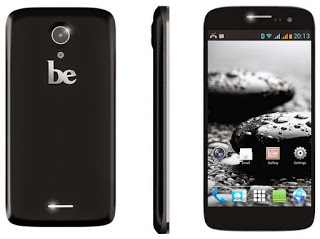
It’s been a while since anyone mentioned the Be Elite. A solid phone with no potential at all!!
Month: September 2015 (Page 1 of 3)
Over time your system gets overloaded with problems and dead shortcuts, the installations and removal of software, some hidden malware you aren’t aware of. Even with cleaning solutions like Iobit advanced cleaner and Ccleaner. You still have some things you can’t clean. You will notice over time a slower boot and a general drop in performance. That’s time to consider a clean install.
What is a clean install
A clean install is the process of erasing your system and installing it again. It’s clean because all the cruft and mess will go when you format your drive (hopefully not taking away precious data) and it will return your computer’s snappy fresh performance. Much like restoring the factory settings, an option available in the late Windows versions: Windows 8, Windows 8.1 and Windows 10.
But what if your computer isn’t OEM and it doesn’t have a recovery disk? Then you have to clean install your system.
The benefits you will gain from clean installing your computer
I got rid of many unneeded Visual C++
This was somewhat of a problem to me! I had nearly 10 Visual C++ and I couldn’t find a way to remove them, even the pages I looked recommend leaving them as-is. Now all of them are gone!
Office fonts and data.
I used to have Office 2010 demo and it installed hundreds of fonts, and removing them by hand was a hassle! Not to mention the tons of registry cruft left down by MS office.
Every trial is now reset to zero.
Some of the tools I experiment with are trials, after I clean install the system all of them can be used all over again!
Registry is smaller and healthier
It’s all about the registry, as it’s where the program’s data are stored. And when removed it doesn’t gain back the size, even defragging it won’t do much good.
I installed much less software (only the necessities).
I was surprised by the amount of tools installed which of I NEVER use! I try to keep it to a minimum. And use tools that do more than one function. I don’t install Gimp and Inkscape for instance because in Windows I have Fast-stone viewer and LibreOffice draw could do the design work, if it’s more than that I have to use Inkscape.
I recovered even more space
More space as the Windows.old is gone, and other things that I don’t need and can’t clean.When I upgraded to Windows 10 there was the Windows.old folder which is supposed to take you back to Windows 8.1. I then discovered it was just a dummy and had to clean install. I saved a lot of space because of that and because of cutting down my software list.
In theory start-up time should be faster.
And it is faster! It has improved between the old 8.1, Windows 10, and reinstalling 8.1.
Solved the Swow drama I had when I was “interested in games”
I had to copy tons of DLL files to make some games work. And that was a mess! I almost ruined Windows over copying some files by mistake.
All the tricky settings you changed once and forgot how to return (and feel too lazy to return)
As I was doing some PHP work I had to Install the Xampp server on my computer, it wouldn’t work so I had to change a lot of settings to make it work, formatting meant that it went back to default on it’s own!
The first actual clean install I had in a while
Since starting the dual boot thing I haven’t clean installed! I installed Windows 8, Windows 8.1 was a store update, and Windows 10 was an upgrade. Even when I clean installed Windows 10 I was being forced. And not actually doing it to gain any benefit.
These were the benefits I found and could think of, do you have any more benefits to add?
I’m sure that the factory option is also good and will probably do the same good, but my system isn’t OEM and that doesn’t apply to me. If I could get a chance to try that option I’ll make sure to note of it.
How should often to do this reset?
That’s a tricky one! It depends on you mostly, if you have a slow changing system then it won’t be necessary for two years at most. On the other hand if you tend to install and uninstall software a lot. You might want to do that yearly (You will enjoy it!).
Have a nice day 🙂
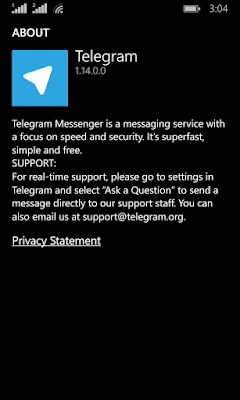
We have looked into several chat apps in this blog such as Whatsapp and Viber. Telegram focuses more on privacy and security more than these apps.

Telegram’s popularity exploded when Facebook announced it’s acquisition of Whatsapp in early 2014 raising security concerns among users, peaking 50 million downloads that day alone. Telegram is free and open source and has no advertisement what so ever!
Let’s take a look at the reasons to abandon whatever you become addicted to and switch to Telegram.
Who can you chat with in Telegram?
Much like Whatsapp and Viber, your contacts are your phone book contacts, and you can look users by user name as well.
You can talk to a single person or be a part of a group, and you can chat people using the secret chat feature.
Telegram features
Free and open source
When Whatsapp has been recently changed to become free, Telegram is free for life and has no ads what so ever (almost too good to be true!), while Viber has the sticker market which always wants you to buy the stickers.
Private
Telegram messages are heavily encrypted and can self-destruct, which is great for privacy (unless you are the parent of a teenager!) the most secure form of chatting you can have is provided by Telegram.
If the other person tries to take a screenshot of the secret chat, you will be notified! That’s amazing 🙂
Fast
Telegram delivers messages faster than any other application ( I still need to put this feature to the test), it tends to delay on SIM data but in general it’s fast!
Secure
Telegram keeps your messages safe from hacker attacks.
Powerful
Telegram has no limits on the size of your media and chats, while Viber and Whatsapp limit you to media files, you can send anything with Telegram! (Zip .MP3 .Doc) as big as you like!!
Cross platform / Cloud based
All of the popular platforms are supported, Windows, Linux, iOS, Android, and in case that wasn’t enough, there is a web version. And you can access your chats from an unlimited number of devices you have, and the web version is independent, you don’t have to prove to be online to chat on your PC!
Download
Click on the platform you have and it will take you to the official app in the store (you don’t want to download an unofficial app).
Download for Windows Phone
After we looked at the awesome features, lets take a look at some things Telegram has:
As of August 2014 Telegram delivers 10 BILLION telegrams each day!
You can create a bot to do whatever you want (if you have the skills to do so) and this bot will fetch your email, check the weather or even play chess! Read more about it here.
You can enjoy strong and private chats with your friends and co-workers, create groups to chat more efficiently or even subscribe to channels.
Channels
This is the latest features added on September the 22th 2015
Channels are the latest way to deliver messages to an unlimited number of subscribers, where they can catch up to the latest messages and read all the message history, each channel has a view count and a members count. and for a better understanding of it subscribe to Telegram’s channel, and you can create your own channels right away as the new Android / iOS version will have this feature with the latest update, others are coming soon.
And before you ask, no it doesn’t support voice/video calls!
It’s not a VOIP application, it’s not a video chat application. It’s a chat application that does! They might add the VOIP option later, I don’t think it’s going to be free. So enjoy the incredible feature set.
Conclusion
I am happy to find a chat app that Facebook hasn’t got it’s claws on yet! Those guys are all over the place! Telegram is safe, secure. Totally free and completely awesome!
The possibilities are endless, and the development is ongoing!
Do you use Telegram to chat with friends and family? Please tell me your experience with it in the comments section below.
Until the time of this writing Piriform hasn’t made it’s software available for Ubuntu. But there are other tools you can use to clean and optimize your computer.
One of these tools is Ubuntu Tweak. A suit of tools that is used to tweak and optimize Ubuntu and control some aspects that aren’t usually easily available.

To install Ubuntu Tweak click this link and download it to your computer then install it as you would do normally.
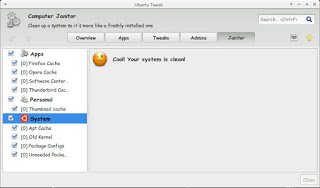
From the main menu navigate to janitor and click the stuff that need cleaning.

There are several categorizes: Apps, Personal and system.
You have to be careful when cleaning. If you don’t know what to do I suggest you avoid the system category.
Once checked press clean and enter your password to clean up the system as you see in the image!
It’s a good way of tracking disk space and keeping an eye on your system.
Please note that cleaning up the APT cache will delete the software installations you downloaded from the software center, and you should copy them first for backup and re installation if anything happens!
أنا الفائز بجائزة المدون المنتظم لعام 2025 من موقع مرجع التدوين
