Month: August 2015 (Page 1 of 4)

Uninstall Windows 10 Reinstall Windows 8.1 using the same license (Not a rollback).

I’m happy to announce that I found a way to get back to Windows 8.1! Not from the rollback option or the recovery! My way is uninstalling Windows 10. And reinstalling Windows 8.1 using the same license!
It’s not a rollback. I had Windows 10 for over a month, plus I removed the Windows.old and reinstalled Windows 10. So no recovery options were available. What I did was an old fashion uninstall / reinstall job with some license work.
The method is very simple. I’m going to list somethings you need first:


  • Make sure your Windows 10 works.
  • Make sure you are using the same version of Windows 8.1 you had before.
  • You must be online the whole time. Your Windows 10 has to work because we are going to “Uninstall it”. If it doesn’t work for any reason DON’T INSTALL WINDOWS 8.1 RIGHT AWAY. I warned you!!

You need to repair or fresh install your version of Windows 10 in order to complete this tutorial. I made a post about it so feel free to check it out!

Uninstalling Windows 10

The first step is running the command prompt in administrator privileges.

and type in the commandslmgr /dlv

You will get an information box about your computer. What we need from here is the Activation ID.
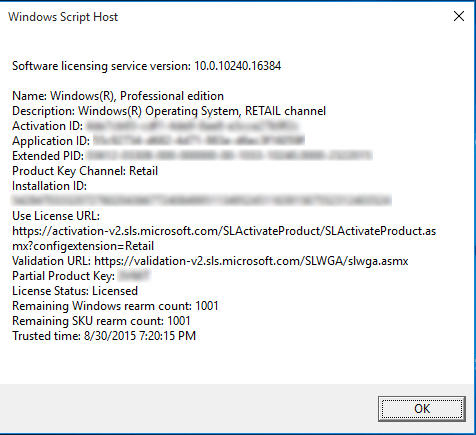
Information box about your license
  • After getting it we are going to uninstall that product key (so we can use it after reinstalling 8.1). Type in :
    slmgr /upk 181520dd-3fc4-4df2-81f5c513467ad56d –
  • Iblurred out my key, so just put in yours-
  • If a box comes out saying your product is uninstalled. You done it right.
  • Go check the activation. If it says it’s not activated, then you are free to move into the next step.
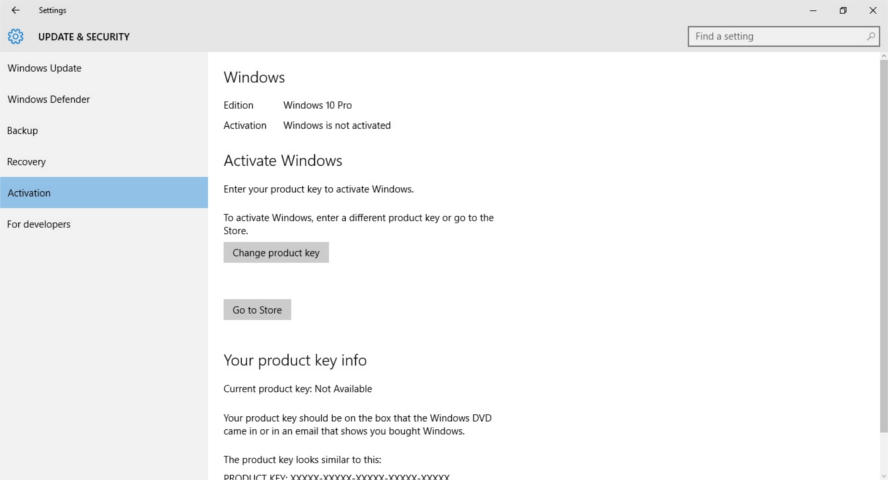
Windows 10 is not activated

Installing Windows 8.1

Make sure you backup all your data. And that you have your license key (That came with the disk or in an e-mail) and if you don’t know where to find it. There is a helpful way to find it.
Get the Windows 8.1 disk. Boot from it by hitting F12 on boot.
Follow the installation procedure, format the drive Windows 10 is on and install Windows 8.1 there.
Make sure you are connected to the Internet when prompted.
Complete the installation as you would do normally. And when it comes to entering the key. Skip that step.

Activating Windows 8.1

When Windows 8.1 is up and running, run the command prompt in administrator privileges and type in the command
slmgr /ipk XXXXX-XXXXX-XXXXX-XXXXX-XXXXX
 Where XXXXX is your serial number, which you will find on the label of the disk or in the e-mail sent to you.

You will get a box saying key XXXXX-XXXXX-XXXXX-XXXXX-XXXXX installed successfully.

When checking the Windows activation, I found that the key used to activate was the same I had before upgrading to Windows 10. (I blurred mine for obvious reasons).
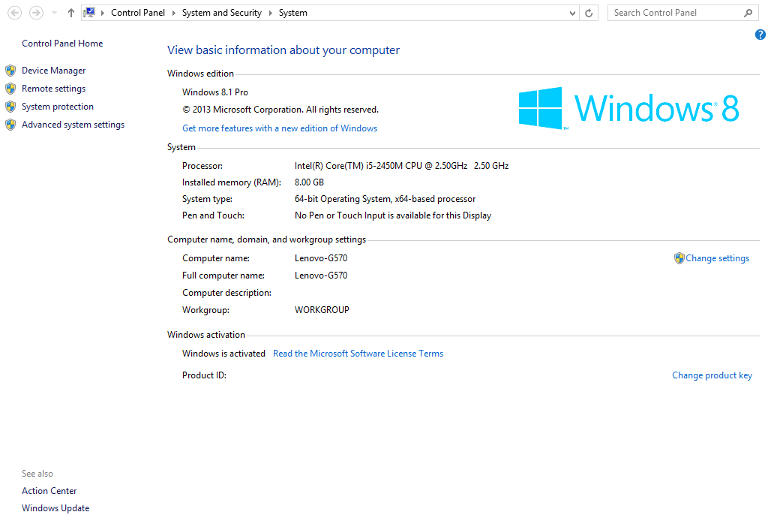
Windows 8.1 activation

Important Notes

If you use a different version of Windows other than you used, it won’t activate and you would have to reinstall Windows 8.1.

You must be online the whole time.
If you are dual-booting, you will have to do these steps again to make sure everything works.
If you are unable to find your license key use the software in this post.
Update: This part is written after rolling back.
I was forced to download all of the updates released for Windows 8.1. A total of 1.5 GB download on top of the 3 gigabyte download!
I hope you found this a useful post. Please comment below if anything. And if you are out there. Don’t upgrade to Windows 10.
Top 3 common issues faced when dualbooting

Dual booting can bring many perks if done properly. It’s like having two computers working together. And a really good idea in case one of the systems fails, you will have a configured running system and your work flow won’t be affected by the fail. As I had to fresh install Windows 10 from scratch (because the rollback failed).

There are some minor disturbances to take care of first. And those are mostly caused by Windows.

1. Ruins the dual boot.

I have a complete post about this topic! No matter what you do. Installing Windows will erase any grub boot data and you won’t be able to access your other system (in my case it was Xubuntu) I made a whole post dedicated to this as a part of the dual boot saga. So please checkout the post for the fix.

2. Time is always wrong

As you use Windows you will notice your time settings are forgotten every time you shutdown.

  • This is quite easy to fix as you just need to edit a registry key to set the time once and for all. From run open regedit.exe and navigate to :
    HKEY_LOCAL_MACHINE>SYSTEM>CurrentControlSet>Control>TimeZoneInformation
  • Create a dword32 key and name it “RealTimeIsUniversal” And set the value to 1 by double clicking on it.
  • Lastly reboot to Ubuntu and then to Windows and your issue will be fixed.

3. Error mounting drives

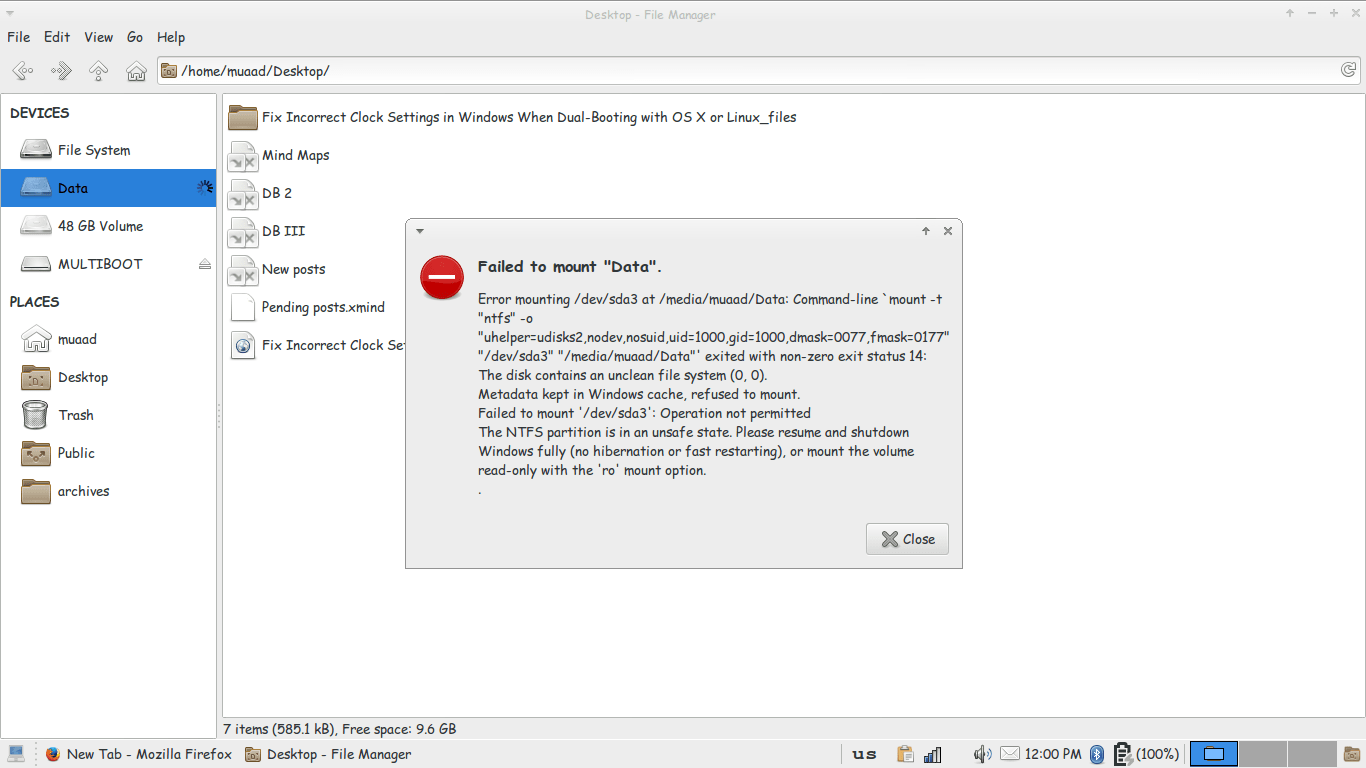
3. I couldn’t mount the data drive because Windows is still not totally shutdown, the drives are being used to “fast boot” in order to be able to use the drive without error, we need to disable fast boot. The screenshot shows an error caused by fast boot on Windows.

Error mounting drive in Ubuntu
Since it’s caused by Windows, we go and disable it from Windows.
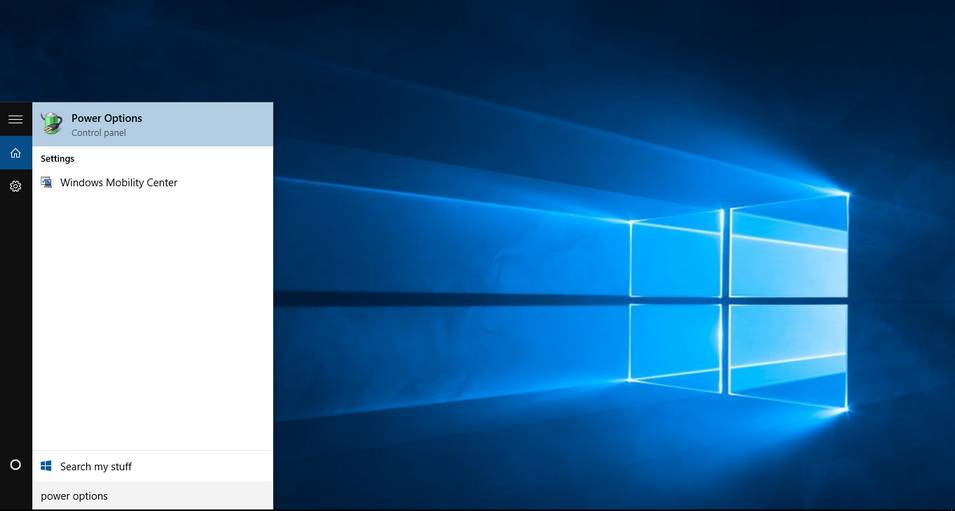
Go to Start menu and type: Power Options and click on the choice.
Type in power options in the search bar
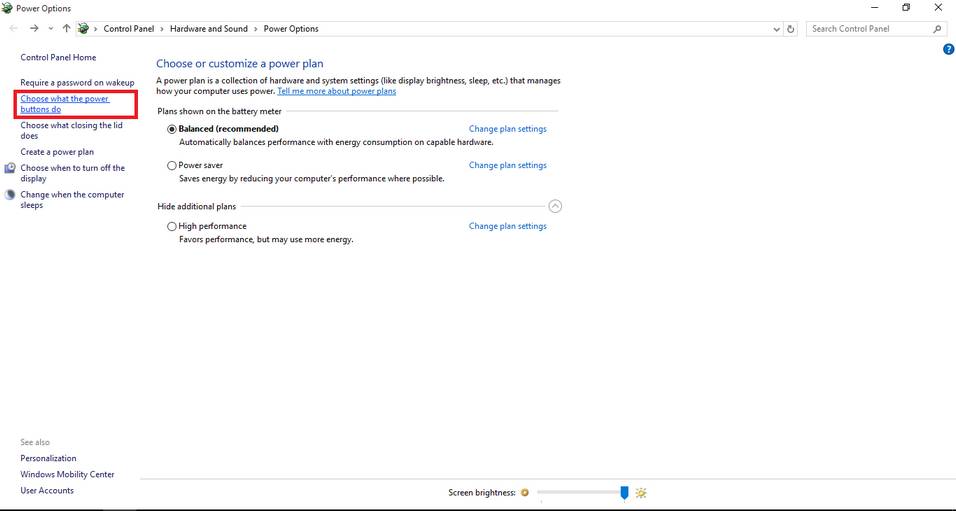
From there click on choose what the power buttons do.
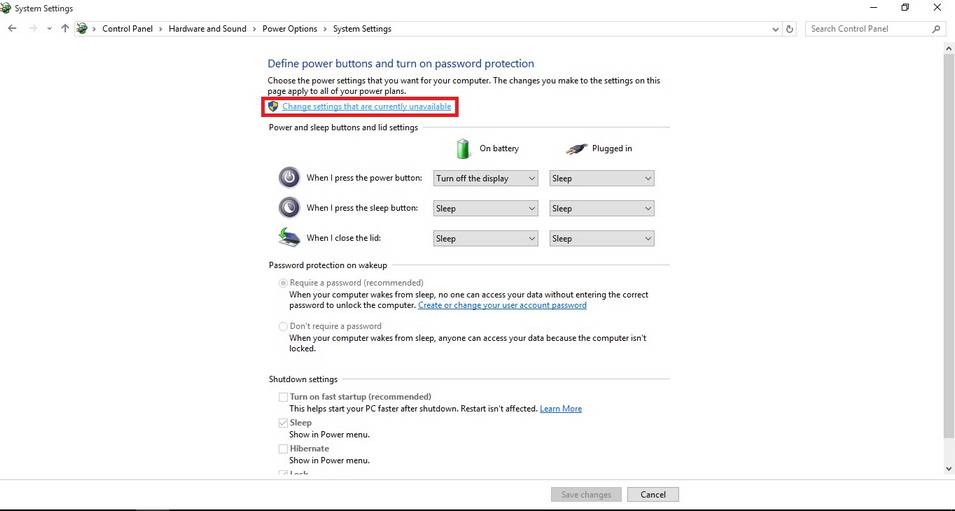
Click change settings that are currently unavailable to unlock the greyed options.
change settings that are currently unavailable
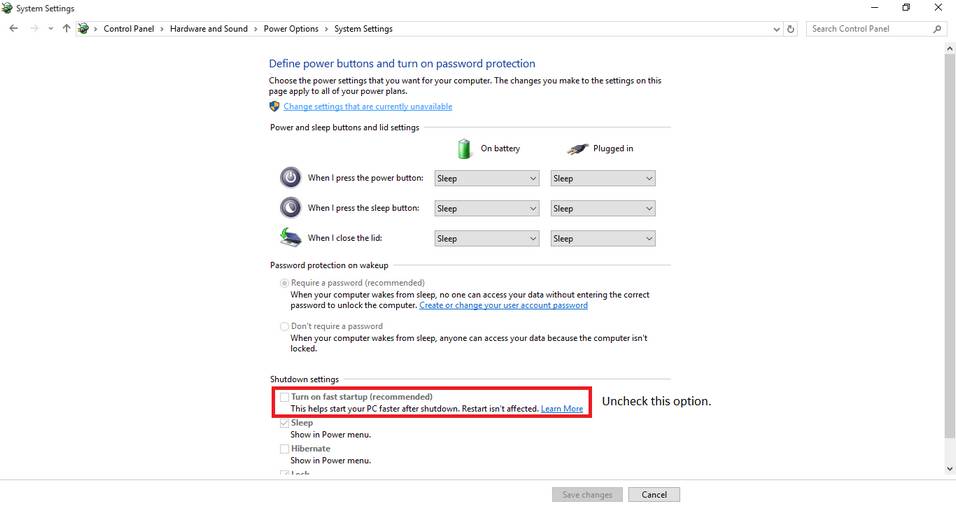
Then uncheck turn on fast startup. And close the window.
Uncheck turn on fast startup
Once the fast boot is disabled you will be able to access all the drives from Ubuntu without a problem.
Here I tried to list my experience on dual booting to help with these three bugs I faced twice. I hope you find it useful 🙂

10 reasons not to upgrade to Windows 10

I had my initial doubts about Microsoft giving out Windows 10 for free. Everyday I am convinced that my worries were sound! And it was much worse sadly!

For these reasons I am regretting the Windows 10 upgrade offer
I wrote this post prior to my upgrading, some of these fears aren’t exactly true (or proven wrong) but still they sound pretty reasonable don’t they?

Here are 10 reasons to skip the Windows 10 free update that expires July 29th.

 1. Too good to be true

How will Microsoft make money if it gave the system for free plus free updates? That’s doesn’t seem too profitable! Two years to get you hooked then bang!! 100$ per year..

2. Windows 8.1 is working fine!

Unless they change something or decide to kill it prematurely, it should be running smooth for eight more years (extended support officially ends in 2023). As the old saying goes: “If it’s not broken, don’t fix it”.

3. Windows 8 wasn’t free!

Yeah! It cost a lot of money! Plus the upgrade from Windows 8 and changing the license. All of that is money, then they wanna charge per year?

4. The upgrade will cost a lot

Data charges will apply, plus the amount of time to download and the down time I will be out of service to get it to run. let alone the fee I have to pay yearly after a while of service.
Update: This part is written after rolling back. Downloading Windows 10 + Updates + Downloading Windows 8.1 + Updates. That’s over 10 Gigabytes of data. All of which I paid for!

5. Cloud based / Internet based

My internet connection is really bad. I can’t afford to have all my data in the cloud! (same reason why I can’t download the upgrade with ease) I am not sure how will Windows as a service will affect my productivity or my daily flow, so I have to be careful.

6. Security concerns

Microsoft is collecting data to improve the system and is constantly improving it. Does that mean they constantly collect my data? Not feeling to good about that.

7.compatibility issues

Spite of all the promises Microsoft makes. I fear that something would go terribly wrong with the drivers and solving it would take months.. I can’t afford that simply.. What if it doesn’t support executor? That was my main concern coming from Windows 7!!
(Everything worked fine).

8. Is Windows 10 really all that?

I used 8.1 for a while now, it’s not that bad! Its good enough for my needs, what does Windows 10 bring more? Support for hardware I don’t own, and many services I don’t use. Even the whole start menu hype isn’t making me jump with joy (I never used it any way) I use executor for much of my daily work combined with Rocket Dock.

If it’s just the look there are transformation packs out there I can use to get the look and feel of Windows 10.
This part is written after rolling back. Windows 10 did nothing new to me, same old story, I still have my old hardware so it was nothing. Windows 8.2 for real!

9. License is tied to the device

I am upgrading from my old dusty laptop, trading a Windows 8.1 license for a Windows 10. Windows 10 is tied to my device ( the rusty old laptop) so if anything happens to my laptop, it’s over! I can’t transfer the license to a new computer (like I did in the dual boot saga) which means: New laptop, new Windows 10 license! -Unconfirmed worry!
This part is written after rolling back. I managed to remove Windows 10 and reinstall Windows 8.1 without a hitch!

10. No turning back!

If you upgrade to Windows 10 and stay there for a month, you lose the right to roll back to Windows 8.1 or Windows 7. So please take your time to think this over. (actually were were screwed long before that!).
: This part is written after rolling back.

In the end it’s a personal choice, it does not have to affect your needs or desire to upgrade, you have a whole year to upgrade, so think it through. I will try to get an eCommerce mean soon ?

If you are convinced that Windows 10 isn’t for you and you would like to go back, here is how! 

In the mean time, have a good time and enjoy working on whatever system you choose.

التدوين من الهاتف المحمول 2

كنت قد تحدثت في تدوينة سابقة عن التدوين من الهاتف المحمول ووعدت بتجربتها عمليا. اليوم سأتكلم عن خدمات الزبون في ليبيا ما يعرف ب customer service متخذا من شركة البديل مثالاً:

قرر صديقي أخذ هاتفه السامسونغ للصيانة لدى شركة البديل بشارع الجرابة، هاتفه لم يكن يشحن، ولأنه لم يشتره من البديل ولم تكن عليه ضمانة فقد ضيع عدة أيام ينتظر هاتفه ودفع ثمنا باهظا للصيانة.

Albadeel logo

بمجرد أن فتح هاتفه لاحظ أن تغطية الشبكة غير موجودة أظلافا! فأعاده للوكيل لصيانته مجددا.

بعد عشرة أيام من الآخذ والرد والأعذار الواهية قاموا بإعطائه هاتفه دون أن يصلحوه بحجة انه تمت صيانته من قبل و لا يمكن قبول هاتف “مفتوح”!!!

إنكار المعلوم

رغم كل المحاولات فقد ادعى الموظفون عدم معرفتهم بالأمر بل وانكروا قبول الهاتف من أصله بحجة انه غير موجود في “المنظومة”! (حيث أن الأجهزة التي تصلح لديهم تدخل إلى قاعدة بيانات خاصة بالأجهزة.)

وكان ما يثير حنقي أن البائع الذي كان ينكر بكل قوة هو من تسلم الهاتف في المرة الأولى! وبعد قرابة ساعة كاملة و الحوار مع ثلاثة من موظفي المبيعات تعرف احدهم علينا أخيرا! ما أدى إلى معركة خلف الأبواب المغلقة بينهم. حتى مهندس الصيانة أنكر رؤية الهاتف من قبل مع العلم انه من قام بصيانته في المرة الأولى!!!

قاموا بسؤالنا اكثر من مرة أن كان اشتغل بعد إصلاحه أم لا، في النهاية أخذوا الهاتف على مضض (بعد تأكيدنا أننا نريد فقط إصلاح الضرر ولا نطمع في صيانة مجانية!) مع تحميله قيمة الصيانة الجديدة والمحاولات الفاشلة للإصلاح! السبب في إنكارهم هو خوفهم من صيانة الهاتف مجانا، علما بان التغطية كانت تعمل قبل أن يضعوا ايديهم عليه!

طبعا لم يتصلوا به أو يردوا على اتصالاته..

المزيد من التأجيل

وعندما ذهبنا اليهم بعد بضعة أيام أجابونا بان الهاتف يحتاج إلى قطعة غيار، ولان مخزنهم مقفل فالأمر سيستغرق أسبوغا. مع شدة الأسف ووعدهم بتحمل تكلفة الصيانة كاملة. مع إغفالهم لعطل آخر ذكره عند التسليم. وزعموا انهم اتصلوا بصديقي ووجدوا هاتفه مقفلا مع العلم أنه لا يقفله أبدا!

لم يتصلوا به أيضا فذهب إليهم بنفسه للمرة العاشرة ليخبروه بأن الهاتف معطل عطلا جوهريا ولا يمكن إصلاحه!

ندم متأخر

صديقي نادم بشدة على التعامل مع البديل الذي كلفه قرابة الشهرين وأضعاف قيمة للصيانة بالإضافة إلى الارتباك وسوء المعاملة الذي لقيناه من الموظفين! واجزم انه لن يتعامل معهم بعد ذلك ابدأ! وابلغني انه سيأخذ هاتفه إلى شارع المدار ولتذهب الوكالة إلى الجحيم!

هل لاحظت أن موقع البديل تم اختراقه؟ لا أظن أنهم لاحظوا حتى!

التدوين من الهاتف صعب ومحبط!!

« Older posts