Category: Android (Page 14 of 16)

Telegram instant messaging application review, channel update

We have looked into several chat apps in this blog such as Whatsapp and Viber. Telegram focuses more on privacy and security more than these apps.

Telegram’s popularity exploded when Facebook announced it’s acquisition of Whatsapp in early 2014 raising security concerns among users, peaking 50 million downloads that day alone. Telegram is free and open source and has no advertisement what so ever!

Let’s take a look at the reasons to abandon whatever you become addicted to and switch to Telegram.

Who can you chat with in Telegram?

Much like Whatsapp and Viber, your contacts are your phone book contacts, and you can look users by user name as well.

You can talk to a single person or be a part of a group, and you can chat people using the secret chat feature.

Telegram features

Free and open source

When Whatsapp has been recently changed to become free, Telegram is free for life and has no ads what so ever (almost too good to be true!), while Viber has the sticker market which always wants you to buy the stickers.

Private

Telegram messages are heavily encrypted and can self-destruct, which is great for privacy (unless you are the parent of a teenager!) the most secure form of chatting you can have is provided by Telegram.

If the other person tries to take a screenshot of the secret chat, you will be notified! That’s amazing 🙂

Fast

Telegram delivers messages faster than any other application ( I still need to put this feature to the test), it tends to delay on SIM data but in general it’s fast!

Secure

Telegram keeps your messages safe from hacker attacks.

Powerful

Telegram has no limits on the size of your media and chats, while Viber and Whatsapp limit you to media files, you can send anything with Telegram! (Zip .MP3 .Doc) as big as you like!!

Cross platform / Cloud based

All of the popular platforms are supported, Windows, Linux, iOS, Android, and in case that wasn’t enough, there is a web version. And you can access your chats from an unlimited number of devices you have, and the web version is independent, you don’t have to prove to be online to chat on your PC!

Download

Click on the platform you have and it will take you to the official app in the store (you don’t want to download an unofficial app).

Download for Android

Download for iOS

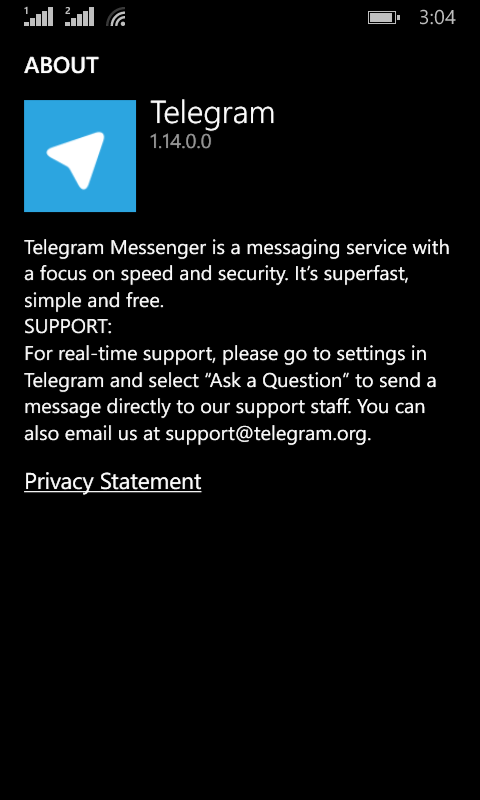
Download for Windows Phone

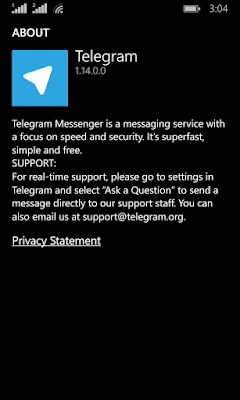
Telegram Screenshot

After we looked at the awesome features, lets take a look at some things Telegram has:

As of August 2014 Telegram delivers 10 BILLION telegrams each day!

You can create a bot to do whatever you want (if you have the skills to do so) and this bot will fetch your email, check the weather or even play chess! Read more about it here.
You can enjoy strong and private chats with your friends and co-workers, create groups to chat more efficiently or even subscribe to channels.


Channels

This is the latest features added on September the 22th 2015

Channels are the latest way to deliver messages to an unlimited number of subscribers, where they can catch up to the latest messages and read all the message history, each channel has a view count and a members count. and for a better understanding of it subscribe to Telegram’s channel, and you can create your own channels right away as the new Android / iOS version will have this feature with the latest update, others are coming soon.
And before you ask, no it doesn’t support voice/video calls!

It’s not a VOIP application, it’s not a video chat application. It’s a chat application that does! They might add the VOIP option later, I don’t think it’s going to be free. So enjoy the incredible feature set.

Conclusion

I am happy to find a chat app that Facebook hasn’t got it’s claws on yet! Those guys are all over the place! Telegram is safe, secure. Totally free and completely awesome!

The possibilities are endless, and the development is ongoing!

Do you use Telegram to chat with friends and family? Please tell me your experience with it in the comments section below.
I thinking of changing my mobile phone. Any clues?

Hello there everyone! How are you keeping?
I’m thinking of changing my Smartphone. I like the Be-Elite feature set but it’s not what I am looking for at the moment! 

  Being said the Be-Elite is big and bulky. The 5 inch screen makes it a
What kind of smartphone should I buy?hassle to carry around. Adding a pouch turns it into a tablet! (Just kidding!) and the lack of updates is a total turnoff to me!
To someone else it could be the affordable overkill phone they dreamed of for so long!
I’m selling it and investing the money in a new phone! (If you are interested drop my a line!)
I need your help! The Smartphone I want has to have the following features:

  1. Dual Sim.
  2. Significant battery life.
  3. Upgradeable OS.
  4. Not too big or bulky!
  5. Durable (Can withstand a drop or two!).
  6. Responsive touch!
  7. Must have VoIP!
  • I guess that rules out Apple because they don’t have any dual-SIM phones. At all! Maybe that’s a feature to add to the new iPhone 7!
  • The Android market is over flowing with devices from various manufactures (In fact a little bit too much!)
  • Windows phone looks very interesting!
  • And while being a QWERTY lover I wouldn’t consider a BlackBerry because of the price tag at first! And because of it not having support for anything (IMO).
  • I don’t like Samsung’s Touch-Wiz interface. And I don’t feel like buying a device and rooting it on the first day to look like Android again!!

Sigh! This is a bad time to buy a smart phone! So many choices and everyone is claiming that they have the best phone! (Fanboys..)
I’ll be waiting for your comments! Please leave a kind one below!
Have a lovely day!

Backup your installed Android apps as .Apk files

Hey there you guys. How are you today? Today I’m going to be talking about backing up Android applications to your computer. It’s very simple and really handy!
This way you can create a personal backup of your application


I’m going to be using a software called Myphone Backup. Which comes in two parts: Android app. And Windows installation.
It’s a software used to manage your phone over a connection. And backup contents. I used version 1.8.3 for the tutorial while the links on the site are the latest 1.8.6
It’s freeware, if you like it then consider posting a donation to support the development!
Install the app on your phone and the software on your computer.
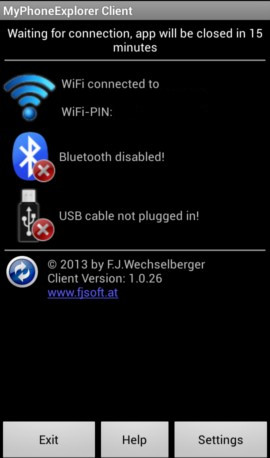
Now open the app on your mobile and select the way to connect. Let’s use Wifi.


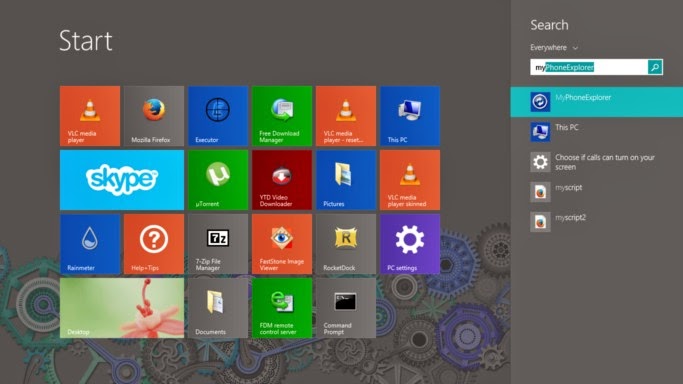
After installing it. Go to the start menu and type” Myphone” to have it appear in the search results.

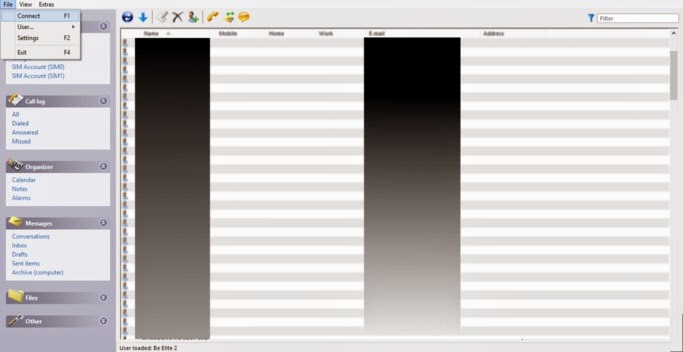
Then let’s run the computer software. And connect to the phone by going to File Connect. Or pressing F2.


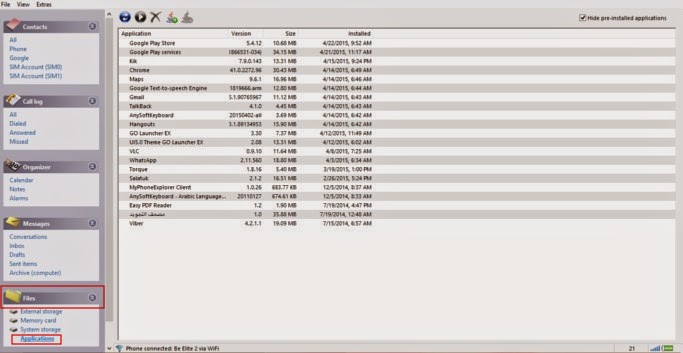
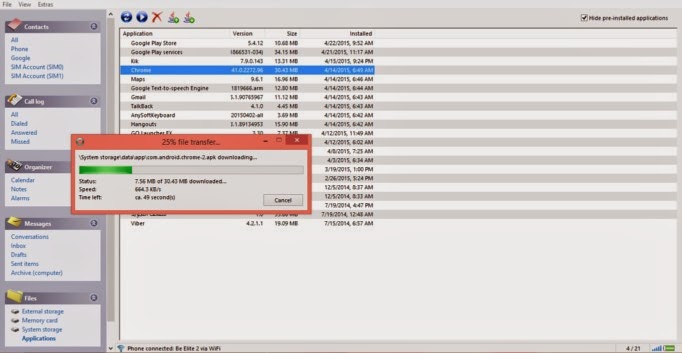
After connecting to the phone go to the pane files. Then choose apps.
Hide system apps for safety.
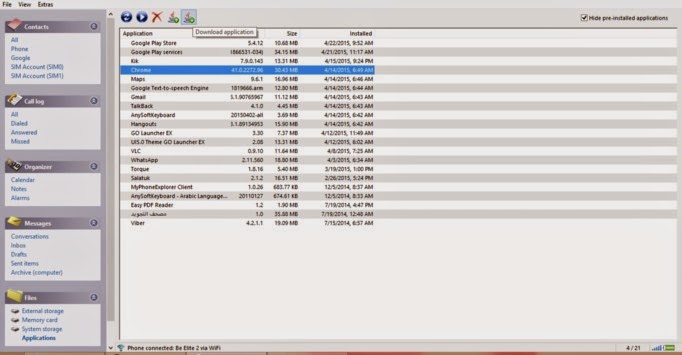
You can install apps via side loading by pressing upload, save them by pressing download,  And many other useful functions!


From here you can backup the applications one by one. Click on the desired app and select download.

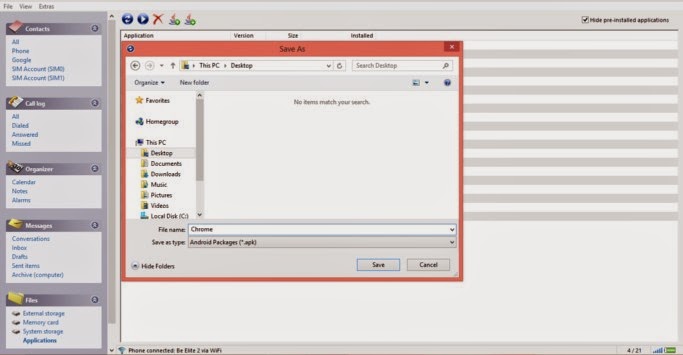
It will prompt you to select a location to save it. Wait a little, and the app is saved to your computer in .apk form 

  Wait for the progress to finish. And there you have it!

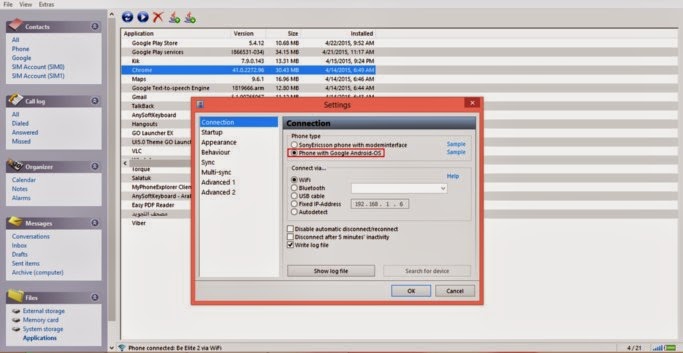
The most common way for this method to fail is the connection between the computer and the phone. So make sure you do it properly. And choose Android from the settings.
I hope you enjoyed this post! Please comment below and let me know what you think?
Do you have an easier way to backup apps. Let me know it 🙂

5 Reasons why I still use my Symbian phone at this day and time

Hey there. Good day to you

How are you doing today. I hope you are doing fine and well!

I still use a Symbian phone to this day. Why you ask?


Knowing that Android has the biggest market share today. And that Symbian was put to rest by Nokia in 2011 in favor of Windows Phone. That all didn’t change my mind! Here are the reasons why I still use my Symbian phone:

It looks professional!

It’s kind of a shallow reason. But the look of a Symbian phone to me is professional to my eyes٫ do you agree with me?

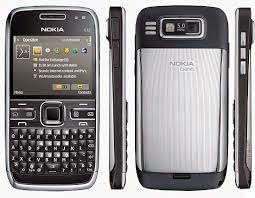
E72 doesn’t look 10 years old. It’s screaming business and seriousness!!

It’s stable No annoying update messages for programs or OS. Smooth riding!! If you look at it that way of course.

Battery backup

No matter what you think, the battery life of Android is really bad. Even with tweaks and all. While Symbian has lower specs and consumes less power.

It feels like a phone!

Phones now days are growing larger and larger. And becoming less like a mobile phone and more like tablet, some of them doesn’t have a single button on it! While Symbian keeps it together. Better phone reception and more focus on the phone!

More efficient!

The apps you need. And nothing more! Being far behind means lack of support! No Distractions from Snapchat or Twitter! Less means more focus. More productivity. It’s another way to look at the restrictions of the Symbian phones. So if you have one. Get it out. Shake off the dust. And use it too disconnect a little from the noise of the digital world around you! How do you like this post? Do you still own a Symbain? Let me know what kind is it?

Physical QWERTY keyboards

To me really it comes down to QWERTY input. Which I admit I’m addicted to. It makes me much more productive. There aren’t many QWERTY phones anymore. That’s why I went for an E6-00 Have a nice day. Please give kudos. G+ and share with your circles.

This is an outdated post, I sold my Symbian phone a long time ago.

« Older posts Newer posts »