Category: compile from source

الجانب المظلم للمصادر الحرة

تحدثت كثيرا في هذه المدونة عن البرمجيات مفتوحة المصدر وقمت بتقييم عدد كبير منها وشرح كيف تعمل وكيف يمكنها أن تستبدل برمجيات ويندوز الاحتكارية أو نظام ماك مثلا. لكن هناك جوانب أخرى لا ندركها ولا نراها قد تعرقل تطور بعض المشاريع.
شعار نظام لينكس البطريق تاكس وهو يلبس بذلة دارث فيدر من سلسلة أفلام حرب النجوم

البشر خلف البرمجيات

هذه المشاريع المجانية التي لا نفكر فيها غالبا يقوم بتطويرها أشخاص متطوعون لديهم احتياجات ومصاريف ونفقات يجب أن تدفع، وأيضا تكاليف استضافة المواقع والخوادم التي توضع عليها البرامج والمواقع. هذه تدفع غالبا من خلال التبرعات.

أنت لا تدفع، إذا لا تنتقد!

قد تكون متابعًا لمشروع ما وتستخدمه بشكل يومي ويروق لك، لكن تطويره بطيء، أو أن هناك علة تواجهك ولم تحصل على الدعم الكافي لإصلاحها. أو أن إصلاحها سيأتي مع دورة التطوير التالية التي يبدو وكأنها لن تأتي أبدا!

المشروع يموت

بعض المشاريع مفتوحة المصدر يتخلى عنها أصحابها لأي سبب ما. ربما لدى المطور بعض المشاكل أو أن هذا المشروع ببساطة مشروع تعلم من خلاله البرمجة وتخلى عنه لصالح عمل يدر عليه دخلا. قد يحدث أن يشتق المشروع بواسطة مطور آخر ويكمل مسيرة تطويره كما حدث مع RSSOwl، أو أن يتوقف لأجل غير مسمى.

حتى المشاريع المدفوعة تموت وتتوقف!

تطوير البرمجيات عملية صعبة ومكلفة، وحتى المدخول الربحي من بيع التراخيص لا يكفي لبعض الشركات لكي تستمر وتنافس في سوق العمل.
هنا أضرب مثالا ب Jumpcraft البرنامج الذي اشتريته لعمل مشروع تخرجي. رغم أنه يباع بمبلغ 50 دولارا للترخيص إلا أنه اختفى من الانترنت. وأغلب الظن أنه أشهر افلاسه..

تعديل: تم فتح مصدر البرنامج مؤخرا ويمكن مطالعة الإعلان من هذا الرابط.

دورة تطوير أطول من “ليلة بلا عشاء”

سأضرب مثالا ببرنامج Free download manager والذي كان مجانيا ومفتوح المصدر في إحدى مراحله على الأقل. منذ فترة طويلة والناس تطلب من المطورين أن يطوروا نسخة لنظام لينكس، لأنه ليس من المعقول أن يكون مجانيا ومفتوح المصدر ولا يعمل على نظام لينكس سوى بطرق المحاكاة مثل (واين).
ماطل المطورون تارة، ورفضوا ذلك مطلقا تارة أخرى، وتحججوا بحجج سخيفة في أحيان كثيرة. ثم وفي النهاية استسلموا للضغط الجماهيري وأطلقوا “نسخة” ألفا مبدئية.. بعد 11 سنة من أول مطالبة رأيتها!!
وتلك النسخة “اﻷلفا” غير صالحة للاستخدام بعد، وتنقصها العديد من المميزات ومليئة بالعلل!

معجزة المصادر الحرة

أن تستمر المصادر الحرة وتنمو وتنتشر ليصل عدد اﻷجهزة التي تعمل على نظام لينكس إلى 5% من اﻷجهزة في العالم (نفس النسبة المئوية لنظام ماك الذي تدعمه شركة أبل العملاقة). هذا عدا المشاريع الناجحة جدا مثل Firefox المتصفح الثاني بعد غوغل كروم. ومشغل الفيديو VLC الذي تجاوز عدد تحميلاته المليار بكثير.  هو بالفعل ضرب من المعجزات مقارنة بالفلسفة والترخيص، وتوزع المطورين حول العالم واختلاف لغاتهم ومشاربهم.

ما ساعدني على التأمل في هذه المعجزة أكثر هو كتاب (الكاتدرائية والبازار). كتاب قصير ومفيد يشرح فلسفة المصادر الحرة والعوائق دون تطويرها. أنصح بالإطلاع عليه لأي مهتم بالمصادر الحرة.

يوتوبيا المصادر الحرة والواقع

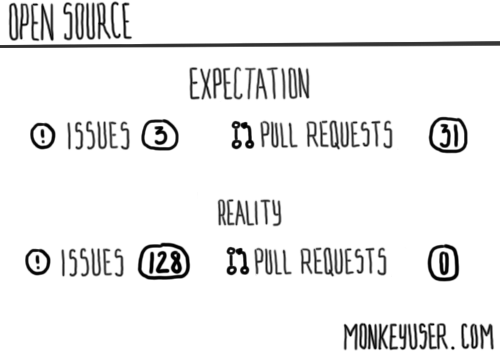
في عالم مثالي (يوتوبي) مستهلكو المصادر الحرة هم أنفسهم مطوروها، حيث يتم تعديل البرامج وفقًا لحاجة المستخدم ومشاركة تلك التعديلات مع من يشاء بواسطة ترخيص مرن. لكن الواقع أن نسبة بسيطة من المستخدمين يمكنهم فعل ذلك، بينما الباقون هم مستخدمون سلبيون – وأنا منهم -، يتلقون البرامج جاهزة دون أن يقوموا بأي مجهود يذكر. (إلا إن كنت تعتبر التحميل والتنصيب مجهودًا).
حالة دراسية

صراع محررات الويب الرسومية في العقد الأول من الألفية. أنصح بمطالعة هذه التدوينة لفهم كيف يمكن أن تسير المصادر الحرة بشكل خاطئ.

إن كنت تحب مشروعا ما وترى أنه لا يتم تطويره بالشكل المناسب فهناك خياران يمكنك القيام بهما

  1. التطوع من أجل المساهمة في تطوير المشروع.
  2. التبرع بمبلغ مالي تجاه تطوير المشروع.

أو يمكنك التحلي بالصبر!

في الختام

هل لديك مشروع تتابعه بفارغ الصبر؟ هل ساهمت أو تبرعت لمشروع من قبل؟ شاركني في قسم التعليقات.
How to compile the latest version of Wesnoth on Ubuntu and integrate it with Lutris?

Wesnoth is a wonderful game available for free for Linux, however lately it has been falling out of favor with packagers; currently stuck at 1.14.5 while the latest version is 1.14.7 as of this writing! This tutorial will show you how to compile the source code of the game and integrate it with Lutris, and even add a custom icon so it can be searched easily across the system and docked on launchers.

Compiling Wesnoth from source on Ubuntu 16.04

While this method is not recommended and it’s only advised for advanced users only, it could be the only way to have the latest version of Wesnoth on Ubuntu.

1. Download the source code from the game’s site, always go for the latest version. and make sure to checksum the source code prior to doing anything, the value of the checksum is provided on the download page and you can easily check it using the terminal.


2. In the terminal, install scons using: sudo apt install scons
I’ve  decided to compile the source using scons rather than cmake because it’s much easier, however the compiling process happens in the same directory as the game, so make sure to copy the game to the target directory first, I’m going with /opt/wesnoth-1.14.7/wesnoth for the rest of the tutorial.

3. Download all the missing dependencies:
sudo apt install libsdl2-dev libsdl2-image-dev libsdl2-mixer-dev libsdl2-ttf-dev 


libboost-all-dev libvorbis-dev libcairo2-dev libpango1.0-dev l


ibssl-dev libreadline-dev cmake make scons pkgconf

4. Go into the game directory, for example /opt/wesnoth-1.14.7/wesnoth and install with the command scon.
Please note that the process is long and resource extensive, so please be patient.

More instructions and options can be found here on the official wiki.

And that’s it, now the game works fine!

Note: If you played an earlier version of Wesnoth, please be sure to copy your save games and preferences so you don’t start from scratch.

Integrate with Lutris

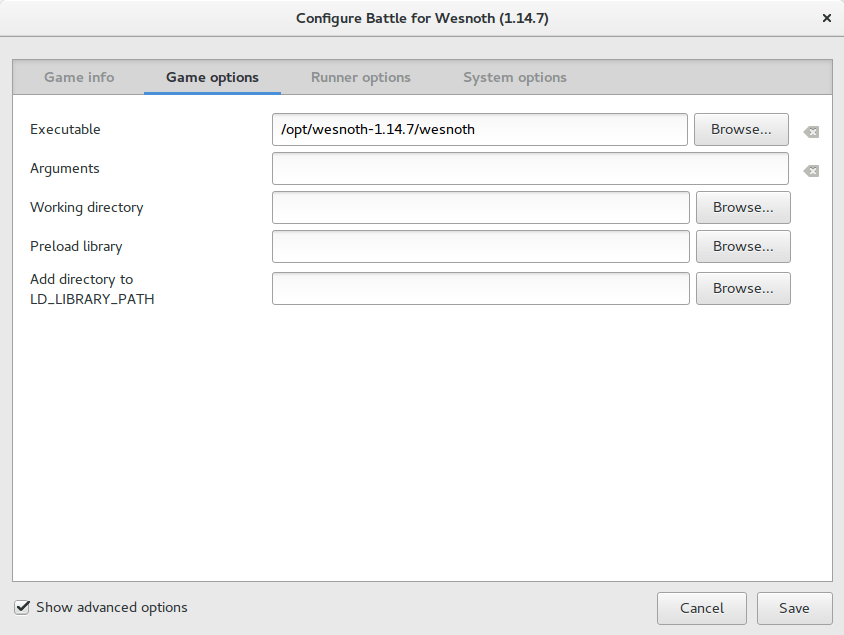
After compiling from source, Wesnoth can be easily configured to work with Lutris, simply by changing the path of Wesnoth from the default to wherever you installed it, I happened to install in /opt/wesnoth-1.14.7

Lutris icon


A screenshot from Lutris showing how the directory is changed


Adding an icon so you can dock it and be able to see it in the dash

Compiling Wesnoth this way won’t allow you to be able to search it or add it to plank for example, you will have to add a custom icon for this to work.

1. Go to /usr/share/applications/ as root and create a new .desktop file using a text editor (with sudo privilege).
The contents of the file should be like so:
[Desktop Entry]
Name=wesnoth
wesnothComment=The Battle for Wesnoth
The Battle for WesnothEncoding=UTF-8
Exec=/opt/wesnoth-1.14.7/wesnoth
Icon=/usr/share/applications/wesnoth.png
Terminal=false
Type=Application
StartupNotify=false
Categories=Application;Game;

Feel free to copy this file to your computer as long as you have everything installed as mentioned here, if you change anything make sure this document reflect your changes.

2. Save the file and you are good to go! As soon as you loook up Wesnoth in your system you will be able to find it and dock it on launchers such as plank.

After doing all that, I’ve uninstalled the old 1.14.5 and removed the repositories from my system, from now on I’ll compile on my own!

I hope that you find this tutorial useful, if you have any questions please let me know in the comments section below.

Credit goes out to Reddit user TonicAndDjinn as he provided a lot of helpful tips on how to compile the game.