Category: English Post (Page 21 of 97)

Planning and result

I thought I had everything figured out! Drew out a master plan that was fail proof and went on with the plan, little did I know that things can go wrong in a multitude of ways!

Original plans

I don’t want to share my exact plans on the blog, but I can say that I took a great deal of effort to see my plans through, worked hard and spent countless sleepless nights achieving vital steps to the plan, however things didn’t go the way I wanted them to go, and that’s fine!

A plan for each letter of the alphabet 

I was determined that I am going to change my current situation, rather than ranting about it and not doing anything; gladly I managed to make some changes to my life, and trying to implement others as the days go by.
I realized that plans often need changing to adapt to real life situations, rather than expecting life to adapt to our plans. 

Life is a box of chocolates

A quote from the movie Forrest Gump goes like this: “Life is a box of chocolates, you never know what your gonna get.“, I guess it relates to the way things are where I was hoping to get something but winded up with something else different, I’ll try to make the best of my situation and turn things to my favor.

At least I don’t have to deal with issues at my old job anymore, that is a relief! 

Adsense failure!

I’ve been trying to make a revenue out of the blog for a while now, I enjoyed the idea of a passive source of income, sadly Google mistook someone genuinely trying to help me gain money with fake clicks, and my account is banned! So for now, you get an ad-free experience on my blog!
So sad, right after I was asked to setup an address to receive a pin number; We’ll it’s never bad to have a P.O Box, who wants to be my pen pal?
But they couldn’t block the spammers who leave dozens of fake comments on my blog every week?

Blogging wise, this month wasn’t so good

I have a lot of drafts that I’ve put a lot of effort in just laying around waiting to be published, I guess there is something wrong with the way I publish them? It feels like a chore lately, and I hate that! I will try to set the up for October instead.

A desperate attempt to salvage the rest of 2018

I would like to do something that changes how I look at this year, because so far it’s rather bleak and negative. I’ve set a number of realistic goals to achieve over the course of the next three months, with a little help of my old friend “Don’t break the chain“. 

Final words

I firmly believe in fate and destiny, and that God’s will shall prevail over my will; I ask Allah to help me and aid me on this path.

Thank you for reading.
Battle for Wesnoth review and download

I’ve reviewed many games on this blog, all share a similar concept: being freeware or open source.
Honorable mentions include: Streets of Rage 5, Rocks’n’Diamonds, Mario 2012, Tux Cart, Kega Fusion (Sega emulator), Fix it Felix remake, among other games

What is a Turn-based Strategy?

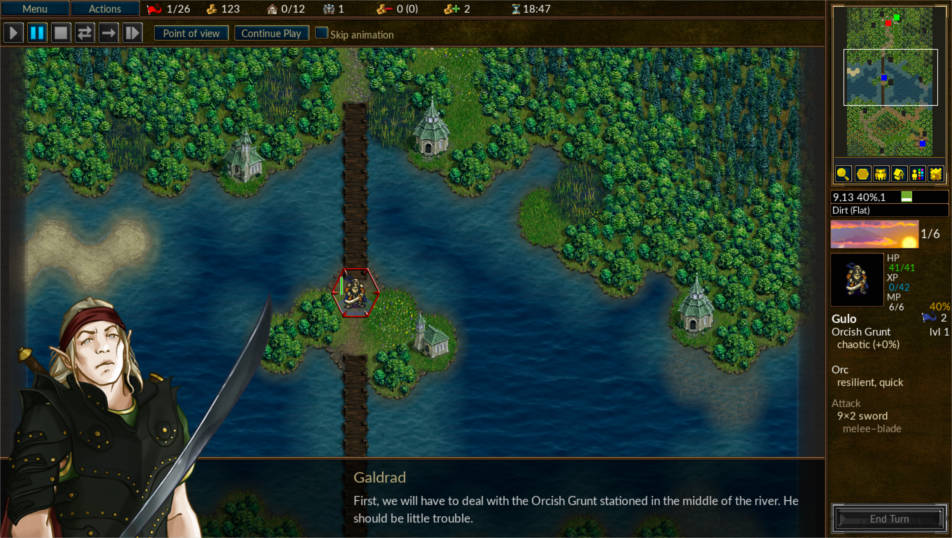
Today I’ll be talking about a new game: Battle for Wesnoth, a free and open source TBS (Turn-based strategy), in games like these a player does all of his moves which can include moving troops, fighting enemies or taking control of villages, before ending his turn and waiting for the other player/s to play.


What makes Wesnoth so special?

The battle for Westnoth stands out in the midst of free and open source strategy games, because let’s face it, a lot of free games are rough around the edges and really hard to get into, some are almost made as quirks that only the developers can enjoy! (Like Flair Alpha that I reviewed a few years back, and lords a war! , they were unplayable to me.), Wesnoth is nothing like that, it’s a game that has all the makings of a classic game, and many in the open source community consider it the best strategy game available!

Also there is a great community backing this game since it’s first release in 2003, providing huge support and even making custom campaigns for users to download and enjoy!

Setting and game play

The games events take place in the fantasy kingdom called Wesnoth, Where armies of humans, orcs, elves and zombies battle for power and dominance, many units and tactics are available for the player to try and explore through many campaigns.
The game itself is what you would expect of a strategy game, crisp graphics and captivating game play that will keep you busy for hours on end! Featuring both single player campaigns and multiplayer modes.


How to play this game?

If you ever played a TBS (Turn-based strategy), you will find yourself familiar with the concepts of this game, but even if you haven’t played a TBS before, the tutorial mode will be more than enough for you to understand how the game plays, and will prepare you for the increasingly difficult campaigns that await for you.

Screenshots


Rating

Battle for Wesnoth is rated 9 / 10 on Steam, 4.5 / 5 on SourceForge, and  4.5 / 5 on Freewarefiles.com

Download

Wesnoth is cross-platform, it can be enjoyed on many operating systems, including Android (Now removed from google stor),  IOS.
For Windows users you have to download the installer from here. Latest version 1.14.5
Mac users can download from this mirror.

Linux download

Wesnoth is in the Ubuntu repositories by default (Version 1.12 for Ubuntu 16.04), but alternative repositories can be added to be able to download the latest version to date 1.14.3 (1.14.5 isn’t compiled for Ubuntu yet), and for other distros packages can be found of this link.


Repository for Ubuntu

sudo add-apt-repository ppa:vincent-c/wesnoth
sudo apt-get update


I highly recommend adding the repository to the software list and downloading the latest version, as it brings many bug fixes, a partial redesign and added campaigns.

You can also use Lutris to download this game.


Important notice:

Ubuntu packages aren’t being updated regularly, even the moderators of the forum recommended that I’d download the game using other methods, here is my post on how to compile Wesnoth from source and integrate it with Lutris, available from this link.

  Android port

Specifications needed to play Wesnoth

Minimum specifications

This game requires at least 2GB of ram, 800MB of disk space, and a dual core processor, and 800 * 600 screen resolution.
(I’ve managed to run it smoothly on an Intel Celeron laptop).

Recommended specifications

4GB of ram, 2GB of disk space, a dual core processor and 1024 * 768 screen resolution.

Final words

It’s been a while since I’ve came across a game that I enjoyed like this! If you are looking for a strategy game to lose yourself in, this is a great candidate. A great way to spend the time and unwind from life’s stress.

Do you enjoy strategy games? What are your favorites, do you want to see more of these on this blog? Let me know in the comments section below!

My second wind blogging!

I thought around the sixth year of blogging that I ran out of ideas, I’ve blogged about things I never though I’d talk about in public, and that was it.

 The end of the road

I was seriously complimenting about quitting blogging and just leave the blog to collect views slowly, which is something I discussed in the sixth anniversary blog post.

Walking away from blogging isn’t something I would like to do, it’s a big part of who I am and how I view myself, therefore I needed to dig deeper to find more topics that relates to everyday life.

My blog is growing with me

My blog is a journal of my life (at least the things I chose to share), it helps me celebrate important things and look back on my life.

Also it’s a chronicle of my learning journey, and it helps archive providing me with a centralized easy to access knowledge base of all the things I experienced with.

I’m glad that I was able to find my second wind blogging, I have more ideas to blog about that would keep me going for a while.

What’s the use?

There are some days where I feel that I’m not making a difference, that what I write isn’t read or even care about what I do, that my existence is equal to non-existing, but that’s far from true! I am helping and making a difference, and helping make people’s lives better, even by a little tip or trick!

I’m not there yet!

I haven’t achieved my goals from blogging, I still haven’t made a profit out of this blog! And I would like to reach 1 million views before thinking of calling it quits! (Currently around 370,000 views).
It’s always nice to look back and see how far I’ve traveled, see what milestones I made and how my blog is touching people and helping them. 
What do you think? Were you ever close to quitting and then realized that you can go the distance? Please let me know in the comments section below.

Editing blogger blog posts that won’t edit!

I had my blog for some time now (six and a half years to be specific), and during that time I experimented with a lot of things, and made some mistakes along the way.

Major issues solved

One of the things was the a:link that was showing on my blog and I didn’t know where it came from and how to remove it, turns out it was caused by coping text straight from LibreOffice writer, then I noticed that some posts had colors and fonts that didn’t look like the general blog template, and trying to edit them like you would normally do wouldn’t work, and that’s very frustrating to be honest.

As I continued digging around, I managed to find a fix for that bug and I will share it here in this post.

First step, identifying the culprit posts

The posts that look off are shown on the blog, you can see them and tell that the colors or fonts aren’t consistent with the general layout of the blog, it would be a problem if the posts become unreadable due to color matching, and that requires changing.
How to fix the posts?
There is no easy one click fix for this issue, you need to edit them one by one.

Fixing the posts

    1. Edit the post in question
       Go to blogger posts and search for that post.

    2. From there edit the post and go to HTML view and copy the code, you might want to save a copy of it as backup.

    3. Open up your favorite text editor, I’ve reviewed many on this blog such as Sublime and Atom, but I’ll be using Atom for the rest of this post.

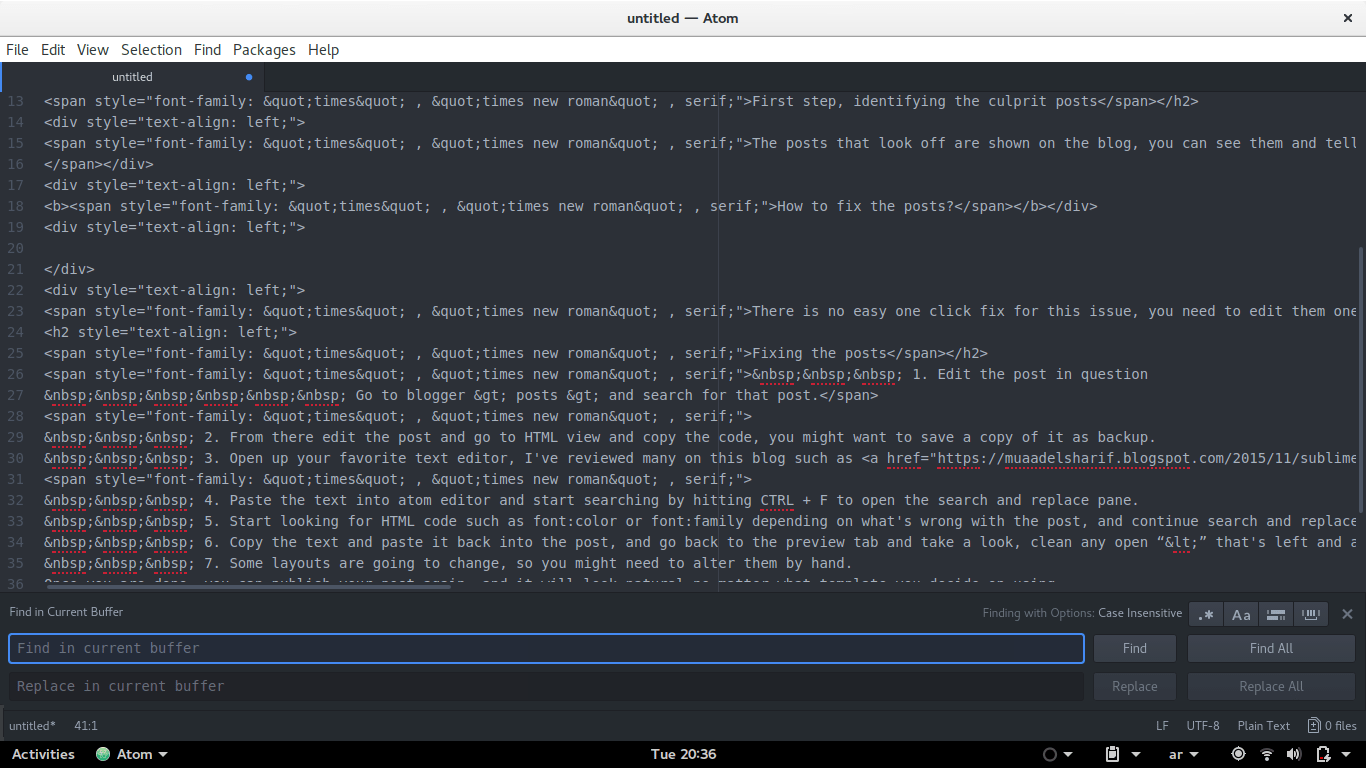
    4. Paste the text into Atom editor and start searching by hitting CTRL + F to open the search and replace pane.

    5. Start looking for HTML code such as font-color or font-family depending on what’s wrong with the post, and continue search and replace until you think you got out all the culprit code.

    6. Copy the text and paste it back into the post, and go back to the preview tab and take a look, clean any open “<” that’s left and any left junk, just make sure you don’t mess up the text, if it’s too much to handle copy it back to Atom and start search and replace.

    7. Some layouts are going to change, so you might need to alter them by hand.
Once you are done, you can publish your post again, and it will look natural no matter what template you decide on using.

I hope you found this post useful, please leave any questions in the comments section below.

« Older posts Newer posts »