Category: Telegram

A Netbook in retrospective!

When I bought the Netbook I have now a few months ago, I feared that I might not have a practical use for it. I already have a laptop which has been laying around for years; I really like it and spend many hours each day using it. So, how will I fit the new thing into my daily workflow?
The answer is really simple: Work

Taking my Netbook to work

This little thing is a blessing! If fits in my bag effortlessly and I feel like I’m carrying nothing at all! While my fellow teachers carry tons of books and papers with them, I use my Netbook to read the material and give lessons, something I wouldn’t be able to do that easily, also making adjustments and documents on the fly is fantastic, I don’t have to wait in line to use the “teacher’s computer”.

But .. I can take my laptop to work too, can’t I?

Yes, and no!

My laptop is my “daily driver”, and like most people I have private information and things I’d prefer to keep as safe as possible, it’s always a fear of mine that it would be lost or stolen. Getting stopped at a check point and stolen at gunpoint is a common risk now days in Tripoli, so that’s something to think about..

Even forgetting the bag in a public place would be a catastrophe to me! Some losses even a backup can’t restore.
But with this little guy, things are okay, I only have the things I work on now, even if it’s lost, it didn’t cost that much and it doesn’t have any vital information. The best of both worlds!

There is one tiny problem tho..

Version control

In my series “Dual boot saga” I complained that having two laptops to work with was a confusing thing (which was), that statement is less valid now, but still has some sense.  

When I’m working on a document for example, let it be a weekly plan, an answer sheet or a monthly exam, sometimes I happen not to know which document is more recent if I copied it from one laptop to the other, or which one has the changes I need; these little annoyances waste a lot of time. 
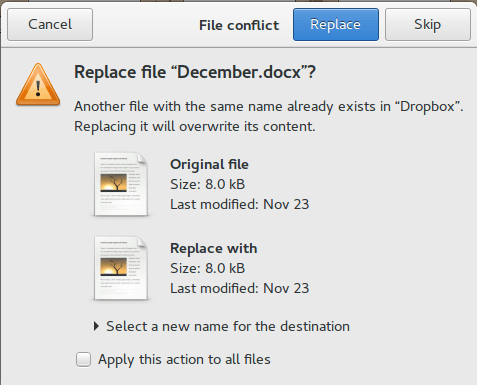
More often than not I’d leave a document on one of the computers and have to get out of bed to get it (I never remember these things only until I turn off the lights and roll under the blanket), this in itself is torture!

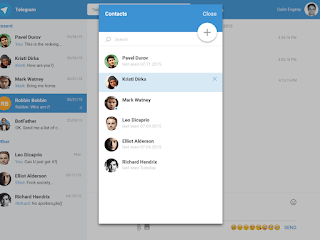
I sometimes upload my documents to Telegram web, and then access the site on my laptop or phone and download the document, but that’s just too much work!

Dropbox

This solution was right there in front of me the whole time! I can upload the documents and access them from any device. It’s not complicated like Google drive and doesn’t have added frills like Telegram Web, and it works perfectly with Linux. 

All I have to do now is to finish the document and upload it to Dropbox, no more calling home asking for someone to unlock my laptop and send a file I forgot (happened to me very recently sadly, and yes it was a Wednesday!). 

And even if the free plan only gives 2 GB of free space, I don’t think I’ll ever fill that.

Final words

My Netbook is far from perfect, it’s slow and the screen is smacked, but for the purpose I use it for, it runs like a champ! And now that I’ve gotten around the Two laptop hurdle, I can safely say that my productivity will be through the roof.

Well, that if the electric company leaves us alone.

تطبيق تيليغرام الحل اﻷمثل لإتصالاتك!

توجد العديد من التطبيقات في السوق تسهل عملية التواصل بين الأفراد، والقليل منها فقط يراعي خصوصية الفرد وسلامة بياناته، في هذه التدوينة سنتعرف على أحد أفضل هذه التطبيقات (تيليغرام) ولماذا يجب أن تفكر فيه كخيار لتواصلك مع الأخرين؟

ماهي التطبيقات الموجودة في السوق؟

سأغطي في هذا الجزء ثلاث تطبيقات شائعة يستخدمها المستخدم العربي بشكل عام (والمستخدم الليبي بشكل خاص)، ومميزات وعيوب كل تطبيق منها.

فيسبوك ماسنجر

أحد أكثر التطبيقات شيوعًا هو ماسنجر فيسبوك، والذي يستخدمه أكثر من مليار إنسان حول العالم لتبادل الرسائل والمكالمات،  وهو تطبيق منفصل عن تطبيق الفيسبوك رغم أنه يجب أن يكون موجودًا لتتمكن من تبادل الرسائل مع “الأصدقاء” على فيسبوك.

سياسة الخصوصية لدى فيسبوك مصممة لانتهاك كل حقوق المستخدمين وأخذ مفهوم الخصوصية منهم نهائيًا، لدرجة أن المفوضية الأوروبية نصحت مواطني الاتحاد الأوروبي بغلق حساباتهم على فيسبوك إن أرادو التمتع بخصوصية البيانات (التي لا يعلم أحد أين يحتفظون بها ولا ماذا يفعلون بها تحديدًا)، كما أن فيسبوك يتحكم في ملحقات الجهاز كالكاميرا والميكروفون من دون علم المستخدم ليجمع بيانات حوله!

 واتساب ماسنجر

واتساب التطبيق المملوك لفيسبوك يقدر عدد مستخدميها بمليار مستخدم حول العالم، ويتميز هذا التطبيق بخصوصية أكثر من ماسنجر فيسبوك لأن الرسائل مشفرة من طرف لطرف، ولكن بسبب إستحواذ فيسبوك على الشركة فإن سياسة الخصوصية قد تغيرت وأصبح لفيسبوك باب خلفي تنفذ منه على الرسائل وتستطيع إرسال رسائل الإعلانات المخصصة لك حسب اهتماماتك على موقع التواصل فيسبوك!

فايبر ماسنجر

فايبر هو أكثر التطبيقات شيوعًا في ليبيا ويستخدمه مئات آلاف المستخدمين لتبادل الرسائل والمكالمات يوميا، يتميز بمكالمات صوتية مجانية.


 يعيبه أن مكالماته ورسائله غير مشفرة، ويمكن الإطلاع عليها من قبل طرف ثالث (مخترق) بسهولة كبيرة، لدرجة أن هيئة الاتصالات السعودية حظرت استعمال الفايبر لأنه يخالف معايير أمن الاتصالات لديها، خاصة أن الشركة المالكة لهذا التطبيق شركة صهيونية تعمل من داخل الأراضي المحتلة!

الخصوصية على الإنترنت

الخصوصية الكاملة على الإنترنت تكاد تكون معدومة، وطالما لديك حساب واتصال بالشبكة فإن الخطر ماثل على الخصوصية وأمن الأفراد، واستعمال تطبيقات مثل التي ذكرتها في الفقرة الماضية يزيد من نسبة الخطر بشكل كبير، فبين التطبيقات الثلاثة المذكورة الوحيد الذي ينطوي على مخاطرة متوسطة هو واتساب، بينما فايبر هو الأسوأ أمنيًا، وبينما يبدو فيسبوك محصنًا من الاختراق الخارجي فالخطر الأكبر على المستخدم هو شركة فيسبوك نفسها!

تطبيق تيليغرام

هو تطبيق مجاني ومفتوح المصدر ظهر في سنة 2013 ويهدف لتمكين الأفراد من التواصل بشكل خصوصي وأمن على الشبكة، ويوم إكمال صفقة بيع واتساب لفيسبوك بمبلغ 19 مليار دولار وصلت تحميلات تيليغرام لأكثر من 50 مليون تحميل في يوم واحد!


كيف تتم الدردشة على تيليغرام؟

إذا كنت قد استخدمت واتساب او فايبر فأنت تجيد استخدام تيليغرام بالفعل، ففيه معظم الخواص المعتادة من أي برنامج محادثة (ماسنجر) مثل:


  • يوفر تيليغرام إمكانية مراسلة المستخدمين الذين تملك أرقام هواتفهم أو أسماء معرفهم على تيليغرام.
  • كما توجد فيه الدردشات الجماعية (غرف الدردشة) مع أكثر من 50 مستخدمًا في وقت واحد.
  • يوفر إرسال رسوم تعبيرية وقصاصات.
  • إرسال صور، ومقاطع فيديو، ورسومات.

 لكن هنالك بعض الميزات الإضافية التي تود معرفتها!

  • يمكن الاشتراك في “قنوات” على تيليغرام، تجلب لك الرسائل والأخبار من حسابات معينة، وإنشاء قنوات خاصة بك تمكنك من التواصل مع عدد كبير من الأفراد في وقت واحد (أفضل مثال على هذه الميزة أن يكون لدى المعلم قناة على تيليغرام والطلاب في الصف مشتركون فيها، ويتلقون منه الواجبات ومواعيد الامتحانات).
  • إرسال ملفات للمستخدمين الآخرين من أي نوع كان (ليس فقط ملفات الوسائط المتعددة) طالما يقل حجمها عن واحد غيغا بايت للملف الواحد، وهي خاصية رائعة لمن يعمل عن بعد، كما تبقى هذه الملفات في سحابتك الإلكترونية للتخزين مالم تقم بمسحها.
  • نسخة الويب من تليغرام تعمل بشكل مستقل عن تطبيق الهاتف، بينما واتساب يحتاج لوجود الهاتف متصلا بالانترنت ليتم عملية فتح التطبيق. هذه ميزة لتليغرام حيث يمكنك الدردشة من الكمبيوتر شريطة أن تقوم بإدخال الكود المرسل لك على هاتفك بشكل صحيح.
  • الميزة الأقوى لتليغرام والتي تجعل خصوصيته متفوقة على كل التطبيقات سالفة الذكر هي الرسائل السرية، حيث ترسل هذه الرسالة مباشرة من المرسل للمستقبل، دون أن تخزن على خوادم تيليغرام، وتقوم بتدمير نفسها تلقائيًا بمجرد إرسالها، كما أنها تحذرك إن قام المستقبل بالتقاط لقطة الشاشة للرسالة المذكورة).

تيليغرام يضيف خاصية المكالمات

في مقارنة مباشرة بين واتساب وتيليغرام كان تيليغرام الفائز بتحدي الخصوصية، بينما تفوق واتساب بخاصية المكالمات الصوتية التي أضيفت له لاحقًا (لأجهزة أندرويد وأيفون وويندوز فون 8.1 وما فوق فقط)، وكان على من يريد التحدث بالصوت أن يبقي على واتساب أو فايبر، حتى يوم الثلاثين من مارس سنة 2017

 أعلنت تيليغرام عن إضافة خاصية المكالمات الصوتية المشفرة والأمنة للمستخدمين في أوروبا الغربية، على أن تضاف لبقية العالم في وقت لاحق! متخلية عن سياستها السابقة بعدم الاستثمار في مكالمات الصوت!

كمستخدم للبرنامج يسعدني أن تيليغرام لم يوفوا بوعدهم وأنهم قاموا بإضافة خيار المكالمات ليقف تيليغرام على قدم المساواة مع باقي التطبيقات ويتفوق عليها!

ما رأيك في هذه التدوينة؟ هل تستخدم تطبيق تليغرام؟ وهل شجعتك هذه التدوينة على تجربته؟
ما التطبيق الذي تستعمله لإدارة اتصالاتك؟
شاركني في قسم التعليقات وشكرا لك على قراءة التدوينة.


Whatsapp sharing your phone number with facebook? Privacy??

Whatsapp had added a new entry on the company blog saying that it changed the privacy agreement to allow sharing your phone number with Facebook the parent company, does this sound like a surprise to you?

Whatsapp logo

Whatsapp changing the game

Since 2014 Whatsapp said it will test with features to ensure that it stays free after it canceled the 1$ per year fee, but until yesterday no one knew what the plans were.
Whatsapp will share your number with Facebook for advertising purposes, to help 
deliver better service and connect you to companies and service providers based on your friends and interests, while promising not to share your number with anyone and emphasizing the fact they added end to end encryption. 

Isn’t this spamming?

Whatsapp thinks that it’s OK to send messages like these, you are already receiving messages on your mobile and receive phone calls, why not Whtasapp messages with content like this?

There is a way out of this tho, even partly.

How to keep your number from being shared?

Future versions of Whatsapp will have an option which you can enable or disable to op out of the phone number sharing, but the rest of the newly updated privacy policy will apply to you as soon as you open Whatsapp!

So this is the price of being free? 

I think I like the old 1$ per year policy, it’s not so bad once you think of the huge privacy violations Facebook and now Whatsapp are committing towards it’s users!
Nothing is for free, everything has a price and if you aren’t paying for it, then you are probably paying a different kind of price, you are being the merchandise!   
It’s a pretty sweet deal I must admit, free calls and unlimited free text messages,  but if your privacy matters to you, the calling price would be too high.

Any alternatives?

Lets go back to February of 2014 when Facebook announced its monstrous acquisition of Whatsapp in a record breaking 12 billion dollar sale, people starting migrating to Telegram like crazy, they knew the age of private free communication was over!

Telegram VS Whatsapp

I’ve blogged about comparing Whatsapp to Telegram some time back, right now Telegram is the sure fire way for a secure chatting experience, as for Whatsapp, I’ve uninstalled it already!

Say no to Facebook

How do you feel about this sudden change? Do you still trust Whatsapp and Facebook with your privacy? I’ve blogged about leaving Facebook and still in favor of unplugging from it.

Telegram VS Whatsapp! Battle of the chat apps!! (2016)

WhatsApp is a popular texting message, and Telegram is an alternative of WhatsApp that has gained mainstream interest after the acquisition of WhatsApp by Facebook. While being really similar in features, I’ll be comparing them head to head so readers can have a decision!

Telegram VS WhatsApp

At the core, both applications are similar, they both serve the same purpose, chat apps!
There are some differences, let’s take a look at them!
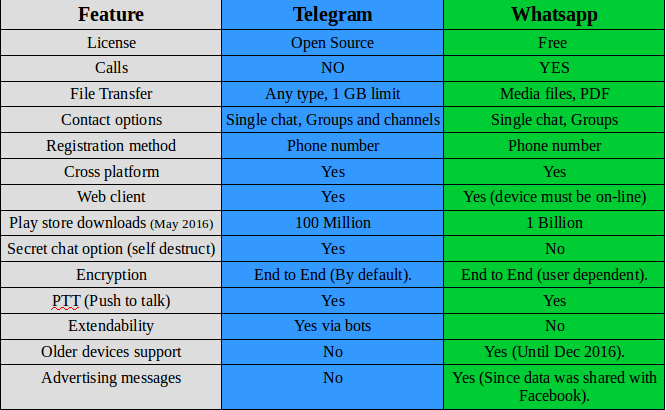
I made a table of comparison based on information available at the moment.


Telegram VS Whatsapp comparison

Key points

While being very similar, whatsapp‘s killer edge is having voice calls, the option that Telegram doesn’t have and doesn’t plan on adding them to it’s feature set.

WhatsApp is many times more popular than Telegram, so it has a wider user base, and the devices supported by WhatsApp are much more than Telegram! (supports older model Nokia Asha and Symbian but only until the end of 2016!).
It requires updating very often and it’s hard to manage on a limited internet connection.

And the call quality is terrible for the same reason! So in the few months I had Whatsapp, I didn’t make a single call!

Another major draw is privacy concerns, Whatsapp edited the privacy agreement and shared data with it’s parent company (Facebook) which will use the data for “targeted advertising”.


Whatsapp
has recently added Encryption, it’s not like the protection level that Telegram provides, but it’s a start (Telegram is an end to end application).

Telegramis focused on security and speed, it provides better security than WhasApp and the secret message option is something that WhatsApp doesn’t support!

File transfer is also a plus for Telegram, with 1 GB limit and any file type supported! Whatsapp is limited to media files (and pdfs).

Telegram
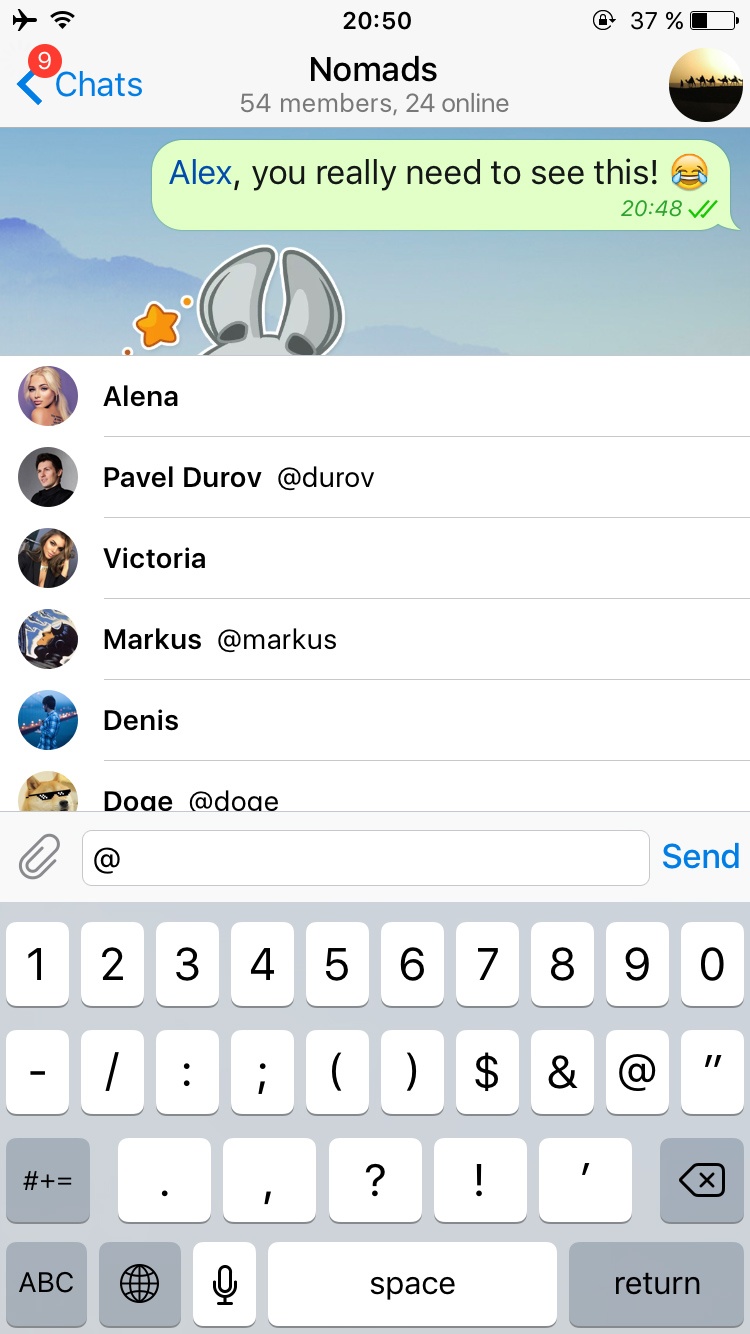
‘s bot feature increases the application’s functionality much more than Whatsapp, these bots do many things like instant translation from inside the application, and the possibilities are endless!! You can get nice gifs just by writing @gif in the chat bar.

I think WhatsApp‘s main con is that it’s owned by Facebook, and Facebook is known for not respecting user’s privacy!

Verdict: WhatsApp remains on top by a slight margin! With call support and wider user base, WhatsApp is a better choice for communicating your loved ones. But if security is a concern for you then you have to sacrifice voice calls and use Telegram!

Why not download Telegram too? It’s free and more secure! And in the end your needs determine the winner of this bout!!

I personally prefer Telegram, but I have to be subjective!

After the latest updates, I removed Whatsapp once and for all, Telegram is the way to go.

What do you use? And what do you recommend? Tell me your thoughts in the comments section below!