Month: December 2015 (Page 2 of 7)

BlueGriffon 1.8 is out!

As a free lancer web developer / designer on Linux. I strive to find the tools that make my work easier and more fun! In terms of web development there aren’t many YSIWYG tools to use, with Nvu and Kompozer being discontinued and BlueGriffion’s seemingly end of life (marked as discontinued by Alternativeto.net), LibreOffice has shown some WYSIWYG potential and I noted that in a previous post.

It’s no where near Adobe DreamWaver or Muse – let’s not forget that LibreOffice is a word processing suit and not by any means a web design tool. The wizard technique crashes the whole program often too.
I use text editors like Atom to get my design done. And any decent designer needs to know his code inside out, I don’t mind a little help from a WSIWYG tool to help me see what I do and help arrange stuff a little bit.

I even emailed BlueGriffon asking them for an update, I didn’t get a response so I assumed the project died.

I then stumbled upon the latest update 1.8 I was so excited!! (nerd fit)!

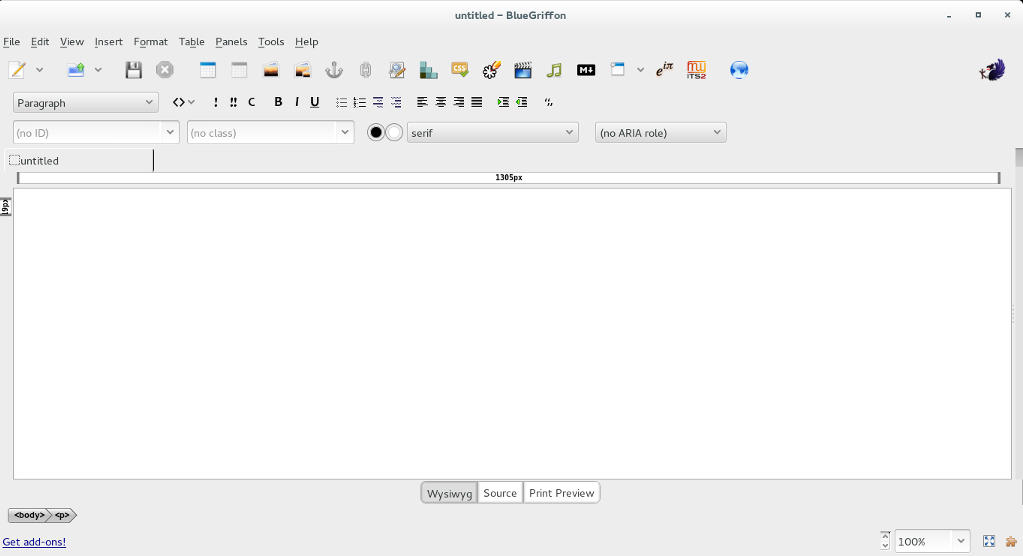
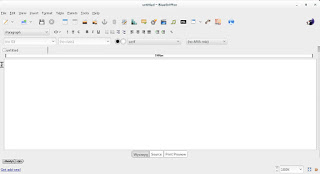
BlueGriffon's main interface

I downloaded it and gave it a quick run, it works well so far.

I was able to find a manual on-line which you can find here, it’s not for version 1.8 but it works fine (the GUI is exactly the same).

Working with BlueGriffon makes the job easier especially working with CSS attributes and values, it also makes the page web complaint by filing all the fields from the beginning.

To download BlueGriffon 1.8 go to this link.

Give it a try and see what you think.
Did you like this post? If you did share it with your friends, sharing is caring 🙂

GIMP 20 years of awesome!

Last November, GIMP celebrated it’s twentieth anniversary, becoming the official Open source image editing suit.

 GIMP stands for GNU Image Manipulation Program, and through out it’s age GIMP went through a lot of development and improvements, and drew it’s fair share of comparisons and controversy.
GIMP has many scripts and filters to enhance it’s productivity and it’s rage is simply amazing, it can be used for a wide range of work from basic editing to professional grade photography and everything in between. It became my to go-to suit that I use for everything! And this blog has many GIMP tagged posts. In fact my best viewed posts are usually about GIMP! Feel free to check these posts from this link.
GIMP is now at version 2.8.16 (the birthday version) and it’s better than ever, go download it from GIMP.org for your system, it’s cross platform.

It’s never too late to join the movement of open source, even if it’s been 20 years since the first GIMP build. It shows how much passion and experience behind this awesome project.
Besides code, GIMP has a great community that is our there to help and give support for new users and experienced users as well.
Also there is a ton of scripts out there that will make your life much easier, as one of my readers replied to the Obamicon post: “I love it, saved my a ton of work with Illustrator, thank you so much”.

Even if you are an Adobe master and can’t imagine using anything other than PS, download GIMP and give it a spin (even on a virtual machine) and see what all of these people are excited about, you will go back to using it. I guarantee it!

Did you download GIMP? What did you think? Let me know what you have in mind in the comments section below!

You liked this post? Share it with your friends! Sharing is caring.

منظومة حجز موعد استخراج جواز السفر أخبار ومستجدات

مرحبًا بك في تدوينة جديدة حول الجوازات في ليبيا.
في التدوينات السابقة تحدثت عن المشاكل التي تواجه الناس في التسجيل في منظومة الحجز، والتحسينات الظاهرية التي طرأت على منظومة حجز المواعيد. لنلقى نظرة على الوضع الحالي للجوازات، وأخر ما أعلنته المصلحة وتداوله الناس فيما بينهم.


لاحظ الكثير من المواطنين وأنا منهم أن المنظومة تكون مكتملة الحجز بمجرد الإعلان عن موعد جديد لفتحها، في جميع المدن وفي ذات الوقت، الأمر يدفع للشك، خاصة مع انتشار إعلانات يزعم أصحابها حجز موعد لك إن كنت مستعدًا لدفع 700 دينار للشخص الواحد، هل توجد علاقة بين الأمرين؟

المنظومة مقفلة منذ أخر أسبوع في السنة الحالية، وحتى أول أسبوع من السنة الجديدة للجرد السنوي (مضافًا إليه العطلة الطويلة التي تمتع بها الموظفون والطلبة الليبيون)، وأول موعد متوافر للحجز سيتم الإعلان عنه في حينه.

ظهرت صفحة جديدة على موقع فيسبوك تزعم أنها تتبع لمصلحة الجوازات الليبية.
 وتدعي هذه الصفحة أنها حلقة وصل بين المواطن والمصلحة وتقوم بالإجابة عن بعض التساؤلات التي تدور بخلد المواطن البسيط.

سبب تأخر الجوازات عن الصدور يتمثل في الأسباب الأتية

“تمتلك مصلحة الجوازات 160 محطة تصوير عاملة في ليبيا عبر فروع الجوازات.
للمحطة الواحدة قدرة تصوير 6 مواطنين في الساعة.

سنة 2016 فيها 365 يوم منهم 200 يوم عمل باعتبار يوم الخميس عمل داخلى والجمعة والسبت عطلة اسبوعية.
متوسط ساعات العمل 8 يوميا.
إذن مجموعة ما يمكن تصويره في 2016 هو 200 يوم * 8 ساعات عمل في اليوم * 6 مواطنين لكل محطة فى الساعة * 160 محطة عمل.
النتيجة ما يقارب على 1536000 مواطن يمكن تصويره فى حالة استقرار الخدمات فى ضوء 4 مليون مواطن لم يتقدمو للتصوير حتى حينه هذا يفسر بشكل واضح وجلى سبب ازدحام منظومة حجز المواعيد” ..

كما قدمت الصفحة بعض الأعذار لازدحام عملية تصوير الجوازات

“مشروع الرقم الوطنى هو من صمم و ورد ونفذ منظومة إصدار جواز سفر المواطن دونما التنسيق مغ المصلحة.
سايقا في الأغلب رب الاسرة يقوم بالتقديم بالنيابة على أفراد أسرته كالنساء والأطفال عداّ فئة الشباب و الآن كل الأفراد مطالبين بالحضور.
مبانى الفروع وأقسام الجوازات غير مصممة باستقبال هذا الكم من المواطنين فى نفس الزمن.
قدرة طابعات الجوازات بما يعادل الثلث فقط من متوسط عدد المواطنين الذين يمثلون يوميا أمام الكاميرات .
عدم توفر خام المستند بشكل مستقر يواجه متطلبات الطباعة.
انقطاعات الكهرباء وتأثيرها .
عدم نقل المعرفة والتدريب لمختصي المصلحة.”

لماذا تمتلك مصلحة الجوازات صفحة على موقع فيسبوك يمكن لأي شخص إنشائها والتحدث باسمها، بينما يمكنها عمل موقع إلكتروني بنطاق .gov أو التحدث في إذاعة مسموعة أو متلفزة دحرا للشبهات؟

 بعض المواطنين قام بالتقاط الصورة منذ شهر أغسطس الفائت ولم يستلم جوازه حتى اليوم!

من الواضح أن موضوع الجوازات سينضم للأساطير والموروث الشعبي الليبي، جنبًا إلى جنب مع أم بسيسي وباقي الأساطير مستحيلة التحقيق..

تعديل: تابع تغطية يوم الحجز ساعة بساعة من هنا.

Zim-Wiki: Where have you been all my life?

I’ve come across Zim-Wiki while searching for the best note pad application , in this review I shall talk about why it has become my go to application for almost everything!

A true al l in one solution!

Before installing Zim-w iki I used several software to do a part of the functionality it has!

Zim-Wiki logo
Zim-Wiki logo

I used Rednote book as a daily journal and Tasque to make to do lists while using basket notes as a personal knowledge database! Talk about a cluttered data life!

Now after migrating to Zim- wiki I replaced all o f that software for more versatility, more functionality and more focus!  Which in turn made me a lot more productive! Less resources an d more work done!

Zim -wiki is light weight and cross platform (Windows and Linux). It operates like a wiki so it makes it easy to store and retrieve data and link pages together.

It’s simple and easy to use. And the interface is pretty straight forward. And gets the job done.

  • I also look into the import / export feature as I need to backup and restore data quite often, and without it , it would be useless like Tomboy (now Gnotes).
  • It is amazing! Just look at t h e plugins like the  box backup. It seems perfect so far.
  • It has a journal feature, it can log events against days on the calendar, if you like to keep your program count down, it’s a good idea to use the embedded journal and abandon other applications. You can access the journal feature by clicking the calendar icon on the right.
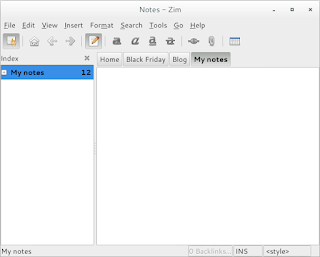
Zim-Wiki interface
Zim-Wiki interface

Plugins

Zim Desktop wiki is expendable with the use of plugins, you can download and install many plugins from this site,  and access them from the menu :
 

Edit Preferences Plugins

It also supports word count and many other editor features to make the experience complete like the distraction free mode, just hit F11 and enjoy! It can be used to write a book as well, you can make your book the main folder and then distribute it on the pages and link it all together easily!

I did mention that LibreOffice is the best book writing software out there, looking closer at Zim-wiki, LibreOffice won by a nose!


Tags

You can use the tag feature by typing @ before any word, that will be a tag, and it will be displayed in the tag pane , it’s used to c ollect and sort da ta and make finding things easier inside notebooks.


Restoring after delete

If you delete a page by mistake you can easily recover it from the recycle bin (or trash, depending on your system).

Check the help embedded for more cool tips on how to use Zim desktop wiki.

Download and install


You can download Zim wiki by visiting the website and downloading a .deb archive to install, or you can add the repository so it grabs updates automatically as a part of the system update.

sudo apt-get add-repository ppa:jaap.karssenberg/

zim
sudo apt-get update 

sudo apt-get install zim

Z i m -wiki as a to do list app

I used to use Tasque to handle my daily tasks but not anymore! Now I enable d the Task list plugin and I was set! It’s that good! Enable the plugin by going to:  


E dit Preferences   Plugings Task list


After that you will see the checkbox icon, add the word todo to any line to make it a task, strike it through to mark it done!

If you want to see a checkbox then go to Insert Checkbox list.
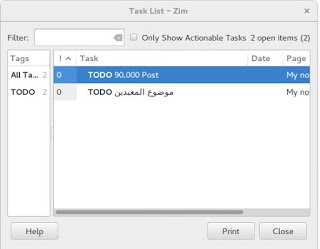
 

Zim-wiki task list plugin

Zim-wiki as GTD software

Although Zim-Wiki wasn’t developed to be a GTD (Getting Things Done) application, it can be edited easily to support the productivity plan, you can find this tut orial on Zi m -wiki’s site that tells you ho w to make it.


Markdown e d itor

If you like to use Markdown to style your documents and work then you don’t need to look for other tools! Zim-Wiki has you covered with Markdown support!

< ” Rati ng

Zim -wiki is awarded 4.95 on the Ubuntu software center receiving tons of positive feedback, so it has to be good! It’s also well received on Alternativeto.net

Honorable mentions

In this bit I’ll mention some other apps and why I stopped using each of them.
  • I started with Treepadlite and I didn’t like the interface.
  • I also tried CodeLib which was really good except the random crashes and the heavy memory foot print.
  • After that I used Tomboy which I really loved excepts the fact it doesn’t export notes which made me lose lots of notes. Also it’s tricky to figure which GTK library to use with on Window s.
  • I then adopted BasketNotes. Which was really really good. Except for one thing. It is a K D E application and for that I needed lots of libraries that Xubuntu didn’t have, and that made it heavy and prone to crashing.

So I decided to export the notes and find a suitable software for my needs. Here comes Zim-wiki!


What note keeping software so you use? What feature do you prefer the most?
Sharing is caring, share this post with your friends.

« Older posts Newer posts »