
Wodan the Trail is a turn based strategy game made by the German developer Stammel. It’s set in a fantasy setting and utilizes elements of land control and siege. The game is for ( 2 – 8 ) players. This is the second turn based strategy game I’ve reviewed, checkout Wesnoth as well.
Category: English Post (Page 17 of 97)
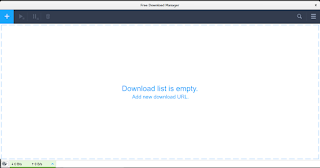
 After what seemed like an eternity, the popular free download manager has finally made a version for Linux! The development team finally came around after refusing to release a Linux version for years!
It all began in mid 2016 when the developers posted a poll asking what features did the users want to have in FDM, a version for Linux was on of the features suggested.
The Linux community help
I reached out to a very popular Linux blog: Itsfoss, and posted a guest post talking about FDM and asking for the help of the Linux community to change the voting results. The support was overwhelming and Linux is the first featured voted by a margin. You can view the results of the poll from here.
A support issue
Over the years FDM was no longer open source, it turned into a freeware with the old branch 3.9.x remaining open source. So the source wasn’t going to be posted where people could collaborate on it.
Also I’ve received information from the developers saying that it would have to be written from scratch in order to support Linux properly.
 |
| A screenshot of FDM running natively on Linux |
FDM 6.1 supports Linux!
At last the long wait is over! A version of FDM finally supports Linux! This “Alpha” was released in October of 2018, and the stable version is yet to be released. It’s a huge step from being a promise, a concept and an option on a poll..
You can download this version for Linux Ubuntu from this link.
It’s still in the very early stages of release and missing a lot of features as stated on the download page, with more functionality expected later this year; including features from the 3.9.x series of FDM.
Also Ubuntu is the only distribution of Linux currently supported and any other distros that support .deb files.
Final words
It’s wonderful seeing that something I’ve worked hard towards achieving is finally paying off. I’ve been rallying and pressuring the support team for over 3 years now for a Linux version.
My happiness will be complete when a stable version of FDM 6.1 is released and Linux is one of the supported systems.
Do you use FDM? How do you feel about a Linux version of FDM after all these years? Please let me know in the comments section blow.
The new Firefox is amazing, it’s been renamed Quantum since version 57 back in 2017. I used to use an add – on to import and export passwords, however it’s no longer supported in the new version of Firefox.

An update that does some damage!
However I’ve noticed that sometimes after an update, the saved passwords are erased, and I have to enter them manually, which is a real pain!
How to import and export passwords without an add – on?
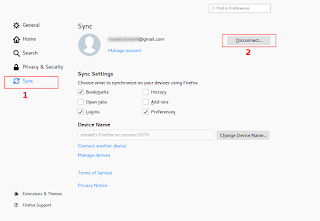
There is a very simple way which is creating a Firefox account and using that to sync your information across different devices: Passwords, bookmarks and history.
You must have more than one device for this method to work: Your phone and your computer for example. Or two computers: Your work computer and your house computer.
The fix
From the main menu go to: Edit Preferences Sync
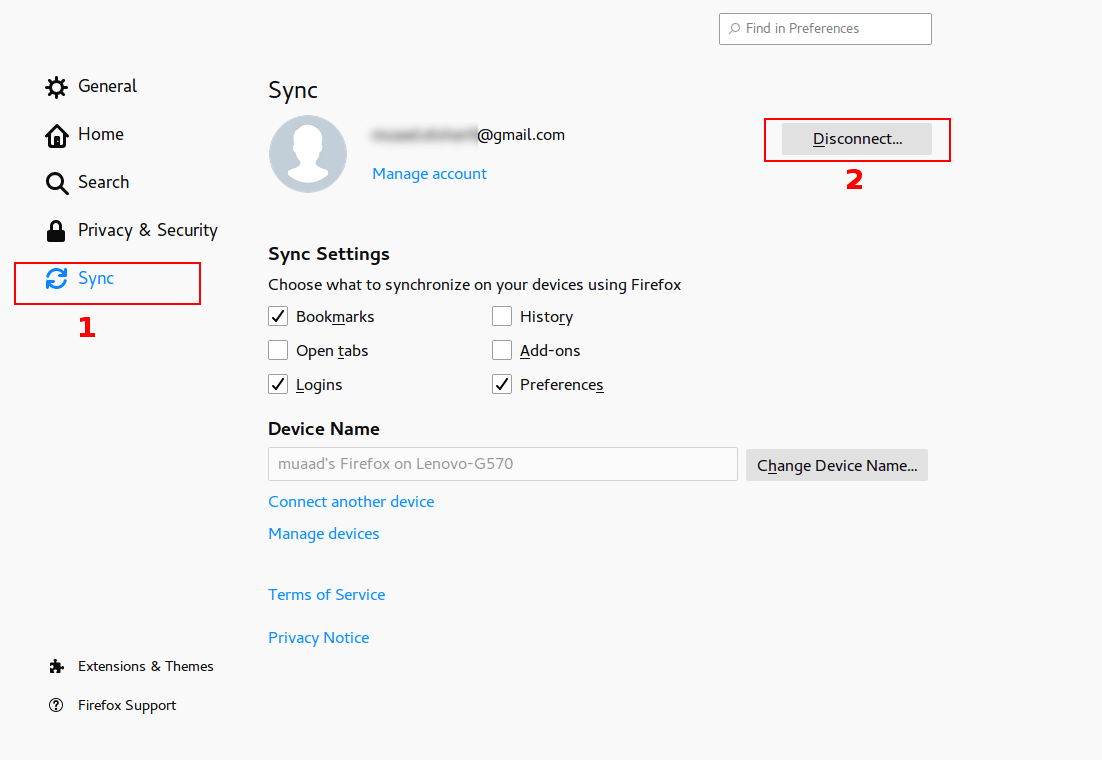
Click Disconnect, then sign again with your login information. Firefox will sync the information from the other device and you will get back your passwords in no time!
Please note that clicking disconnect would erase any data you had stored in Firefox, so watch it!
Final words
That’s how you restore saved passwords and bookmarks for Firefox Quantum. I hope you found this post useful. Please leave a comment if you have a question.

RSSOWl is one of the best RSS feed aggregators available for free, if not the best, however it’s well known that RSSOwl has been discontinued since December 2013. This doesn’t pose a real problem as the current version is stable and usable, for now!
The journey ends here
 If you plan on upgrading to a more recent version of Ubuntu (18.04 for example being the latest LTS), you will be unpleasantly surprised that RSSOwl won’t work due to dependency related issues.
You can search for an alternative, sites such as: Alternative.to provide millions of software to search through.. I have to be honest and say that no alternative of RSSOwl works in the same way or can be customized to have the same functionality.
What can be done?
If you are on Ubuntu 16.04 you can rest assured knowing that it would be supported until 2021, you will enjoy the usability of RSSOwl for a period of time.
How about something fresh and exciting?
You can use the RSSOwl fork: RSSOwlnix.
That’s the beauty of open source, it really never ends. If a project is discontinued for whatever reason, someone else will pickup the slack and continue the work.. Especially when the project has a massive following as such.
I’d like to see that happen with a commercial software!
What’s new in this fork?
This fork has updated dependencies and should work with later versions of Linux Ubuntu and Windows. I haven’t tested it RSSOwlnix on anything but Ubuntu 16.04 and it worked fine. It works slightly different than the original project and a bit unstable being a beta. Albeit it’s rather usable and gets the job done.
RSS essentials
If you are like me, someone who uses RSS feeds a lot and uses them to keep up with the world news, then this is for you. I’ve used RSSOwl for over 7 years and to me it’s an essential software, I no longer have to compromise if I have an upgrade planned.
Download
You can download RSSOwlnix from this link, latest version 2.7.0 as of this writing.
Windows 64 Bit
Linux 64 Bit
Final words
Do you use an RSS reader? Would you consider using RSSOwlnix? Please let me know in the comments section below.
أنا الفائز بجائزة المدون المنتظم لعام 2025 من موقع مرجع التدوين
