
Category: English Post (Page 18 of 97)

How to compile the latest version of Wesnoth on Ubuntu and integrate it with Lutris?

Wesnoth is a wonderful game available for free for Linux, however lately it has been falling out of favor with packagers; currently stuck at 1.14.5 while the latest version is 1.14.7 as of this writing! This tutorial will show you how to compile the source code of the game and integrate it with Lutris, and even add a custom icon so it can be searched easily across the system and docked on launchers.

Compiling Wesnoth from source on Ubuntu 16.04

While this method is not recommended and it’s only advised for advanced users only, it could be the only way to have the latest version of Wesnoth on Ubuntu.

1. Download the source code from the game’s site, always go for the latest version. and make sure to checksum the source code prior to doing anything, the value of the checksum is provided on the download page and you can easily check it using the terminal.


2. In the terminal, install scons using: sudo apt install scons
I’ve  decided to compile the source using scons rather than cmake because it’s much easier, however the compiling process happens in the same directory as the game, so make sure to copy the game to the target directory first, I’m going with /opt/wesnoth-1.14.7/wesnoth for the rest of the tutorial.

3. Download all the missing dependencies:
sudo apt install libsdl2-dev libsdl2-image-dev libsdl2-mixer-dev libsdl2-ttf-dev 


libboost-all-dev libvorbis-dev libcairo2-dev libpango1.0-dev l


ibssl-dev libreadline-dev cmake make scons pkgconf

4. Go into the game directory, for example /opt/wesnoth-1.14.7/wesnoth and install with the command scon.
Please note that the process is long and resource extensive, so please be patient.

More instructions and options can be found here on the official wiki.

And that’s it, now the game works fine!

Note: If you played an earlier version of Wesnoth, please be sure to copy your save games and preferences so you don’t start from scratch.

Integrate with Lutris

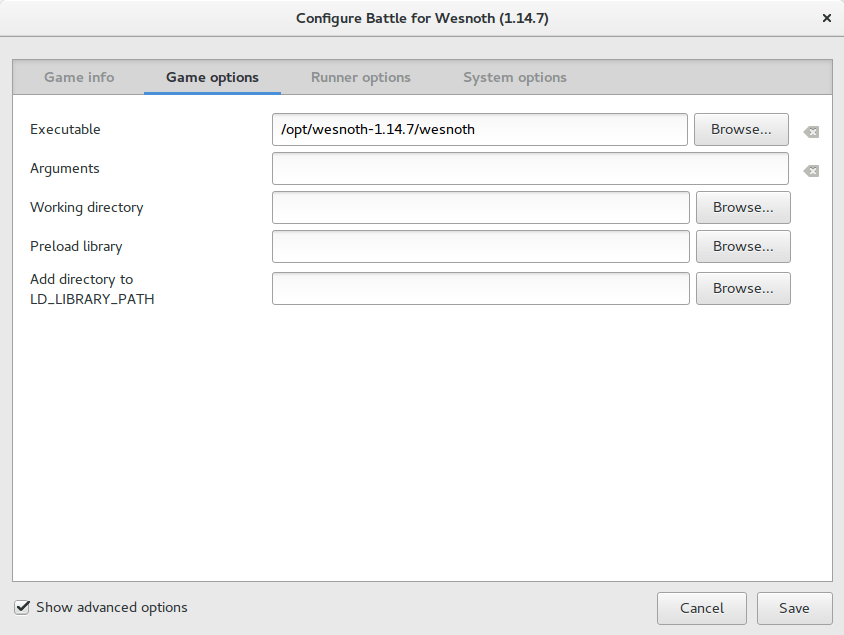
After compiling from source, Wesnoth can be easily configured to work with Lutris, simply by changing the path of Wesnoth from the default to wherever you installed it, I happened to install in /opt/wesnoth-1.14.7

Lutris icon


A screenshot from Lutris showing how the directory is changed


Adding an icon so you can dock it and be able to see it in the dash

Compiling Wesnoth this way won’t allow you to be able to search it or add it to plank for example, you will have to add a custom icon for this to work.

1. Go to /usr/share/applications/ as root and create a new .desktop file using a text editor (with sudo privilege).
The contents of the file should be like so:
[Desktop Entry]
Name=wesnoth
wesnothComment=The Battle for Wesnoth
The Battle for WesnothEncoding=UTF-8
Exec=/opt/wesnoth-1.14.7/wesnoth
Icon=/usr/share/applications/wesnoth.png
Terminal=false
Type=Application
StartupNotify=false
Categories=Application;Game;

Feel free to copy this file to your computer as long as you have everything installed as mentioned here, if you change anything make sure this document reflect your changes.

2. Save the file and you are good to go! As soon as you loook up Wesnoth in your system you will be able to find it and dock it on launchers such as plank.

After doing all that, I’ve uninstalled the old 1.14.5 and removed the repositories from my system, from now on I’ll compile on my own!

I hope that you find this tutorial useful, if you have any questions please let me know in the comments section below.

Credit goes out to Reddit user TonicAndDjinn as he provided a lot of helpful tips on how to compile the game.


Metamorphosis

No, this isn’t the a review of the novella by Franz Kafka! I’m addressing some personal changes and feel like reflecting on them in this post.


Metamorphosis
Metamorphosis

People come and go

This is a difficult one to process – for me at least – , that the people in my life are temporary – In sense everything is – and for that reason, I must not rejoice when new people enter my life, or feel like it ended when others leave my life. I started to think of it more like a public transit vehicle where people come on the cart and others go off of it. I also left some people’s life and left a place, that’s how things go.


I’m not always right

While this one seems like a no-brainer, it took me a while to comprehend that the other party might have a more convincing argument than mine, and that I might be completely wrong. It’s true that I’ve been treated unfairly in the past, however that doesn’t mean I have a fair cause all the time!

The change is real!

I no longer resemble my former self, I have enough self awareness to tell that much. Am I better or worse however? Have I made progress or have I regressed as a person? I cannot answer this clearly from this perspective and level of consciousness. Quite frankly I don’t know what to think or how to feel about these changes? Should I succumb to the overwhelming changes?  Or should I resist and hold on to scraps of an old identity?

“The only constant in life is constant change”

Trying to resist change is a change in itself – no matter how nonsensical this phrase sounds -, people change and I am no exception to the winds of change. It’s both exciting and terrifying to morph into someone new, even if it happened gradually and almost unnoticeably.

“A river cuts through rock, not because of its power, but because of its persistence.”

I am a result of my actions and choices. All those little things I gave no thought, and the major life changing events fall like the sand in an hourglass, shaping my identity and the course for the rest of my life. And that is something I must learn how to deal with.

The path

If things were as simple as having two clear paths to choose from, one for the “light” and the other for the “dark”. Life is so much more complicated than a binary choice setup, and the former choices are often shrouded in doubts and clouded in mystery.
I only hope that when the dust settles, I maintain what matters of myself and lose all negative traits and flaws. The term purify by fire comes to mind.

A complete transformation

In moments of weakness I prayed to wake up changed into another man, stronger and more confidant in myself. Such a drastic change can’t possibly occur overnight. If only things were that simple!
However as the old saying goes: “Careful of what you wish for”.. Now the wish is granted, but not for the man who made the said wish!
With change our motives and wishes change as well, that’s why timing is critical, I do believe that dreams and wishes have an expiry date to them ..


Searching for the holy grail

A question I ask myself often is: “Who am I?”. I am beginning to think that there is no definite answer for this question. Identity is ever changing. ever shifting, being shaped by everything a man encounters and experiences. The answer itself changes from the time the question is asked to another.
Finding the one true answer would be like finding the holy grail, the greatest treasure a man could find in himself.

Until the day I find what I’m looking for, I’ll continue asking, searching and growing.

Focuswriter not starting stuck on loading sounds fixed

Focuswriter is a free and open source (FOSS) cross-platform distraction free writing software that is lightweight and easy to use. Today I’ll show you how to bypass the loading sounds bug and fix it completely!


Focuswriter logo

The problem

It all started when I tried to enable the typing sounds on my Netbook running Antix Linux, the program froze and I had to shut it down manually. After that whenever I try to start the program, it won’t start!


Attempted fixes

Trying to uninstall the program and install it again didn’t work! Even removing configuration files from Synaptic didn’t work, no matter how many times I install and uninstall it again, the problem persists!

The fix

Using your file manger of choice, navigate to /home/[username]/.config/GottCode/ and in it you will find one file only: FocusWriter.conf
Delete it and restart the system, after it starts again, you will have Focuswriter running like it should.
A new configuration file will be created automatically, no need to worry about the file being deleted. 

Focuswriter interface

Final words

Going for a lightweight mixture of a Netbook, Antix and Focuswriter can be a winning combination, and as a slight compromise bucklesrping can be installed individually for an aesthetically pleasing writing experience. And if you are typing at night, enable the leds on your keyboard!

Do you use any of these tools? Do you find this tech tip useful? Please leave your opinion in the comments section below, and I’ll see you in the next one.

How to download Bucklespring as a Deb in Ubuntu and enable it?

Bucklespring keyboards are iconic keyboards with distinct sound effects, sadly they went out of fashion however you can still relive the wonder of them on any keyboard you have

Downloading as a snap vs .deb

The most popular way to download this trick is via a snap, but I don’t like to use these nor have any of them installed. I still prefer the old fashioned .deb packages. 


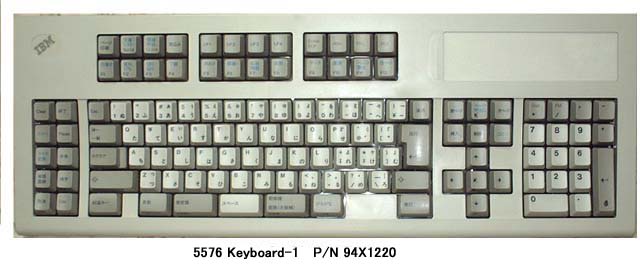
A bucklespring keyboard

The packages

The package bucklespring_1.4.0-2_.deb can be downloaded easily from Debian’s packaging website (I shall link it below), please note that you won’t find this deb package in Synaptic.

Download the bucklespring-data_1.4.0-2_all.deb and the bucklespring_1.4.0-2_.deb.Install the data first then the bucklesrping package itself.

How to run Bucklespring?

Bucklespring has no GUI (Graphic user interface), so in order to get it to run you need to open the terminal and simply type in: 

buckle

Download links

Please choose the right architecture for your processor.

Important notes

You have to keep that terminal (x session) open in order to enjoy the bucklespring sounds as you type on the keyboard.

I happened to notice that some keys don’t produce the sound as they are typed on (the number pad on the right side of the keyboard).

Final words

It’s a cool trick to have enabled, totally changes your using experience of the keyboard. I find that it’s best paired with LED enabling (also enabled from the terminal) for a maximum nerdy effect.

Have you enjoyed this tip? Do you like the bucklespring noise? Tell me what you think in the comments section below, and I’ll catch you in another one!

« Older posts Newer posts »