Category: Mindmap (Page 2 of 3)

فن التفكير

“تحت هذا القناع أكثر من الجسد. تحت هذا القناع توجد  فكرة يا سيد (كريدي)، والأفكار مضادة للرصاص”

هذه إحدى الاقتباسات الملحمية من فيلم V for Vendetta. فيلم بريطاني يعود للعام 2005 ميلادي. أنصح بمشاهدته إن كنت ترغب في مشاهدة شخص شغوف .. لا أود حرق الفيلم حتى وإن كان عمره 15 سنة تقريبًا..

ما هو التفكير؟

سؤال بديهي أليس كذلك؟ أنت الآن بينما يعالج عقلك هذه السطور تقوم بالتفكير في إجابة عنه. يمكن القول بأنه تشغيل العقل لغرض فهم شيء ما.

التفكير نشاط هام، لكن كم مرة نفكر فعلا؟

الأمر يتراوح من شخص لأخر. البعض يمضي الوقت في التفكير دون فعل! والبعض الأخر يمضي وقته في الفعل دون تفكير! أعتقد أن كلاهما خاطئ.. الإفراط في التفكير مرض مرهق لصاحبه. والحماقة أعيت من يداويها.

كيف يمكن تحسين جودة الأفكار وتنقيحها؟

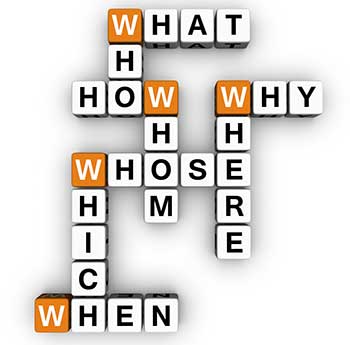
طرح الأسئلة مهم جدًا، الأسئلة الصحيحة. الأسئلة تجلب بدورها تفرعات وأفكارًا أخرى لم تكن لتخطر ببال. أبسط مثال يمكن سرده هنا هي الأسئلة المعروفة في اللغة الانجليزية بأسئلة (WH questions) .

What? – How? – When? – Where? – Why?

هذه الأسئلة (ماذا؟ كيف؟ متى؟ أين؟ لماذا؟).  الحصول على الإجابات لهذه الأسئلة يعطي فهمًا لهذه المسائل ولو بشكل أساسي.
ما هي العملية الفكرية التي تستخدمها؟

  • الخرائط الذهنية مثلا هي إحدى الطرق لطرح الأفكار وتقسيمها وفهم ارتباطاتها.
  • الحديث مع الآخرين أو حتى مع النفس يمكن أن يساعد.
  • كتابة الأفكار ورسم وخربشة المخططات قد يساعد كذلك.

هل يمكن للمناقشات تحسين جودة الفكرة وتحويلها من “مجرد فكرة”، إلى فكرة عبقرية؟!

نعم! من القصور التفكير أن عقلك محيط بكل التفاصيل والحيثيات. عندما تطرح فكرتك على الآخر حاول الاستماع إلى ما يرد به قبل فرض فكرتك عليه. فقد تكون إَضافة ذات وزن وقيمة.

الأفكار الجيدة تولد أفكارًا جيدة

عندما تحيط نفسك بوسط عال الجودة ومحتوى رفيع. سيعمل ذهنك على ذلك التردد ويتعامل معه.
أذكر مثالا على ذلك من موقع ريدت الشهير، به منتدى showerthoughts “أفكار حوض الاستحمام” وبه يطرح الأعضاء أفكارًا خطرت عليهم في أغرب اللحظات. أجد بعضها ملهمًا جدًا ومثيرًا للاهتمام.
أيضا هناك منتدى askreddit/ وبه بعض الأسئلة المحورية وإجابات تتراوح بين الساخرة والمبدعة. أنصح بشدة بمطالعة محتوى هذين المنتديين. تلك الأسئلة والأفكار تفتح العقل على نوافذ لم تكن لتخطر ببال.

لحظة اليوريكا

يوريكا هي كلمة يونانية تعني حرفيًا (وجدتها) وتنسب للعالم أرشميدس الذي فهم قانون الطفو عندما رأى كمية المياه التي أزيحت عند دخوله الحمام (وربما يكون وجد الصابونة).
لحظة تفتق الذهن عن فكرة أو حل لمشكلة ما. يزعجني جدا التفكير في كم من فكرة ضاعت بسبب عدم تدوينها بالشكل الملائم. هل كانت إحدى هذه الأفكار لتنهي الجوع في العالم؟ أم إن إحداها كانت لتعالج مرضًا عضالا يفتك بالكثيرين؟ أو شيء يقلل التلوث؟

الرياضيات والتفكير

شخصيًا لم أكن أبدًا من محبي الرياضيات، بل إنها في فترة كانت مشكلة حياتي الأساسية أيام دراستي بالمعهد. وأذكر جيدًا فضل الأستاذ (علي نشنوش) -ذكره الله بكل خير- عليّ وشرحه السلس المبسط. وقوله بشكل دائم أن الرياضات “رياضة للدماغ”. وأن المهندس بحاجة لدراسة الرياضيات حتى لو لم تكن تخصصه.. أعتقد الآن أنه كان محقًا.
ليست الرياضيات فقط، بل كل ألغاز الذكاء وألعاب العقل التي تعتمد على تنشيط الفكر. أظن أنه يجب إدراجها في المناهج الدراسية. ولو كمادة تحت المجموع (ليس بها نجاح ورسوب).

تخمير الأفكار

أحيانًا تظل الفكرة خامدة في العقل الباطن كبذرة. تنتظر اللحظة المناسبة بينما هي تنمو وتترعرع في اللاوعي. ثم تبرز على السطح لتبدو وكأنها وليدة اللحظة أو كإلهام من اللامكان. لا أعرف كيف يمكن فعل هذا بشكل “واعي”. لكني قرأت في مكان ما عن العمليات الفكرية لنوابغ المسلمين وطرق حلهم للمشاكل. كان بعضهم يتلو شيئًا شبيها بالأرجوزة قبل نومه ليستمر ذهنه في حل المسألة. وكان آخر (أظنه جابر بن حيان) يحل المسائل قبل نومه مباشرة وينام على قراطيسه ليستمر في الحل وهو نائم.

قوادح العقل

ختامًا

كلنا ولدنا بعقول، الكل بإمكانه تشغيل عقله والولوج لإمكانياته الخارقة. العقل الذي أوصل الإنسان للفضاء وذلل أمامه الصعوبات. لكن هذا الخيار خيار واع وطريق وعر ليس الكل راغبًا في سلوكه.

هل تعتقد أن هناك أناسًا ولدوا عباقرة وأن السباق حسم سلفًا؟ أم أن طريق النبوغ والجد والاجتهاد مفتوح أمام الكل؟
مراحل إعداد تدوينة

إعداد تدوينة ليس كفتة (ولا مؤاخذة)، اﻷمر يحتاج إلى إعداد وتوضيب، وكبس وقلي في الزيت. مهلا! هذه وصفة الكفتة!

بغض النظر عن الكفتة والكباب، التدوينة يجب أن تكون ابعد ما يكون عن الهبد المرتجل، وأقرب لفكرة متعمدة ذات هدف ومغزى.

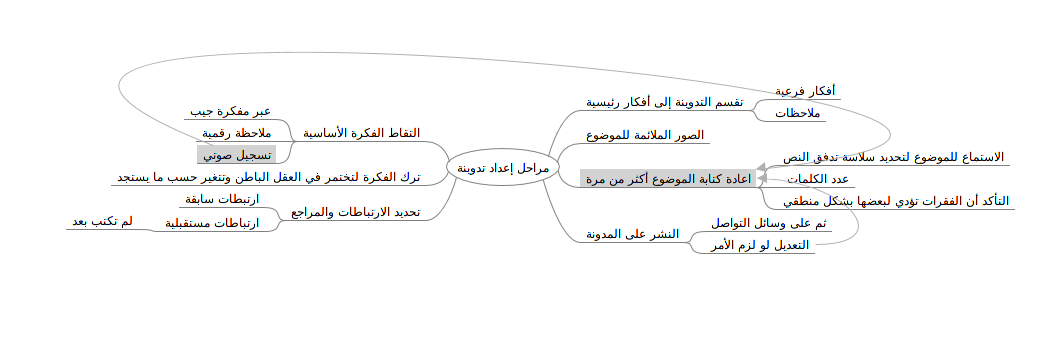
1. التقاط الفكرة وتدوينها بأسرع وقت، معظم اﻷفكار تأتي في أبعد وقت ممكن عن التدوين (كالتنظيف مثلا) لذلك أحتفظ بمذكرة بالقرب مني.
2. تخمير الفكرة. تركها لبعض الوقت دون معالجة لتتضح أكثر وتتقلب في العقل الباطن.
3. ربط التدوينة بتدوينات سابقة أو تدوينة تالية (مع الإشارة الصريحة لذلك والربط في التدوينتين).
4. رسم خريطة ذهنية. يساعد هذا على معرفة العناوين الرئيسية والفرعية وما ستحتويه التدوينة.
5. كتابة مسودة على الورق.
6. تسجيل اﻷفكار صوتيًا والاستماع لها لاحقا.
7. طباعة المسودة وسماعها عن طريق مترجم غوغل مثلا لتوضيح نقاط القوة والضعف وما يجب تعديله.
8. عمل التعديلات اللازمة بحيث تكون كل الفقرات مترابطة وتؤدي لبعضها بسلاسة دون كسر تدفق التدوينة.
9. اختيار الصور الملائمة والروابط التي تعزز الموضوع.
10. نشر التدوينة.
11. مشاركتها على وسائل التواصل.
12. إجراء التعديلات اللازمة بعد النشر أو حسب ملاحظات القراء.
برامج مساعدة: زيم ويكي ليبر أوفيس. للحفاظ على اﻷفكار.

هذه التدوينة تأتي ضمن سلسلة نصائح التدوين التي أنشرها، لتعزيز المحتوى العربي والرفع من كفاءة المدونين، حتى لا ينحصر الموضوع على قلة تجلس في برج عاجي تنظّر على أنفسها.  
هل لديك نصائح أو خطوات أخرى تضيفها؟ قسم التعليقات مفتوح لك..

Minimalism is the new efficiency

The year 2017 is coming to an end, here I have some updates to share, small changes in my productivity flow that might prove to be a game changer in the near future!

Bye bye Xmind!

I’ve been using Xmind as a mind map manager for over 4 years now, I’ve even blogged about it and boasted it’s features. Only to realize that it’s bloated! I don’t use half the features it has and most of the “good stuff” are locked away with a commercial license.

Most posts start out like that.

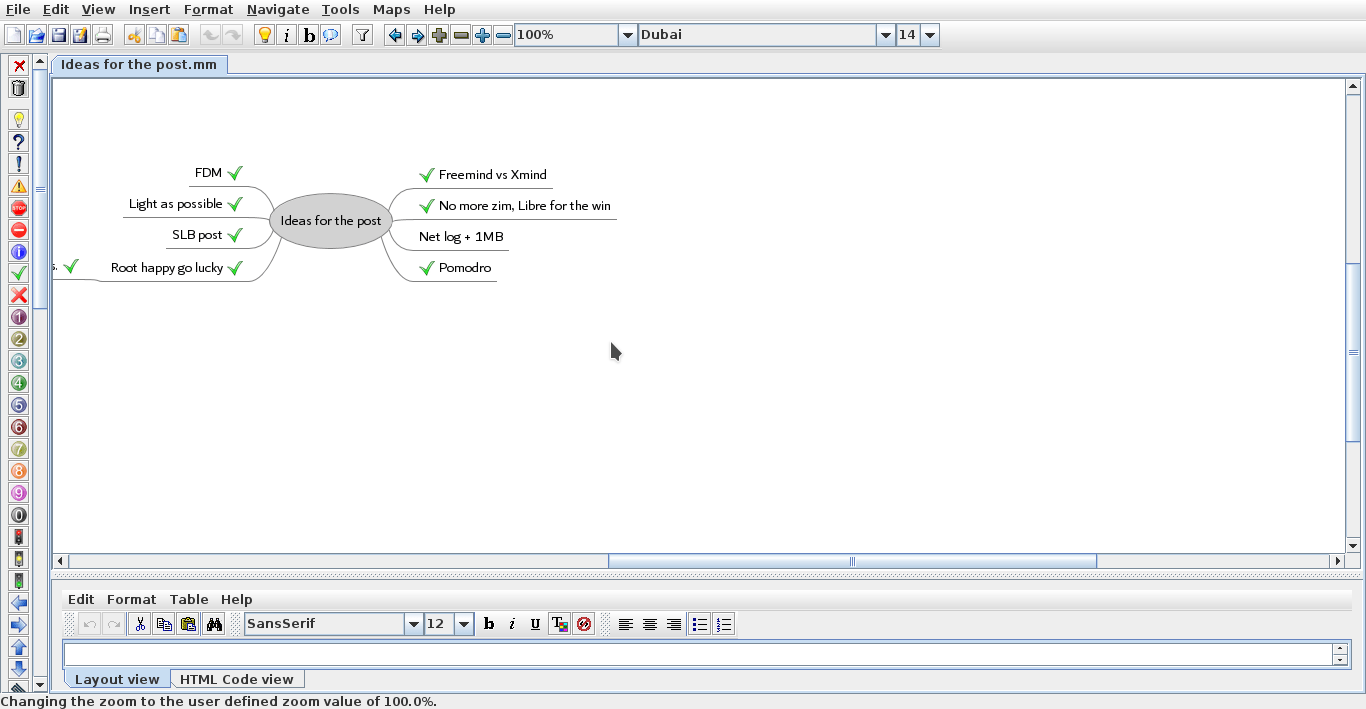
I’m back to using Freemind V 1.0.1 and I couldn’t be happier.
Just opening Xmind 3.5.2 sent my laptop fan on a frenzy, spinning like I’m rendering an HD video, as I’m writing this Freemind is sitting in the background like it doesn’t exist! Brilliant!

Even tho there is a way to make mind maps in Libreoffice, it’s can’t beat the quality of Freemind.

Why the change?

Freemind is smaller in size, consumes less resources, and while it may not look as pretty or well finished as Xmind it gets the job done completely free of charge.
It’s all about simplicity and achieving productivity.


Freemind 1.0.1 interface


Going back to Pomodro

Since moving to Kubuntu I haven’t had a decent timer for my system, I tried out several ones but none of them was as good as pomodro timer, I installed it and the Gnome app works perfectly on KDE, it’s one of my most viewed posts for a reason!

No more Zim?!

Yes Zim-Wiki is the best personal wiki I came across, and while it’s functional I find having to change from it and to LibreOffice quite irritating, so I had to clear out the clutter and stick to one productivity suit, LibreOffice is packed with features and so much I don’t feel like I miss anything.
I had to install tasque again, but I removed it because I like managing my tasks in a graphical way using a mind map.

Phone Tweaks

I’ve blogged about customizing and rooting my phone in Arabic (follow at your own risk), and I’ve rendered my phone useless before by removing an essential system app using root privilege, now after everything went back to normal I decided to remove some apps that I felt like I no longer need.

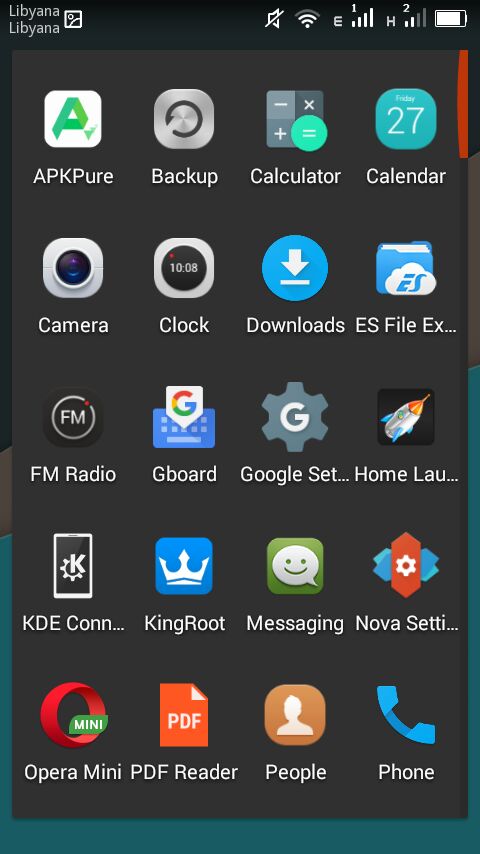
I installed ES file explorer, from back when it was ad free, and since it does so many functions I took the liberty to remove the file manager, the music player, video player, photo gallery. ES file explorer does all that and more!

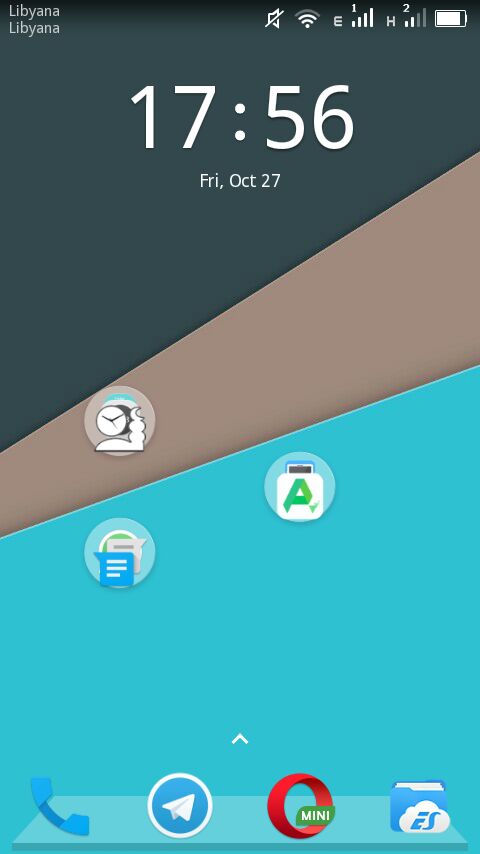
 I’ve also removed all the moving backgrounds. I’ve also removed Apex and installed Nova launcher, which is working great!


Phone’s interface with Nova


The app drawer

I don’t use a note keeping app because I send the notes to myself via Telegram, and I removed maps because I never got anywhere using it!

Before I had the default android keyboard disabled, now I deleted it all together. I use Gboard as the default keyboard, and using ES file explorer and root privlages I tweaked the keyboard sounds (I need a life).

I’d remove Google play store if I could, but sadly it cannot be done, it doesn’t even work for me and it was the root cause of all my of issues, I use APK pure and I haven’t had an issue with it yet!

I’ve replaced the prayer time app with a lighter one and the feature packed Adobe with a simple PDF reader.

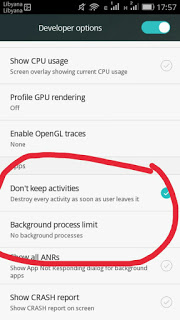
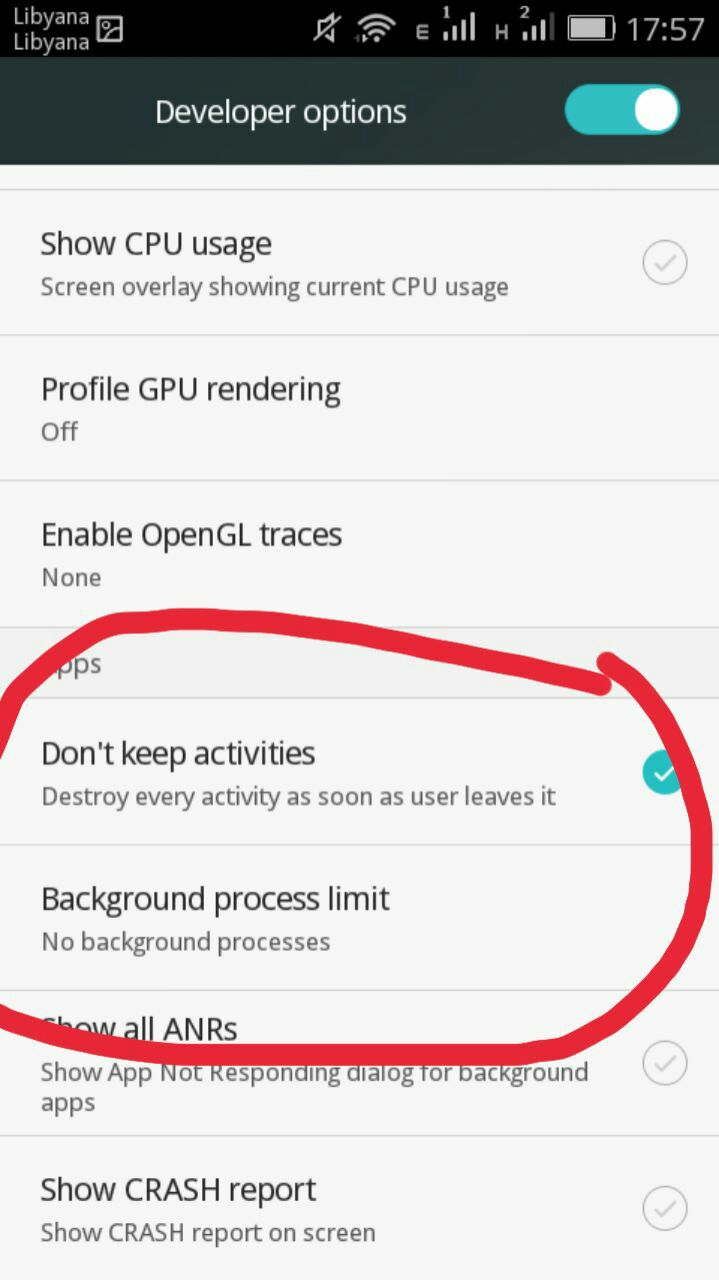
To save more battery power I changed the developer options to kill unused apps, there is some improvement, but again you’re advised to try any of these tricks at your own risk. Gotta keep it charged and happy because you never know..

Tweaking developer options
And since the system didn’t fall apart yet, I think it was a success, I do keep a stock ROM just in case the phone fails, and I advice you to do so too if your phone manufacturer
provides them.

Software for work

What I’m trying to do is creating a productive work flow, that’s minimal and efficient, while moving to Linux was a great first step, I feel more needs to be done, and since I downloaded several gigabytes worth of software for college work (all free and open source of course), I have to make budget cuts to keep the system going!

No more room for Sublime or Atom (god forbid), and since I downloaded Android studio and Netbeans, I decided that Kate (default text editor in Kubuntu) would suffice to write code, rather than the former two. All in favor of saving space and resources.

Kate can’t handle large text files, such as the blog backup for example.

Blogging ventures

I blogged on Itsfoss, one of the leading open source blogs to help draw attention to a Linux version of FDM, I blogged about it a while back but it wasn’t enough to tip the scale in favor of FDM Linux, after my post on itsfoss was published FDM Linux went from being 5th on the future feature vote with 840 votes to being the 1st post on the feature vote, with over 24% of the votes! Talk about domination!!

Now it’s the matter of getting the development team to start working on the long awaited Linux version, I’ve been waiting for over 4 years now!

SLB experience

I’ve blogged about the internship I had at Shlumberger a few years ago, and the support from the community was overwhelming, I should have written about it earlier. The post ranked in over 950 views in a week, I don’t get this kind of attention usually!


A blogging interview!

I was a guest on Ms. Malak Altaeb’s blog, she is doing a fantastic job and I suggest that you give her a follow.

LTT’s net

“Bykyfk” or pay as you go by LTT is cleaning my pockets dry, I have to charge in a new card daily, which is silly if you ask me considering that the internet is really slow, the only option at hand was to change the package from 2MB/s to 1MB/s. Reducing the line’s speed by half doesn’t mean it reduces the cost by half, but it’s a good start to save some money, since this stupid liquidity crisis isn’t going anywhere.

I’ve also made a net log to track when each card is recharged and how long did it last, I don’t have to keep cards till they finish!

I’ve blogged about Libyan internet back in 2015, little improvement (if any) happened since then.


Final words

This post is a break between the “job posts” I’m writing on my blog in Arabic, looking back; I’ve had some terrible jobs! Is my current job better? Slightly, but don’t tell my manager!!

I hope you enjoyed this technical update, have a lovely weekend and leave a comment below, it’s free!

LibreOffice Draw to design Mind maps! (Template inside)


LibreOffice Logo

There are many free and commercial tools to create mind maps, I for one prefer a bit of minimalism, and who can’t be a minimalist when the Document Foundation develops such an amazing software package such as LibreOffice! I use it personally to do many day to day tasks, and I just added one more thing to my list of uses!

Today’s post doesn’t require you to be a master LibreOffice Draw user (even when making the map is so easy!) all you have to do is to download the template and edit it to suit your needs! I’ve put the download link at the bottom of the post, so read on!


The Map

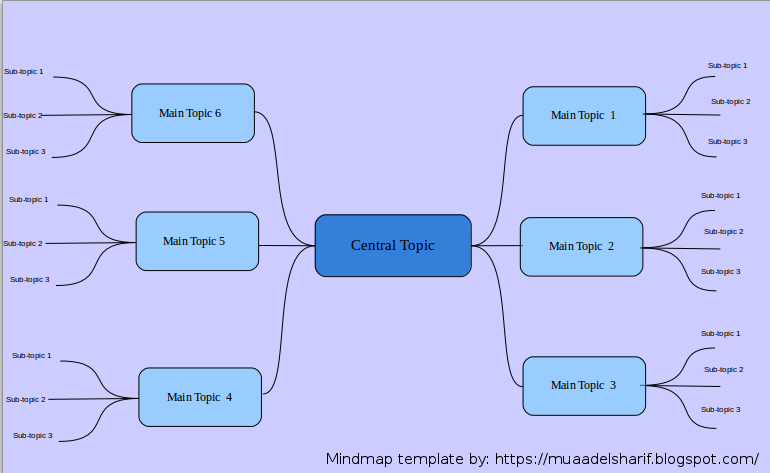
The template I prepared is a three level map with six main topics ordered in counterclockwise order, with each topic having three sub topics, you can increase them easily by copying and pasting then using the proper connector type from the tools.


Mindmap created with LibreOffice Draw

You can easily customize the colors of topics and font types to suit your needs, this is just a template after all! And feel free to remove the attribution I put -feel free to visit my blog tho ;)-

I’m sharing this template under creative commons CC BY you can use it freely as long as you mention I made it when asked so.


CC BY

I was going to make this post a detailed one on how to make this mind map, but I realized that it’s basic skills and no need to repeat them, especially that I’m sharing the mind map template itself so everyone can use it.

To download the mind map template, please click here.

So here you have it! We used the versatile LibreOffice to create a great looking mind map! Let me know what do you think in the comments section below, and remember to share with your friends and family.

Happy mind mapping with LibreOffice!

« Older posts Newer posts »