Category: Productivity (Page 6 of 13)

Minimalism is the new efficiency

The year 2017 is coming to an end, here I have some updates to share, small changes in my productivity flow that might prove to be a game changer in the near future!

Bye bye Xmind!

I’ve been using Xmind as a mind map manager for over 4 years now, I’ve even blogged about it and boasted it’s features. Only to realize that it’s bloated! I don’t use half the features it has and most of the “good stuff” are locked away with a commercial license.

Most posts start out like that.

I’m back to using Freemind V 1.0.1 and I couldn’t be happier.
Just opening Xmind 3.5.2 sent my laptop fan on a frenzy, spinning like I’m rendering an HD video, as I’m writing this Freemind is sitting in the background like it doesn’t exist! Brilliant!

Even tho there is a way to make mind maps in Libreoffice, it’s can’t beat the quality of Freemind.

Why the change?

Freemind is smaller in size, consumes less resources, and while it may not look as pretty or well finished as Xmind it gets the job done completely free of charge.
It’s all about simplicity and achieving productivity.
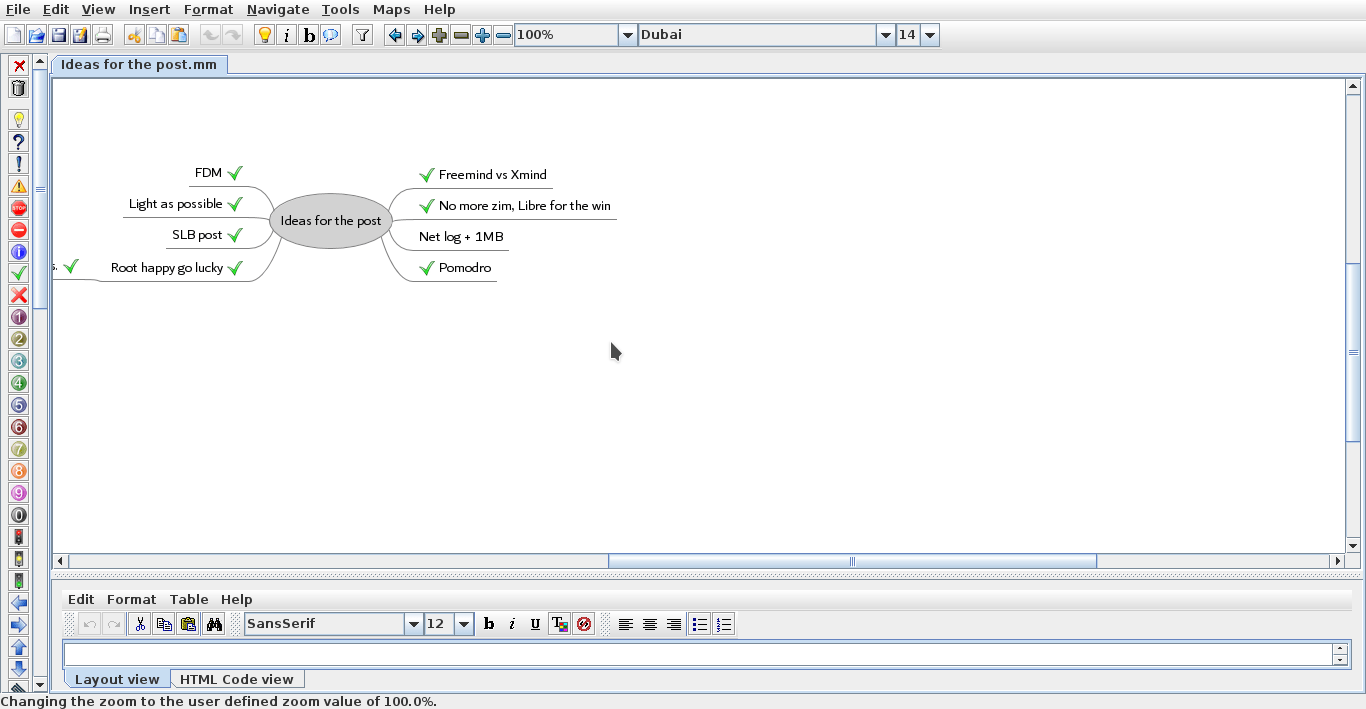
 

Freemind 1.0.1 interface


Going back to Pomodro

Since moving to Kubuntu I haven’t had a decent timer for my system, I tried out several ones but none of them was as good as pomodro timer, I installed it and the Gnome app works perfectly on KDE, it’s one of my most viewed posts for a reason!

No more Zim?!

Yes Zim-Wiki is the best personal wiki I came across, and while it’s functional I find having to change from it and to LibreOffice quite irritating, so I had to clear out the clutter and stick to one productivity suit, LibreOffice is packed with features and so much I don’t feel like I miss anything.
I had to install tasque again, but I removed it because I like managing my tasks in a graphical way using a mind map.

Phone Tweaks

I’ve blogged about customizing and rooting my phone in Arabic (follow at your own risk), and I’ve rendered my phone useless before by removing an essential system app using root privilege, now after everything went back to normal I decided to remove some apps that I felt like I no longer need.

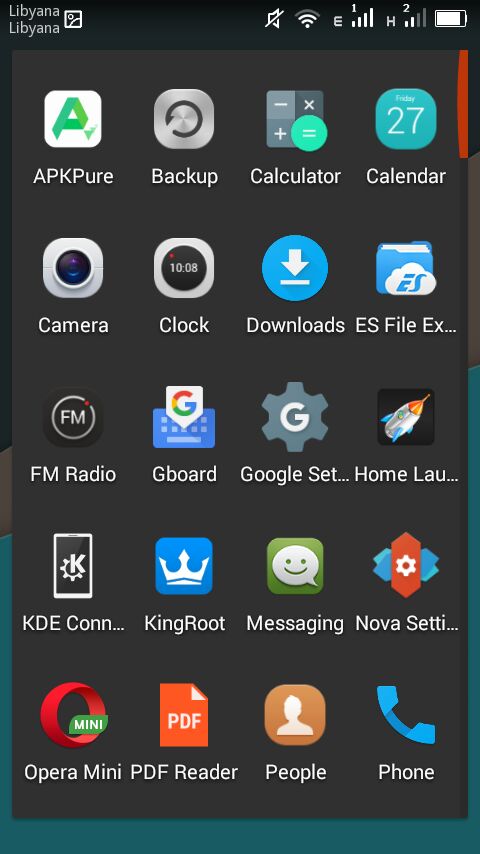
I installed ES file explorer, from back when it was ad free, and since it does so many functions I took the liberty to remove the file manager, the music player, video player, photo gallery. ES file explorer does all that and more!
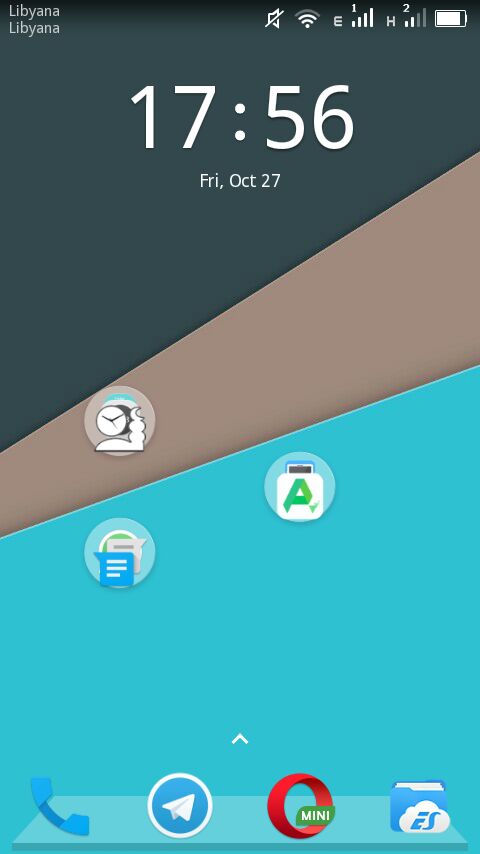
 I’ve also removed all the moving backgrounds. I’ve also removed Apex and installed Nova launcher, which is working great!


Phone’s interface with Nova


The app drawer

I don’t use a note keeping app because I send the notes to myself via Telegram, and I removed maps because I never got anywhere using it!

Before I had the default android keyboard disabled, now I deleted it all together. I use Gboard as the default keyboard, and using ES file explorer and root privlages I tweaked the keyboard sounds (I need a life).

I’d remove Google play store if I could, but sadly it cannot be done, it doesn’t even work for me and it was the root cause of all my of issues, I use APK pure and I haven’t had an issue with it yet!

I’ve replaced the prayer time app with a lighter one and the feature packed Adobe with a simple PDF reader.

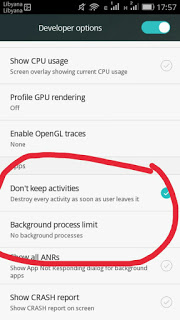
To save more battery power I changed the developer options to kill unused apps, there is some improvement, but again you’re advised to try any of these tricks at your own risk. Gotta keep it charged and happy because you never know..
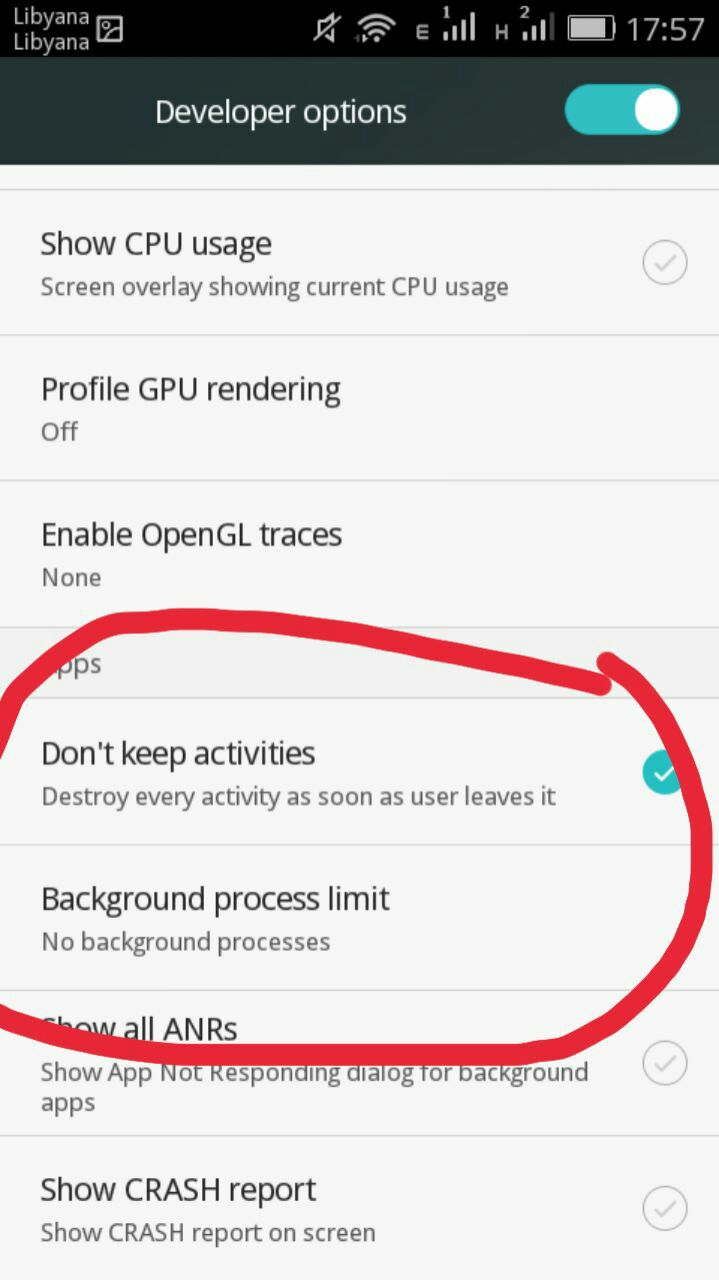
Tweaking developer options
And since the system didn’t fall apart yet, I think it was a success, I do keep a stock ROM just in case the phone fails, and I advice you to do so too if your phone manufacturer
provides them.

Software for work

What I’m trying to do is creating a productive work flow, that’s minimal and efficient, while moving to Linux was a great first step, I feel more needs to be done, and since I downloaded several gigabytes worth of software for college work (all free and open source of course), I have to make budget cuts to keep the system going!

No more room for Sublime or Atom (god forbid), and since I downloaded Android studio and Netbeans, I decided that Kate (default text editor in Kubuntu) would suffice to write code, rather than the former two. All in favor of saving space and resources.

Kate can’t handle large text files, such as the blog backup for example.

Blogging ventures

I blogged on Itsfoss, one of the leading open source blogs to help draw attention to a Linux version of FDM, I blogged about it a while back but it wasn’t enough to tip the scale in favor of FDM Linux, after my post on itsfoss was published FDM Linux went from being 5th on the future feature vote with 840 votes to being the 1st post on the feature vote, with over 24% of the votes! Talk about domination!!

Now it’s the matter of getting the development team to start working on the long awaited Linux version, I’ve been waiting for over 4 years now!

SLB experience

I’ve blogged about the internship I had at Shlumberger a few years ago, and the support from the community was overwhelming, I should have written about it earlier. The post ranked in over 950 views in a week, I don’t get this kind of attention usually!


A blogging interview!

I was a guest on Ms. Malak Altaeb’s blog, she is doing a fantastic job and I suggest that you give her a follow.

LTT’s net

“Bykyfk” or pay as you go by LTT is cleaning my pockets dry, I have to charge in a new card daily, which is silly if you ask me considering that the internet is really slow, the only option at hand was to change the package from 2MB/s to 1MB/s. Reducing the line’s speed by half doesn’t mean it reduces the cost by half, but it’s a good start to save some money, since this stupid liquidity crisis isn’t going anywhere.

I’ve also made a net log to track when each card is recharged and how long did it last, I don’t have to keep cards till they finish!

I’ve blogged about Libyan internet back in 2015, little improvement (if any) happened since then.


Final words

This post is a break between the “job posts” I’m writing on my blog in Arabic, looking back; I’ve had some terrible jobs! Is my current job better? Slightly, but don’t tell my manager!!

I hope you enjoyed this technical update, have a lovely weekend and leave a comment below, it’s free!


Productivity tips for a better working session

I always wanted to post on being more productive when working on the computer, I listed a few ideas that should help you achieve the right balance of productivity without exhausting yourself, being productive and consistent gives you more credibility and it means you will meet your deadlines rather than running breathless and sleepless trying to finish before the clock strikes midnight! I also listed a set of handy tools you can add to your arsenal and help you become a productivity guru.

List the tasks you have to do

You can’t just browse causally and do random things and hope these random activities will get you anything done!

IF you don’t know what to do, how will you achieve anything?


Some people still enjoy good old pen and paper

Know what needs to be done, and how much time does it need before getting down to business, and don’t forget to prioritize your tools as well!

The best way to keep ahead is to write a to-do list or use a software that arranges that for you, I reviewed a great task management suit from here for Windows, and for GNU/Linux I have my trusty Zim-Wiki to do the trick.

Prepare everything up ahead

Have everything you need by your side so you minimize those “ mini trips” just to look at things or to do trivial tasks, these little pauses damage your focus and makes it harder for you to start working again. Instead use the breaks to do the minor things.
While keeping yourself hydrated always leave the water and other drinks away from the computer or power source, I can’t stress that enough!

Handle distractions

Probably is the hardest part when working, how to disengage from the world and getting into the zone! Here are some suggestions.

No Wi-Fi could fix your procrastination issues!

Turning off the Wi-Fi is too extreme, especially when most of the tools used to work are on line! I suggest a site blocker for your browser, this sets a blacklist of sites you shouldn’t be wasting your time on, and leaves the rest for you to work, if you found yourself fiddling with the extension to get on line then turn off the Wi-Fi!

Again the breaks are your best friend, use those breaks to check on the people you care for, don’t shut your family and friends off to work! That’s never a good idea!

A little tip goes all the way, I set my wifi not to connect automatically anymore! So I have to connect it manually when I need something!

Have a working goal

Say to yourself: I’m not having that treat until I finish writing 5 pages today, or I’m not going to watch my favorite show until I finish the post I started, that way you work for a goal or a reward, and you will find out yourself that the sense of achievement is more rewarding than any treat!

Set a timer

It’s a good idea to use a timer to enhance your productivity, as recent studies show that the brain needs frequent breaks to maintain focus, sadly it’s very easy to forget taking frequent breaks while working.

Regular stretches can prevent RSI and help you rest from long work sessions, hence the need for a good timer!


Using a timer for productivity
Ready? Set. Go!


I’ve blogged about several timers here on this blog, feel free to check Instant boss for Windows, and Pomodro timer for Linux, as I rate those the highest.
While Instant boss is more “aggressive” and I would totally recommend it to anyone wanting to get the job done while having procrastination issues, it’s not cross platform, but I spoke to the developer on Twitter and said she might port it to Linux if she had the time, and Pomodro timer is the best timer I came across on Linux, and the post was very well received by the readers of my blog!

The right tools for the job

Use a software package that helps you to do more and focus on the job at hand, I’d recommend LibreOffice as I believe it packs a ton of potential!
You will need a spell checker also, so make sure that the dictionaries for your language are installed in LibreOffice.


Toolset
Without the right tools, you will suffer!


You might want to add a clipboard manager and a screenshot tool as well if needed. It will help you be more productive, that’s the office worker starter pack!

All of these tools mentioned in this point come preloaded with Ubuntu (so much for GNU/Linux failing on the desktop) so maybe I should list Ubuntu as one of the right tools for the job?

For many purposes (other than document creating) I tend to use Zim-Wiki and do believe that it’s highly underrated! It can do the work of many tools at once, I use it to make and follow to do lists and keep notes, journals, and all sorts of information, you might want to check it out!

Using better software means making your work easier without putting too much load on your computer, which takes us to the next step.

Your computer

Assuming you work from a laptop / desktop computer -as I find the smaller devices running Android impossible to do any real work with- there is nothing worse than a slow unresponsive computer that hangs all the time.


It looks cute doesn’t it? :3


For that I will be making a separate post that will help many people be happier and more productive at work, simply by optimizing the computer’s performance, so stay tuned.

Working at a specific time of the day

Some writers swear that writing on a specific time of day helps them get the best out of them, why not you? I think we can take this advice forward and apply it on general working and not just writing, you have everything in place and all the tools set up and ready to work.
Building a consistent routine will help you be more productive and will make starting work very easy and more of a habit than a chore.

General health tips

There are more common sense tips that I’ll list very quickly like getting enough sleep and eating healthy, these are often overlooked and that can cause some serious health issues, I’m no doctor but you need to sleep at night, drink enough water and eat your vegetables!


Eating healthy and living healthy
Never underestimate the importance of a good diet

How did you like this post? What are your productivity secrets? Do you use any special tricks or tools I didn’t mention here? Please let me know in the comments section below.
And share this with your social media circles and keep the productivity going.

فيسبوك، هل اَن أوان أن تتركه؟

مرحبًا بكم أعزائي القراء.

أمل أن يكون يومكم هذا سعيدًا، ومرحبًا إلى مقالة أخرى من مقالات مدونتي، سنتحدث اليوم عن موقع الفيسبوك.

أصبح الفيسبوك من أكثر المواقع زيارة على الإطلاق، الكل لديهم حساب أو حسابان عليه! إنه شعبي جدًا وممتع جدًا، كل شيئ تحبه موجود هنالك وفرصة تواصلك مع أي أحد في العالم تقريبًا! أليس هذا شيئًا رائعًا؟

لا، ليس كذلك!

لو كان تفقد حسابك على الفيسبوك هو أول شيئ تفعله عند الإستيقاظ من النوم وأخر شيئ تفعله قبل الخلود إلى النوم، ربما تكون مدمنًا على الموقع، هل إجابتك هي لا؟ قل لي إذن: متى كانت أخر مرة دخلت فيها على الموقع لتفقد شيئ ما؟

اﻷمر أكثر خطورة مما تعتقد، ومصطلح إدمان الفيسبوك ليس شيئًا يدعو إلى السخرية.

مثل هذه المواقع يجب أن تدعم حياتك وتواصلك، لا أن تأخذ حياتك منك!

متى كانت أخر مرة تحدثت فيها إلى شخص ما؟ قرأت كتابًا، أو مارست إحدى تلك الهوايات التي وضعتها في قسم الإهتمامات بالموقع ثم نسيت أمرها كليًا؟

لو توقفت لتفكر في إجابة الأسئلة السابقة مليًا، فأنت في ورطة!

هذا الموقع مصمم ليكون متاهة، بمجرد أن تدخل إليه فإنك تفقد طريق الخروج!

هل يعني رمز الإعجاب أي شيئ اﻷن؟ هل رمز الضحك

“هههه” هو الطريقة الجديدة للضحك؟ هل سننقذ الناس الجياع في أفريقيا بمشاركة صورة؟ هل هذا هو مستقبل البشرية؟

أخرج من موقع فيسبوك و استرد حياتك!

أعلم أن شعورًا بالشك يساورك اﻷن، كل أصدقائي هناك! ألعب اﻷلعاب على الفيسبوك، هو مصدر معرفتي للأخبار واﻷحداث الحالية، لا أستطيع المغادرة!

حقاً؟ كيف كانت حياتك قبل موقع الفيسبوك؟ يبدو اﻷمر وكأن فيسبوك هو كل حياتك!

عندما تقلع عن استخدام فيسبوك ستنال فوائد كثيرة منها

الكثير من الوقت

ستصيبك الدهشة حينما تكتشف مقدار الوقت الذي كنت تمضيه على فيسبوك! واﻷشياء التي منعك من فعلها! بدلا من الكتابة عنها في فيسبوك، اذهب و افعلها!


سوف توفر المال

لن تصدق كمية اﻷشياء التي إشتريتها فقط لأنك رأيتها في إعلان على الفيسبوك، أو لأن أحدًا ما تعرفه تباهى بها على الفيسبوك!

ستوفر مالك للأمور التي تحتاجها فعلًا ولن تنفق المال على أمور تافهة تحت ضغط إجتماعي أو وهم احتياجك للشيئ.

ستنام نومًا هنيئًا

!ستستمتع بنوم هانئ! لن تبالي بالمنشور الذي تشاجرت فيه مع أحدهم، أو كم من الإعجابات نالت صورتك الجديدة، ولن تستيقظ من عز نومك على إشعار غبي من منشور أعجبت به دون تركيز، أو محادثة مع شخص بالكاد تعرفه، هذا أمر خطير جدًا! الموقع متواجد طوال الوقت ولمدة 24 ساعة، هذا يعبث بدورة النوم الخاصة بك، هنالك دائما شيئ لفعله، شخص متصل للحديث معه، وداعًا لدورة نوم صحية ومرحبًا باﻷرق، ما يعني المزيد من الفيسبوك!

راحة البال

مع كل تلك الترهات خارج حياتك، مستويات التوتر والقلق ستنخفض بدون شك! ستشعر بإسترخاء أكثر، والفضل(لله سبحانه وتعالى أولًا) ثم يرجع لإنسحابك من الفيسبوك!

ستفكر بشكل مستقل

لن يخبرك مدعى معرفة أحمق كيف تعيش حياتك بعد اﻷن

! كيف ترتدي ملابسك، أين وماذا تأكل، أين تمضي عطلتك المقبلة، أو إعلانات زرع الشعر المزعجة تلك!

لن تكون زومبي بدون عقل يتفقد هاتفه كل 30 ثانية لترى من فعل ماذا أو من يشعر بالسوء!

حياتك ستكون ملكًا لك مجددًا

خصوصيتك هي كنز نادر الوجود في هذا العصر الرقمي، أنه لأمر في غاية الغرابة أن يسألك شخص بالكاد تعرفه: كيف تشعر بعد تركك للعمل الذي بقيت فيه بضع سنوات؟

ماذا! كيف عرفت بذلك؟

أوه، انتظر!

ستشكرك البطارية وباقة الإنترنت

ستدوم بطاريتك بشكل أكبر و ستوفر باقة الإنترنت، مايعني عمرًا أطول و استهلاكًا أقل ونقودًا أقل!

ستكون منتجًا أكثر!

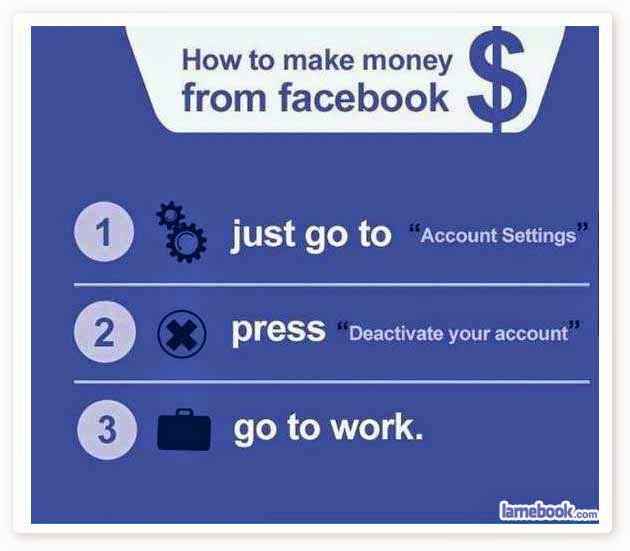
تعطيل تفعيل الحساب. واذهب للعمل!

بمناسبة العمل، ستزيد فرصك في المحافظة على وظيفتك، أو الحصول على وظيفة جديدة!

لا تصدقني؟ كم من شخص تم طرده من العمل بسبب منشور على الفيسبوك؟ الكثيرون!
كثير من الناس يضيفون مدرائهم وزملائهم في العمل على موقع فيسبوك،، ما يعني دمجًا بين الحياة الشخصية وحياة العمل، والحياة الرقمية، كثيرًا ما ينسى الناس أن المنشورات التي يكتبونها من باب التنفيس عن الغضب قد تفسر بطريقة مختلفة، أو ادعائهم المرض بينما هم في الحقيقة على شاطئ البحر (قصة حقيقية وتم طرد الموظفة على الفور!).
كما أن الخلافات “الفيسبوكية”ستؤثر على مجريات العمل، حتى لو كانت على مباراة في كرة القدم!
كثيرًا ما يعتمد مدراء التوظيف على موقع فيسبوك لمعرفة شخصيات العاملين وميولهم الحقيقية، لا السير الذاتية المزخرفة، والكثير من الأشخاص يتم قبولهم أو رفضهم بناء على ما وضع في صفحاتهم الشخصية، ابتداء من الصورة وانتهاء بالمنشورات والإعجابات!
لذا عندما أقول لك أن الفيسبوك قد يتسبب في طردك أو في بطالتك، فكر مليًا في ذلك!!

ستفقد الوزن

لا أمازحك! أدمج كل العناصر التي تحدثنا عنها:

 أنت في الخارج تتعرض لضوء الشمس، تشم الهواء النقي، تتمشى وتعمل، ترى الناس وتتفاعل معهم، ستتحرك أكثر وتخسر وزنًا أكثر، مفعوله عجيب!


بعد كل هذه اﻷسباب أعتقد أنك بدأت تغير رأيك عزيزي القارئ، وإن كنت لا تصدق أنك مدمن على الموقع وتعتقد أنني أبالغ قم بتجربة التحدي اﻷتي:

تحدي الإمتناع عن الفيسبوك 24 ساعة

ابق بعيدًا عن الفيسبوك

24 ساعة، يبدو اﻷمر تافهًا أليس كذلك؟ أنا لم أنته بعد!

ليس مسموحًا لك بدخول الموقع، أو تفقد الإشعارات، قراءة الإشعارات في البريد الإلكتروني!
 بإختصار: أريد منك أن تتظاهر بأنه ليس لديك حساب على الفيسبوك،.
عد لاحقًا وأخبرني كم مضى من الوقت قبل أن تنهار وتخسر التحدي.
لو اختبرت أعراض الصداع والرغبة القهرية في تفقد موقع فيسبوك مرارًا وتكرارًا على هاتفك أو جهاز الكمبيوتر، أنت بحاجة إلى مساعدة فورية (أنا أفترض ذلك على اﻷقل).
.
وأنت (من غير أن تعلم) قمت بالخطوة اﻷولى للخروج من الفيسبوك!
حاول أن تعطل تفعيل حسابك لأربع وعشرين ساعة فقط، لا داعي للإستعجال (اﻷحمق فقط من يحاول الإقلاع فورًا!)
ثم بعد ذلك عطل تفعيله ليومين، ثم عد، وإستمر على هذا المنوال.
عندما تترك الفيسبوك لأسبوعين متتالين ستقدر قيمة الحياة من دونه!
 هذه النصائح ليست لمن يستعمل الفيسبوك مرة كل سنة، بل هي للشخص الذي دخل وضيع طريق الخروج!

كن لطيفًا

قبل مغادرة الموقع قم بإعلام أقاربك وأصدقائك عبر منشور وأذكر لهم طريقة يمكنهم التواصل من خلالها معك.
لا تحتاج إلى 3000 صديق وسبع صفحات لتديرها، هذا كثير جدًا! أترك أقرب أصدقائك بالقرب منك! هنالك العديد من الطرق الرائعة للتواصل معهم، إذهب للزيارة على سبيل التعيير، لو كانوا يسكنون بعيدًا عنك اتصل بهم!
لو كانوا خارج البلاد وتخشى تكاليف المكالمات الدولية إستعمل تطبيقات الفويب مثل الفايبر أو الواتساب مثلًا، في النهاية اﻷمر متروك لك.


المراسلة النصية قد تكون ممتعة، فعل ذلك بالطريقة الصحيحة في الوقت المناسب مع الشخص الملائم، ويمكن استعمال التطبيقات السالف ذكرها كذلك!
لا شيئ يعلو على الجلوس والتحدث مع الناس وجهًا لوجه.

أخشى أن يكون هذا العصر الرقمي قد أبعدنا عن بعض، بينما يصبح العالم قرية صغيرة تصبح منازلنا صحارى شاسعة..

من علامات القلق أن يتبادل زوجان يعيشان في نفس المنزل الرسائل الإلكترونية و المحادثات على الفيسبوك وهما معًا في المنزل عوض التحدث مع بعضهم البعض.
أمل أن تكون هذه التدوينة قد ساعدت في جعلك تدرك كم كانت فكرة سيئة أن تسجل حسابًا على فيسبوك!
ولا إن فيسبوك ليس مجانًا، هو أي شيئ إلا أن يكون مجانيًا!!

في الختام

رجاء تذكر، هذه “الشبكات الإجتماعية” وظيفتها دعم حياتك، لا أن تطغى عليها!

هذه لن تكون أخر تدويناتي حول هذا الموضوع، سأقوم بإضافة المزيد من الأراء، لكن كما تعلمون أن مشاركتكم مهمة جدًا

! علق باﻷسفل وأخبرني ما رأيك في هذه التدوينة، وشاركها مع أصدقائك لتعم الفائدة وتنمو المدونة أكثر.

التدوينة مترجمة بتصرف من تدوينة سابقة لي باللغة الإنجليزية، للإطلاع عليها الرجاء الدخول على هذا الرابط.

A Pomodoro Timer for GNOME

Using a timer is essential for productivity and fitness using a computer, as it helps you maintain focus and mental agility. Let alone preventing RSI which is a serious issue that affects computer users worldwide.

Timer apps on Linux

There aren’t many good timers for Ubuntu, but this one is clearly different!  
I tried many timers for my productivity use like the timer dockelt on Docky and world timer, I also tried RSI Timer,  but something always felt missing! 

Pomodro timer

Pomodro timer is the best of the bunch. 

Availability

This timer for Linux only as it supports several distros like: ArchLinux, Debian, Fedora, Gentoo, OpenSuse, Ubuntu and more.
It integrates with the interface and works nicely with the notifications. *Gnome only currently.

Work Flow

It’s a must have as it supports a whole work session without the need of manual interfering. It’s better than Gnome clocks which sets one Alarm and the program Alarm that needs a lot of configuration. It’s almost as good as instant boss. Supports productivity and efficiency. While keeping you aware of moving and taking frequent breaks. 
I’ve been able to work it into Ubuntu Gnome 16.04 and it’s been working like a charm, even making use of the notifications, very nice!

Download

It can be downloaded freely from the site for many Linux distributions (Linux only), to download go to the site and scroll down to download. 

It runs perfectly on Ubuntu Gnome 14.04.4 and Ubuntu Gnome 16.04 without a problem.

Did you like this timer? Will you be downloading it? Please let me know what you think in the comments section below.

« Older posts Newer posts »