Category: Ubuntu (Page 12 of 24)

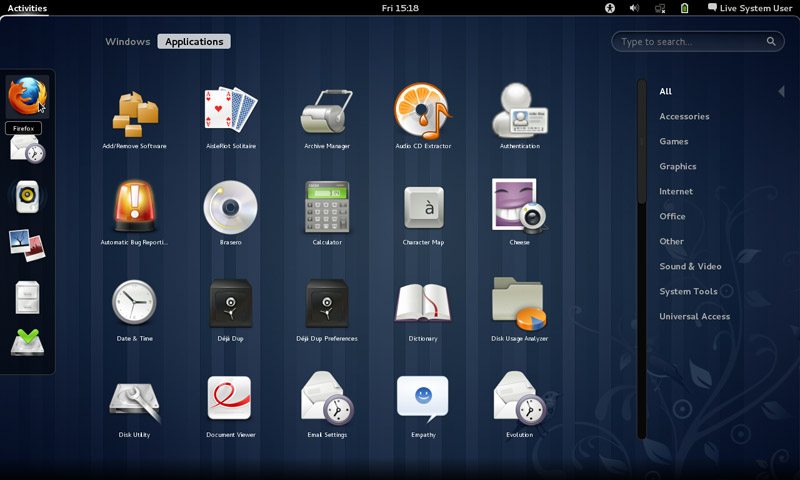
Removing Cinammon and Installing Gnome 3.12.2 on Xubuntu 14.04

Over the course of the last weeks I’ve been making change happen by playing around with interfaces, now I’m left with the buggy Cinammon interface and the two login screens bug.


I began downloading Gnome 3.12, it took a while using these commands:

$ sudo add-apt-repository ppa:gnome3-team/gnome3

$ sudo add-apt-repository ppa:gnome3-team/gnome3-staging

$ sudo apt-get update

$ sudo apt-get dist-upgrade

$ sudo apt-get update

To add some extras:

sudo apt-get install bijiben polari gnome-clocks gnome-weather gnome-maps gnome-music gnome-photos gnome-documents gnome-contacts epiphany-browser gnome-sushi gnome-boxes gnome-shell-extensions

That didn’t work. Then I realized I need to download Gnome full from Ubuntu software center

That I did, a total of 436 MB
 

The lock screen thing wasn’t resolved, one page suggested a full uninstall of lightfm-gtk-greeter
I did that, and it won’t log in any more!!
I had to open the system live mode and it didn’t fix it, even by downloading the package manually
The repair option did the trick after enabling the network and choosing the right login manager, I was back to square one
sudo apt-get install lightdm-gtk-greeter
sudo update-alternatives –config default.plymouth
logo/ubuntu-logo.plymouth, afterwards run this command
sudo update-initramfs -u
For the login screen, run this command :
sudo dpkg-reconfigure lightdm
I did the change from under ubuntu after login, from lightdm to gdm, and it worked!

Gnome 3.12.2 Is the last supported Gnome version that Ubuntu 14.04 can handle, that’s one of the drawbacks of running LTS, you can’t always have the latest software.

Work it in

The double password bug was fixed.
I download LightDM-GTK-greeter to fix the deletion of it. And even that didn’t fix it fully. I had to enable it from the commands.
Then I chose Greeter after login to change the ugly Xubuntu login style.
I had to download Ubuntu’s boot animation as it won’t show it.
 

FDM 5.1 released, Ubuntu version up for vote?

I’ve blogged about FDM in this blog before, being the best free download manager, and the alternative for IDM, and that it could replace uTorrent on your computer (and if you are using uTorrent, please remove it, it’s malicious!)< and the continue broken downloads using mirrors even if the server doesn’t support it!

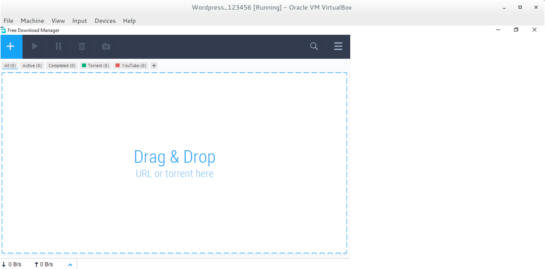
FDM 5.1 Interface

It has been redesigned into a more streamlined UI and they made the configuration is easier to use.
One of the biggest changes noted is the addition of a mac version and dropping the support for Windows XP and Windows Vista.

Since the addition of a Mac version, I wondered, why not an Ubuntu version? So I e-mailed the contact e-mail, and this is the response they gave me:


Hello!
Thank you for your feedback.

Our team is planning to release FDM5 for Linux OS, still, not in the nearest future though. We’ll inform all our users. Please keep up with the news on our blog.

I will be following them closely for you!

That means that FDM is one step away from being truly cross platform after being stuck in the Windows ecosystem for years!

Those are fantastic news! The new version is so awesome, Mac addition is lovely, and I can’t wait to see how does it look on Ubuntu, Will it make it in time for Ubuntu 16.04?

Update 2


“Dear Muaad,
Unfortunately, we are not planning to release a Linux build until a stable release for Mac OS X & Windows is out.
However, we are doing our best to make sure that our source code is compilable under Linux to the extent that it will not be too big an issue when we get to it.”

Update 3:
FDM has published a poll for future features, Linux is one of them! So vote Linux!!

Until this wait is over, be more than welcome to use uGet, it’s that good!
Let me know what you think in the comments section below.

Time for a change of interface on on Xubuntu 14.04

I have a need for change lately, I have been shaking things up and reordering things here and there . I believe its healthy. Amongst the changes decided to do some remodeling on my computer.

As you may know I use Xubuntu Linux and Windows 8.1 side by side as a dual boot. And since I just reverted back to Windows 8.1 (coming back from Windows 10) there is no need to mess around that. So it was time to take a look at my Linux distribution.

I have been using the same interface for quite some time now (since April 2014 to be specific) and that seems like a very long time to spend around one interface.

XFCE works well and I configured it to work like I want. Using Docky and Kupfer to do my daily tasks. And it works too well I’m afraid!

XFCE is a minimalistic interface who focus on performance rather than visual appeal, that’s a polite way of saying it looks awful but works well.

The blue scheme is depressing! I felt a sudden urge to change the scenery ( not just editing the theme, NOPE!).

I took a look at the interface options available for my Ubuntu LTS 14.04 Trusty Taher:

  • Unity (Ubuntu’s default interface).
  • Gnome(Ubuntu’s former default interface).
  • Cinnamon(Comes with Mint).
  • KDE( I assumed it will be much bigger in size because its not Gnome based).
  • LXDE(has an even more minimalistic approach than XFE).

Back when I installed Xubuntu I made the system partition small, so this is going to be an issue. Added to the horrible Internet that Libyawears so proudly, I needed to make a sensible decision to accommodate all of these conditions.

Before going any further, I need to mention that a Linux interface isn’t a theme (there are themes available for every interface), its the upper layer of the system that has the visual elements, login controls, handler apps. While it sounds like a difficult thing to do, its actually very easy to install an interface. You can have multiple interfaces at the same time (if you have enough free space on your system partition.) and alternating between them is as easy as choosing the user on login!

It’s an easy change that feels like installing a whole new system without the hassle of starting over and installing everything like it was before, your apps will be safe but the apps that come with the interface will change from one to the other.
I divided this into parts, I’ll post the next part soon enough, let me know what you think in the comments section belows 🙂

Tech news digest January 2016 (Ubuntu 16.04 and Windows 8 is dead)

There has been a lot of news this week, too small for a separate post each, but together you can have a collection of news!

Ubuntu 16.04, code named “Xenial Xerus” -A fancy word for hospitable squirrel – is just around the corner, and a torrent of cool news and amazing vibe is in the air! Here I have some news about the newest edition to the Ubuntu family:

Ubuntu 16.04 logo
Ubuntu 16.04 logo

  • The software center won’t be included in Ubuntu 16.04, instead it features “Gnome Software”.
  • Empathy and Brasero are also retired and won’t be shipped along 16.04.
  • It is announced that Ubuntu 16.04 will have Kernel 4.4 the latest stable kernel published yet!
  • Alpha version of the new 16.04 is available for download, please not that this version is for test purpose only, and not for daily use on your machine!
  • Ubuntu 15.04 support ended already, if you are using it please upgrade to Wily Werewolf 15.10 to continue getting updates and security patches.

And, a single piece of Windows news ..

  • Windows 8 support ended officially, so if you are still using Windows 8, you have to upgrade immediately or face the terrible consequences! 

I’m very excited for the new version of Ubuntu, it is going to be awesome! It’s not like we get a LTS version everyday!

How are you feeling about it? Are you planning on downloading the new version? If so, what’s the flavor you are downloading? Tell me in the comments below 🙂

« Older posts Newer posts »