Category: English Post (Page 35 of 97)

90,000 page Views!

Today I noticed that I reached 90,000 page Views!!

Another significant milestone on my blog while reaching for my goal of 100,000 views which doesn’t seem too far away!  There are some changes and things I’d like to address in this site update

Blogging about Libya in Arabic

The 90,000 views post banner that I made in Gimp

Since my last milestone a few months ago I made some changes to the blog regarding content, I decided to put more focus on Libyan readers (seems only natural since I’m a Libyan living in Libya, duh!) and I have to say it’s starting to pay off! After all my top viewed post is the passport post, a pure Libyan matter.

I added a Libyan section on my blog collecting all the posts I made about Libya in Arabic and English too, I am afraid I can’t express some matters properly lately, we have some very unique problems and explaining it to foreign friends is really frustrating, people can’t imagine a country without cash flow in banks for over 6 months!

Putting more focus on Libyan readers and blogging more in Arabic doesn’t mean that I’m not blogging in English anymore or neglecting my English speaking fans! I can do both (I hope!). After all I posted this in English haven’t I?

I also started post journals, it’s an old school kind of blogging, where a blogger captures his impressions and events of his daily life and turns it into blogging, lets see how that turns out.

 I also been doing several S.E.O (search engine optimization) tweaks on my blog, I hope they come into play soon and help my blog grow.

CAPTCHA much?

I’ve taken a courageous step and decided to remove the CAPTCHA from my blog, it attracts spammers like crazy, but it’s a risk I’m willing to make, I mean Google’s CAPTCHA has become so annoying lately it drives me off stuff I want to see, so I guess it’s the same for readers wanting to comment, I’m moderating each and every comment tho, no chance!!

I got me a new logo!

I’ve been helping a friend promote his Radio show on Twitter (Checkout 96.9 FM Wednesday at 10:)) PM CET) and he thought he would reward me by designing me something, I asked him for a logo I can use on my blog, what do you think?
My blog’s new logo

Social media update

  • I’ve reached 20,000 followers on Twitter and I’ve decided to take a break of the whole “Followback” system, it requires so much energy without real reward, and don’t get me started on spam! I will continue to follow back people who follow me, but not the in same way I used to do.

    20,000 twitter followers banner
    My 20,000 Twitter follower banner, also made in Gimp


  • I’ve decided to create a Facebook page, not a personal page, a page for my blog! Who would have thought!
    While I’m known to be an anti Facebook person, I know for a fact it’s the biggest social network out there, and it’s a shame not to share my content there, it would be interesting to preach about the dangers of Facebook while being on the site! I have to admit that Facebook is my biggest traffic source. As we grow up we learn to compromise, I guess this is a price I have to pay to grow my blog.
    I’ll post a link to my blog’s Facebook page when I have it ready. 

On a lighter note, this is my 300th post after the cleanup I did a few months ago and I didn’t make a banner because this wasn’t supposed to be my 300th post!

With less that 10,000 views separating me from my blogging goal, a lot of work is due to celebrate that properly, and I’m going to need tons of fan feedback, so keep that coming folks!

As the month of Ramadan is coming to an end, I wish you enjoy a peaceful month with your friends and loved ones, and that things in Libya and all of the Arab and Muslim world improve soon.

Thank you for reading this update, please leave your comments in the comments section below, and have a nice day.


LibreOffice Draw to design Mind maps! (Template inside)


LibreOffice Logo

There are many free and commercial tools to create mind maps, I for one prefer a bit of minimalism, and who can’t be a minimalist when the Document Foundation develops such an amazing software package such as LibreOffice! I use it personally to do many day to day tasks, and I just added one more thing to my list of uses!

Today’s post doesn’t require you to be a master LibreOffice Draw user (even when making the map is so easy!) all you have to do is to download the template and edit it to suit your needs! I’ve put the download link at the bottom of the post, so read on!


The Map

The template I prepared is a three level map with six main topics ordered in counterclockwise order, with each topic having three sub topics, you can increase them easily by copying and pasting then using the proper connector type from the tools.


Mindmap created with LibreOffice Draw

You can easily customize the colors of topics and font types to suit your needs, this is just a template after all! And feel free to remove the attribution I put -feel free to visit my blog tho ;)-

I’m sharing this template under creative commons CC BY you can use it freely as long as you mention I made it when asked so.


CC BY

I was going to make this post a detailed one on how to make this mind map, but I realized that it’s basic skills and no need to repeat them, especially that I’m sharing the mind map template itself so everyone can use it.

To download the mind map template, please click here.

So here you have it! We used the versatile LibreOffice to create a great looking mind map! Let me know what do you think in the comments section below, and remember to share with your friends and family.

Happy mind mapping with LibreOffice!

Tech news digest June 2016 (Linkedin sale, OnePlus3, snaps for Linux and more)

This week had many interesting news happening all over the tech world!
Let’s take a look at this digest and catchup really fast!
Microsoft is said to buy the enterprise social media site Linkedin for a record 26.02 Billion dollars in cash, the deal is trending worldwide with people shocked over the size of the acquisition, it’s a bold business choice to say the least!
The current S.E.O of Linkedin Jeff Weiner will report to Satya Nadella the C.E.O of Microsoft, as Microsoft is looking to reach to the 433 million users of Linkedin to expand it’s business and products such as Office 365 and cloud solutions.


Microsot’s logo

In other Microsoft news the Windows 10 “free upgrade” will expire on July the 29th, so if you are planning to update you better put that on your checklist and fast!

OnePlus is ready to launch the third smartphone of it’s famous “flagship killer” series: OnePlus3, the highly anticipated phone will come with a 64GB internal memory and 6GB of RAM! (specs according to GSMarena).
The countdown is almost done and the launch event will be presented in virtual reality via a The Loop. A special App available on the Google store.
More details will be available as soon the smartphone is released.
Here is the official unboxing video.


Apple’s logo

Apple annonced at WWDC 2016 the release of it’s latest update to iPhone and iPad: iOS 10. Which brings many improvements to iPhones such as a redesigned message app, lock screen and the ability to delete many pre-installed apps, the update will be shipped this fall. (for more details check the Apple site from here)


It’s not a Snap! Just a package icon!

Now we take a tour of the Linux world:  Sanps are the hottest thing in the Linux world today and for a good reason! Snaps were first announced as a feature of Ubuntu 16.04 that installs programs easily without needing to install dependencies (as it’s packed with the binary) or use command lines to install, these snaps can run virtually on ANY Linux distro! Meaning you can use Ubuntu apps anywhere you go on Linux: Desktop, server or cloud!

The main advantages of Snaps are security, speed and ease of use as they are easier to create, install and update! And many of the major open source projects like LibreOffice and Ubuntu will use them very soon as the standard way to deliver software.

This has been a dream for Linux users for many years because different distros use different package managers, meaning that Debian software won’t work on Fedora and vice-versa.
I’m glad to see that happening finally, learn more about this awesome new technology!

Fedora’s latest release: Fedora 24 was supposed to be released today, but due to some bugs not being fixed it was postponed, Fedora is ready when it’s ready! Checkout the bug list if you can’t wait!

Finally the Linux oriented blog it’sfoss is celebrating it’s fourth anniversary (does it ring a bell?) by throwing a giveway, the prise is the awesome Raspberrypie3.

It’s F.O.S.S’ logo

Here is my lucky link for you to enter and help me win, because if I did I’ll make a video review of it and many posts about it! 😉

Raspberry Pi 3
The Raspberry Pi 3 as shown on the giveaway site!


That was the tech news of the week segment, I hope you enjoyed this quick digest, let me know what you think in the comments section below!

Duolingo the best and easiest way to learn a new language!

Many of us dream to learn a new language but never actually do anything to do that! We are to busy

to take a course after work or simply won’t pay the cost for a course. Well today’s app has got you covered!

Let’s take a look at: Duolingo

Duolingo's opening screen

Duolingo is an application that helps you learn another language for free, forever, in a fun and addictive way that’s similar to a video game!

Learning on your Smartphone Who doesn’t have a Smartphone now days? Everyone has at least one and they stare at them all the time! So why not stare at an application that will help you learn a new language in an easy fun way? It’s better than checking Facebook or Twitter every 20 seconds! All you need is a good Internet connection and you are good to go! (There are some lessons don’t require an Internet connection, it is needed to keep track of progress and score.)

Duoligo's logo

Who uses Duolingo?

The app is cross platform and is available to Android, Apple iOS and Windows phone. There is also a web version so you can learn on the go and from anywhere! You can even use it in the class room for your students if you are a teacher, free of charge!
It is used by 120 million people around the world to use all sorts of languages, why don’t you join the ranks too?

Available languages

all you have to do is to download a version for your device, sign-up

with your e-mail and you are set.

Choose your native language

and see what languages are available for you!

Duolingo course list for English speakers

This list is for the English speakers, it scrolls down as it offers

many options, other languages don’t have as much options as Duolingo uses statistics to provide each region with the courses on demand, and I haven’t found any course for the native Arabic speaker on Duolingo’s version for Windows phone, but I found a course on the website aimed at native Arabic speakers who migrated to Sweden. 

Tracking progress

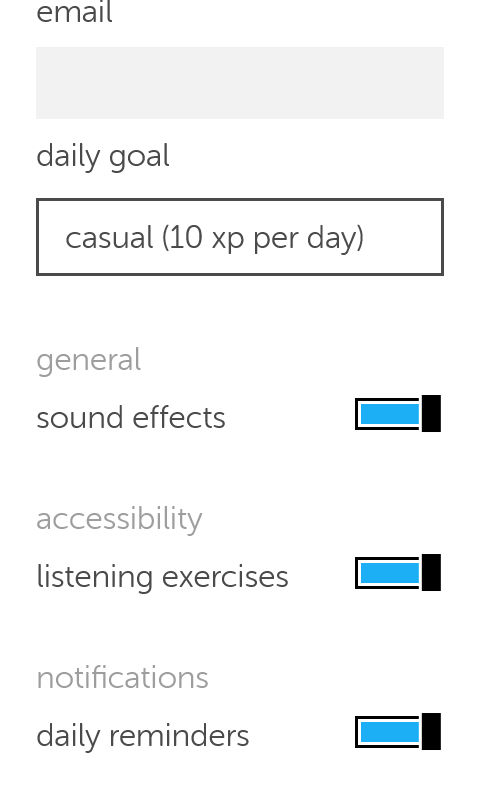
Set the number of experience

points you need to earn daily so Duolingo helps you keep track of your daily goal, you can set those from the settings, anywhere from 10 (casual) to 50 (insane).

Duolingo's settings
 You can also control getting daily reminders (I highly recommend yo keep those ON).

How does it work?

  • Duolingo

uses colors and sounds to make learning easy and fun and more game-like, by using a scoring system, ranking and rewards, similar to elements found in video games, and that’s where the name Gamification comes from.

  • The language
  • learning itself is based of quizzes and games that aims to teach you the language you plan on learning.

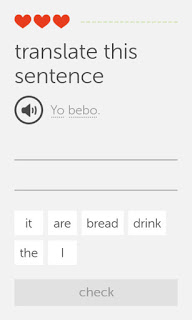
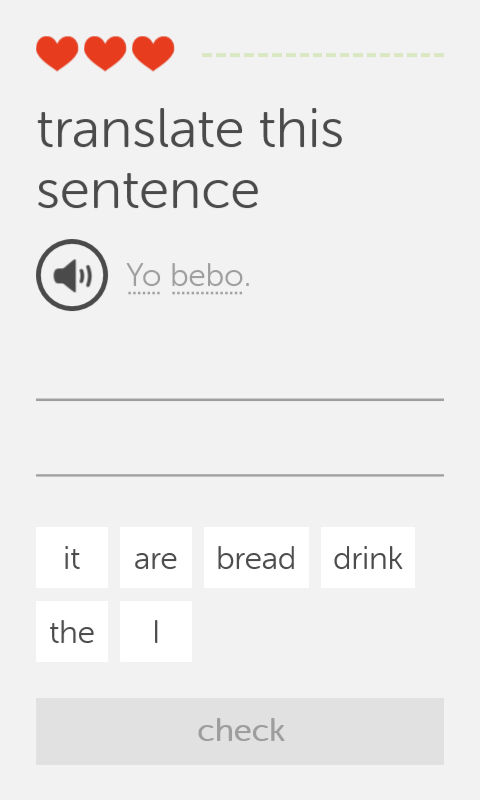
    One of Duolingo's exercises

    • This exercise i

    s very simple, you listen the word by touching the speaker icon, then choose the correct words from the choices below, each correct answer fills up the bar to the right, and a wrong answer takes a try (a heart) and when you run out of hearts, you repeat the lesson all over again! There are many other exercises and I’ll leave those for you to discover!

    Finally..

    Duolingo is a fun app that helps you jump start your language learning and have fun doing it, I don’t think it can replace the full learning experience or taking courses, but it’s a start!

    Will you download Duolingo? What is the language you always wanted to learn? Let me know what you think in the comments section below.
     

    « Older posts Newer posts »