
Category: Productivity (Page 4 of 13)

قوائم المهمات

قوائم المهمات من أكثر طرق الانتاجية شيوعا وفاعلية، يستخدمها الجميع في شتى الوظائف ومناحي الحياة لتحقيق أكبر قدر ممكن من الانتاجية، هذه التدوينة تطرح طرقًا لتحسين مهارة إعداد القوائم وكيفية الاستفادة منها بالشكل اﻷمثل.
قائمة المهام هي وثيقة مرجعية لانتاجية اليوم كله (أو الفترة الزمنية المستهدفة) لذلك يجب أن تكون مرتبة بشكل جيد ومكتوبة بلغة مفهومة وقابلة للتفسير بشكل واضح وسليم.


متى توضع القائمة؟

وضع القائمة يجب أن يكون من مساء اليوم السابق، أو في الصباح الباكر على أقل تقدير.

بماذا تبدأ؟

في البداية يجب وضع مهمة سهلة وحركية لتعزيز النشاط والشعور بالانجاز المبدئي، كشراء بعض الحاجيات من المتجر، أو تنظيف الحجرة (تعتبر من أفضل نصائح الانتاجية وتعطي شعورا بالنظام والنظافة طول اليوم). وربما بعض التمارين الرياضية.

فرّق تسد

  • تقسيم المهمات كبيرة الحجم إلى مهمات صغيرة قابلة للقياس، لأن تنفيذها ومتابعتها يكون أسهل.
  • كتابة المهمات بشكل سهل وواضح: مثلا اكتب: اشتري الحليب من المتجر، بدلا من: حليب.

ضع اﻷشياء المتشابهة معا

ترتيب المهمات المتشابهة معا فمثلا وضع كل الاتصالات الهاتفية معا ليتم الاتصال في فترة متقاربة، وإرسال كل الرسائل والبريد الالكتروني على شكل دفعات.

التحكم في العدد

ضع رقما أقصى لعدد المهمات اليومية ولا تتعداه، مثلا خمس مهمات ولا تزد على ذلك، إلا لو وجدت نفسك نشيطا وقادرا على العمل، فالارهاق يؤدي لنتائج عكسية تضر بانتاجيتك (كانت ادارة الارهاق موضوع دورة كاملة اخذتها في شركة شلمبرجير).

اسكب كل ما يجب فعله على الورق، هذه التقنية مأخوذة من انتاجية انجاز اﻷعمال GTD ثم قسمه الى ما يجب عمله فورا وما يمكن ترحيله لأشخاص أخرين.

في حالة أن بعض المهمات يمكن تكليف أشخاص أخرين بها يجب فعل ذلك وعدم ارهاق نفسك بمحاولة فعل كل شيء.

ترحيل المهمات التي لم يمكن انجازها: على سبيل المثال ذهبت لانجاز معاملة حكومية وطلب منك الموظف العودة في اليوم التالي (هذا يحدث غالبا)، فيجب عليك ترحيل المهمة للغد، شطبها نصف شطب، فأنت هنا قمت بالمهمة ولكنك لم تنجزها.

لا تعض أكثر مما تستطيع مضغه

عند صياغة المهمات اترك سقف التوقعات عاديا، فمثلا كتابة سطر مثل: قراءة عشر كتب” هو أمر غير واقعي لن يورثك سوى الاحباط! لكن كتابة شيء مثل: “قراءة عشر صفحات من كتاب ما” أكثر واقعية وقابل للتحقق. المهمات الكبيرة الغير ممكنة سبب من أسباب التسويف.


قسم المهام لمهمات أصغر وقابلة للادارة بشكل افضل

مهمة مثل تنظيف البيت كاملا ستكون صعبة على شخص واحد لينجزها في يوم واحد وثم تتبقى له طاقة لفعل شيء أخر، لذلك من الواقعي تقسيم المهمات على مدار اﻷسبوع: مثلا تنظيف الحمامات يوم السبت، وتنظيف غرف النوم يوم الاثنين، ومسح الغبار يوم الثلاثاء، ويوم اﻷربعاء 🙂

هذا مجرد مثال، أعلم جيدا أهمية تنظيف البيت بشكل دوري كل يوم.

حارب التسويف

عندما تكون مهماتك ذات حجم مناسب وذات أولوية صحيحة، لن يبقى للتسويف مكان في حياتك وستنجز ولو شيئًا بسيطًا كل يوم، تذكر أن طريق اﻷلف ميل يبدأ بخطوة.

لا للمهمات العشوائية

تصفح الانترنت هو أفضل مثال على المهمات العشوائية! سأزور تلك الصفحة، سأرى هذا الفيديو، سأحمل هذا البرنامج. التنفيذ بهذا الشكل لن ينجز شيئًا، ولو أنجز شيئًا لن يكون ذا قيمة.

ربط تنفيذ المهمات بتوقيت معين لكي لا تلتهم اليوم بكامله، ويمكن العودة إليها بعد إنتهاء باقي المهام وتوافر وقت فراغ.

ماهو وقتك اﻷفضل؟

بعض الناس ينتجون بشكل أفضل في الصباح الباكر، البعض اﻷخر يفضل الليل ليعمل فيه، استكشف وقتك الخاص واجعله لكّ!

هناك بعض اﻷيام لن تستطيع أن تنجز الكثير، فلا تقسو على نفسك، كل شخص له دورة انتاجية خاصة، تعرف على دورتك واستفد من مواطن القوة فيها ولتكن مواطن الضعف وقتا للراحة وشحن البطاريات.

أدوات تساعد على الانتاجية

في هذه المدونة عدة مواضيع حول أدوات تساعد على مراقبة المهام لمختلف أنظمة التشغيل:

هذا تطبيق لويندوز Total organizer

هذا تطبيق لينكس Tasque

هذا تطبيق لأندرويد

ورقة وقلم للناس الكلاسيكية

وطبعا زيم ويكي به خصائص ادارة وقت وانتاجية ممتازة جدا وتغني عن العديد من التطبيقات، مثالي لمن يحب التقليل من التطبيقات على جهازه مثلي أنا.

ختامَا

ما هي نصائحك في الانتاجية؟ هل لديك وقت خاص تعمل فيه؟ كيف تكتب قوائمك؟ هل تستعمل القوائم أصلا؟ شاركني في قسم التعليقات.

A Netbook in retrospective!

When I bought the Netbook I have now a few months ago, I feared that I might not have a practical use for it. I already have a laptop which has been laying around for years; I really like it and spend many hours each day using it. So, how will I fit the new thing into my daily workflow?
The answer is really simple: Work

Taking my Netbook to work

This little thing is a blessing! If fits in my bag effortlessly and I feel like I’m carrying nothing at all! While my fellow teachers carry tons of books and papers with them, I use my Netbook to read the material and give lessons, something I wouldn’t be able to do that easily, also making adjustments and documents on the fly is fantastic, I don’t have to wait in line to use the “teacher’s computer”.

But .. I can take my laptop to work too, can’t I?

Yes, and no!

My laptop is my “daily driver”, and like most people I have private information and things I’d prefer to keep as safe as possible, it’s always a fear of mine that it would be lost or stolen. Getting stopped at a check point and stolen at gunpoint is a common risk now days in Tripoli, so that’s something to think about..

Even forgetting the bag in a public place would be a catastrophe to me! Some losses even a backup can’t restore.
But with this little guy, things are okay, I only have the things I work on now, even if it’s lost, it didn’t cost that much and it doesn’t have any vital information. The best of both worlds!

There is one tiny problem tho..

Version control

In my series “Dual boot saga” I complained that having two laptops to work with was a confusing thing (which was), that statement is less valid now, but still has some sense.  

When I’m working on a document for example, let it be a weekly plan, an answer sheet or a monthly exam, sometimes I happen not to know which document is more recent if I copied it from one laptop to the other, or which one has the changes I need; these little annoyances waste a lot of time. 

More often than not I’d leave a document on one of the computers and have to get out of bed to get it (I never remember these things only until I turn off the lights and roll under the blanket), this in itself is torture!

I sometimes upload my documents to Telegram web, and then access the site on my laptop or phone and download the document, but that’s just too much work!

Dropbox

This solution was right there in front of me the whole time! I can upload the documents and access them from any device. It’s not complicated like Google drive and doesn’t have added frills like Telegram Web, and it works perfectly with Linux. 

All I have to do now is to finish the document and upload it to Dropbox, no more calling home asking for someone to unlock my laptop and send a file I forgot (happened to me very recently sadly, and yes it was a Wednesday!). 

And even if the free plan only gives 2 GB of free space, I don’t think I’ll ever fill that.

Final words

My Netbook is far from perfect, it’s slow and the screen is smacked, but for the purpose I use it for, it runs like a champ! And now that I’ve gotten around the Two laptop hurdle, I can safely say that my productivity will be through the roof.

Well, that if the electric company leaves us alone.

I’ve bought a Netbook!

The first post I wrote on this blog was on a Netbook, and one of the most popular posts at the time was about a Netbook, I’ve had one, I’ve loved it like a child of mine, and regretted selling it to this day (I still do honestly, I did so much on a computer that isn’t supposed to do much!).

You never know what you had until you lose it!

Every time I went to a computer store they caught my eye, and whenever someone brings me one of them to fix, I remember the sweet old days with my Netbook, it felt personal and it felt like something I loved to use and create things on.

Browsing through open sooq I came across a Netbook that was reasonably priced, it had a minor flaw (the monitor has dead pixels on one corner, as if the Netbook took a fall), and after a bit of negotiation with the seller, I managed to strike a decent deal.

Later that day, I swapped out the HDD on the Netbook to my laptop, and used the SSD on the Netbook to make it faster, and after installing Ubuntu 14.04, I was good to go!

I tried installing Ubuntu 10.10 Netbook remix, but that lasted for like an hour, nostalgia doesn’t do much, 10.10 is not supported anymore and I couldn’t download any software on it, what a shame!

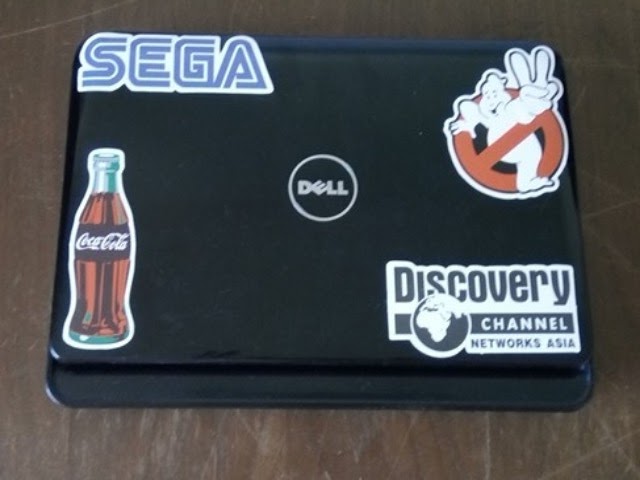
The new Netbook that I got, and some cool stickers


The typing experience is some of the best I’ve had, it’s bouncy and fast, a bit crammed together but that takes me back! And it makes my laptop feel like a monster! 5 inches make all the difference apparently!

Pros of the deal

Despite the obvious limitations, it would have cost a lot more to buy something off of Amazon and ship it to Libya (I’ll be posting about buying online / shipping soon enough in Arabic), due to the new increase in shipping prices, shipping a standard laptop would cost nearly twice as much as this Netbook! Let alone that I’ve managed to seal a deal on open sooq the day before, so it’s even cheaper in my book!

Hitting two birds with one stone

By swapping out the HDD, I have fixed the issue on my other laptop, and with buying a Netbook, I have a backup that I can take anywhere without fearing it would be lost or stolen, it’s just a device for typing stuff and getting things done,

Having two laptops

I remember posting back in the day in my “dual boot saga series”, that I hated having two laptops and I couldn’t choose between them, always favoring one over the other, this isn’t the case.

I wouldn’t sell my laptop for example and keep the Netbook as a main device, that’s silly and unrealistic, the Netbook has limited resources and can do so much, it’s just so good at what it does.

And it’s always nice to have a backup in case the laptop fails for example, or for work (it would be a lot lighter and easier on my back to carry around, also less stressful in the case of it getting lost).

What’s it like?

I don’t remember Netbooks being so small! This one is really tiny compared to the laptop I’ve been using the last six years!

Also, it’s hot, I mean really this model has no fan, it uses a heat sink of some sort to manage the heat, and it gets annoying with time (would be great in the winter tho!), I applied some thermal grease and it’s better now, also installing a light resource Linux distro helps.

It was nagging me for years, so I had to do something about it, and here I am back to using a Netbook after six years.

Trying something new

I installed FocusWriter on my Netbook for a minimalistic writing experience, it’s small and aesthetic, and exports files as ODT by default.

The big question?

Will this allow me to be more productive and write more stuff? Or will it be another failed experiment of mine? I do realize that experimenting is a big part of learning, but I hope I get this one right, for old time’s sake.

Do you have / had a Netbook? What do you think of them? Did this post inspire you to buy one of them little laptops?

Leave your thoughts in the comments section below, and I will see you soon.

P.S: This post was written on a Netbook,

P.S.S: A retrospective post was written a few months later, take a look at it!

I’m back to using Atom Editor

Not a fan of the green icon.

Life is all about discovery, learning and not being afraid of making mistakes, with that being said, I say that I’m back to using Atom after a rocky relationship, of love and hate!

Why I am bothering to give Atom a second chance, the reasons are detailed below.


1. The only “free” editor of the bunch.

I’ve identified Sublime text as the best text editor for development purpose, let’s not forget that Sublime is not free, I know that they allowed using it for those who are under-privileged, but it’s still a Freemium that costs 70$ (free if you can handle the annoying pop up telling you to register every now and then), after changing the licensing plans in early 2018, I don’t know the current status of Sublime text and don’t care very much to be honest!
Atom editor is free and open source under the MIT license, and despite of Microsoft making a money grab for GitHub, Atom will remain free and open source for everyone to enjoy.

2. It’s down right beautiful!

Of all the text editors available on Linux (I use Linux on my everyday laptop), Atom the best looking of the bunch! Not just the color schemes and themes, everything in Atom is designed to look awesome, from user interface to the website, even the shirts and mugs look great (never got any but my birthday is coming up ;), and the user experience is great, even compared to Microsoft VS code (who is based on coffee script and javascript as well), despite my love for efficiency, I value a beautiful GUI. 

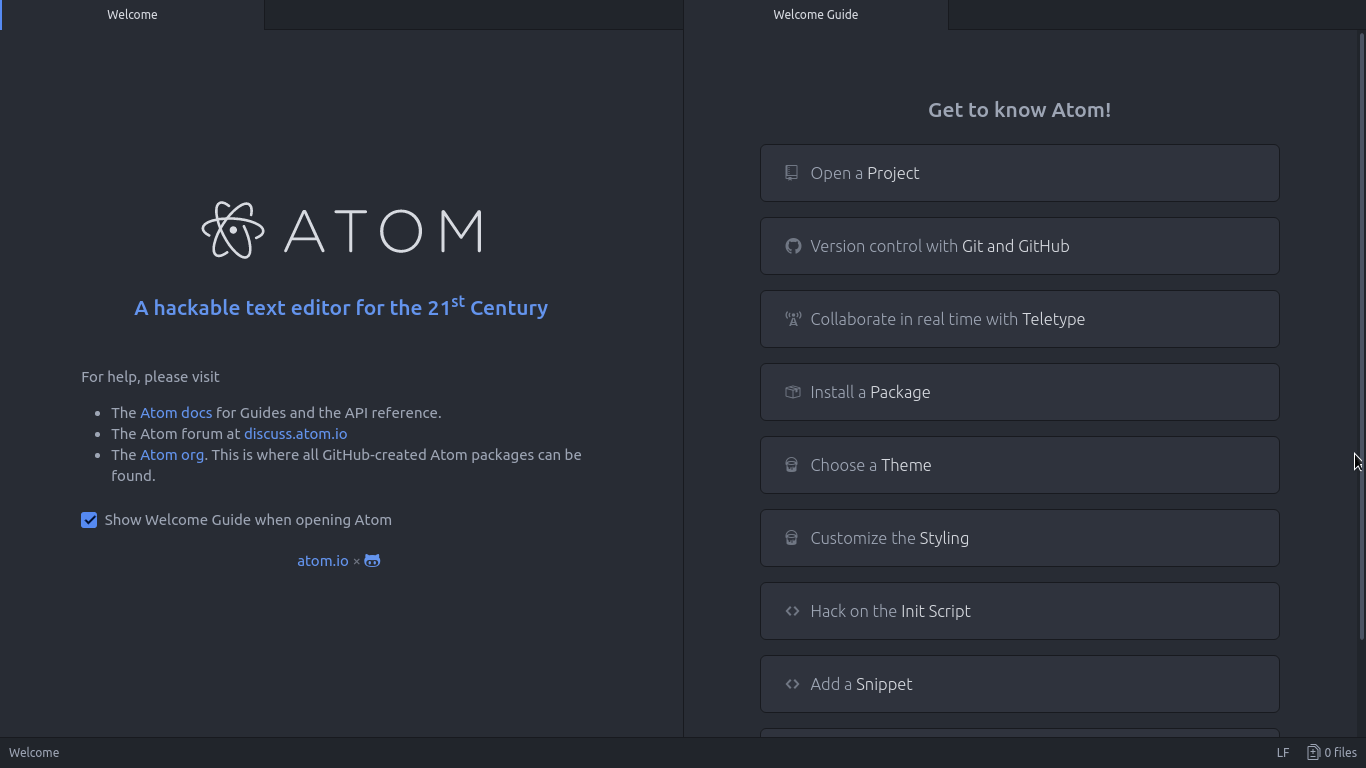
Atom Editor interface
Ain’t that a beauty?

3. Very customizable

Atom has a ton of themes and packages available for download, which makes it more expandable and versatile, and with some knowledge you can develop your own themes and packages, all what you need to know is in the Atom flight manual (released in 2015 but still very informative). You can even change the key-map of Atom to whatever editor you migrated from and customize it as you like to decrease the learning curve.

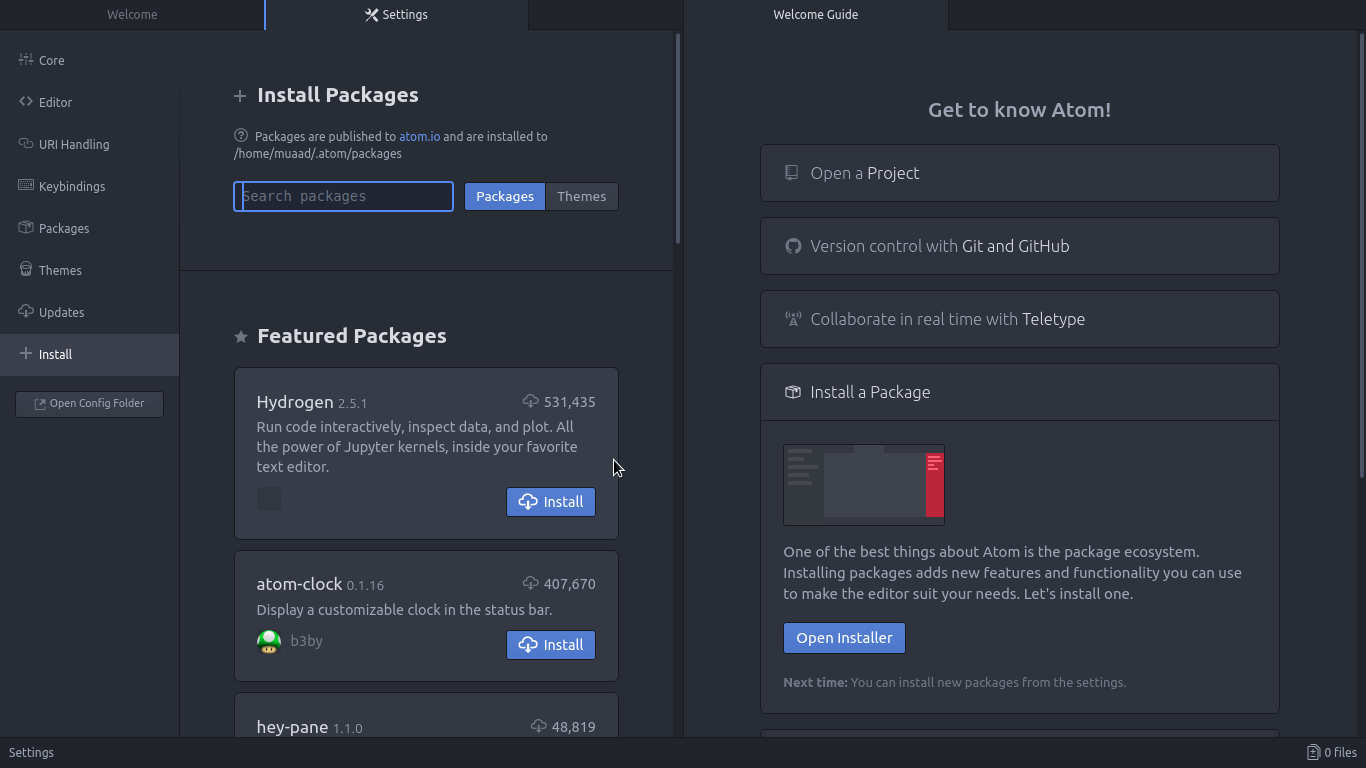
Package installer interface

4. Ease of use

User experience should be always considered when evaluating software, and VIM for example despite being the most efficient and the most praised text editor in all of the Linux ecosystem, however it’s not easy to use at all, the learning curve is steep, I read the book titled “A byte of VIM“, but I still don’t see why or how can it be better than Atom or anything, as I don’t do anything “professional” with VIM. As a matter of fact, I’m not too keen on the whole terminal as a one tool for all.

5. Consumes more resource, so what?

Yes, Atom is heavier than Sublime or VIM, but does it really matter at this point? In the year 2018 laptops are getting faster and RAM is getting bigger, a few hundred megabytes almost seem like nothing when considering all the reasons mentioned above, it might not be the most resource efficient, but it’s the most usable editor of the bunch.
A well tweaked laptop (both hardware and software) can handle Atom like a breeze, and it’s getting better as time goes by. Speed won’t be an issue if you use an SSD (although using an SSD in itself can be an issue at times!), you could say it’s the price of enjoying a beautiful interface and ease of use.
Besides, converting to a less consuming Linux distro has spared some memory to spend (I’ll blog about it later and link back).

6. The devil you know!

I’ve been using Atom (On and Off) for the past three years, I’ve read the Atom flight manual and even reviewed it on my blog in a few posts (this is the fifth), so for the most part I’ll stick to Atom being the familiar editor that I’ve known and loved (sort of) for the past three years. I’m not alone, as it’s one of the most popular text editors on Alternativeto.

Have you ever used Atom before? What are your impressions about it? What do you use to edit prose and code, and if you use VIM, please take your rants to /r/VIM, because they would be appreciated better by fellow VIM zealots than me.

And yes, this post was written in Atom 1.28, so that you know!

« Older posts Newer posts »