Category: Windows 10 (Page 7 of 11)

Top 3 common issues faced when dualbooting

Dual booting can bring many perks if done properly. It’s like having two computers working together. And a really good idea in case one of the systems fails, you will have a configured running system and your work flow won’t be affected by the fail. As I had to fresh install Windows 10 from scratch (because the rollback failed).

There are some minor disturbances to take care of first. And those are mostly caused by Windows.

1. Ruins the dual boot.

I have a complete post about this topic! No matter what you do. Installing Windows will erase any grub boot data and you won’t be able to access your other system (in my case it was Xubuntu) I made a whole post dedicated to this as a part of the dual boot saga. So please checkout the post for the fix.

2. Time is always wrong

As you use Windows you will notice your time settings are forgotten every time you shutdown.

  • This is quite easy to fix as you just need to edit a registry key to set the time once and for all. From run open regedit.exe and navigate to :
    HKEY_LOCAL_MACHINE>SYSTEM>CurrentControlSet>Control>TimeZoneInformation
  • Create a dword32 key and name it “RealTimeIsUniversal” And set the value to 1 by double clicking on it.
  • Lastly reboot to Ubuntu and then to Windows and your issue will be fixed.

3. Error mounting drives

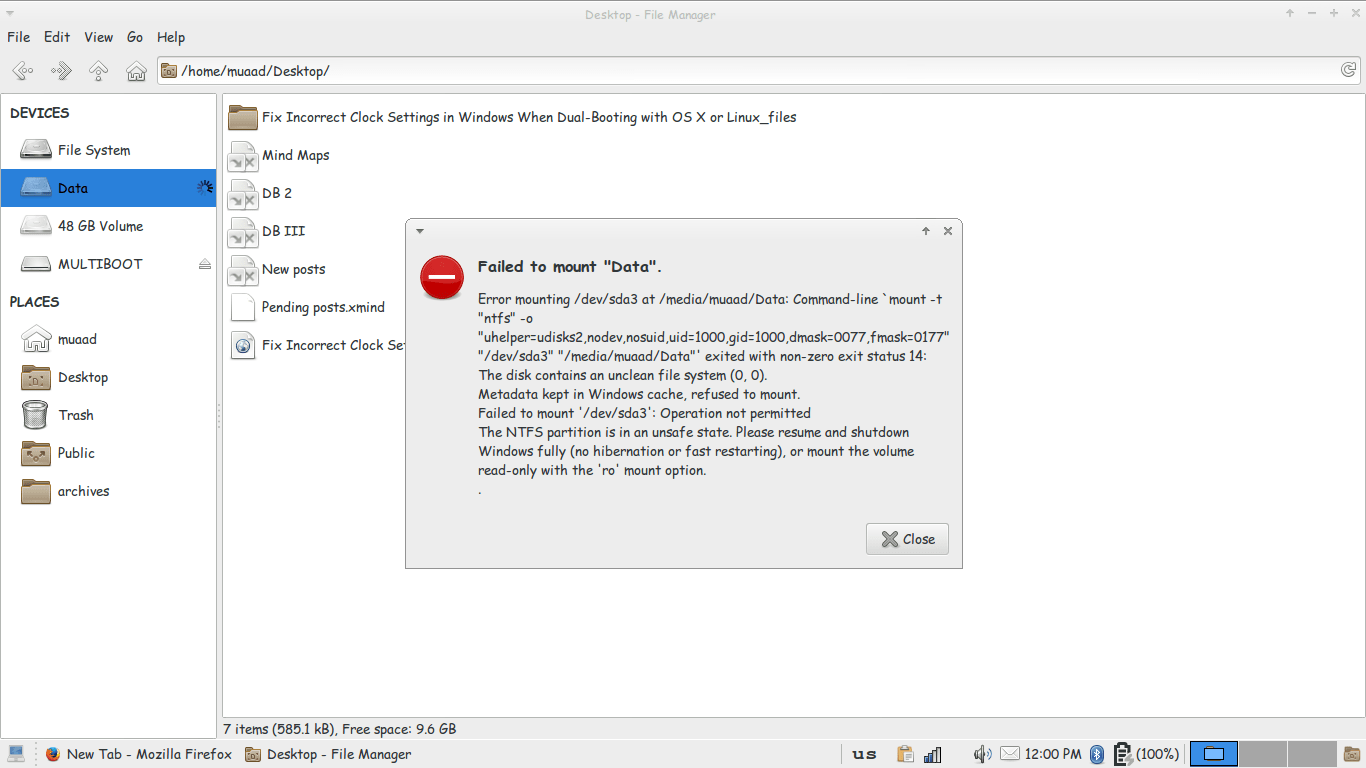
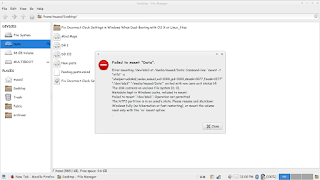
3. I couldn’t mount the data drive because Windows is still not totally shutdown, the drives are being used to “fast boot” in order to be able to use the drive without error, we need to disable fast boot. The screenshot shows an error caused by fast boot on Windows.

Error mounting drive in Ubuntu
Since it’s caused by Windows, we go and disable it from Windows.
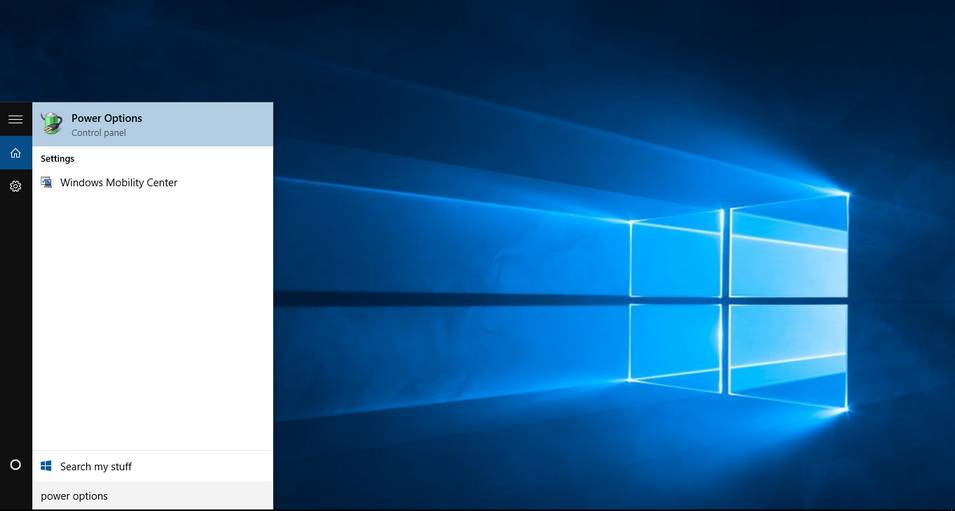
Go to Start menu and type: Power Options and click on the choice.
Type in power options in the search bar
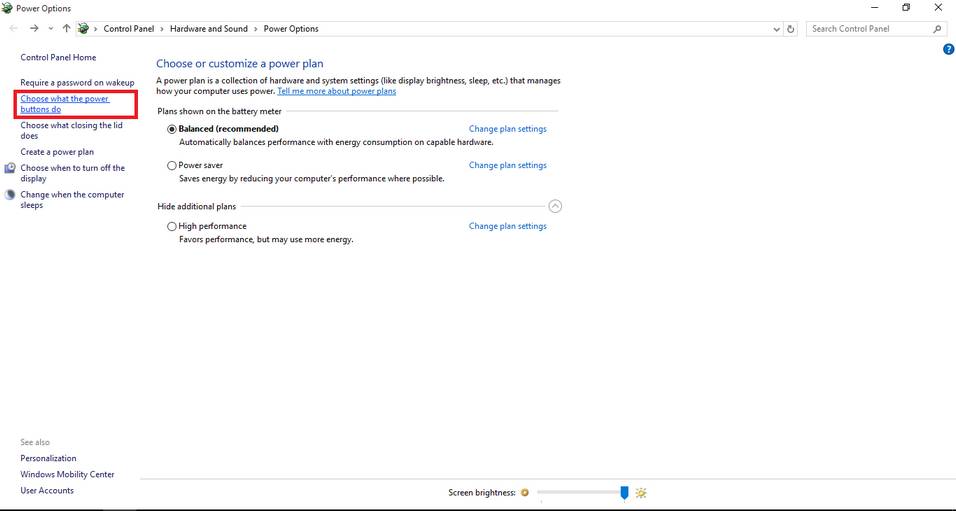
From there click on choose what the power buttons do.
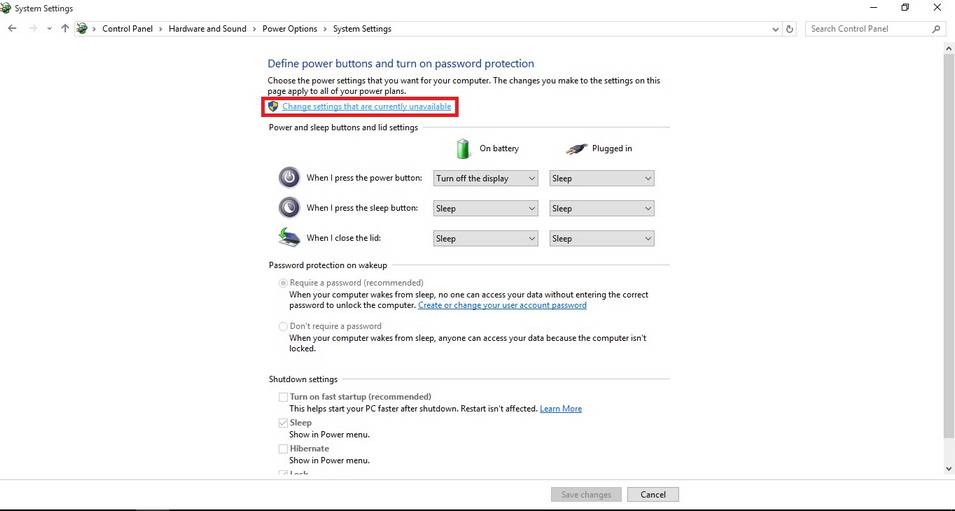
Click change settings that are currently unavailable to unlock the greyed options.
change settings that are currently unavailable
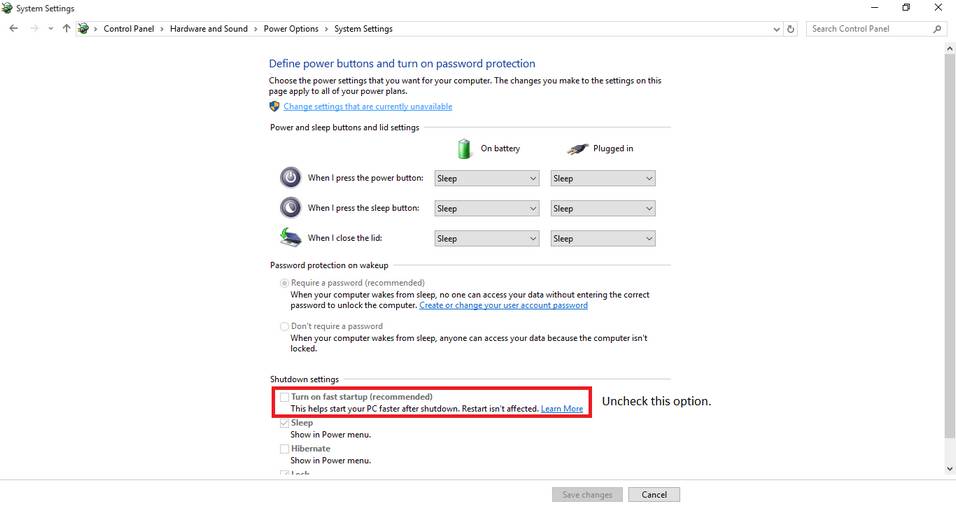
Then uncheck turn on fast startup. And close the window.
Uncheck turn on fast startup
Once the fast boot is disabled you will be able to access all the drives from Ubuntu without a problem.
Here I tried to list my experience on dual booting to help with these three bugs I faced twice. I hope you find it useful 🙂

10 reasons not to upgrade to Windows 10

I had my initial doubts about Microsoft giving out Windows 10 for free. Everyday I am convinced that my worries were sound! And it was much worse sadly!

For these reasons I am regretting the Windows 10 upgrade offer
I wrote this post prior to my upgrading, some of these fears aren’t exactly true (or proven wrong) but still they sound pretty reasonable don’t they?

Here are 10 reasons to skip the Windows 10 free update that expires July 29th.

 1. Too good to be true

How will Microsoft make money if it gave the system for free plus free updates? That’s doesn’t seem too profitable! Two years to get you hooked then bang!! 100$ per year..

2. Windows 8.1 is working fine!

Unless they change something or decide to kill it prematurely, it should be running smooth for eight more years (extended support officially ends in 2023). As the old saying goes: “If it’s not broken, don’t fix it”.

3. Windows 8 wasn’t free!

Yeah! It cost a lot of money! Plus the upgrade from Windows 8 and changing the license. All of that is money, then they wanna charge per year?

4. The upgrade will cost a lot

Data charges will apply, plus the amount of time to download and the down time I will be out of service to get it to run. let alone the fee I have to pay yearly after a while of service.
Update: This part is written after rolling back. Downloading Windows 10 + Updates + Downloading Windows 8.1 + Updates. That’s over 10 Gigabytes of data. All of which I paid for!

5. Cloud based / Internet based

My internet connection is really bad. I can’t afford to have all my data in the cloud! (same reason why I can’t download the upgrade with ease) I am not sure how will Windows as a service will affect my productivity or my daily flow, so I have to be careful.

6. Security concerns

Microsoft is collecting data to improve the system and is constantly improving it. Does that mean they constantly collect my data? Not feeling to good about that.

7.compatibility issues

Spite of all the promises Microsoft makes. I fear that something would go terribly wrong with the drivers and solving it would take months.. I can’t afford that simply.. What if it doesn’t support executor? That was my main concern coming from Windows 7!!
(Everything worked fine).

8. Is Windows 10 really all that?

I used 8.1 for a while now, it’s not that bad! Its good enough for my needs, what does Windows 10 bring more? Support for hardware I don’t own, and many services I don’t use. Even the whole start menu hype isn’t making me jump with joy (I never used it any way) I use executor for much of my daily work combined with Rocket Dock.

If it’s just the look there are transformation packs out there I can use to get the look and feel of Windows 10.
This part is written after rolling back. Windows 10 did nothing new to me, same old story, I still have my old hardware so it was nothing. Windows 8.2 for real!

9. License is tied to the device

I am upgrading from my old dusty laptop, trading a Windows 8.1 license for a Windows 10. Windows 10 is tied to my device ( the rusty old laptop) so if anything happens to my laptop, it’s over! I can’t transfer the license to a new computer (like I did in the dual boot saga) which means: New laptop, new Windows 10 license! -Unconfirmed worry!
This part is written after rolling back. I managed to remove Windows 10 and reinstall Windows 8.1 without a hitch!

10. No turning back!

If you upgrade to Windows 10 and stay there for a month, you lose the right to roll back to Windows 8.1 or Windows 7. So please take your time to think this over. (actually were were screwed long before that!).
: This part is written after rolling back.

In the end it’s a personal choice, it does not have to affect your needs or desire to upgrade, you have a whole year to upgrade, so think it through. I will try to get an eCommerce mean soon ?

If you are convinced that Windows 10 isn’t for you and you would like to go back, here is how! 

In the mean time, have a good time and enjoy working on whatever system you choose.
Fresh install Windows 10

After I was absolutely certain that Windows was unrecoverable. So I began the process to fresh install Windows 10. I really felt stuck but what can we do?

When I installed Windows 10 in July the promise was if you don’t like it you can rollback within a month of install. I didn’t like it since the first days and I had a long list of problems with it. I’ll post that later. But when attempting to rollback I couldn’t and I learned that the whole thing is just a sham!

I was in a hurry installing so I didn’t take any pictures. It’s exactly like installing Windows 7, 8 or 8.1 when it comes to choosing the partition to install on it.

Windows 10 Logo

I used the same disk I used for upgrade, but instead of running it from Windows, I booted to it by F12 then choosing the disk from the boot menu.

The only different part can be found in the Windows 10 upgrade post

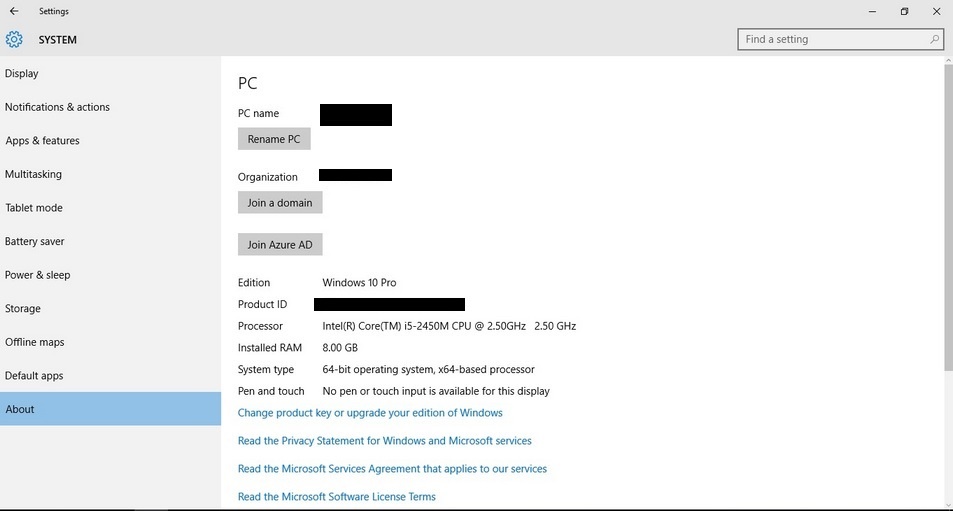
When installing Windows 10 for the second time after the upgrade ignore all and any prompt to enter your password. You can activate as soon as you get your desktop from System About. As long as you can see a Product ID you are good to go. You can find more info about clean install in Windows 10 FAQ.
Activate Windows 10

My notes on the installation process are

  • It was much faster than the upgrade process. Probably one of the fastest ever as I had Windows 7 and Windows 8 fresh installed on this computer.
  • The wireless driver wasn’t installed right away. And I had to do the update fix.
  • The Bluetooth wasn’t recognized properly and I had to uninstall it and reinstall it for it to work.
  • Many people said they had problems connecting the computer to a TV. I had them too, my fix was connecting it after boot so the system won’t “hang”. Well. For better or worse, I’m stuck with Windows 10..

Have a nice day 🙂

LibreOffice 5.0 is out!

Finally after what seemed like forever! LibreOffice 5.0 is out!
“LibreOffice 5.0 is the tenth major release since the launch of the project and and the first of the third development cycle. LibreOffice is a full feature open source office suite which compares head to head with every product in the same category, while it stands out for superior interoperability features.”


I’ve downloaded it for both Windows and Linux. And I immediately noticed the different GUI elements implemented into LibreOffice 5 in comparison with 4.x which are differently cleaner and takes less screen space!


Thanks to improved filters the compatibility between LibreOffice and other office suits like Microsoft Office has improved. And a lot of under the hood work has been done to improve the stability and reduce the crashes overall.
Version 5 with be the foundation of the Android version, Ubuntu touch, and the upcoming cloud version.

Note: if you are downloading the 64x version for Windows you are going to need a 64x Java machine.

It looks really good and I can’t wait to sink my teeth into it and make full use of it’s amazing features!

« Older posts Newer posts »