Month: February 2017 (Page 1 of 2)

Plank. The BEST dock you will ever use on Ubuntu!

I blogged about Docky a few years ago when I moved to Ubuntu from Windows as I needed something to replace Nexus dock, and later RocketDock, and I added it to a post about the best docks for Linux and Windows.

Introduction

Docky is the dock to go to when using Ubuntu, it’s fast and it’s light, not to mention it’s free, it has two branches for development which I find to be a bit confusing!
One of the branches is stable but lacks features, and the other crashes often but is full with features.

What if there was a dock that had the best of both branches? Stable and fully featured? Meet Plank everyone!

Plank

Plank is a fork of Docky that is shipped by default with the popular operating system Linux Elementary. It is based on Docky 3.0.0 according to the Plank wiki, and it’s aimed to be the simplest dock available, to preform what a dock is supposed to do, and I couldn’t agree more!

How to install Plank?

In a terminal window enter these commands one by one to install Plank, and after it’s done you can find it by searching the name in any interface you use.

  sudo add-apt-repository ppa:ricotz/docky # <- is not a typo
  sudo apt-get update
  sudo apt-get install plank

Configuring Plank

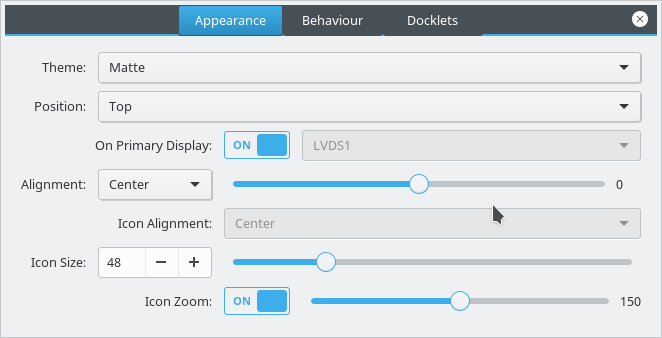
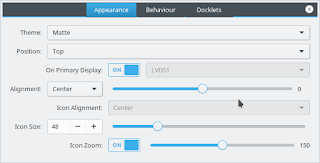
By right clicking an empty place in the dock you can summon the preferences of Plank, but that proves to be a little difficult, so by typing the command: plank –preferences

 
to adjust and fine tune the settings of Plank.

How to add executables as shortcuts to plank?

If you are using plank on Ubuntu you know that you can’t add executable files right to the doc, you need to add the icon to the program directory and then add the icon to the dock, here is a really simple way to do it from here.

My verdict

It’s the best dock I used so far, so light and does exactly what it should, without having to choose between two branches and having to roll back packages.

What do you use on your system? Are you considering Plank? Share your thoughts in the comments section below, and don’t forget to share the post on social media 🙂

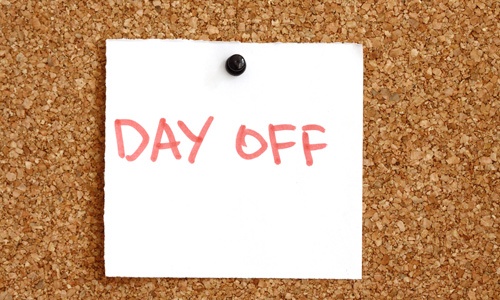
مذكرات يوم إجازة

مرت مدة طويلة منذ أخر إجازة حقيقية حصلت عليها!
لا أتحدث عن أيام العطلة، فكل أسبوع لدينا يوم الجمعة (أعمل يوم السبت معظم الوقت)، وحتى يوم الجمعة لاحظت أنني أقوم بالكثير من الأعمال التي لا تندرج تحت مفهوم الإجازة!


أحتاج لإجازة حقيقية بعيدًا عن العمل وتعقيداته وصخب الإنترنت وشبكات التواصل، من الصعب جدًا توفير مثل هذه الأيام ولكنني قررت تخصيصها بالقوة!

ورغم أنني في إجازة، إلا أن هذا لم يمنعني من أن أكتب هذه السطور لأضعها على مدونتي في وقت لاحق، لا أعتبر الكتابة عملا يستدعي التوقف عنه، إنها حاجة ضرورية كالأكل والشرب، من يستطيع أن لا يأكل أو يشرب بحجة العطلة؟

ماذا يقول ستيفان كوفي؟

العادة السابعة من العادات السبع للأشخاص العالي الفاعلية كانت أخذ أجازة لشحذ المنشار، أدركت أن منشاري بحاجة ماسة للشحذ بعد أيام طويلة من العمل دون توقف على أمور متشعبة، وحتى لا أخاطر بالانهيار وفقدان الطاقة نهائيَا قررت استباق المحتوم وأخذ يوم راحة قبل أن أجبر على فعل ذلك في وقت لا أستطيع التوقف فيه، أو أن أخاطر بوعكة صحية قد تكلفني أكثر من الوقت والمال.

هنالك مثل انجليزي يمكنني ترجمته على النحو الأتي: العمل طول الوقت ودون لعب يحول جاك إلى صبي ممل! هذا المثل يحث على أخذ قسط من الراحة بين الحين والأخر لتجديد النشاط. تصادف أن يوم الأمس كان يوم أجازة لتعويض عطلة رسمية أتت في يوم الجمعة، فقررت أن أستغل هذا اليوم قليل الزخم لأرتاح قليلًا وأفكر في الخطوة التالية، وكانت أهم خطوة هي فصل الإنترنت عن جهازي بالكامل! جدولت التغريدات على موقع تويتر لتعرض أخر ثلاث تدوينات كتبتها لأنني أريد أن تستمر- مدونتي في النمو حتى وأنا خارج الشبكة.

شبكات إجتماعية أم شبكات لصيد المجاملات والإعجابات؟


ياللشبكات الاجتماعية! إنها تسبب الإدمان! تعدت وظيفتها الأساسية التي كانت توصيل الناس ببعضهم وتوصيل الأخبار لتتحول إلى حياة موازية تمتد بجوار حياتنا اليومية، وتطغى عليها بالنسبة للبعض الأخر!

ناهيك عن النقاشات العقيمة حول قضايا عادة ما تكون جزئية أو سطحية وليست ذات أهمية جوهرية، وللأسف هذه القضايا ملهيات عن الأمور المهمة، الحمد لله أنني فوتت أحدها بعطلتي هذه!

من منطلق المنظور الأكثر إيجابية قررت أن أتغاضى عن الأمور السلبية وأركز على تحقيق الأهداف المستقبلية.

أكاد أنسى كيف كان العالم قبل الشبكات الإجتماعية لأنني كنت أحملق في التلفاز طوال الوقت (توقفت عن مشاهدة التلفاز منذ عدة سنوات) وحقيقة لا أعرف كيف كانت الحياة قبل التلفاز فأنا من مواليد جيل التسعينات -أخر الثمانينات لأكون أكثر دقة-.

الرسائل الواردة لا تعرف معنى العطلة أو الخصوصية، هي تقتحم علينا حياتنا في كل وقت، وطالما الكهرباء متصلة هنالك عمل للقيام به، لا توجد آلة في هذه الدنيا تعمل طول الوقت دون توقف، فما بالك بالإنسان الذي خلق من لحم ودم وأعصاب؟!

كنت قد دونت من قبل عن أضرار إدمان موقع الفيس بوك وقلت أن أنماط النوم تتبدل بسبب دخول الموقع طول الوقت، لأن هنالك شيئا يمكن فعله على مدار الساعة، أناس يمكن التحدث إليهم ومنشورات جديدة لقراءتها طول الوقت!

قصة تاريخية

في أوج الحرب العالمية الثانية حين كانت قوات المحور تتواجه مع ألمانيا النازية، فاجأ وينستون تشرتشل رئيس وزراء بريطانيا آنذاك الجميع بأنه سيأخذ إجازته كما جرت العادة، بينما قرر هتلر تأجيل إجازته بسبب ظروف الحرب. حدث ما كان متوقعًا وصارت قرارات هتلر متخبطة وعشوائية وغارقة في التعب بسبب تفويته الإجازة، بينما عاد تشرتشل نشيطًا ومفعمًا بالطاقة لمواصلة القتال، وهزمت ألمانيا هزيمة نكراء في الحرب وانتحر هتلر (كما تقول الروايات الرسمية، لكنني أعتقد شيئًا أخر تمامًا)، لا أقول بسبب عدم أخذه لاجازة سنوية، ولكن الأمر لا يخلو من ذلك!

ماهي الخطوة التالية؟

الخطوة التالية هي تحديد يوم أجازة ثابت لا أقوم فيه بأي وظيفة مهما كانت بسيطة أو مهمة، والأغلب أنه سيكون يوم الجمعة، من المهم جدًا تحديد يوم للعطلة لغرض تجديد النشاط والإقبال على العمل بنفس متجددة ومنشرحة.

كما أن الابتعاد عن تفاصيل العمل لوهلة سيمنحني القدرة على النظر إليها من منظور أبعد قليلًا ويمكنني من رؤية الصورة الكبرى لعملي وما أقوم به.

متى كانت أخر إجازة حقيقية أخذتها عزيزي القارئ؟ ماذا فعلت فيها؟ ومتى تريد أخذ إجازتك التالية؟ شاركني برأيك وشارك التدوينة على وسائل التواصل الإجتماعي لتصل لأبعد مدى.

خلعت النظارة السوداء

قررت بعد تفكير طويل حفزته نصيحة من أحد معارفي أن أتخلى عن المنظور السوداوي الكئيب الذي أنظر من خلاله للحياة، لا يبدو الأمر بهذه السهولة خاصة وأن ذات الظروف الصعبة لا تزال مهيمنة بقوة على المشهد.


نظارات شمسية سوداء

لا تزال الأمور كما هي عليه، ربما هذه نعمة في ظل الظروف الحالية أن اﻷحوال لم تزد سوءَا. لست في موضع يسمح لي بتقييم الوضع والحكم عليه، فأنا ببساطة أفتقر للمنظور الملائم للحكم على الأمور وتقييمها.

لا أدري متى تنقشع هذه الغمامة السوداء، أحيانا يبدو كأنها لن تنقشع أبدًا ولن تفارق المشهد; لكنني قررت أنني لن أنتظر ذلك.

من السهل حقيقة الانزلاق في دوامة البؤس، فهي هناك وجاذبيتها قوية، تستمد قوتها من وطأة الأوضاع الراهنة.

يكفيك فتح أحد شبكات التواصل الاجتماعي، وكل ما ستطالعه عيناك هو مظاهر البؤس والشقاء، هذه البلاد وهذه المدينة نالت حصتها من العذاب، أعتقد ذلك على الأقل.

كوب ماء نصف مليء أو نصف فارغ

خوارزميات غامضة

المشكلة الحقيقية أن المواقع مثل فيسبوك وتويتر تعمل بطريقة معينة، تقوم فيها خوارزميات الموقع بجلب الأشياء المشابهة للأشياء التي تطلع عليها باستمرار، لذلك كلما تعمقت في هذه الأخبار (التي ثبت أن بعضها كاذب ومفبرك) كلما ستأتي إليك أخبار أكثر وأكثر! أعتقد أن الشبكات الاجتماعية تجعل الحياة أقل سعادة فعلا.
قبل أن ندخل في هراء التنمية البشرية وأن الكوب نصف ممتلئ بدلا من أن يكون نصف فارغ، قررت أن أشرب طالما هنالك ماء!

الجانب اﻷخر

بدلا من النظر إلى الكوارث والسلبيات قررت أن أكون منصفًا وأبحث عن بعض الجمال في الوجود الذي من حولنا، ويجب أن أعترف بأن هذا لم يكن أمرَا صعبًا!
لن أتحول إلى النقيض وأنغمس في عالم خيالي تحفه الورود والفراشات وأقواس قزح، فهو أمر لا يقل سخافة عن النظارات السوداء في الجانب الأخر.

يوجد الجمال من حولنا كما يوجد القبح والشر والسلبيات، والحكمة تقتضي النظر إلى الأمور من كل جوانبها، لا بتفضيل أحد الجوانب على الأخر.
أسأل الله أن يفرج كرباتنا ويقضي حوائجنا عن قريب.

هذه التدوينة ليس لها علاقة بتاريخ اليوم، اليوم جمعة وسأعامله على هذا الأساس فقط.

ما رأيك في هذا المنظور؟ هل تعتقد أنه صواب أو خاطئ، وما تعليقك عزيزي القارئ؟

Kubuntu 16.04.01 Install and review

I have been using Ubuntu Gnome for over a year now, and it has been great, there has been some bugs here and there that I could work my way around, but it got really out of hand lately so it was time for a change!
Disto hopping

I admit, distro hopping is something I am guilty of; you get to try many distros and interfaces very easily, and it is criticized for being counter productive and a total waste of time and resources, but that’s not always the case, it’s sometimes you need to take a step back to keep going forward.

 Reasons why I left Gnome

The corner jester that summons the work spaces in Gnome isn’t really productive, and the Gnome classic mode isn’t very “classic”, I couldn’t achiever the level of productivity I strives to archive.

Other choices to look at

So I started to look for an alternative that isn’t “Gnome based” and that left me with few options! Many popular interfaces are built on Gnome and I believed that the problems will tag along.

Unity isn’t even an option on my list because I don’t like it! I’m glad there is a choice in the open source world, so I decided to try Kubuntu for a change, and to get rid of my issues.


Kubuntu has a support cycle of 5 years, perfect!

Going for Kubuntu

I downloaded Kubuntu as usual by a torrent because it’s better for the network and my pocket, and it took a lot as usual (7 hours).

Installing Kubuntu

Installing Kubuntu was easy, same as the usual installation of Ubuntu, and it was up and running in a few minutes.

Interface and user experience 

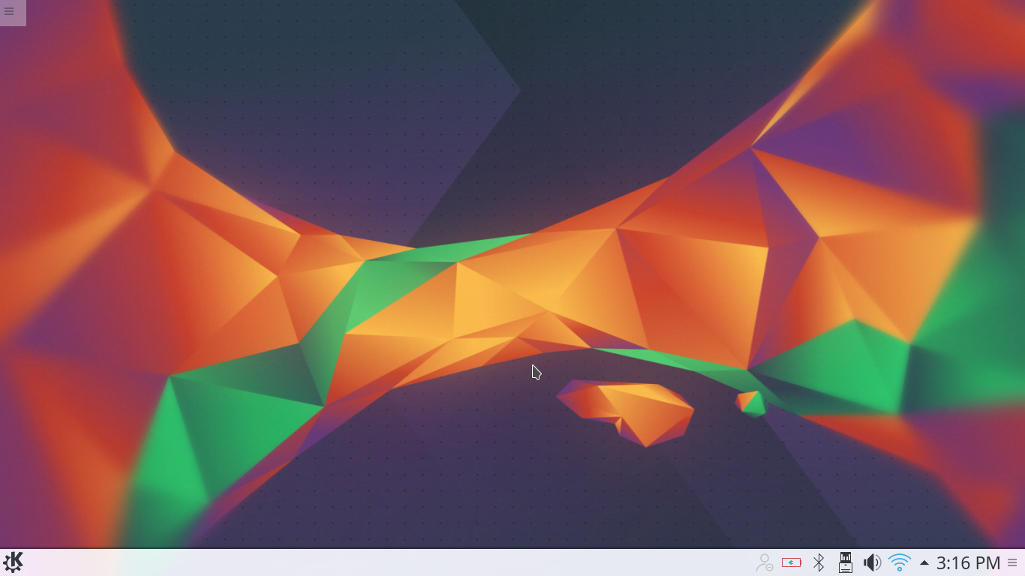
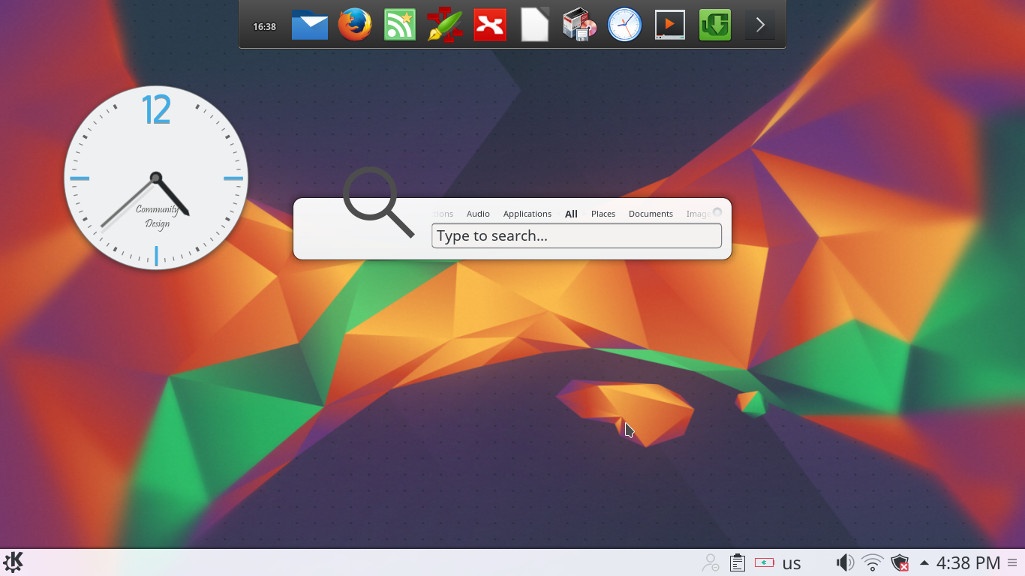
The interface on the other hand is completely different from Gnome, and I instantly remembered Windows because of the menu and the bottom panel, Kubuntu is aimed for an easier user experience, I think they meant it was “a windows like experience”.

Default interface in Kubuntu

It’s even has an Aero peak like feature, when you hover the mouse over a taskbar program and you see a preview of the program running in a box.

Areo peak in Kubuntu


So far the experience is smooth, but it’s different from all the interfaces I used before,  and the default applications are also different from the gnome/unity bunch.

Of course KDE comes packed with tools that start with “K” like Kedit and Knote, I’m not ready to give up Zimwiki for example so some of these K tools had to go! 

I have a tip for you: If you copy and paste terminal commands from web pages, you are going to have to change Gedit to Kate, so you get your commands up and running 🙂

The Widgets are interesting and really give a larger scale for customizing.

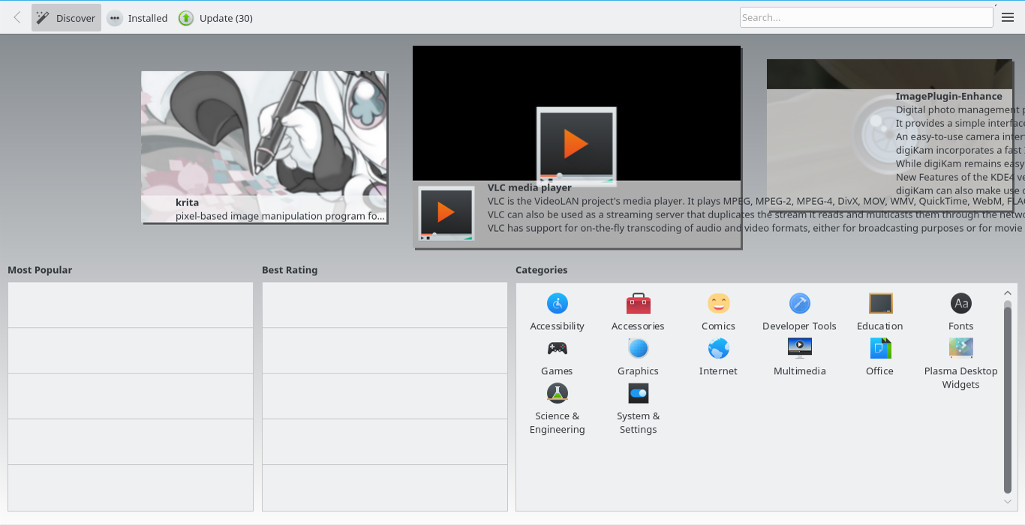
While the software center is a bit, different!

Software and updates

I’m used to having the software settings and sources in a separate application than the software center, in Kubuntu they are merged up together and aren’t exactly easy to find, as if the Kubuntu developers don’t want you to find the source settings and edit them properly.

Kubuntu software center

The file manager Dolphin

Some of the things I really liked is the Dolphin file manager, it’s much better than Nautilus, the interface is clean and clear, and doesn’t have some of the chronic bugs Nautilus plagued with, it’s also featured packed as it has a double pane and gives a better access to the main controls and preferences. 

Dolphin file manager

Adding my set of tools

The final Kubuntu desktop

Things to note

I also noticed that Kubuntu doesn’t have a backup utility? That is not good to be honest, it was so easy adding Deja backup from Synaptic but a backup utility is something you need out of the box! 

Another thing is the terminal emulator Konsol, it doesn’t start with the usual CTRL + ALT + T key combination right away and it takes a bit of tweaking to get it to work.

Dolphin doesn’t handle the smartphone very well, it can’t write to the phone’s memory and often fails to explore it’s contents in MTP mode.

My post about Ubuntu Gnome is still relevant to a great degree, I do miss the Gnome pomodoro timer because it’s a Gnome application and you have to install all of Gnome libraries and dependencies, to get it to work, which isn’t exactly productive. And I’m really unsure how to integrate it into the KDE interface, so it has to go! Ktimer on the other hand has great potential of launching scripts and apps on a specific timer.

Slow boot!

One of the main issues I noticed is the slow boot, nearly 10 times what Gnome needed to boot, I managed to fix this problem and you can find the solution here

Warning

Never install any distro if the Checksum don’t match! I did it and I was in for a world of pain, and had to reinstall all the packages from synaptic.  

Final verdict

I think Kubuntu and KDE in general is underrated and doesn’t get as much “mainstream attention” as other flavors and interfaces, it is worth a try!
It feels really well polished and almost reminds me of Macs OS, I’ve never had or worked one on, but that’s what I think at least.

What do you think of this post? Do you use Kubuntu? What do you think?
Please share this on social media, and subscribe to my mailing list to get updates before anyone else! 
« Older posts