Month: May 2019

سبع سنين على درب التدوين

سبع سنوات مرت بحلوها ومرها منذ قررت افتتاح هذه المدونة، محطات عديدة مررت بها كشخص وكمدون موثقة على هذه الصفحات، بالتلميح تارة، وبالتصريح تارة أخرى. أزورها باقتضاب في هذه التدوينة.

بالعودة إلى البداية، عندما بدأ كل شيء.. كانت رغبتي من افتتاح هذه المدونة هي تقديم المساعدة بشأن مشاكل لم أجد حلولًا لها على شبكة الإنترنت. مثل هذه التصرفات ترجع لتنشئتي الكشفية والتي عماد شريعتها هي تقديم المساعدة دون انتظار لمقابل.

مرور سبع سنوات على افتتاح هذه المدونة

رحلة تعلم

شملت هذه التدوينات رحلتي في عالم الكمبيوتر والصيانة، وتحولي لنظام لينكس وإتقاني له بشكل تدريجي، وتجارب حياتية تنوعت ما بين وظائف شغلتها، وهوايات مارستها، ومواضيع عامة هنا وهناك. وطبعا تغطية للأزمات المعيشية التي أثقلت كاهن المواطن: الحرب اﻷهلية، وأزمة الكهرباء، وأزمة نقص السيولة، وأزمة السكن، والازدحام المروري، وأم الأزمات ومصدرها: الانقسام السياسي.

أزمات شخصية

مواضيع مثل: مفترق طرق، ووهم الاختيار، والجيلاطينة الصفحة المفقودة، ورثاء حمزة – رحمه الله – لم يكن من السهل نشرها والحديث عنها، ولكنها أبصرت النور في النهاية وظهرت للعلن بعد طول تفكير وانتظار.

مواضيع محورية

هناك مواضيع نالت قصب السبق وتهافت عليها القراء، وكانت أكبر مصادر جذب المشاهدات للمدونة: تدوينة الجوازات، وتدوينة صيانة المولدات، وتدوينة زيادة سرعة الواي ماكس، وباللغة الانجليزية مراجعة لينكس أبونتو غنوم 16.04

ومضة من العالمية

بعض تدويناتي ترجمت للغة اﻷلمانية من قبل الناشطة (أنجيليكا غوتش) ونشرت على موقع دي فيرتاج (الجمعة) المتخصص في نشر مقالات الرأي، حتى أن أحد التدوينات المترجمة من مدونتي كانت على قائمة اﻷكثر مطالعة في ذلك اﻷسبوع!

علامات فارقة

قرابة 500 تدوينة، و 500 ألف مشاهدة (حسب إحصائيات غوغل)، وما يقارب اﻷلف تعليق من القراء (وردودي عليها بالطبع)، إنها رحلة طويلة يسعدني أنني قمت بها، وأتمنى أن تكون عادت على القراء بالنفع والفائدة، وأن ينولني ثواب نشر العلم النافع والعمل به.

إلى أين؟

فكرت في ترك التدوين مرات عدة، وكل سنة أتوقف لأنظر مالذي تبقى من الموضوعات لأكتب عنه؟ أو ماذا يمكنني تقديمه للقراء؟ هذه السنة أيضا تساورني هذه اﻷفكار، لكنني لا أحمل القلق بشأن مشوار التدوين كثيرًا.  أما عن المشاهدات فأطمح للوصول لأقصى رقم ممكن، مليون مشاهدة أو أكثر لا تبدو حلمًا بعيد المنال.

خطوات للأمام وأخرى للخلف

لم يفلح سعيي الحثيث في تحصيل إيراد من المدونة، هذا ليس سيئًا، ولكنه ليس جيدًا في نفس الوقت. بعض الأمور ينبغي تقبلها كما هي وعدم تضييع وقت طويل في التعامل معها.
تبقى الفائدة في الدرس المستفاد، وما يمكن أخذه للتجارب القادمة.

المدونة تبدي عمرها

المدونة هنا على الشبكة منذ 7 سنوات، رغم نمو مشاهداتها وقاعدتها الجماهيرية إلا أنها تبدي عمرها..  بعض البرامج التي تحدثت عنها لم تعد مواقعها موجودة. وبعض التدوينات تغيرت أسماؤها. بل إن المدونة نفسها مرت بعدة تغييرات كبيرة. ومع ذلك فإنني أحاول جهدي أن تظل المعلومات دقيقة وصحيحة. وأقوم بربط المواضيع القديمة والحديثة لكي يصل القراء إليها بسهولة. من باب اﻷمانة في السرد.

يسرني أن أي ما كنت قد فعلته لجلب المشاهدات قد نجح، فهناك عدد يومي جيد من القراء يمر بالمدونة كل يوم. الجانب السلبي لهذه الإعدادات هو التعليقات الوهمية التي أجد منها بضع تعليقات كل يوم. لكنني أمسحها بشكل دوري ولا أسمح بنشرها على المدونة إطلاقًا.

أتلقى الكثير من اﻷسئلة وطلبات المساعدة على مواقع التواصل. تحدثت عن هذا في تدوينة المتسللين، لكن يبدو أنها ضريبة الشهرة!

شكر واجب

أتقدم بالشكر لكل من دعمني في مشوار التدوين، سواء بالكلمة أو بالنصيحة، أو بدوام المتابعة والقراءة. يحضرني منهم: شقيقي علاء، وشقيقتي الغالية وزوجها، وصديق العمر سالم جابر، والقارئ المتابع محمد الشريف. والصديق جواد الذي يعلق دائما ويترك بصمة إيجابية.

 شكرا لكم على طيب المتابعة ودوام القراءة. وقراء آخرون لا يعلقون فلا أعرف من هم، شكرا جزيلا لكم.
FDM (Free Download Manager) for Linux is finally here!

After what seemed like an eternity, the popular free download manager has finally made a version for Linux! The development team finally came around after refusing to release a Linux version for years!

It all began in mid 2016 when the developers posted a poll asking what features did the users want to have in FDM, a version for Linux was on of the features suggested.

The Linux community help

I reached out to a very popular Linux blog: Itsfoss, and posted a guest post talking about FDM and asking for the help of the Linux community to change the voting results. The support was overwhelming and Linux is the first featured voted by a margin.  You can view the results of the poll from here.

A support issue

Over the years FDM was no longer open source, it turned into a freeware with the old branch 3.9.x remaining open source. So the source wasn’t going to be posted where people could collaborate on it. 
Also I’ve received information from the developers saying that it would have to be written from scratch in order to support Linux properly. 

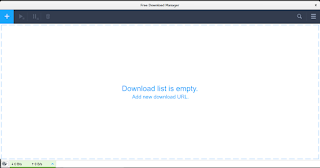
FDM Alpha running on Ubuntu Linux
A screenshot of FDM running natively on Linux

FDM 6.1 supports Linux!

At last the long wait is over! A version of FDM finally supports Linux! This “Alpha” was released in October of 2018, and the stable version is yet to be released.  It’s a huge step from being a promise, a concept and an option on a poll..

You can download this version for Linux Ubuntu from this link.
It’s still in the very early stages of release and missing a lot of features as stated on the download page, with more functionality expected later this year; including features from the 3.9.x series of FDM.
Also Ubuntu is the only distribution of Linux currently supported and any other distros that support .deb files.

Final words

It’s wonderful seeing that something I’ve worked hard towards achieving is finally paying off. I’ve been rallying and pressuring the support team for over 3 years now for a Linux version. 
My happiness will be complete when a stable version of FDM 6.1 is released and Linux is one of the supported systems. 

Do you use FDM? How do you feel about a Linux version of FDM after all these years? Please let me know in the comments section blow.

How to restore Firefox Quantum passwords after an update?

The new Firefox is amazing, it’s been renamed Quantum since version 57 back in 2017. I used to use an add – on to import and export passwords, however it’s no longer supported in the new version of Firefox.

An update that does some damage!

However I’ve noticed that sometimes after an update, the saved passwords are erased, and I have to enter them manually, which is a real pain!

How to import and export passwords without an add – on?

There is a very simple way which is creating a Firefox account and using that to sync your information across different devices: Passwords, bookmarks and history.

You must have more than one device for this method to work: Your phone and your computer for example. Or two computers: Your work computer and your house computer.

The fix

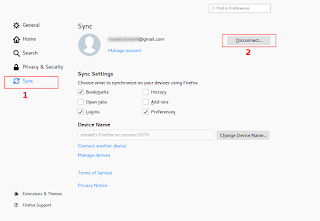
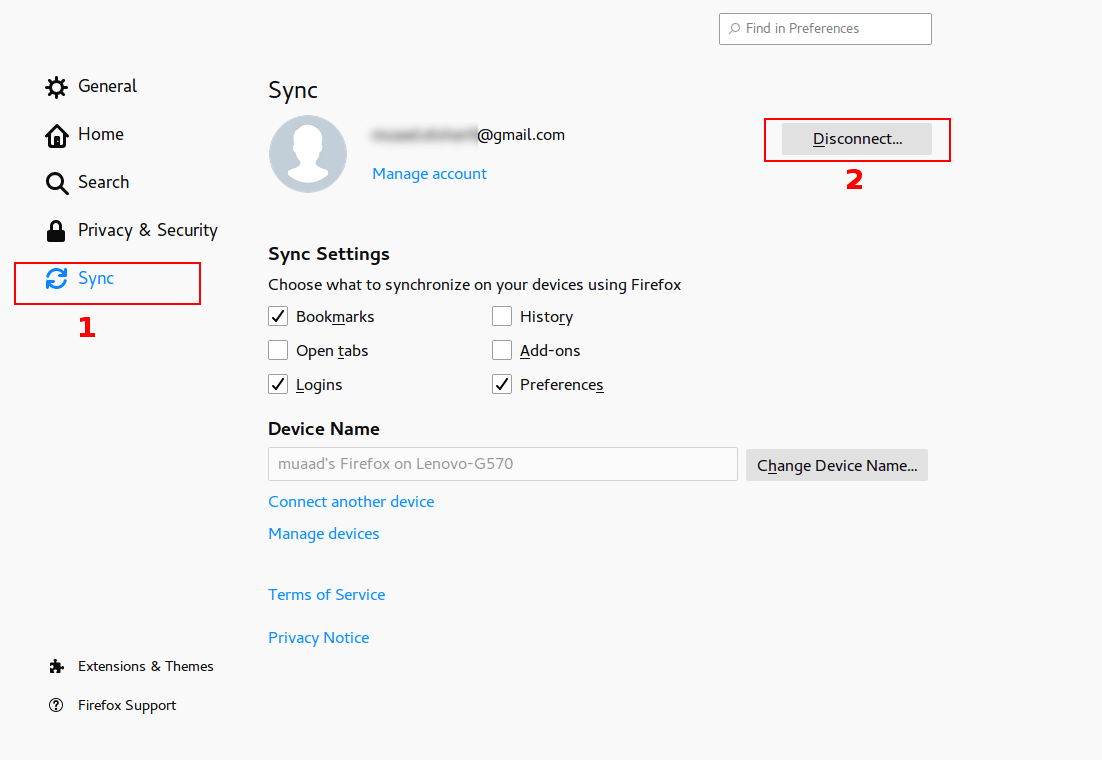
From the main menu go to: Edit Preferences Sync

Click Disconnect, then sign again with your login information. Firefox will sync the information from the other device and you will get back your passwords in no time!
Please note that clicking disconnect would erase any data you had stored in Firefox, so watch it!

Final words

That’s how you restore saved passwords and bookmarks for Firefox Quantum. I hope you found this post useful. Please leave a comment if you have a question.

RSSOwlnix: RSSOwl reborn!

RSSOWl is one of the best RSS feed aggregators available for free, if not the best, however it’s well known that RSSOwl has been discontinued since December 2013. This doesn’t pose a real problem as the current version is stable and usable, for now!

The journey ends here

If you plan on upgrading to a more recent version of Ubuntu (18.04 for example being the latest LTS), you will be unpleasantly surprised that RSSOwl won’t work due to dependency related issues.
You can search for an alternative, sites such as: Alternative.to provide millions of software to search through.. I have to be honest and say that no alternative of RSSOwl works in the same way or can be customized to have the same functionality.
What can be done?
If you are on Ubuntu 16.04 you can rest assured knowing that it would be supported until 2021, you will enjoy the usability of RSSOwl for a period of time.

How about something fresh and exciting?

You can use the RSSOwl fork: RSSOwlnix.
That’s the beauty of open source, it really never ends. If a project is discontinued for whatever reason, someone else will pickup the slack and continue the work.. Especially when the project has a massive following as such.
I’d like to see that happen with a commercial software!

What’s new in this fork?

This fork has updated dependencies  and should work with later versions of Linux Ubuntu and Windows. I haven’t tested it  RSSOwlnix on anything but Ubuntu 16.04 and it worked fine. It works slightly different than the original project and a bit unstable being a beta. Albeit it’s rather usable and gets the job done.

RSS essentials

If you are like me, someone who uses RSS feeds a lot and uses them to keep up with the world news, then this is for you. I’ve used RSSOwl for over 7 years and to me it’s an essential software, I no longer have to compromise if I have an upgrade planned.

Download

You can download RSSOwlnix from this link, latest version 2.7.0 as of this writing.
Windows 64 Bit
Linux 64 Bit

Final words

Do you use an RSS reader? Would you consider using RSSOwlnix? Please let me know in the comments section below.