Category: Windows 10 (Page 4 of 11)

My Gaming Renaissance

I’ve wrote many times on this blog that I’ve lost the urge to game, that gaming was becoming a forced obligation that I push myself to do in all manners of productivity tools: (Chains and to do lists). Then I thought that I found my second wind gaming. That was hardly the case. This wasn’t me trying to adapt a new past time, it’s a different thing altogether.

More than leisure

I was going through a rough patch in my life. I’ve been displaced and lost my job in the process, and on-top of that a massive quarantine has hit the world and everyone was sitting home for days on end. I’ve sat home for so long that my car battery died and couldn’t start it anymore! – Luckily we got that fixed -.

What does this have to do with gaming you might ask? A whole lot actually..

I needed something to pass the time. Keep me sharp and motivated. But since I was feeling down and didn’t feel like doing much, it had to be something easy to pickup.
What better thing than my life long friend, video games.

It was a bit odd at first. The process of re learning something that I already knew and forgot. It took a bit of getting used to, but once I settled on my bike. I was good to go! I spent a lot of time playing video games, staying inside and minding my own business. I think that is a win.
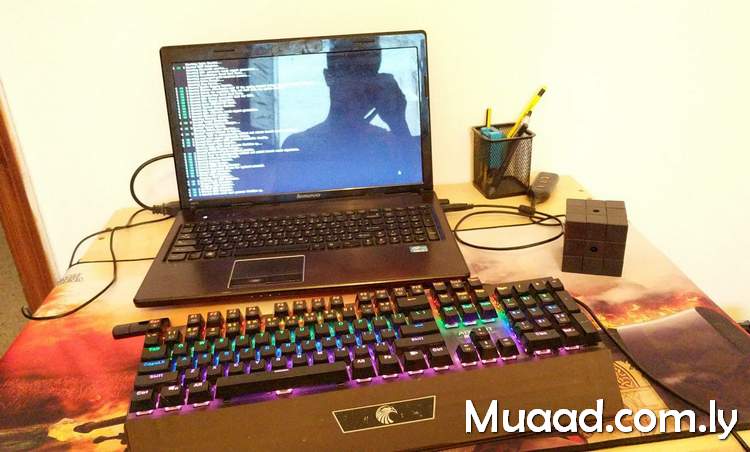
 

My gaming setup. Ain’t much but its honest work


Gaming helped get my mind stop overthinking about life issues. Kept me busy doing something somewhat productive. It doesn’t compare to reading 100 books a year, but it sure feels great!
I think I’ve done more gaming in two months than I’ve done the entire past decade combined!

Why was I hitting a major wall when it came to gaming?

In a previous post I’ve listed a bunch of ways to make the gaming experience more enjoyable. Most of those things I didn’t have access to at that time. So I had to make do with what I had. I’ve also received a bunch of tips off Reddit that I followed.

I’ve watched a Youtube video that got to the bottom of my issue and directed my attention to a very obvious issue that I have:

A lot of my games really suck!

Some games are truly free (free as in freedom not free beer) however, the graphics are choppy and the sound is a nightmare. It’s very rare when you find a totally free game that is very good – Wesnoth is one -.

The fact that I was trying to game on Linux didn’t help much either – I know that this is the year 2020 and that gaming on Linux took massive leaps towards the future with Steam, Vulkan, Lutris, etc – . It’s just not working for me. I love Linux and I love playing video games and it doesn’t seem like the two can exist under one simple scheme.
There are thousands of games out there, everyone is bound to find their cup of tea. I just needed to find mine.

Rediscovering my roots

I started by replaying a game from my past that I found very engaging and stimulating. NFS Most Wanted. Beating the game warmed me up nicely for a much bigger experience.

This ordeal that I was going through reminded me of something that I’ve long forgotten. That gaming was an escape for me from the stress of everyday life. That gaming was there for me when goings were tough. That I made good friends and great times through gaming.

Needless to say that this cemented gaming as a popular pastime for me. Much better than watching TV for example. I’m also thinking of upgrading my gaming setup. Any suggestions?

Do you play video games? What’s your platform of choice? What game are you currently playing? Let me know in the comments section below.


ماذا يوجد بجهازي، نوفمبر 2020

لقد قمت على مر السنوات بتقييم عشرات الحلول البرمجية والنظم المعلوماتية (المجانية منها والمدفوعة). واليوم سأقوم بتقديم 9 حلول برمجية أستخدمها بشكل يومي تحت نظام Windows 10. ليستفيد منها القراء. وأرحب باقتراحاتكم في قسم التعليقات إن كان هناك حلول أفضل من التي اقترحتها في هذه التدوينة.

لماذا Windows 10

مع أنني نصير للبرمجيات الحرة ومدافع عنها. إلا أن Windows 10 ملائم لبيئة الأعمال أكثر (بسب الطبيعة المنغلقة والسياسات الاحتكارية للعتاد ونظم التشغيل ومعايير التقنية). ولأنني ضقت ذرعا بالحلول التلفيقية (الألات الافتراضيةواين). كما أني أعتقد أن برامجًا لنظام Windows ستلاقي رواجًا أكثر كونه النظام الأكثر شيوعًا على الحاسب الشخصي.

معيار الاختيار

  1. كل هذه الحلول مجانية (بعضها مفتوح المصدر).
  2. لا تستهلك الكثير من موارد الجهاز.
  3. يمكن استخدام (معظمها) على نطاق واسع من أنظمة التشغيل (معظم الحلول متعددة المنصات تعتمد على جافا).

سأبدأ بالحلول الانتاجية


الحل الأول: المكتب المفتوح LibreOffice (مجاني ومفتوح المصدر – متعدد المنصات)

كتبت عنه تدوينات كثيرة باللغتين العربية والإنجليزية. هو منتج ممتاز ويزيد جودة مع كل إصدار. إصدار شهري بتعديلات بسيطة. وعلامة فارقة كل ست أشهر. أنصح به بشدة.

تحميل ليبر أوفيس

الحل الثاني: (Zim Wiki) مجاني ومفتوح المصدر – متعدد المنصات

يمثل هذا الحل بالنسبة لي قاعدة البيانات الشخصية. المكان الذي أخزن فيه خلاصة الدروس والتقارير (المصروفات الشهرية، صيانة السيارة، الخ). دونت عن خصائصه وتنصيبه باستفاضة لموقع بوابة التقنية.

تحميل Zim – Wiki

الحل الثالث: Xmind (مجاني للاستخدام الشخصي – متعدد المنصات)

هذا البرنامج وظيفته تصميم الخرائط الذهنية ومخططات التدفق. يمتاز بالعديد من القوالب الجاهزة وجمال التصميم. يعتمد على جافا لذلك يجب تحميل آلة جافا الافتراضية لتشغيله.

تحميل Xmind

برامج الواجهة


الحل الرابع: Executor (مجاني، Windows فقط)

هذا البرنامج هو نافذة مخصصة لاستدعاء البرامج والأوامر. يمكن كتابة عدة أوامر معا وتنفيذها في سلسلة. ما يسهل أداء المهمات التكرارية.
يميزه أنه صغير الحجم للغاية (1 ميقابايت للتحميل) ولا يأخذ حيزًا يذكر من ذاكرة الجهاز. يمكن تخصيصه بأشكال متعددة حسب المزاج والذوق.

تحميل Executor

الحل الخامس: Rocket Dock (مجاني للاستخدام الشخصي، لWindows فقط)

هذا البرنامج يعطيك شريطًا للاختصارات قابلا للسحب والإخفاء. يمكنك وضع أكثر التطبيقات شيوعًا عليه والوصول إليها بكل سهولة.

ملاحظة: رغم أن دعم البرنامج منته منذ فترة طويلة، وأعلان مطوره توقف تطويره رسميا في تدوينة ترجع إلى يوليو من العام 2018. إلا أنه لا يزال يعمل بكفاءة ودون مشاكل تذكر على ويندوز 10. ولم أجد بديلا مجانيًا له يعمل بنفس الخفة والخصائص ..

تحميل Rocket Dock

برامج الإنترنت


الحل السادس: RSSOwl (مجاني ومفتوح المصدر، متعدد المنصات)

هذا البرنامج وظيفته جلب روابط الخلاصات من مختلف المواقع الالكترونية. يوفر عليّ الوقت في جلب الأخبار وقراءتها. أيضّا يؤرشف الأخبار ويسهل البحث عنها لاحقا. يعتمد على جافا لذلك يجب تحميل آلة جافا الافتراضية لتشغيله.
ملاحظة: يعتبر هذا البرنامج منتهي الدعم منذ ديسمبر 2013. لكنه لا يزال يعمل بكفاءة. وهناك مشروع حر مشتق منه. كتبت عنه في هذه التدوينة.

تحميل RSSOwl

الحل السابع: Firefox (مجاني ومفتوح المصدر، متعدد المنصات)

متصفح الويب الغني عن التعريف. أستخدمه منذ عام 2008 دون انقطاع. برنامج مستقر ودائم التحديثات.

تحميل Firefox

الحل الثامن: Free Download Manager (مجاني ، متعدد المنصات)

هذا البرنامج يسهل علي تحميل الملفات من الإنترنت ويوفر خيارات قوية مثل جدولة التحميلات وقفل الجهاز عند الانتهاء من تحميل ملف. كما أن تقسيم الملفات يستفيد من السرعة الكاملة حتى مع وجود اتصال بطيء بالإنترنت. لم يكن دعم لينكس من قبل المطورين خيارًا لكن ومن خلال دعم المجتمع أصبح تطوير نسخة لينكس أولوية. كتبت عن هذا الموضوع مقالة لموقع ITSFOSS الرائد في مجال أخبار المصادر الحرة والتوزيعات. يمكن مطالعة هذه التدوينة كاملة من الرابط.
ملاحظة: أنا أستخدم النسخة القديمة 3.9.8 وهي مجانية ومفتوحة المصدر. لم ترق لي الواجهة الجديدة لذا فضلت البقاء مع النسخة الأصغر حجمًا ذات الواجهة المعروفة والشبيهة بواجهة IDM

تحميل FDM

استعراض الصور


الحل التاسع Fast Stone Image Viewer (مجاني، Windows فقط)

هذا البرنامج لا يمتاز فقط بخصائص عرض الصور وإعداد عروض الشرائح. بل إنه يحتوي على مجموعة أدوات لتحرير الصور والتعديل عليها. ما يجعله مثاليًا لإدارة المجموعات الكبيرة من الصور والتعديل عليها دفعة واحدة. وأنا استخدمته بنجاح في إعداد نسخة كتاب اعترافات إنسان. وساعدني كثيرا في إضافة العلامة المائية، تصغير الصور إلى حجم ملائم للويب، قص الزوائد من الماسحة الضوئية. الأمر الذي كان ليستغرق أياما طويلة من العمل لو قمت به لكل صورة على حدة باستخدام جمب مثلا.

تحميل Fast Stone

ختامًا

هنا قدمت باختصار 9 برامج أستخدمها بشكل يومي. أتمنى أن تكون هذه القائمة راقت لكم وفتحت لكم أبواب برامج جديدة.
ما هي البرامج التي تستخدمها بشكل دائم؟ هل هناك برنامج تريد اقتراحه علي؟ الرجاء ترك تعليقك بالأسفل، والسلام عليكم.

ZKTeco iFace 950 configuration on Windows 10

If you happen to buy the ZKTeco iFace 950 equipped with Bio Time 7.0. You would know that it’s an excellent bio metric machine with plenty of options to track attendance. Facial recognition, fingerprint scanning, ID cards. A lot to choose from.
And it happens to be a nightmare to set up!

You see Bio time is really difficult to configure. I found a 40 minute video on Youtube that explains how to do it, and I still got it wrong.
Bio time = waste of time. 

What was I doing wrong?

I’ve bought the machine, installed it on a wall and begun inserting the employee names into the machine and registering their information. Just like any regular machine would do, right? 
No, this software is very different, it would require you to register all staff from a web interface, then put that into the machine. Overriding any information you had.

You could take a USB copy of the data, but that’s useless. I mean there are two tables that are impossible to link. One is for employees and the other is for attendance log. Trust me I’ve tried many times to create a database and it didn’t work..

So the web interface doesn’t work. Dumping information on USB doesn’t work. What does work?

ZKTeco Attendance Management

Enter ZKTeco Attendance Management. Which is the predecessor of Bio time made by the same company . It’s a stand alone software that’s installed on your computer and you can access the fingerprint scanner using the software interface.

Pros of using ZKTeco Attendance Management

1. Can work on multiple models and machines. In my case I’m using the aforementioned i950 and UT800.
My setup is composed of two finger print scanners of different models linked on the same network. This software has no problem reading them and downloading information from them.
Please note that this version of the software supports 2 default machines. If you have more than that then additional configuration might be needed. 

2. Can work directly with the machine or via a server
If your fingerprint machine is connected to a server and given an IP address, then there is no problem connecting to it using this software. On the other hand if you connect to it directly using a network cable you will also be able to download the log from it when you need it.

3. Simple and easy to use

The interface is simple and intuitive. Unlike the abomination Bio time is.

Adding a machine

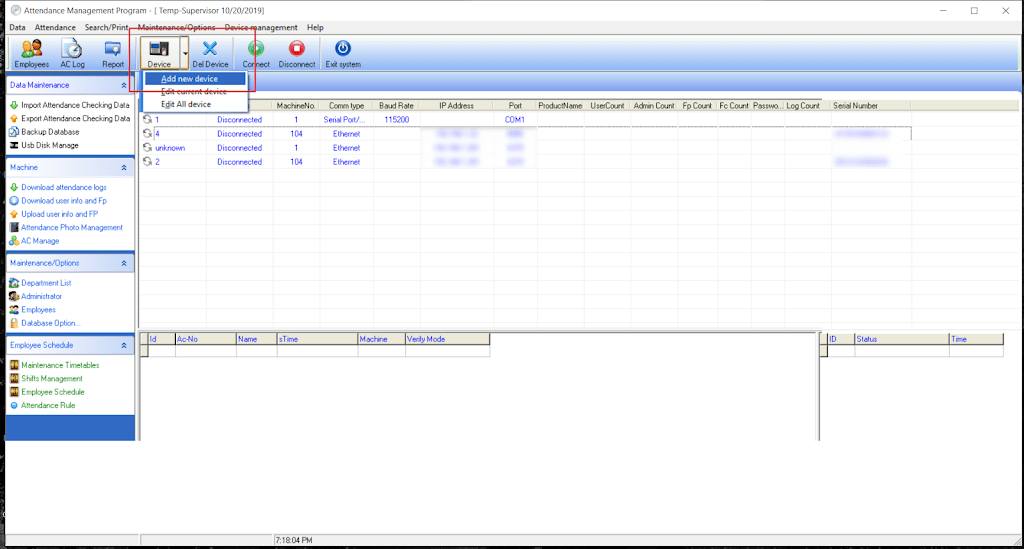
Adding a machine is very easy. All you have to do is click on “Add machine” .
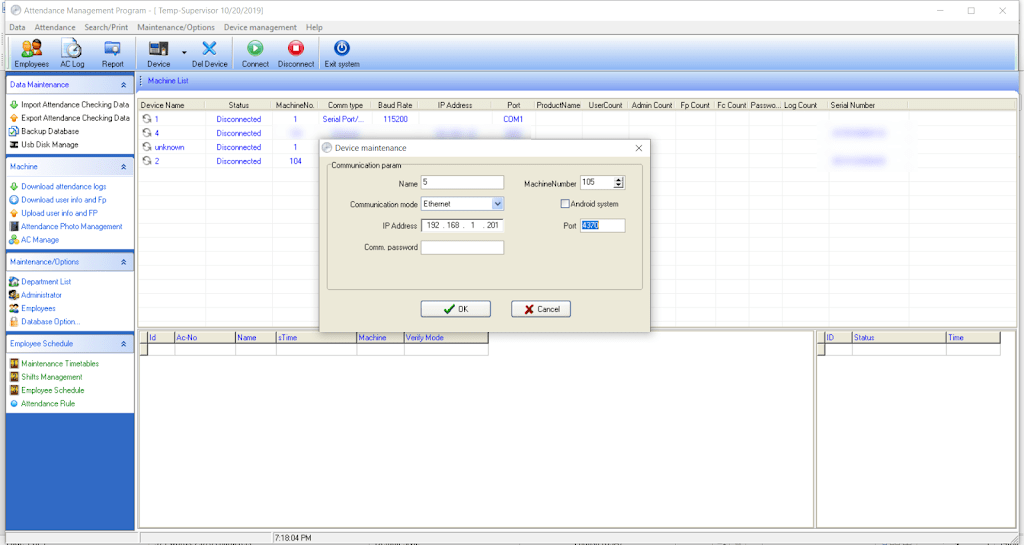
Then enter the IP of the machine. If it’s connected to a router / server then use that IP. Or use the one from your network settings if it’s connected directly to your computer. 

Giving the machine an IP is done under COMM / IP. You also need to set a port number for the machine.
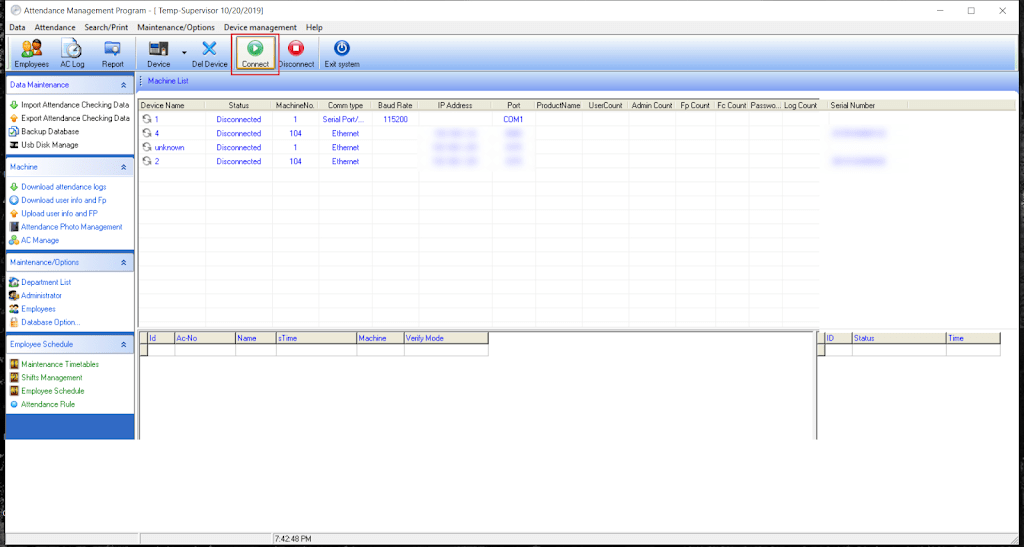
After that you connect to the machine. Wait for a bit and if everything goes well. You will be able to proceed to the next step.

Change the database directory to your installation directory

By default the directory would be set to a folder that doesn’t exist on your computer. I recommend changing to: C:Program Files (x86)ZKTeco5]”C:Program Files (x86)ZKTeco5att2000.mdb”

Downloading attendance log

All you have to do is click on the button “Download attendance log”.  To save the log on your computer. You can choose the format and I recommend excel sheet file format.
You can set rules for your establishment from “setting rules”. But I’ll leave that for you to work it out.

Download the software

You can download the software from here. 

Final words

Sometimes and older solution is a better solution. Both software are made by the same company and will work on machines made by ZKTeco / Trust. I haven’t tried products by other companies such as Fingertec for example. Give it a try if you want but chances are it won’t work..

Did you find this tutorial useful? If so please let me know in the comments section below and I’ll see you in the next one.

Tech news digest June 2016 (Linkedin sale, OnePlus3, snaps for Linux and more)

This week had many interesting news happening all over the tech world!
Let’s take a look at this digest and catchup really fast!
Microsoft is said to buy the enterprise social media site Linkedin for a record 26.02 Billion dollars in cash, the deal is trending worldwide with people shocked over the size of the acquisition, it’s a bold business choice to say the least!
The current S.E.O of Linkedin Jeff Weiner will report to Satya Nadella the C.E.O of Microsoft, as Microsoft is looking to reach to the 433 million users of Linkedin to expand it’s business and products such as Office 365 and cloud solutions.


Microsot’s logo

In other Microsoft news the Windows 10 “free upgrade” will expire on July the 29th, so if you are planning to update you better put that on your checklist and fast!

OnePlus is ready to launch the third smartphone of it’s famous “flagship killer” series: OnePlus3, the highly anticipated phone will come with a 64GB internal memory and 6GB of RAM! (specs according to GSMarena).
The countdown is almost done and the launch event will be presented in virtual reality via a The Loop. A special App available on the Google store.
More details will be available as soon the smartphone is released.
Here is the official unboxing video.


Apple’s logo

Apple annonced at WWDC 2016 the release of it’s latest update to iPhone and iPad: iOS 10. Which brings many improvements to iPhones such as a redesigned message app, lock screen and the ability to delete many pre-installed apps, the update will be shipped this fall. (for more details check the Apple site from here)


It’s not a Snap! Just a package icon!

Now we take a tour of the Linux world:  Sanps are the hottest thing in the Linux world today and for a good reason! Snaps were first announced as a feature of Ubuntu 16.04 that installs programs easily without needing to install dependencies (as it’s packed with the binary) or use command lines to install, these snaps can run virtually on ANY Linux distro! Meaning you can use Ubuntu apps anywhere you go on Linux: Desktop, server or cloud!

The main advantages of Snaps are security, speed and ease of use as they are easier to create, install and update! And many of the major open source projects like LibreOffice and Ubuntu will use them very soon as the standard way to deliver software.

This has been a dream for Linux users for many years because different distros use different package managers, meaning that Debian software won’t work on Fedora and vice-versa.
I’m glad to see that happening finally, learn more about this awesome new technology!

Fedora’s latest release: Fedora 24 was supposed to be released today, but due to some bugs not being fixed it was postponed, Fedora is ready when it’s ready! Checkout the bug list if you can’t wait!

Finally the Linux oriented blog it’sfoss is celebrating it’s fourth anniversary (does it ring a bell?) by throwing a giveway, the prise is the awesome Raspberrypie3.

It’s F.O.S.S’ logo

Here is my lucky link for you to enter and help me win, because if I did I’ll make a video review of it and many posts about it! 😉

Raspberry Pi 3
The Raspberry Pi 3 as shown on the giveaway site!


That was the tech news of the week segment, I hope you enjoyed this quick digest, let me know what you think in the comments section below!

« Older posts Newer posts »