Category: Windows phone (Page 2 of 3)

Advantages of having Windows phone over Android

Until one of my readers asked me this question, I thought I posted about this, turns out I didn’t! Let’s take a look at some of the perks that Windows phone has!
It’s an opinion piece, so don’t get all worked up 😉


  1. Part of the chosen few

    Having a Windows phone is unique, it’s unlike owning an Android device, they have a distinct look and feel to them that only a few can appreciate.

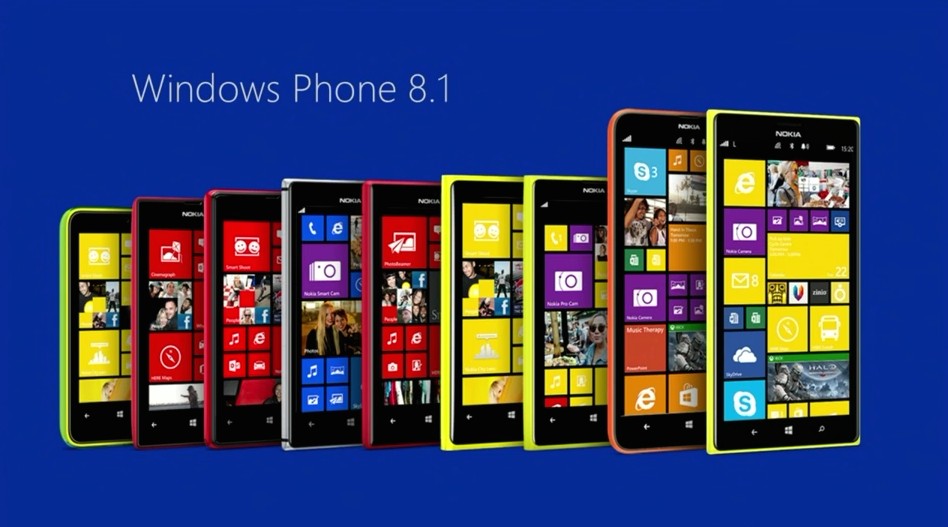
    Excellent lineup of Lumia phones
  2. Simpler interface

    The interface is really easy to navigate through, no fuss and no unneeded widgets that get in the way.
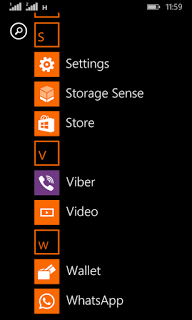
    Windows phone interface
  3. Minimalist approach to the smart phone

    Many people complain that this “app” or that don’t exist for Windows phone, but the fact is the basic stuff exist with great support, while keeping the rust of the clutter out of the box.

  4. Less prone to malware

    Since Windows phone owns less that 3% of market share, it’s less likely to be targeted with malware, unlike Android who owns over 57% of the market share.

  5. Business phone to the core

    it reminded me of the E-series back at the day, phones that were built for business and comes packed with tools to help you work, Windows phone 8.1 comes with Windows’s own personal assistant “Cortana” (Later ported to Android) and many other apps like Microsoft Office, OneDrive, OneNote, tools that help you work, let’s not forget the excellent keyboard that comes pre-installed with the system, and the excellent integration with Windows computers.

  6. Motion data

    It’s a unique feature of Windows phone that allows your phone to graph your movements via the sensor core and display it in a graphical interface, very accurately and with no impact to battery life and show what applications could use the motion data too. This feature isn’t available for other platforms such as Android and iOS. While Cortana (which was only available to Windows phone) became available for Android and iOS too, even when iOS have Siri as a virtual assistant by default.
Final words

These are some of the reasons I thought of to chose Windows Phone over Android, Keep your options open and don’t stick to one thing, I’ve used several Android smart phones in the past like the Samsung SII And Be Elite 2, and who knows what the future might hold?
Checkout my review of the Lumia 630 dual sim while you are at it.

Did you like this post? Would you consider buying a Windows phone in the future? Let me know what you think in the comments section below!

Common Windows Phone errors and how to fix them

Windows 8.1 logo It’s not all fun and games with Windows phone. It’s better than Android as it doesn’t crash as often, but I ran into several bugs the other day that I have to blog about.

Let’s take a look at the issue

I turned off the phone and removed the battery to remove the SD memory card that’s underneath (a major design flaw) and when I returned it, it was not the same! I noticed that many apps were refusing to work the way they used to! And the browser won’t load search results. I thought it was a connection issue ( Error 800704CF). but the error messages were about syncing with outlook ( Error 80070020).
At this point I was going to restore the factory default settings, which would have deleted everything on the phone and I would have to start all over!
After researching several error codes I realized it was far too simple!

The fix

I set the date wrong! (Error 80072F05) The easiest fix was to set the time automatically, to do this follow these three easy steps!

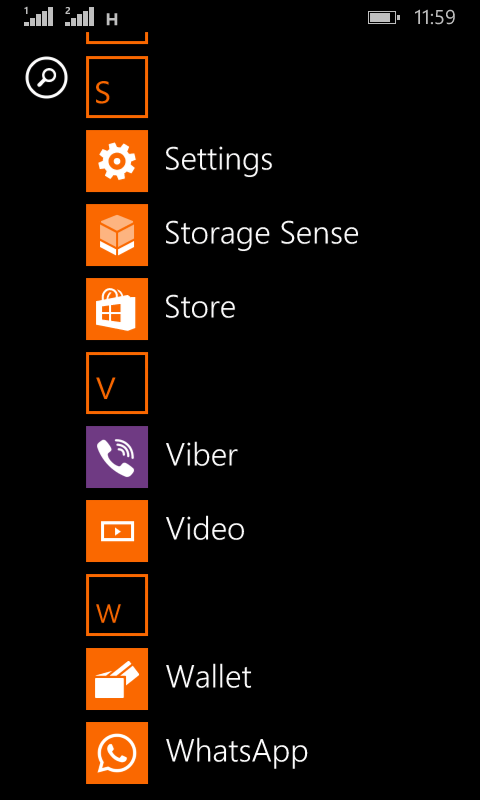
  • Go to the main menu (swipe left from the desktop).

Windows Phone main menu
  •  From there go to Settings
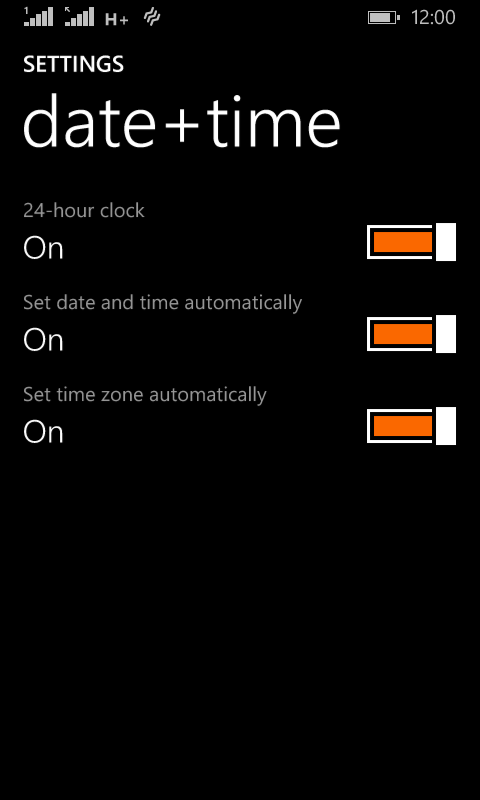
Windows Phone time and date settings
  •  On the date and time settings, set all of the values to on (24-hour clock, set date and time automatically and Set time zone automatically).

  and the phone went back to normal!
 

The codes I encountered were: 80070020, 800704CF and 80072F05. So if you face any of those the first thing you need to check is the time settings. I hope you found this tip useful, and please share it with your friends and family to help the blog grow! 

Telegram VS Whatsapp! Battle of the chat apps!! (2016)

WhatsApp is a popular texting message, and Telegram is an alternative of WhatsApp that has gained mainstream interest after the acquisition of WhatsApp by Facebook. While being really similar in features, I’ll be comparing them head to head so readers can have a decision!

Telegram VS WhatsApp

At the core, both applications are similar, they both serve the same purpose, chat apps!
There are some differences, let’s take a look at them!
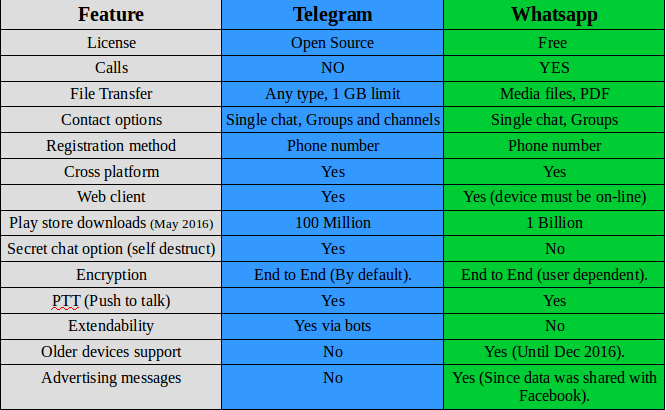
I made a table of comparison based on information available at the moment.


Telegram VS Whatsapp comparison

Key points

While being very similar, whatsapp‘s killer edge is having voice calls, the option that Telegram doesn’t have and doesn’t plan on adding them to it’s feature set.

WhatsApp is many times more popular than Telegram, so it has a wider user base, and the devices supported by WhatsApp are much more than Telegram! (supports older model Nokia Asha and Symbian but only until the end of 2016!).
It requires updating very often and it’s hard to manage on a limited internet connection.

And the call quality is terrible for the same reason! So in the few months I had Whatsapp, I didn’t make a single call!

Another major draw is privacy concerns, Whatsapp edited the privacy agreement and shared data with it’s parent company (Facebook) which will use the data for “targeted advertising”.


Whatsapp
has recently added Encryption, it’s not like the protection level that Telegram provides, but it’s a start (Telegram is an end to end application).

Telegramis focused on security and speed, it provides better security than WhasApp and the secret message option is something that WhatsApp doesn’t support!

File transfer is also a plus for Telegram, with 1 GB limit and any file type supported! Whatsapp is limited to media files (and pdfs).

Telegram
‘s bot feature increases the application’s functionality much more than Whatsapp, these bots do many things like instant translation from inside the application, and the possibilities are endless!! You can get nice gifs just by writing @gif in the chat bar.

I think WhatsApp‘s main con is that it’s owned by Facebook, and Facebook is known for not respecting user’s privacy!

Verdict: WhatsApp remains on top by a slight margin! With call support and wider user base, WhatsApp is a better choice for communicating your loved ones. But if security is a concern for you then you have to sacrifice voice calls and use Telegram!

Why not download Telegram too? It’s free and more secure! And in the end your needs determine the winner of this bout!!

I personally prefer Telegram, but I have to be subjective!

After the latest updates, I removed Whatsapp once and for all, Telegram is the way to go.

What do you use? And what do you recommend? Tell me your thoughts in the comments section below!
 

WhatsApp is now free, no subscription fees what so ever!

WhatsApp is changing it’s payment policy to become totally free, before the first year was free and you had to pay 0.99 cents each year, but that is long history now!

In a recent blog post, the company addressed the current payment plan, they admitted the plan wasn’t going well, as many users didn’t have credit cards or debut cards (I for one don’t have one of those), and those people were wondering if they were going to lose service after the first year. This lead to the change we all witnessed, WhatsApp is free now!

You might be wondering, and it’s a very legitimate question, how is WhatsApp going to pay for it’s services?

It’s not going to be paid by ads, it’s paid by “testing tools” for communicating with organizations and companies, so in another way WhatsApp now is a beta and you are the tester!

It’s not bad, my concern is the privacy policy as it’s owned by Facebook, if you want a truly secure messenger, there is Telegram.

I think a head to head post is due between Telegram and WhatsApp.

Until then, how do you feel about WhatsApp becoming free?

« Older posts Newer posts »