Category: English Post (Page 33 of 97)

Tech news digest (September 2016)

In this post I’m collecting tech news from all over the web, too small for separate posts, but I guess that everyone is up for a treat with a digest like this!

The Samsung galaxy note 7 catching fire!

Samsung has called a worldwide recall of the smartphone on complaints of catching fire and exploding while charging. So if you got one I recommend you to check with the closest Samsung reseller.

Samsung galaxy note 7

And tests that involved Galaxy Edge 7 show that it catches fire and explodes as well.
It is so serious that the Australian airlines banned the use of Galaxy Note 7 because it’s a security concern, and the FFA warns the passengers not to use the phone on planes.

Apache Openoffice maybe put to rest!

The project may be put to rest due to lack of volunteers working on it, as most of them moved to to work on LibreOffice in 2011.

Apache OpenOffice logo


Apache open office has been very slow in development and the last stable update was issued in October of 2015. Bug fixes weren’t issued and the developers fear a major denial of service attack, and Apache’s advice was to use Microsoft office or convert to LibreOffice!
This comes as a shock for many people, Apache open office has a big user base of over 100 million users, I’m sure many people will be upset over this. Personally I had a pleasant experience using Apache Openoffice, and conventing wasn’t the easiest call to make. I hope someone stands for Apache Openoffice and saves it from a horrible feat, and maybe change the Apache license and give it more code freedom!

Whatsapp users will be receiving advertising messages

WhatsApp will start sending advertising messages in the following months, as it shares its data with the parent company facebook, raising high security concerns, I personally advise moving to Telegram for a secure texting experience, I’ve blogged about this as soon as it happened, but it doesn’t hurt to inform the people of the potential security risk.

Whatsapp logo

Those who share your data today will sell it tomorrow!

iPhone 7 and iPhone 7 plus are released

Apple has released the highly anticipated iPhone 7 recently, while the iPhone 7 still keeps the 4.7′ screen size that iPhone 6 had, the iPhone 7 plus will have a 5.5′ screen, an Apple first, and will be running on iOS 10.

 

iPhone 7
iPhone 7


Apple has doubled the internal storage space on iPhone 7 and 7 plus, but no SD slot available in this model too, and no battery capacity information was released yet (as long as it doesn’t blow up, it’s fine by us!).
The latest iPhone is also water resistant, a delight to Apple fans worldwide in case thier phone falls into their overly priced mocha latte!

Google Fuchsia

Google has added a new project to github the leading open source code repository code named Fuchsia.

 

a little is known about this project as of now, but there are reasons to think that it’s the new operating system that Google is developing to ditch android and the Linux kernel altogether, and to install it on a wide range of devices and wearables.

 

Yahoo announces the biggest security breach so far

In the latest trend of major companies announcing security breaches, Yahoo said that a breach affected the data of 500 million users, making it the biggest security breach to be announced so far.

I hope you enjoyed this tech digest of news, please let me know what do you think of this bit? Should it become a regular post on my blog? I will add more news as needed to this digest.

Waiting for your feedback in the comments section below, and share this post with your friends on social media 🙂




My 3 year journey with GNU Linux

Linux has been around for 25 years! Last week the world celebrated the 25th anniversary since Linus Torvalds wrote the Minix kernel.
I’ve been using Gun/Linux based operating system as my main OS for three years now, and it’s been very rewarding! In this post I’ll talk about a journey with GNU/Linux and how it turned into what I use on daily basis and feels right to me rather than the new interesting idea I saw in a tech magazine!

My beginnings with Linux

Although I learned about Gnu/Linux over ten years ago (thanks to the wonderful LTT magazine) I didn’t fully convert to open source until I graduated from college. We depended on Microsoft based products for school such as SQL server and Visual studio, which were essential softwares for a computer science major and I couldn’t risk converting to Linux and messing up my school work so it had to wait, I was itching to get rid of Microsoft Windows and start fresh with an all open source system.

Even then I relied on open source software to do my daily tasks such as Gimp and Apache Open office (LibreOffice came into play in 2011) and the only proprietary software was Windows itself. Once I graduated it was time to kiss Windows good bye.

My Windows setup

My computer had Windows 7 installed on it and I have to admit. It was running like a charm!
I had everything I wanted and had the system fine tuned and optimized to my liking. I downloaded tools and learned how to harness their power to the max, I even blogged about it here on this blog at the time.
But I was willing to give all that up for the sake of open source! Apparently I don’t have a problem of fixing what doesn’t need to be fixed.
Research.
Before converting to Linux I did a lot of research and took my time looking for the best alternatives for tools I used daily, luckily many tools are cross platform and open source so these were a given like VLC and Firefox.
I also took my time testing it as a live version and I even installed it under Windows as a software (older versions of ubuntu supported that).
I didn’t do much distro hopping, I liked Ubuntu from the start and still use it until now.
Distro hopping is one of the major criticism points GNU/Linux receives as people say there are too much distros out there for a person to try and it can be confusing and counter productive.
I have a theory about that!

Distro hopping

Linux is all about freedom and you can try what ever you like, it would be a good idea if you used a virtual machine to test so you don’t ruin your HDD with the excessive installation and removal of systems.

Preparing to convert

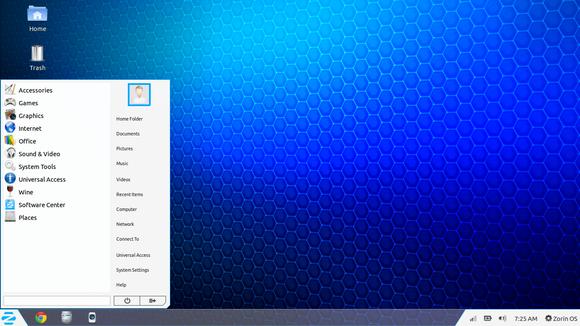
After I listed my software and got the alternatives (executor wasn’t ported to Linux) I decided to install Zorin, built on Ubuntu and came fully featured with everything new comers to Ubuntu needed. 

Zorin-Os-7
The Linux gateway for Windows users.

From flash support and restricted extras all the way down to Wine and Playonlinux to make sure your tools from Windows didn’t go to waste.
It looked and behaved like Windows 7 and I didn’t like that very much. Trying to change it messed it all up and nothing worked, not even installing it fresh?! I was a beginner and didn’t know what to do so I decided to move on to something new.

Installing Ubuntu

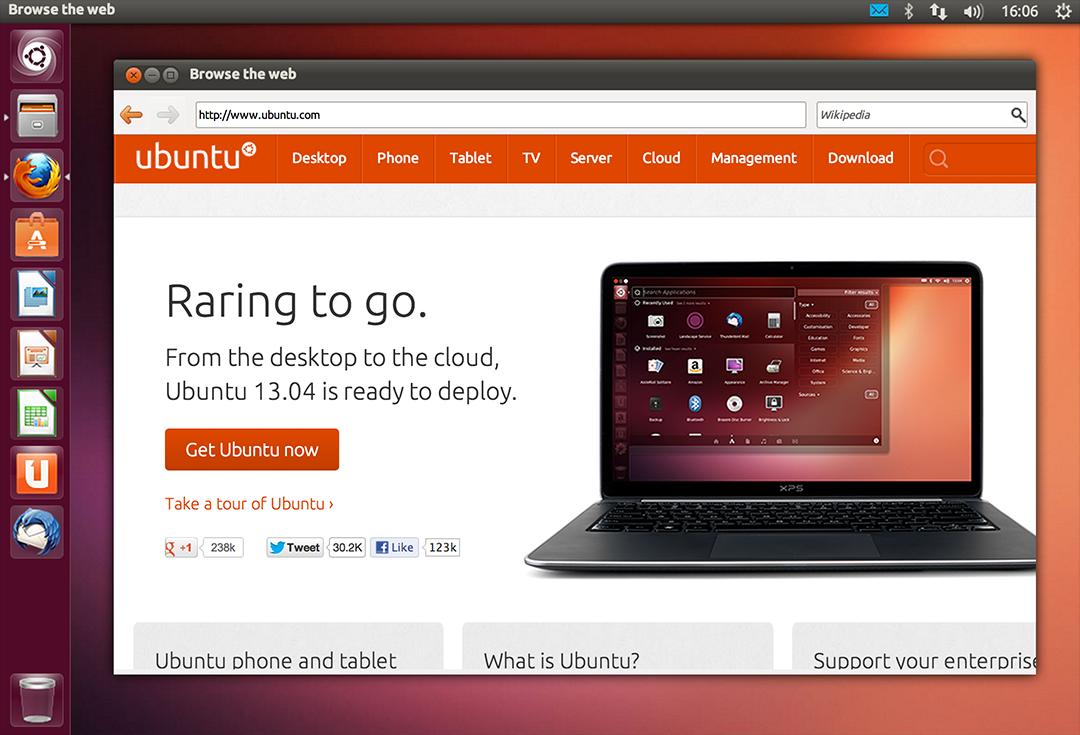
So I installed Ubuntu 13.04. It was really good and got even better when I added xfce interface, while googling for it I learned that latest version of Ubuntu won’t be released for another 2 months, and was going to be an LTS (long support version). 

At the time I had a separate laptop for work and I didn’t think that was really productive!

My first LTS and dual booting

As soon as Ubuntu 14.04 was out I got it and installed it clean, I chose the Xubuntu version because I enjoyed the XFE interface.
It was the best time ever getting to know the new distro and customizing it to my liking.
I had to install Windows for work. And since I gave away the work laptop I decided to dual boot Windows 8.1 and Xubuntu on my computer.
I used Windows to work and it was a good solid experience with the metro interface, but I didn’t feel home until I restarted and went to Xubuntu, I sighed in relief as I saw the loading screen knowing that I enjoyed working on this system and I wrote a list of reasons why.

My interface revolution

After a while I felt I needed a change, so I began testing  with different interfaces until I  decided to go with the Gnome interface, but my “home brew” distro was buggy. I was delightfully surprised to know that there is a project where Gnome was used as the interface for Ubuntu (Ubuntu Gnome) and I downloaded it and installed it right away after a successful trail on a virtual machine. It was the end of the dual boot period for me.

Settling down with Ubuntu Gnome

I got Ubuntu Gnome 16.04 as soon as it got out and I couldn’t be happier! I did a review about it here on this blog which proved to be a total success! Hundreds of readers tune in every month to read this tutorial which I keep to update as often as I find new things (I use the same principle all over my blog).

Windows is residing now on the virtual machine, I use it every once in a while.

The 1% percent dogma and the “Personal computer failure”

Many people claim that GNU/Linux failed on the personal computer with user share just above 1%. While it remains to be a success in the server and super computer department.
Just for your information, GNU/Linux’s user share has exceeded the 2% barrier in July.

And to be honest I never really cared for those people’s opinions anyway, I have a system that is well supported, totally free and I get the job done just as good as I did on Windows based systems (and maybe even better) so why all the fuss?

I love Linux, and so does Microsoft!

I could sing the praises of Gnu/Linux and open source on and on and totally miss the point, I enjoy using and contributing to open source, and I don’t have a problem with Microsoft based software, I think it’s really good!

Microsot loves linux
This image is still strange to me!


Gnu/Linux has came a long way from it’s humble beginnings and it’s a force to be reckoned with in the computer world today, even Microsoft has showed it’s love and support and there is a lot of cooperation between Canonical and Microsoft (it doesn’t necessarily make me happy, but times change).

Final words

A long journey of exploring indeed.  I didn’t do it by the book and I took my time experimenting with things and making my mistakes along the way. But I’ve settled into my system and it feels great!  I wouldn’t have it any other way! Much like life itself.

How did you like this post? Are you using open source or thinking of converting to it anytime soon?
Drop a line below and let’s see what we can do 😉

P.S: I have reached 110000 views on my blog 🙂

Productivity tips for a better working session

I always wanted to post on being more productive when working on the computer, I listed a few ideas that should help you achieve the right balance of productivity without exhausting yourself, being productive and consistent gives you more credibility and it means you will meet your deadlines rather than running breathless and sleepless trying to finish before the clock strikes midnight! I also listed a set of handy tools you can add to your arsenal and help you become a productivity guru.

List the tasks you have to do

You can’t just browse causally and do random things and hope these random activities will get you anything done!

IF you don’t know what to do, how will you achieve anything?


Some people still enjoy good old pen and paper

Know what needs to be done, and how much time does it need before getting down to business, and don’t forget to prioritize your tools as well!

The best way to keep ahead is to write a to-do list or use a software that arranges that for you, I reviewed a great task management suit from here for Windows, and for GNU/Linux I have my trusty Zim-Wiki to do the trick.

Prepare everything up ahead

Have everything you need by your side so you minimize those “ mini trips” just to look at things or to do trivial tasks, these little pauses damage your focus and makes it harder for you to start working again. Instead use the breaks to do the minor things.
While keeping yourself hydrated always leave the water and other drinks away from the computer or power source, I can’t stress that enough!

Handle distractions

Probably is the hardest part when working, how to disengage from the world and getting into the zone! Here are some suggestions.

No Wi-Fi could fix your procrastination issues!

Turning off the Wi-Fi is too extreme, especially when most of the tools used to work are on line! I suggest a site blocker for your browser, this sets a blacklist of sites you shouldn’t be wasting your time on, and leaves the rest for you to work, if you found yourself fiddling with the extension to get on line then turn off the Wi-Fi!

Again the breaks are your best friend, use those breaks to check on the people you care for, don’t shut your family and friends off to work! That’s never a good idea!

A little tip goes all the way, I set my wifi not to connect automatically anymore! So I have to connect it manually when I need something!

Have a working goal

Say to yourself: I’m not having that treat until I finish writing 5 pages today, or I’m not going to watch my favorite show until I finish the post I started, that way you work for a goal or a reward, and you will find out yourself that the sense of achievement is more rewarding than any treat!

Set a timer

It’s a good idea to use a timer to enhance your productivity, as recent studies show that the brain needs frequent breaks to maintain focus, sadly it’s very easy to forget taking frequent breaks while working.

Regular stretches can prevent RSI and help you rest from long work sessions, hence the need for a good timer!


Using a timer for productivity
Ready? Set. Go!


I’ve blogged about several timers here on this blog, feel free to check Instant boss for Windows, and Pomodro timer for Linux, as I rate those the highest.
While Instant boss is more “aggressive” and I would totally recommend it to anyone wanting to get the job done while having procrastination issues, it’s not cross platform, but I spoke to the developer on Twitter and said she might port it to Linux if she had the time, and Pomodro timer is the best timer I came across on Linux, and the post was very well received by the readers of my blog!

The right tools for the job

Use a software package that helps you to do more and focus on the job at hand, I’d recommend LibreOffice as I believe it packs a ton of potential!
You will need a spell checker also, so make sure that the dictionaries for your language are installed in LibreOffice.


Toolset
Without the right tools, you will suffer!


You might want to add a clipboard manager and a screenshot tool as well if needed. It will help you be more productive, that’s the office worker starter pack!

All of these tools mentioned in this point come preloaded with Ubuntu (so much for GNU/Linux failing on the desktop) so maybe I should list Ubuntu as one of the right tools for the job?

For many purposes (other than document creating) I tend to use Zim-Wiki and do believe that it’s highly underrated! It can do the work of many tools at once, I use it to make and follow to do lists and keep notes, journals, and all sorts of information, you might want to check it out!

Using better software means making your work easier without putting too much load on your computer, which takes us to the next step.

Your computer

Assuming you work from a laptop / desktop computer -as I find the smaller devices running Android impossible to do any real work with- there is nothing worse than a slow unresponsive computer that hangs all the time.


It looks cute doesn’t it? :3


For that I will be making a separate post that will help many people be happier and more productive at work, simply by optimizing the computer’s performance, so stay tuned.

Working at a specific time of the day

Some writers swear that writing on a specific time of day helps them get the best out of them, why not you? I think we can take this advice forward and apply it on general working and not just writing, you have everything in place and all the tools set up and ready to work.
Building a consistent routine will help you be more productive and will make starting work very easy and more of a habit than a chore.

General health tips

There are more common sense tips that I’ll list very quickly like getting enough sleep and eating healthy, these are often overlooked and that can cause some serious health issues, I’m no doctor but you need to sleep at night, drink enough water and eat your vegetables!


Eating healthy and living healthy
Never underestimate the importance of a good diet

How did you like this post? What are your productivity secrets? Do you use any special tricks or tools I didn’t mention here? Please let me know in the comments section below.
And share this with your social media circles and keep the productivity going.

Whatsapp sharing your phone number with facebook? Privacy??

Whatsapp had added a new entry on the company blog saying that it changed the privacy agreement to allow sharing your phone number with Facebook the parent company, does this sound like a surprise to you?

Whatsapp logo

Whatsapp changing the game

Since 2014 Whatsapp said it will test with features to ensure that it stays free after it canceled the 1$ per year fee, but until yesterday no one knew what the plans were.
Whatsapp will share your number with Facebook for advertising purposes, to help 
deliver better service and connect you to companies and service providers based on your friends and interests, while promising not to share your number with anyone and emphasizing the fact they added end to end encryption. 

Isn’t this spamming?

Whatsapp thinks that it’s OK to send messages like these, you are already receiving messages on your mobile and receive phone calls, why not Whtasapp messages with content like this?

There is a way out of this tho, even partly.

How to keep your number from being shared?

Future versions of Whatsapp will have an option which you can enable or disable to op out of the phone number sharing, but the rest of the newly updated privacy policy will apply to you as soon as you open Whatsapp!

So this is the price of being free? 

I think I like the old 1$ per year policy, it’s not so bad once you think of the huge privacy violations Facebook and now Whatsapp are committing towards it’s users!
Nothing is for free, everything has a price and if you aren’t paying for it, then you are probably paying a different kind of price, you are being the merchandise!   
It’s a pretty sweet deal I must admit, free calls and unlimited free text messages,  but if your privacy matters to you, the calling price would be too high.

Any alternatives?

Lets go back to February of 2014 when Facebook announced its monstrous acquisition of Whatsapp in a record breaking 12 billion dollar sale, people starting migrating to Telegram like crazy, they knew the age of private free communication was over!

Telegram VS Whatsapp

I’ve blogged about comparing Whatsapp to Telegram some time back, right now Telegram is the sure fire way for a secure chatting experience, as for Whatsapp, I’ve uninstalled it already!

Say no to Facebook

How do you feel about this sudden change? Do you still trust Whatsapp and Facebook with your privacy? I’ve blogged about leaving Facebook and still in favor of unplugging from it.

« Older posts Newer posts »